Mar 23, 2026
AI Terminal Notifications & Activity Logs: Stop Polling Your Agents
Running multiple AI agents but constantly Alt-Tabbing to check which ones finished? Activity logs and real-time terminal notifications eliminate the polling loop and unlock true parallel agentic workflows.
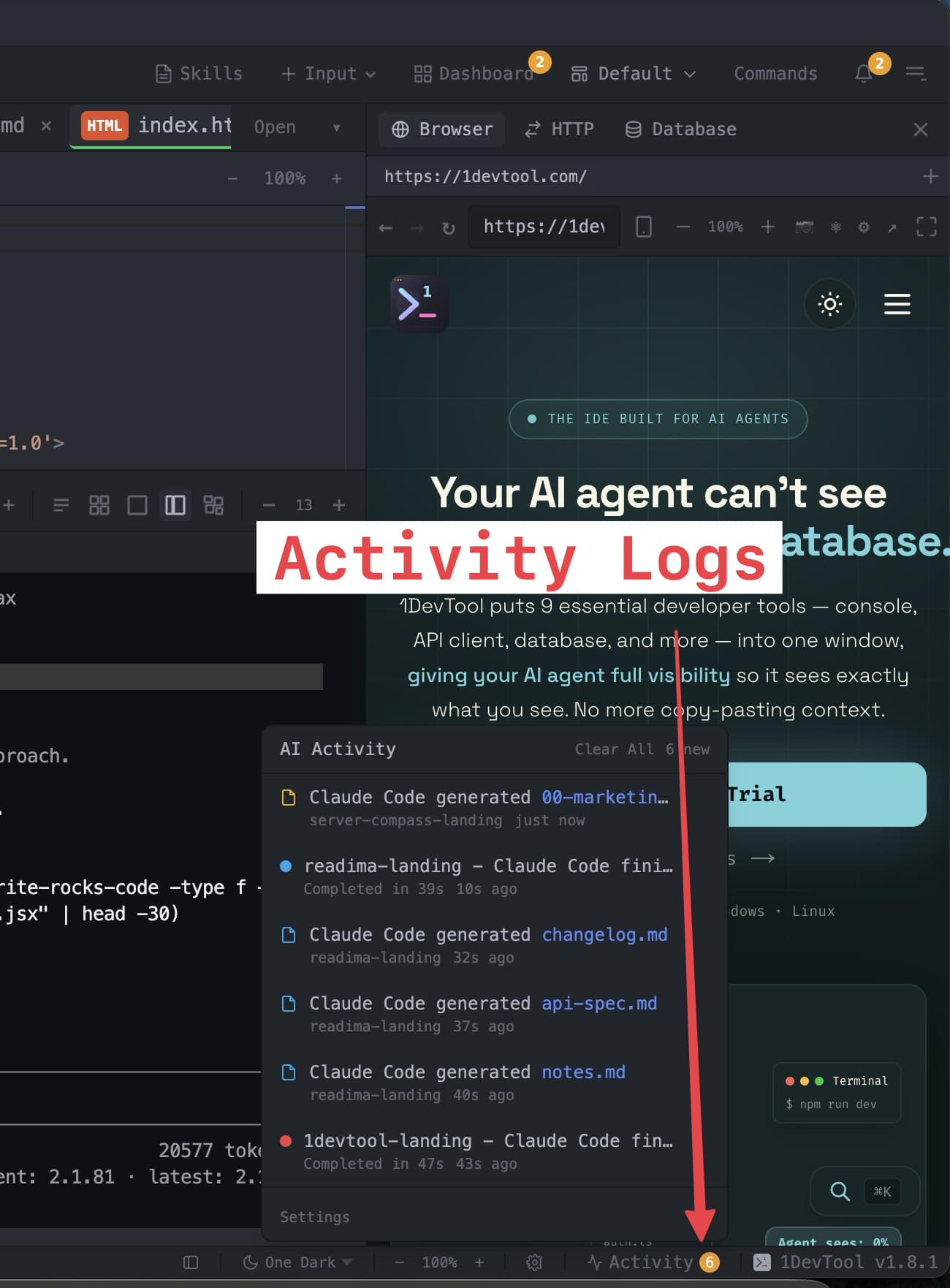
You kick off Claude Code on the backend. Codex is refactoring the frontend. Gemini CLI is generating docs. You Alt-Tab to your browser to check something — and when you come back ten minutes later, you have no idea which agents finished, which are waiting for input, and which are still running.
This is the hidden productivity killer of agentic coding: you don't know when your AI agents are done.
In this post, we break down why terminal notifications and activity logs are the missing piece in multi-agent workflows, and how 1DevTool's new AI Activity Logs feature solves it.
The Problem: AI Agents Work in Silence
Traditional terminals were built for human-driven commands. You type ls, you get output, you type the next command. The feedback loop is instant because you are the one driving.
AI agents are different. You give Claude Code a prompt like "refactor the authentication module to use JWT" and it works autonomously for 2, 5, maybe 15 minutes. During that time, you naturally context-switch — check Slack, review a PR, grab coffee. The problem is that when the agent finishes, nothing happens. No notification. No sound. No badge. The terminal just sits there with a blinking cursor, silently waiting for you to notice.
Now multiply this by 3-4 agents across 2-3 projects. You're running:
- Claude Code on the API layer
- Codex CLI on the React components
- Another Claude Code instance writing tests
- Gemini CLI generating OpenAPI docs
Without notifications, your workflow becomes a polling loop: check terminal 1, check terminal 2, check terminal 3, repeat. You're doing the computer's job — monitoring processes — instead of your own job: making decisions about what to build next.
Why Knowing "Terminal Finished" Changes Everything
This isn't a nice-to-have. Real-time terminal completion notifications fundamentally change how you work with AI agents:
1. Eliminate Idle Time Between Agent Tasks
The average developer using AI agents wastes 5-10 minutes per session just checking if agents have finished. Over a day of multi-agent coding, that adds up to 30-60 minutes of wasted time — not coding, not thinking, just checking.
With instant notifications, the moment Claude Code finishes refactoring your auth module, you see it. You review the changes, approve or adjust, and immediately send the next task. Zero idle time between agent runs.
2. Unlock True Parallel Workflows
The promise of agentic coding is parallelism: multiple AI agents working simultaneously on different parts of your codebase. But parallelism only works if you can respond to completions quickly.
Without notifications, you serialize your attention. You watch one terminal, wait for it to finish, then check the others. With notifications, you can genuinely focus on something else — writing a design doc, reviewing code, or even running a manual test — and respond to whichever agent finishes first.
3. Cross-Project Awareness
If you're a freelancer or indie hacker juggling multiple projects, the notification problem gets worse. You might have Claude Code running on your SaaS backend while Codex is fixing a bug on a client project. These are in different project directories, maybe different terminal windows entirely.
Activity logs that work across all projects — not just the one you're currently looking at — mean you never miss a completion, regardless of which project you're focused on.
4. Know What Your Agents Created
AI agents don't just run commands — they create files. Claude Code might generate a migration file, a test suite, or a markdown document summarizing its changes. Without activity tracking, these files appear silently in your project directory, and you might not notice them for hours.
An activity log that tracks file generation alongside terminal completions gives you a complete picture: "Claude Code finished on the backend project, and it generated migration_002.sql and CHANGES.md."
What Exists Today (And Why It Falls Short)
Let's look at what developers currently use to work around this problem:
tmux / iTerm2 / Terminal.app
Standard terminals have zero awareness that you're running AI agents. They don't know when a command finishes (unless you manually configure shell hooks), and they definitely don't know when an AI agent completes a task versus just pausing for input. You can set up tmux with custom scripts to detect idle terminals, but it's fragile and requires significant configuration.
Cursor / Windsurf / Copilot
AI-focused IDEs are built around inline completions, not agent-based workflows. Cursor has excellent AI integration, but it's designed for a single AI model working within the editor. If you're running Claude Code, Codex CLI, and Gemini CLI simultaneously in terminals, Cursor has no visibility into what those agents are doing.
Warp Terminal
Warp is the closest to solving this — it has command-level awareness and can notify on long-running command completion. But it's still a general-purpose terminal. It doesn't understand AI agent lifecycles, doesn't track generated files, and doesn't work across multiple projects in a unified view.
DIY Shell Scripts
Some developers cobble together shell scripts with notify-send or osascript to send desktop notifications when a command finishes. This works for simple cases but breaks down with AI agents that have interactive prompts, multi-step workflows, and unpredictable runtimes.
AI Activity Logs: The Right Solution
What developers actually need is a purpose-built system that understands AI agent workflows. Not a generic terminal notification, but an intelligent activity feed that knows:
- When an AI agent finishes a task (not just when a command exits)
- When an AI agent generates a file
- Which project the event belongs to
- How long the agent ran
- How to navigate directly to the finished terminal or generated file
This is exactly what we built in 1DevTool: AI Activity Logs.
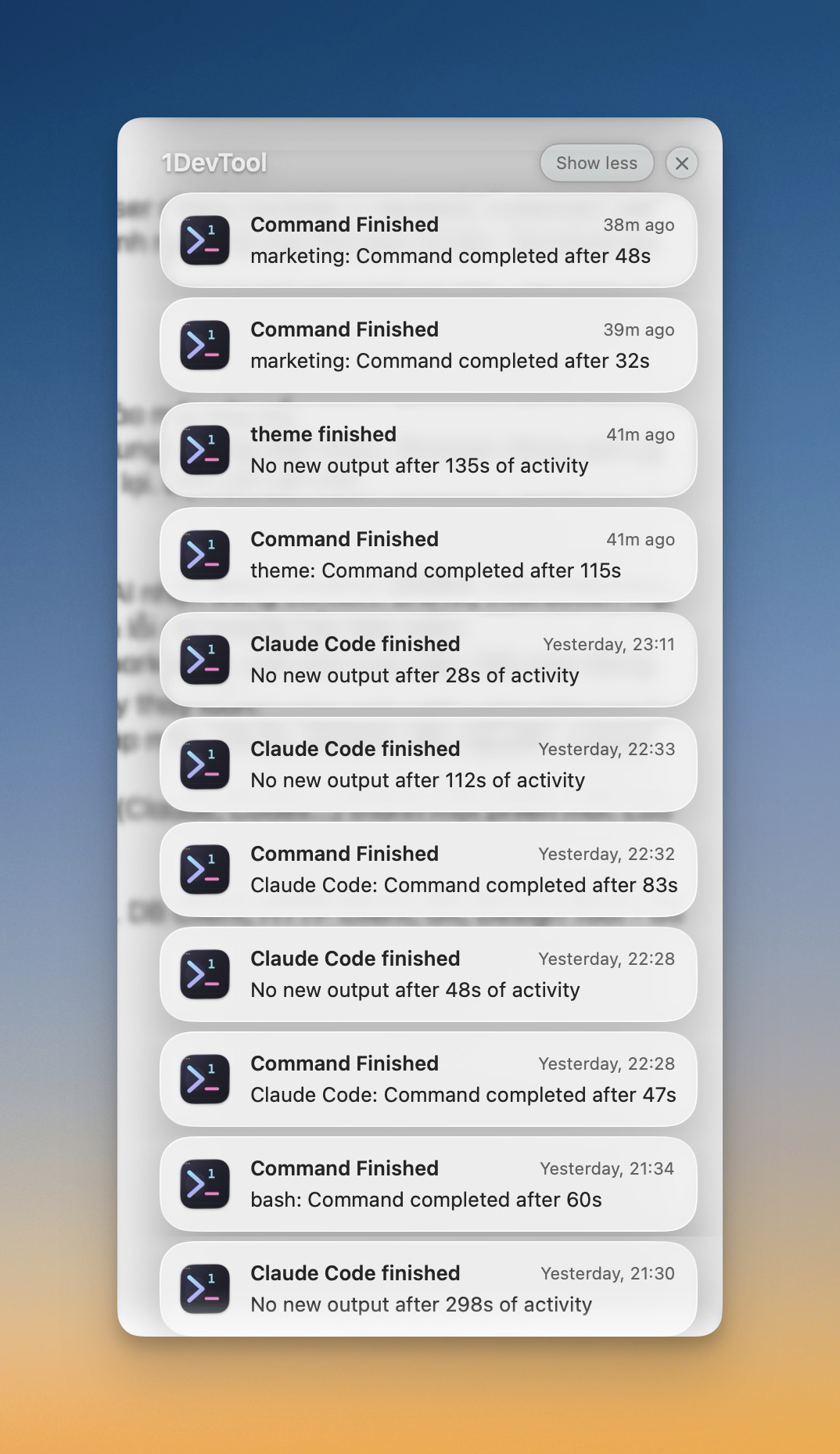
How 1DevTool's Activity Logs Work
1DevTool's activity log system is a unified notification feed anchored in the status bar. It replaces the "check every terminal" polling loop with an event-driven stream of AI activity across all your projects.
Real-Time Terminal Completion Detection
Unlike polling-based solutions that check terminal status every 30 seconds (and miss short runs entirely), 1DevTool detects terminal completions in real time by hooking directly into the underlying PTY (pseudo-terminal) process. The moment an AI agent finishes — whether it's Claude Code, Codex CLI, Gemini CLI, or any other CLI agent — you see it instantly.
Each notification shows:
- The project name with a color-coded dot so you know which project it belongs to
- The terminal name (e.g., "Claude - Backend" or "Codex - Frontend")
- The elapsed time ("Completed in 2m 34s")
- A click-to-navigate action that switches you directly to that terminal, even if it's in a different project
File Generation Tracking
When an AI agent generates a file — a markdown doc, a SQL migration, a config file — 1DevTool detects it and adds it to the activity feed. You see exactly which agent created which file, in which project. Click the notification to open the file instantly: markdown files open in a reading mode for quick review, code files open in the editor.
The file types are configurable. By default, 1DevTool watches for .md files (the most common AI-generated artifact), but you can add .sql, .json, .yaml, and other extensions in settings.
Cross-Project by Default
This is the key differentiator. 1DevTool's activity logs monitor every project you have open, not just the one you're currently looking at. If you're focused on Project A and a Claude Code instance finishes in Project B, the notification appears immediately. Click it, and 1DevTool switches you to Project B and focuses the exact terminal that finished.
For freelancers and indie hackers managing 3-10 projects, this is transformative. You can kick off agents across multiple projects and work on whichever project needs your attention right now, confident that you won't miss a completion on any other project.
Always Accessible, Never Intrusive
The activity log trigger lives in the status bar and is always visible — even when there are no unread events. When events come in, a badge count appears. When you've cleared everything, the badge disappears but the button stays, so you can always open the history and review recent activity.
Events auto-dismiss after 5 minutes (configurable), so the feed doesn't accumulate stale noise. And you can dismiss individual events or clear all at once.
Workflow: Before vs After Activity Logs
Before (Without Activity Logs)
- Start Claude Code on backend, Codex on frontend, Gemini on docs
- Switch to browser to review a PR
- 5 minutes later: "Are my agents done?"
- Alt-Tab to terminal app, check terminal 1 — still running
- Check terminal 2 — finished 3 minutes ago (wasted 3 minutes)
- Check terminal 3 — waiting for input (missed the prompt)
- Switch back to work, repeat the polling loop in 5 minutes
After (With 1DevTool Activity Logs)
- Start Claude Code on backend, Codex on frontend, Gemini on docs
- Work on whatever needs your attention
- Badge appears: "Codex - Frontend finished (45s)" — click to review
- Review, approve, send next task to Codex
- Continue working
- Badge appears: "Claude - Backend finished (2m 34s), generated CHANGES.md"
- Click to jump to backend project, review changes, ship
The difference is that you never waste time checking. You respond to completions the moment they happen, then immediately refocus on productive work.
Who Benefits Most
Developer Profile
Without Activity Logs
With Activity Logs
Solo dev with 2-3 agents
Constantly Alt-Tabbing to check terminals
Instant notifications, zero polling
Freelancer with 5+ projects
Misses completions on background projects
Cross-project feed catches everything
Indie hacker shipping fast
Wastes 30-60 min/day on terminal checking
Redirects that time to building
Team lead coordinating agents
No visibility into agent status
Activity history shows what happened and when
Configuring Activity Logs in 1DevTool
Activity logs work out of the box with sensible defaults, but you can customize them in Settings > Terminal > AI Activity Alerts:
- Enable/disable: Toggle activity notifications entirely
- File types to watch: Choose which file extensions trigger alerts (
.md,.sql,.json,.yaml, etc.) - Auto-dismiss timeout: How long events stay in the feed before disappearing (default: 5 minutes, set to 0 for never)
The settings are accessible directly from the activity log popup footer — no hunting through menus.
Under the Hood: Why This Is Hard to Build
Detecting when an AI agent "finishes" isn't as simple as detecting when a process exits. AI agents like Claude Code are interactive — they might pause to ask for permission, wait for user input, or run multi-step tasks with gaps between steps. A naive "process exited" check would fire false positives constantly.
1DevTool solves this by hooking into the PTY layer and using agent-aware idle detection. It distinguishes between:
- Command finished: The AI agent completed its task and returned to a prompt
- Agent idle: The AI agent has been idle for a threshold period (10+ seconds), indicating it's done rather than just pausing between steps
- Waiting for input: The agent is prompting the user for a decision
These signals are deduplicated so you get one clean notification per completed run, not a flurry of false alarms. The same intelligence applies to file detection — 1DevTool only attributes a new file to an AI agent if that agent's terminal was recently active, preventing false positives from manual file operations.
Beyond Notifications: The Activity-Driven Workflow
Activity logs aren't just notifications — they're a new way to interact with your AI agents. Instead of organizing your work around terminals (check terminal 1, check terminal 2), you organize it around events (something finished, something was created). This is fundamentally more efficient because:
- Events come to you — you don't go looking for them
- Events carry context (project, terminal, elapsed time, generated files)
- Events are actionable (click to navigate directly to the source)
- Events work across project boundaries
As agentic coding matures and developers run more agents on more projects, this event-driven model will become the standard. Terminal polling doesn't scale. Activity feeds do.
Try It Today
AI Activity Logs are available now in 1DevTool. Download the app, open a project, run a few AI agents, and watch the activity feed light up as they finish. It's the feature you didn't know you needed — until the first time a notification saves you from a 10-minute polling cycle.
One workspace. Every agent. Every notification.