Apr 22, 2026
iOS Simulator Mirror and an IDE-Style Database Workspace in 1DevTool
1DevTool v1.17.0 brings a live iOS simulator with real input and inspection, plus a tabbed database workspace, global HTTP/DB state, and terminal focus mode.
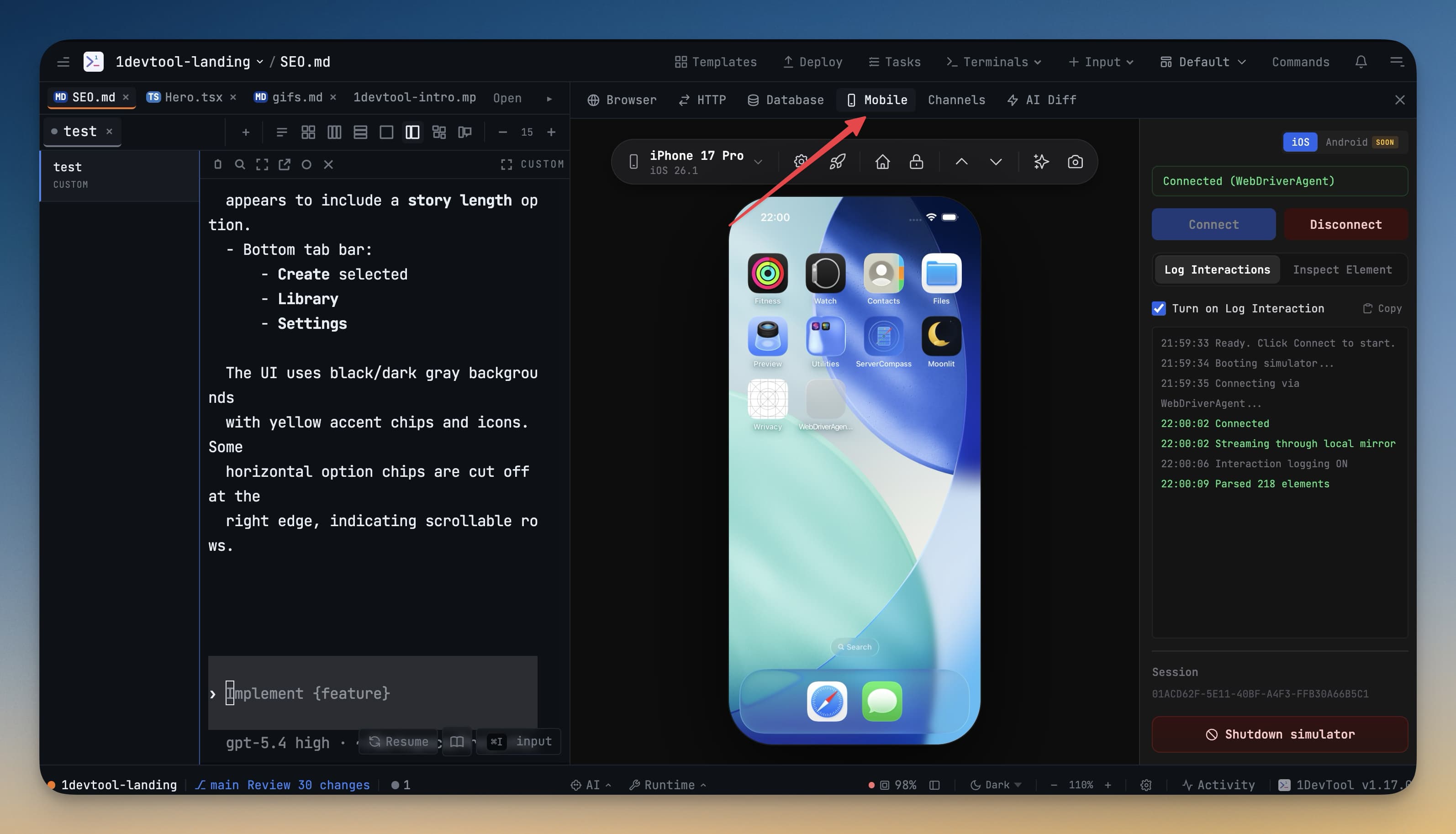
If you build and test apps while running AI coding agents, you probably know this loop too well: write code in one window, switch to a phone simulator, switch again to run SQL, switch again to ask Claude Code or Codex CLI what just broke. The context switching is small each time, but the day disappears in dozens of tiny interrupts.
1DevTool v1.17.0 changes that loop in a practical way. Instead of treating mobile testing and database work as separate tools, it brings both into the same workspace where your terminals already run Claude Code, Codex CLI, Gemini CLI, and your project commands.
Why this matters
The release is not just "more panels." It changes how you debug:
- Your iOS simulator can stay visible next to code and terminals, with real input events instead of a passive preview.
- Your database client now behaves like an IDE workspace, not a single-query utility.
- Core state (connections and HTTP requests) can follow you across projects.
- Session-resume data moved to a local SQLite store so long-running agent workflows are harder to lose.
The net effect is less friction between code, runtime behavior, and data validation.
A live iOS simulator inside your coding workspace
The new Mobile panel is centered around one goal: keep device interaction in the same place where you write and review code.
Device pill controls and WDA routing
In MobileEmulatorWrapper.tsx, the header pill gives one-click access to:
- Device selection (grouped by runtime on iOS)
- WebDriverAgent host configuration
- Launch by bundle ID
- Home/Lock actions
- Scroll gestures
- Screenshot export and Send to AI
The iOS path uses WebDriverAgent as the control plane (ios-adapter.ts) and can switch hosts without terminal juggling. If WDA is unavailable, the adapter still has fallback behavior for stream/input paths.
Tap vs swipe logic is explicit and reliable
In iOSSimulatorView.tsx, gesture classification is deterministic:
- Pointer movement over
0.025normalized distance becomes a swipe. - Anything smaller becomes a tap.
That 2.5% threshold avoids accidental swipes while still making intentional drags easy. Coordinates are normalized to the rendered frame and then mapped back to device space in the iOS adapter (toWDAPoint), which also tracks screenshot dimensions to avoid high-DPI mismatch issues.
Keyboard input batches into focused fields
MobileEmulatorWrapper.tsx batches keyboard input in 150ms windows before sending type: 'text' events. Pressing Enter flushes immediately. This gives you natural typing behavior without spamming the simulator bridge one character at a time.
Inspect Element and interaction logging are actually actionable
The Inspect tab parses WDA /source XML into a local element map (type, label, value, accessibility ID, frame, enabled/visible state). Hovering highlights the best matching element by smallest containing area.
When Log Interactions is on:
- Taps are logged with element context (for example, button label)
- Swipes are recorded with coordinates
- Logs are copyable as plain text for bug reports or AI prompts
A subtle but important implementation detail: source refetch is deferred after tap/swipe so /source calls do not block WDA action calls on the same session. This directly addresses the class of "tap ripple but no real tap" failures that show up under load.
Database client now works like an IDE workspace
The database side of v1.17.0 is a major structural upgrade. DatabaseClient.tsx now composes three clear zones:
ConnectionRailon the left for quick connection switchingWorkspaceSidebarfor schema items, saved queries, and historyWorkspaceMainwith tabbed query/table workspaces and result panes
This is what enables real parallel flow, like keeping one table tab, one migration query tab, and one validation query tab open at once.
Guided connection form plus live URI parsing
ConnectionDraftForm.tsx and connection-string.ts work both directions:
- Fill fields and generate connection strings automatically
- Paste a connection string and parse it back into fields
- Preserve engine families where possible (Postgres/MySQL/Redis variants)
- Toggle project-only vs global scope
This removes a lot of trial-and-error when onboarding staging/production connections.
Result grid handles real-world rows
ResultGrid.tsx now uses Glide Data Grid with custom cell renderers:
- JSON-like cells open in structured viewer dialogs
- Long text cells show compact previews plus char/line counts
- Column widths are resizable and bounded
- Multi-row selection and copy flows are built in
Long text handling is explicit (LONG_TEXT_CHAR_THRESHOLD, LONG_TEXT_LINE_THRESHOLD) so massive markdown/JSON fields no longer blow up row height. For deeper inspection, Enter opens RowDetailDrawer, which renders full-field values vertically and supports row-to-row navigation.
Structure view and SQL preview reduce risky edits
For table tabs, TableStructureView.tsx exposes column metadata and PK/index context in one place. At the same time, SqlPreviewFooter.tsx renders the exact generated SQL shape for table browsing actions, with a resizable panel and optional syntax highlighting.
This is especially useful when you are editing/filtering data quickly and want to sanity-check query intent before execution.
State now travels better across projects
Two storage upgrades matter for day-to-day work:
Global HTTP collections/workspace tabs
HttpTabsWrapper.tsx merges project tabs with globally stored tabs via useGlobalHttpStore. Tabs can flip between project and global scope, and persistence routes to the right store automatically.
Practical outcome: you can keep shared API requests once and reuse them everywhere.
Global database connections
DatabaseClient.tsx merges project-scoped and global-scoped connections with useGlobalDatabaseStore, and StoreManager persists global connections in Electron store keys (globalDatabaseConnections).
Practical outcome: add a staging DB once, then access it from every project workspace.
Terminal focus mode and resume persistence got stronger
Two quality-of-life upgrades from the same release are worth calling out:
TerminalGrid.tsxadds app-level focus mode (appFullscreen) for any terminal pane, withEscexit and automatic fit/focus behavior.resumeManager.tspersists resume sessions/details intoresume-sessions.db(SQLite viabetter-sqlite3) under app user data, including session/message tables and indexes.
So if you run long agent sessions and switch contexts often, the continuity path is more robust across restarts and transient failures.
Before vs after
| Workflow step | Before v1.17.0 | After v1.17.0 |
|---|---|---|
| iOS interaction while coding | Jump between IDE, terminal, Simulator.app | Live simulator panel with tap/swipe/type inside workspace |
| UI element verification | Manual visual checks | Inspect tab with accessibility metadata and hit-tested highlights |
| Database investigation | Single-threaded query flow | Connection rail + sidebar + multi-tab query/table workspace |
| Large row inspection | Horizontal scroll fatigue | Row detail drawer + JSON/long-text viewers |
| Request/database reuse across projects | Recreate or import repeatedly | Global HTTP tabs and global DB connections |
| Long AI terminal outputs | Compete with other panels | One-click app-level terminal focus mode |
Who benefits most
- Mobile app developers who need faster simulator-to-fix loops.
- Full-stack developers who constantly jump between schema checks, API calls, and AI terminals.
- Teams running shared staging environments and wanting consistent request/connection setup across projects.
- Anyone driving Claude Code, Codex CLI, or Gemini CLI in long sessions and needing more reliable resume continuity.
Try it in your own workflow
If your current loop involves too many window switches between device testing, data checks, and AI-assisted coding, v1.17.0 is a meaningful upgrade. Start with the Mobile panel and the new database workspace, then move your most-used HTTP requests and DB connections to global scope so every project opens ready to work.
See the full product at 1devtool.com.