Apr 7, 2026
Terminal Notifier for AI Agents: Native Alerts + Activity Logs in 1DevTool
Classic terminal-notifier breaks the moment you run Claude Code, Codex CLI, or Gemini CLI — the agent process never exits. Here is how 1DevTool detects AI agent completions, fires native OS notifications, and keeps a cross-project activity log that actually understands what your agents are doing.
If you have ever Googled terminal notifier, you were probably trying to solve one specific problem: a long-running command finished in a background terminal and you had no idea. Maybe you installed the classic terminal-notifier Homebrew package and piped ; terminal-notifier -message done to the end of every command. Maybe you wired up osascript or notify-send. It works — until you start running Claude Code, Codex CLI, and Gemini CLI side by side. Then it falls apart.
AI agents are not make build. They pause to think, ask for permission, write files, and resume. A simple "notify when the process exits" hook fires at all the wrong moments — or never fires at all, because the agent process is still alive, just idle.
This post is about a different kind of terminal notifier — one built specifically for AI coding agents. We'll show you how 1DevTool's Terminal Notifications, Activity Logs, and native OS notifications work, why they don't fire on the wrong signals, and how the underlying detection actually distinguishes "the agent finished" from "the agent is thinking."
Why a Classic Terminal Notifier Fails for AI Agents
The original terminal-notifier on macOS, plus its Linux/Windows cousins, all share the same model: you append a notification command to the end of your shell line. npm test && terminal-notifier -title "Done". The shell exits, the notifier fires, you get a desktop alert. Clean for builds and test runs.
AI agents break this model in three ways:
- The agent process never exits. Claude Code, Codex CLI, Gemini CLI, and Amp all run as long-lived REPLs. The shell hook never gets a chance to fire because the agent is sitting at its own prompt waiting for your next message.
- "Done" is ambiguous. An agent might be done with a task, or paused to ask for permission, or stuck mid-tool-call waiting for a network response. A process-exit notifier has no way to tell these apart.
- You have more than one terminal. Even if you wire up notifications per shell, you still need to know which terminal in which project finished — and you need to be able to click the notification to jump straight there. Plain
terminal-notifierjust shows you a toast.
What you actually want is a notifier that watches the terminal output stream itself, knows what an AI agent looks like, and can fire a click-to-navigate alert that lands you in the exact pane that finished — across every project you have open.
Terminal Notifications: Native Alerts, Built for Agents
1DevTool ships a built-in terminal notifier that fires native macOS, Windows, and Linux notifications the moment an AI agent finishes. There's nothing to install, nothing to pipe at the end of your commands, and nothing to configure per-shell. It works on every terminal in every project the moment you open the app.
Two notification types fire automatically:
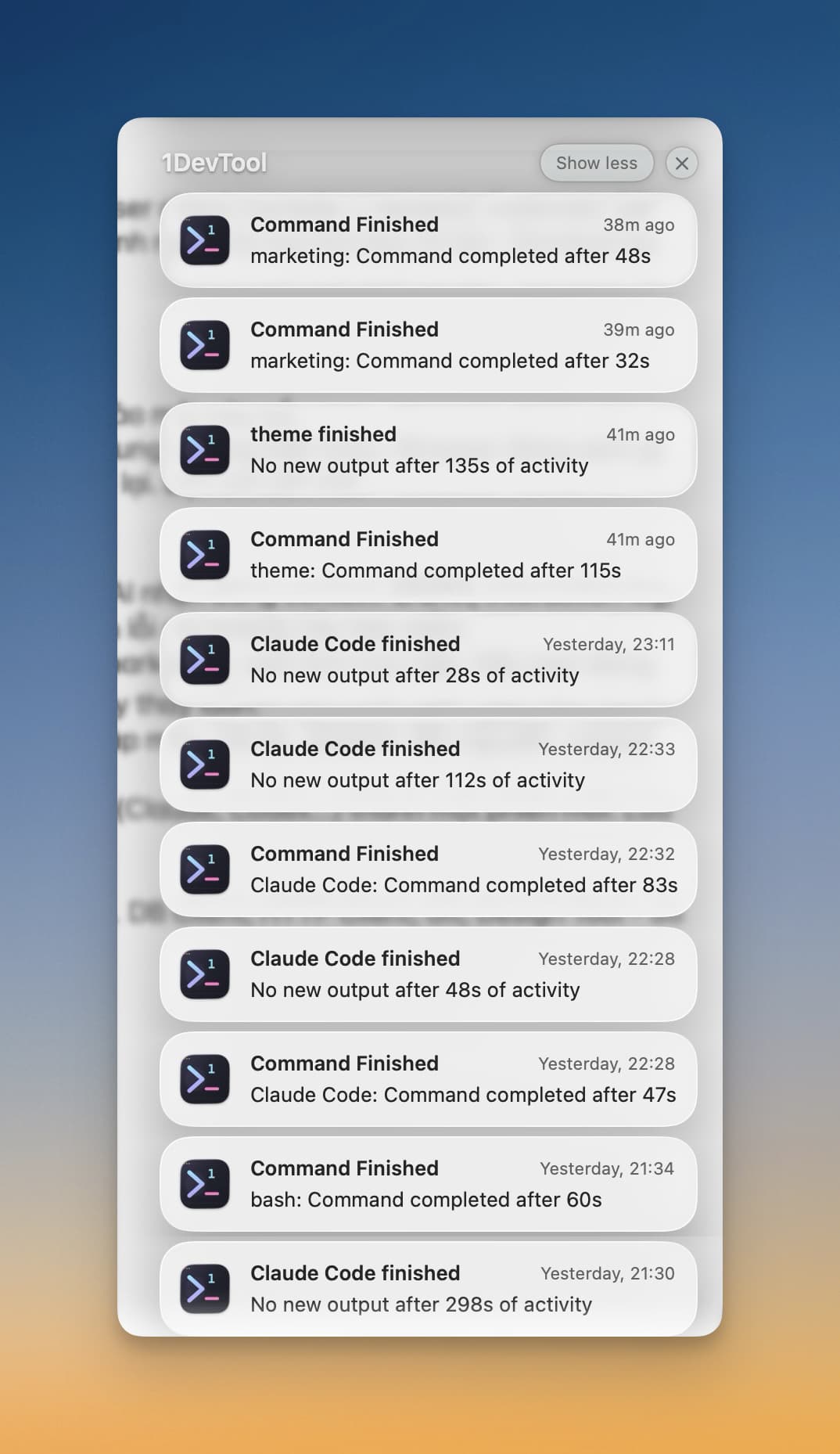
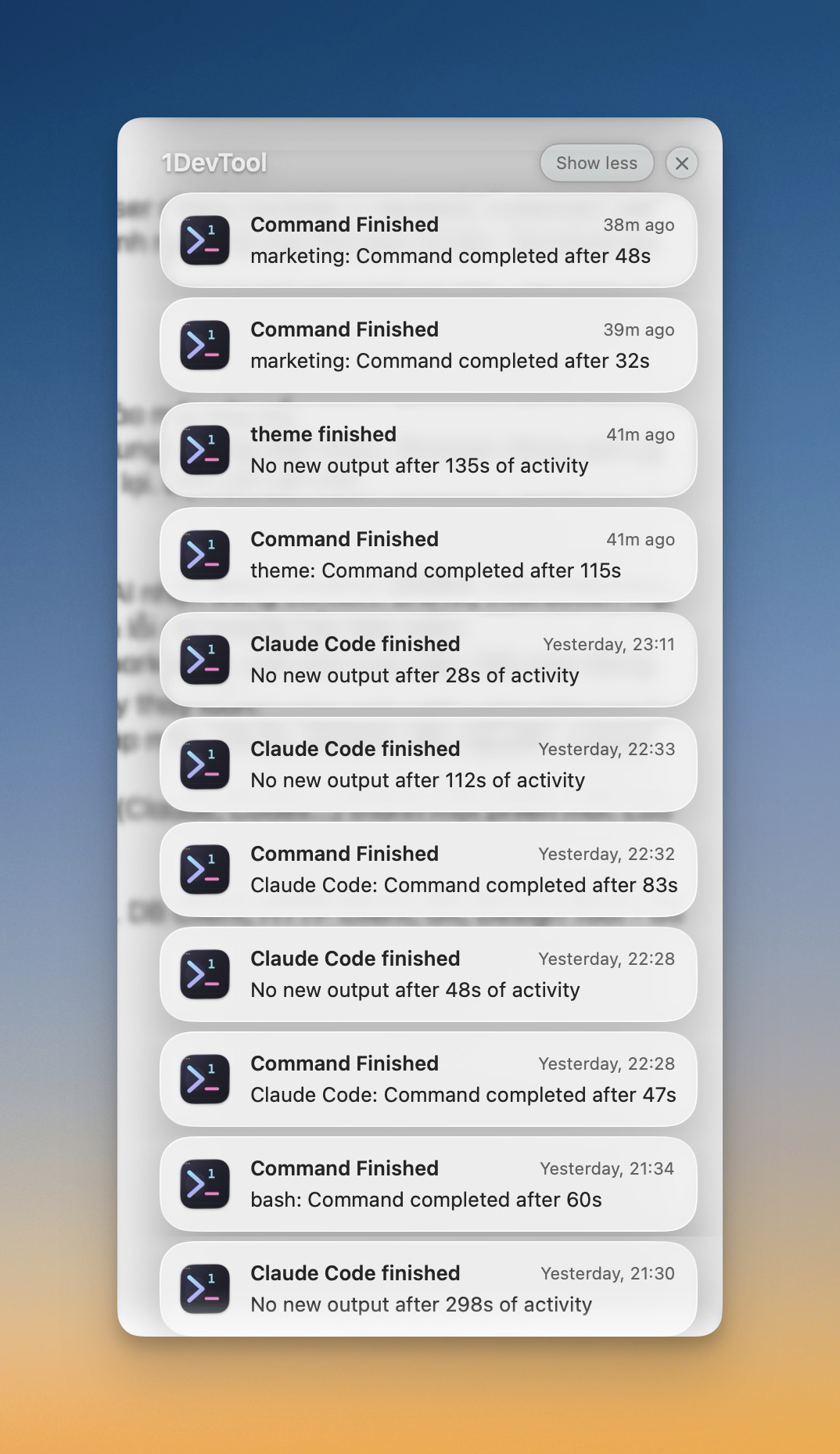
- Command Finished — fires when a command in any terminal completes and ran longer than your threshold (default: 10 seconds). The body reads
"{terminal name}: Command completed after s". - Agent Idle — fires when an AI agent (Claude, Codex, Gemini, Amp) has produced no new output for a configurable window (default: 15 seconds), which is the most reliable signal that the agent has actually stopped working rather than just thinking mid-step. The body reads
"No new output after s of activity".
Notifications only fire when the 1DevTool window is unfocused — if you're already looking at the terminal, you don't need a popup telling you what you can already see. Click any notification and 1DevTool jumps to the exact terminal in the exact project that produced it, even if that project isn't the one you currently have open.
Activity Logs: A Notifier That Remembers
Native OS notifications are great when you're away from the app, but they disappear. Did Claude Code finish 4 minutes ago or 14 minutes ago? Did Codex generate a file you missed? That's where the second half of the terminal notifier comes in: the Activity Logs panel.
Activity Logs is a persistent feed pinned to the 1DevTool status bar. Every time the notifier fires — for any terminal in any project — the event is also written to this feed. Two event types are tracked:
- terminal-finished — an agent or command completed. The card shows the project name with a color-coded dot, the terminal name (e.g.
Claude Code generatedorreadme-landing), the agent type, and the elapsed run time formatted as2m 34s. - file-generated — an AI agent created a file in a watched directory. The card shows the file name (e.g.
changelog.md,api-spec.md), the source agent, and the project. Click it to open the file — Markdown opens in a reader view, code opens in the editor.
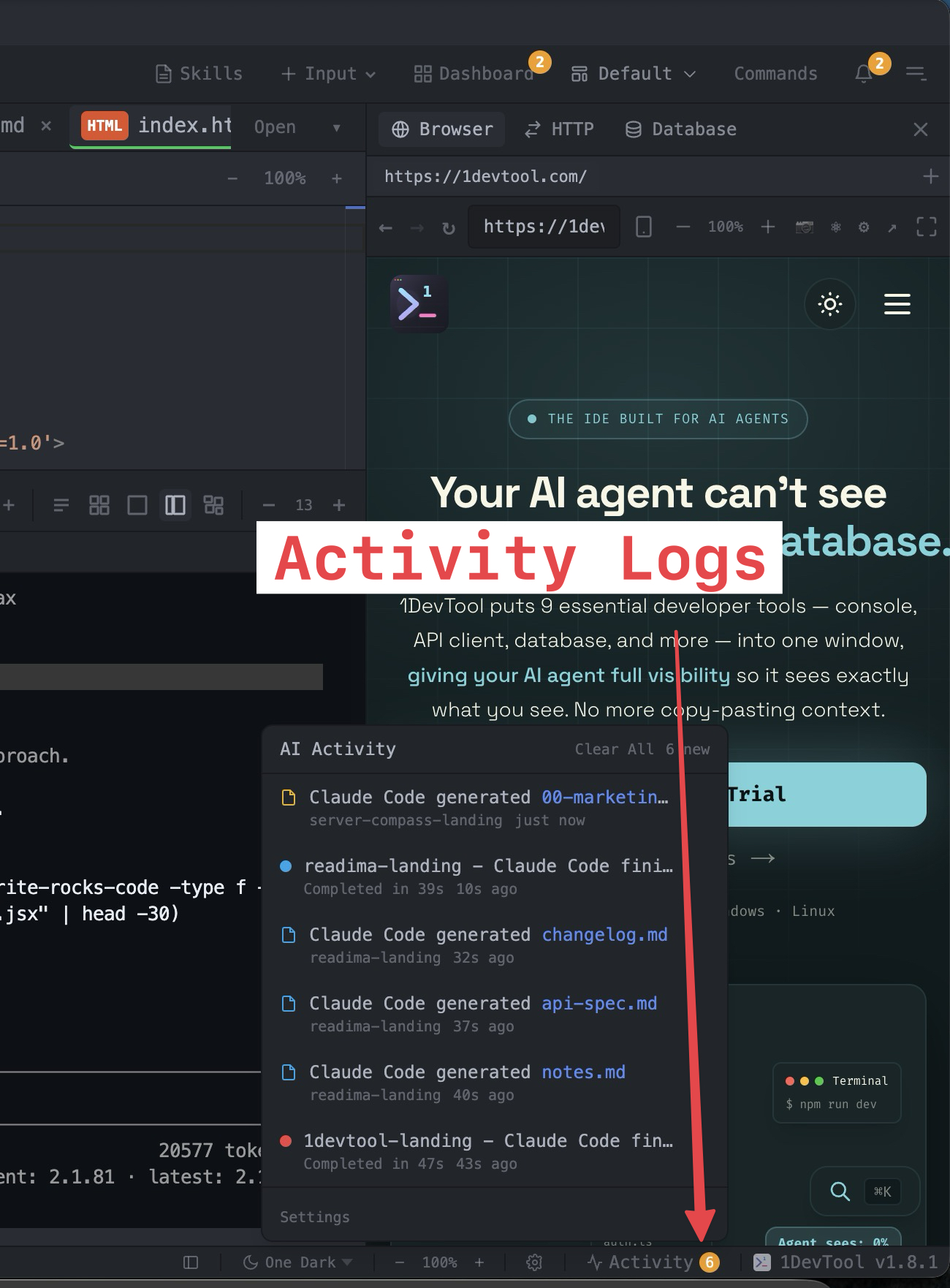
The feed holds a rolling buffer of the most recent events (capped to keep memory tidy), and events auto-dismiss after a configurable timeout (default: 5 minutes) so the panel never accumulates stale noise. You can clear individual events or clear all from the popup header. A small badge appears on the status-bar trigger when there are unread events; once you've seen them, the badge clears but the trigger stays so you can always re-open the history.
How the Detection Actually Works
The reason this terminal notifier doesn't false-positive on agents the way a generic one would is that it doesn't watch the process — it watches the PTY data stream itself, with two separate idle thresholds.
When new bytes arrive on a terminal, 1DevTool starts (or refreshes) a per-terminal idle timer. If 500ms pass with no new output, the system checks whether a shell prompt has been seen since the command started. If yes, that's a Command Finished event. If the terminal belongs to an AI agent and a longer window of silence passes (the agent-idle threshold, default 15 seconds), the system fires an Agent Idle event instead. AI agents are detected by their CLI name — claude, codex, gemini, amp — so regular bash sessions never get Agent Idle alerts (only Command Finished ones).
Both signals run through a deduplication step so you don't get a Command Finished notification followed two seconds later by an Agent Idle notification for the same run. If the same terminal fires twice within a 5-second window with similar elapsed times, the second event is collapsed.
For file-generated events, the file watcher only attributes a new file to an AI agent if a terminal in that project running an AI agent was actively producing output within the last 60 seconds. This is the key trick: it filters out files you create manually, files git checkout drops on disk, and files from agents that finished long ago. Only files that an active agent likely produced make it to the feed.
Settings: Tune Your Terminal Notifier in One Place
Everything lives in Settings > Behavior and Settings > Terminal. The notification side controls native alerts:
- Notify on command finish — toggle Command Finished notifications on/off, plus a slider for the minimum command duration (5-120s, default 10s) so quick commands like
lsnever spam you. - Notify on agent idle — toggle Agent Idle notifications on/off, plus the idle threshold (5-120s, default 15s).
- Play notification sound — pair every alert with a system beep so you notice it even with notifications muted in Focus mode.
The Activity Logs side controls the in-app feed:
- Activity log enabled — master switch for the popup and badge.
- Watched file extensions — which file types count for
file-generatedevents. Defaults to.md(the most common AI-generated artifact); add.sql,.json,.yaml,.ts, or anything else you care about. - Auto-dismiss timeout — how long events stay in the feed before being marked read (0-900 seconds, default 300, set to 0 to never auto-dismiss).
Side-by-Side: Classic terminal-notifier vs 1DevTool
Capability
Classic terminal-notifier
1DevTool Terminal Notifier
Setup
Install via Homebrew, append ; terminal-notifier to every command
Built in, zero config, works on every terminal
Detects long-running AI agents
No — agent process never exits
Yes — Agent Idle fires after a silence window
Distinguishes "done" from "thinking"
No
Yes — separate command-finish and agent-idle thresholds
Click to jump to terminal
No
Yes — opens the exact terminal in the exact project
Tracks generated files
No
Yes — Markdown by default, configurable extensions
Persistent activity feed
No (notifications disappear)
Yes — status-bar popup with rolling history
Cross-project view
No
Yes — every project, one feed
Deduplication
No
Yes — collapses duplicate signals within 5s
A Real Multi-Agent Session With the Notifier On
Here's what a typical session looks like once Terminal Notifications and Activity Logs are running together. You open three projects in 1DevTool:
- marketing — Claude Code working on a landing page rewrite
- 1devtool-landing — Claude Code generating a changelog and API spec
- theme — bash running a long build
You kick off all three, switch to your browser, and start reviewing a PR. Two minutes later, a native notification slides in: Command Finished — marketing: Command completed after 48s. Click it. 1DevTool focuses, switches to the marketing project, and lands you on the exact Claude Code pane that just finished. You review, approve, send the next prompt, and keep reading the PR.
A minute later, another notification: Claude Code finished — No new output after 28s of activity. That's the agent-idle signal for 1devtool-landing — Claude is done. Open the Activity Logs popup from the status bar and you see the full history laid out: the marketing run, the landing run, the theme build that completed at 115 seconds, and a cluster of file-generated entries showing that Claude wrote changelog.md, api-spec.md, and notes.md.
You click changelog.md in the feed. It opens in Markdown reader view. You scan it, ship it, and clear the feed. Total time spent "checking on agents": zero.
Who Needs an AI-Aware Terminal Notifier
- Anyone running more than one AI agent in parallel. The moment you have two agents going, you need notifications — otherwise you serialize your attention and throw away the whole point of parallelism.
- Freelancers and indie hackers juggling multiple projects. The cross-project feed catches completions in projects that aren't even visible.
- Anyone tired of writing
; terminal-notifier -message doneat the end of every command. The built-in detector handles it for every terminal automatically. - Developers who keep missing
changelog.mdorNOTES.mdfiles Claude drops in the repo. File-generated events surface them immediately.
Try the Built-In Terminal Notifier
Terminal Notifications and Activity Logs are on by default in 1DevTool. Download the app, open a project, run an AI agent, and tab away. You'll get the alert, the activity entry, and a one-click path back to the terminal that fired it. No Homebrew install, no shell hooks, no per-command boilerplate — just a terminal notifier that actually understands what your AI agents are doing.
One workspace. Every agent. Every notification, in one feed.
From across the StoicSoft network
Hand-curated reads on the same topic from sister sites in the StoicSoft family.