Jul 13, 2026
Turn Your TODO Comments Into a Kanban Board
Code Tasks now plots the TODO, FIXME, and BUG comments scattered across your project onto a drag-and-drop board — with manual tasks, filters, and one-click handoff to an AI agent.
Every codebase has a second, invisible to-do list. It lives in your comments: the // TODO: handle the empty state, the # FIXME: this races on slow networks, the // HACK: remove after the migration. You write them in the moment, fully intending to come back. But they scatter across dozens of files, buried under imports and business logic, and the only way to find them again is to grep — or to stumble into one while debugging something else.
So the list grows. A FIXME you meant to handle last month is still sitting three functions deep in a file you haven't opened since. There's no single place to see what's outstanding, no way to tell the critical notes from the throwaway ones, and no sense of progress as you clear them. The comments that were supposed to remind you become background noise.
Your code comments are now a board
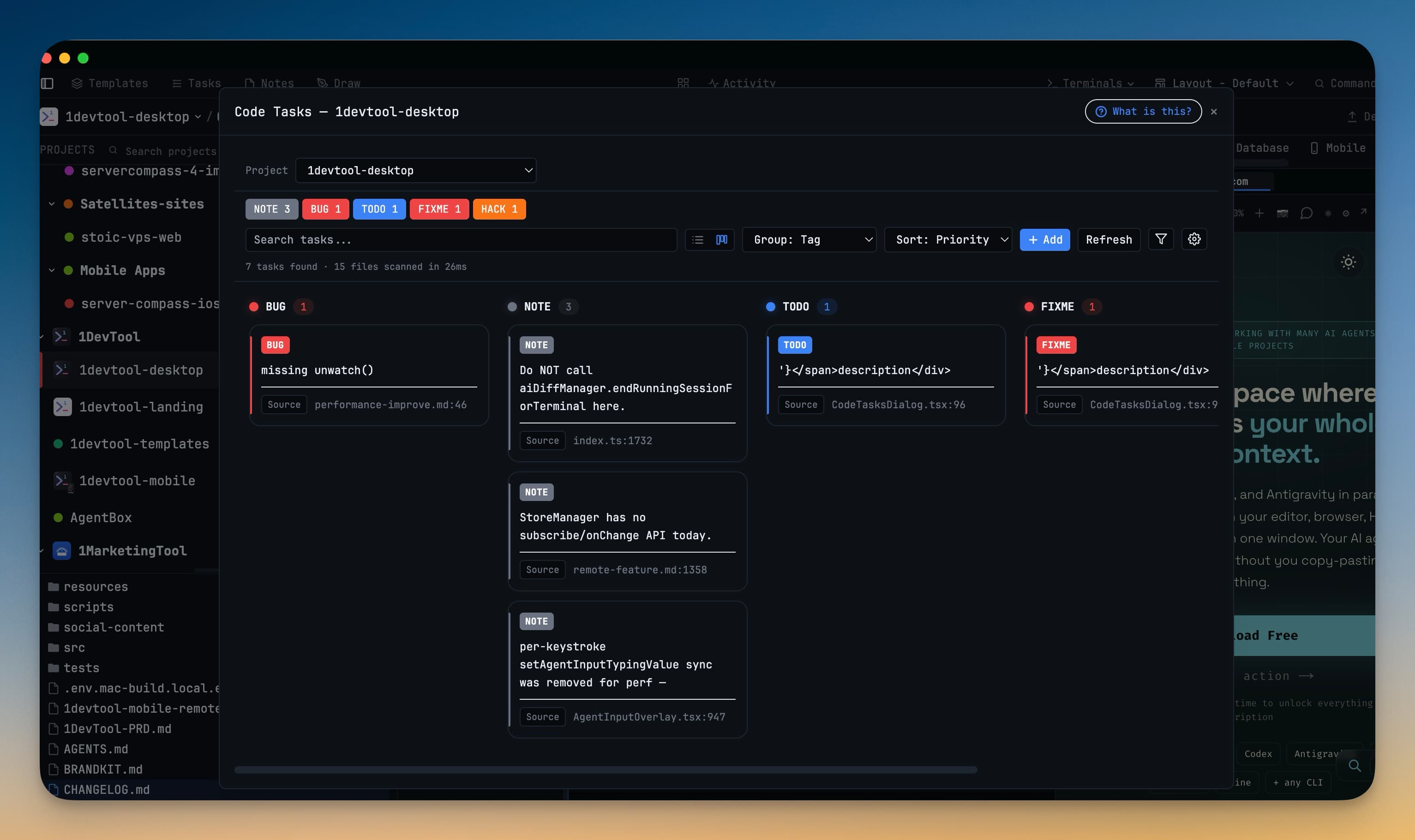
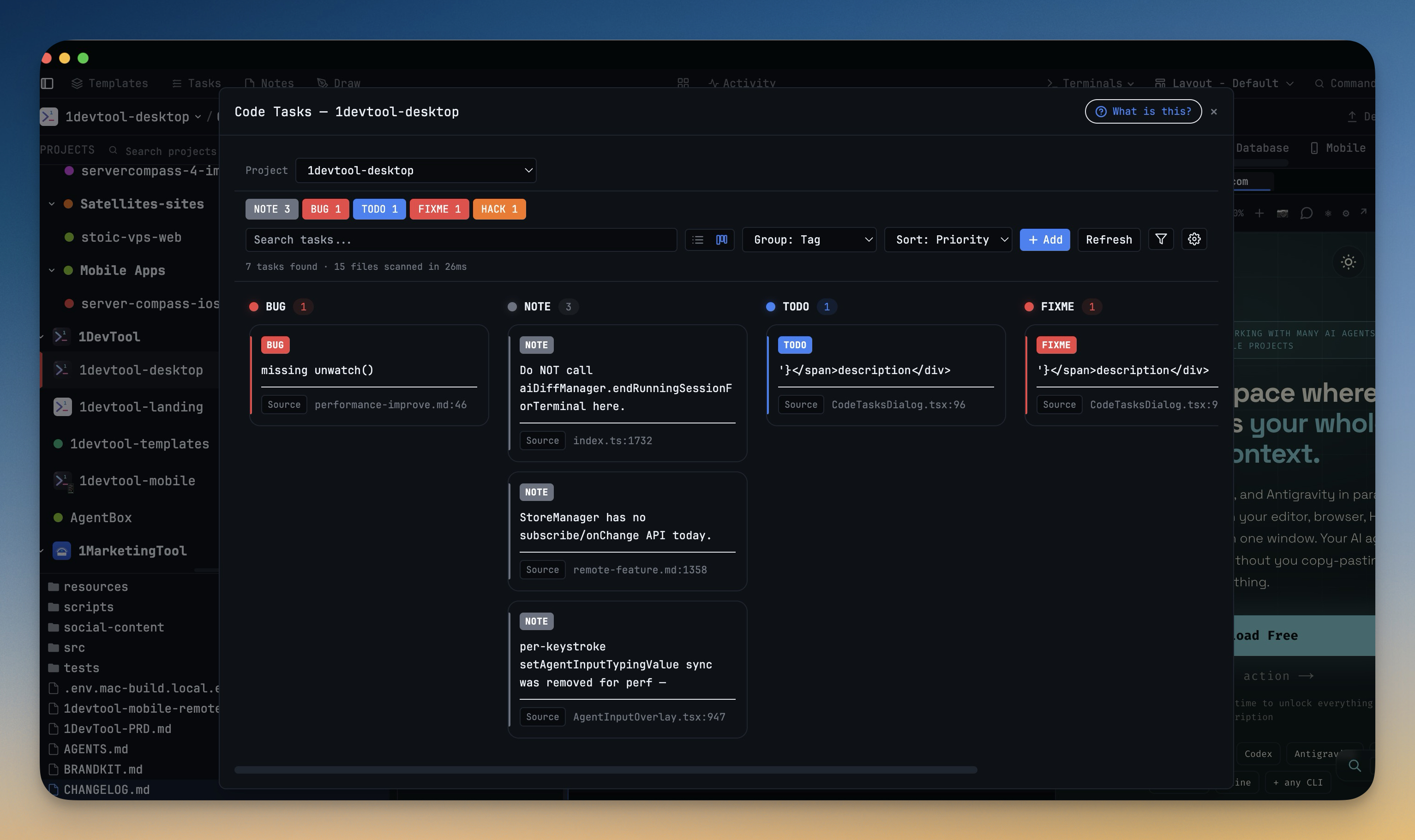
1DevTool's Code Tasks already scanned your project for tag comments and listed them in one panel. As of v1.39.0, that list is a board. Open Code Tasks and your TODOs, FIXMEs, BUGs, and HACKs land as cards on a drag-and-drop Kanban board — grouped, filterable, and ready to work through. And you can now add tasks that were never in your code at all, so the board holds your whole plan, not just the parts you happened to annotate.
How it works in practice
The board scans itself
Open the Code Tasks dialog, pick a project, and 1DevTool scans it in milliseconds — the header tells you exactly what it found, right down to "7 tasks found · 15 files scanned in 26ms". Every tag comment becomes a card, and the cards arrange themselves into columns. By default they group by tag, so all your BUGs sit in one lane and your NOTEs in another, but you can regroup by priority, file, author, or source without rescanning. Prefer the old flat list? One click on the view toggle brings it back.
Priority and ownership come straight from the comment. A // FIXME!!: ... reads as critical, a single ! as high, and // REVIEW(alex): ... hands the task to Alex — so the board reflects the intent you already encoded, with no extra tagging required.
Add the tasks that were never comments
Not every task belongs in the source. The follow-up you thought of in a standup, the doc you need to write, the dependency you keep meaning to bump — none of those start life as a // TODO. Click Add and create a manual task with a description, tag, priority (Normal, High, Critical), and an optional file, line, and assignee. It sits on the board next to the scanned cards and saves with the project, so it's still there tomorrow.
Manual cards are the ones you can drag. Move one to another column and it re-tags or re-prioritizes itself to match — drop a task into the Critical lane and it becomes critical. Scanned cards stay put on purpose, because they mirror your code; try to drag one and 1DevTool quietly reminds you to edit the comment instead.
Filter down to what matters now
A board with a hundred cards is just a prettier pile. Search narrows it as you type — by description, file, or assignee — and the filter popover lets you show only a given priority, or only scanned vs. only manual tasks. Combine them to answer real questions: "show me every critical FIXME I wrote," or "just my manual tasks for this week."
Do something about it
A card isn't a dead end. Select one and you can Open in Editor to jump straight to the exact line, Send to Agent to hand the tag, file, line, and surrounding code to an AI terminal as a ready-to-run fix prompt, or Copy as Markdown to drop it into a GitHub Issue, Linear ticket, or Notion doc. The board is where you find the work; these are how you clear it.
Before vs. after
| Clearing your TODOs | Without Code Tasks | With the board |
|---|---|---|
| Finding them | grep -rn "TODO|FIXME" . and read the wall of output | Open the panel — every tag comment, already sorted |
| Telling them apart | Eyeball which ones look urgent | Priority columns from ! / !!, filter to critical |
| Tasks without a comment | Keep a separate scratch file | Add a manual card that saves with the project |
| Working through them | Open each file by hand | Open at the line, or send it to an AI agent |
| Sharing one | Copy the text, reformat it | Copy as Markdown, paste into your tracker |
Who gets the most out of it
Solo builders moving fast leave a trail of // TODOs in their wake. Code Tasks finally gives that trail a home — and lets you hand the tedious ones to an AI agent without breaking flow.
Anyone inheriting a codebase can open Code Tasks on day one and read the previous author's FIXMEs and HACKs as an instant, prioritized map of the project's known rough edges.
Small teams get lightweight task tracking that lives where the work does. // REVIEW(sam): assigns a card, manual tasks capture the non-code work, and nothing has to be duplicated into a separate tool until it's genuinely ready to be.
Try it
Update to 1DevTool v1.39.0, open a project, and launch Code Tasks. Whatever's already annotated in your code shows up on the board in a few milliseconds — so start by dragging your loudest FIXME into Critical, or add the task you've been meaning to write down somewhere. Your scattered comments were always a to-do list. Now they finally look like one.