Answer Agents in Conversation
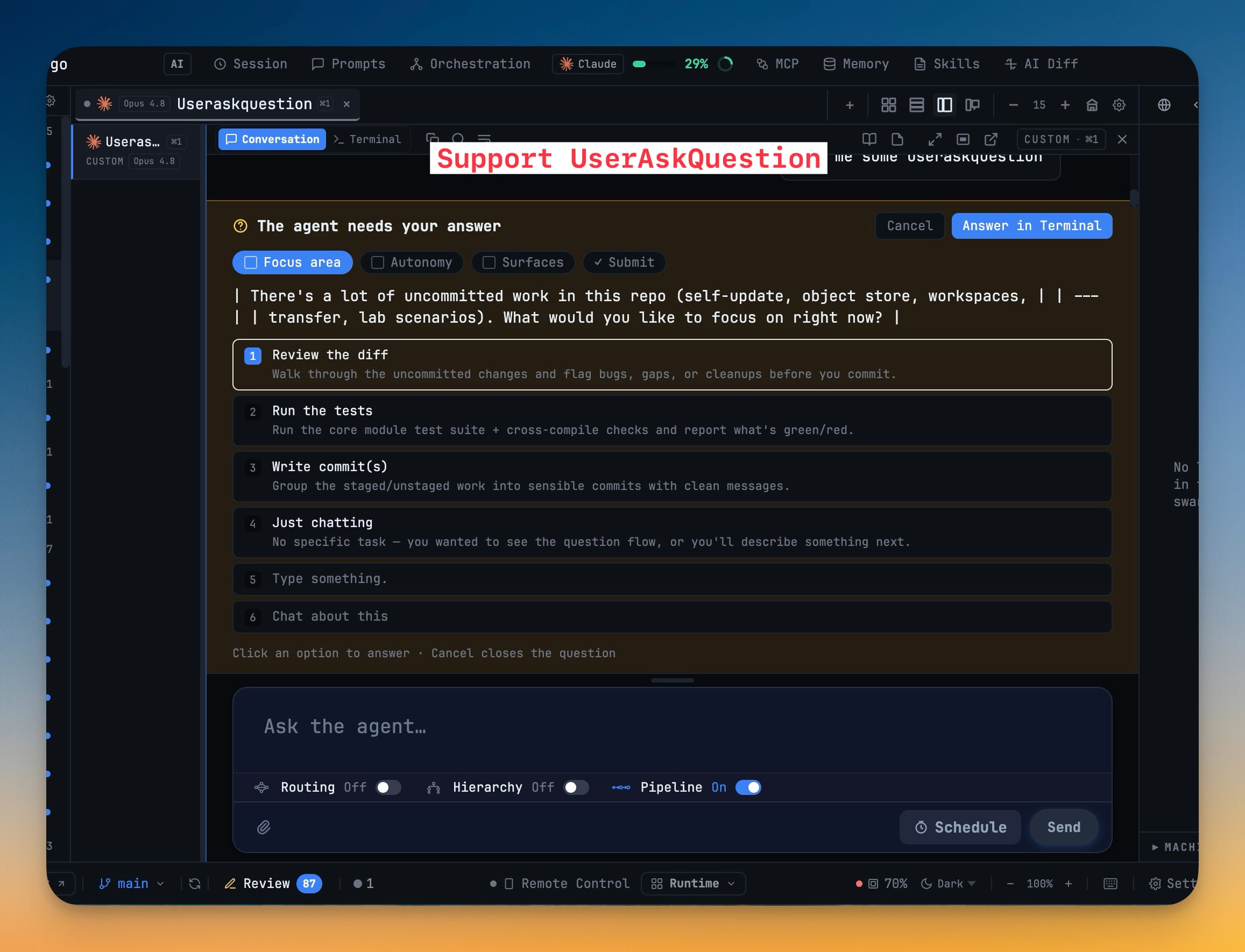
When a running agent asks a multiple-choice question, Conversation shows it as an interactive card above the composer — pick a numbered option, type a free-text answer, or check several at once — so you respond without switching back to the Terminal. Every choice becomes the exact keystrokes the agent expects.
More Screenshots
Click any image to zoom in
Why You Need This
How this feature boosts your daily productivity
Conversation exists so you can read an agent as a chat instead of a raw terminal. But the one moment the agent truly needs you — a decision it cannot make alone — used to bounce you back to the Terminal to answer. The answer card keeps that moment where you already are: read the question, choose, and the agent gets a clean, correctly-formatted response.
How It Works
Get started in 4 simple steps
Read the question as a card
When a running agent asks a multiple-choice question, Conversation surfaces it as a card headed "The agent needs your answer", right above the composer instead of only pointing you to Terminal.
Pick an option or type your own
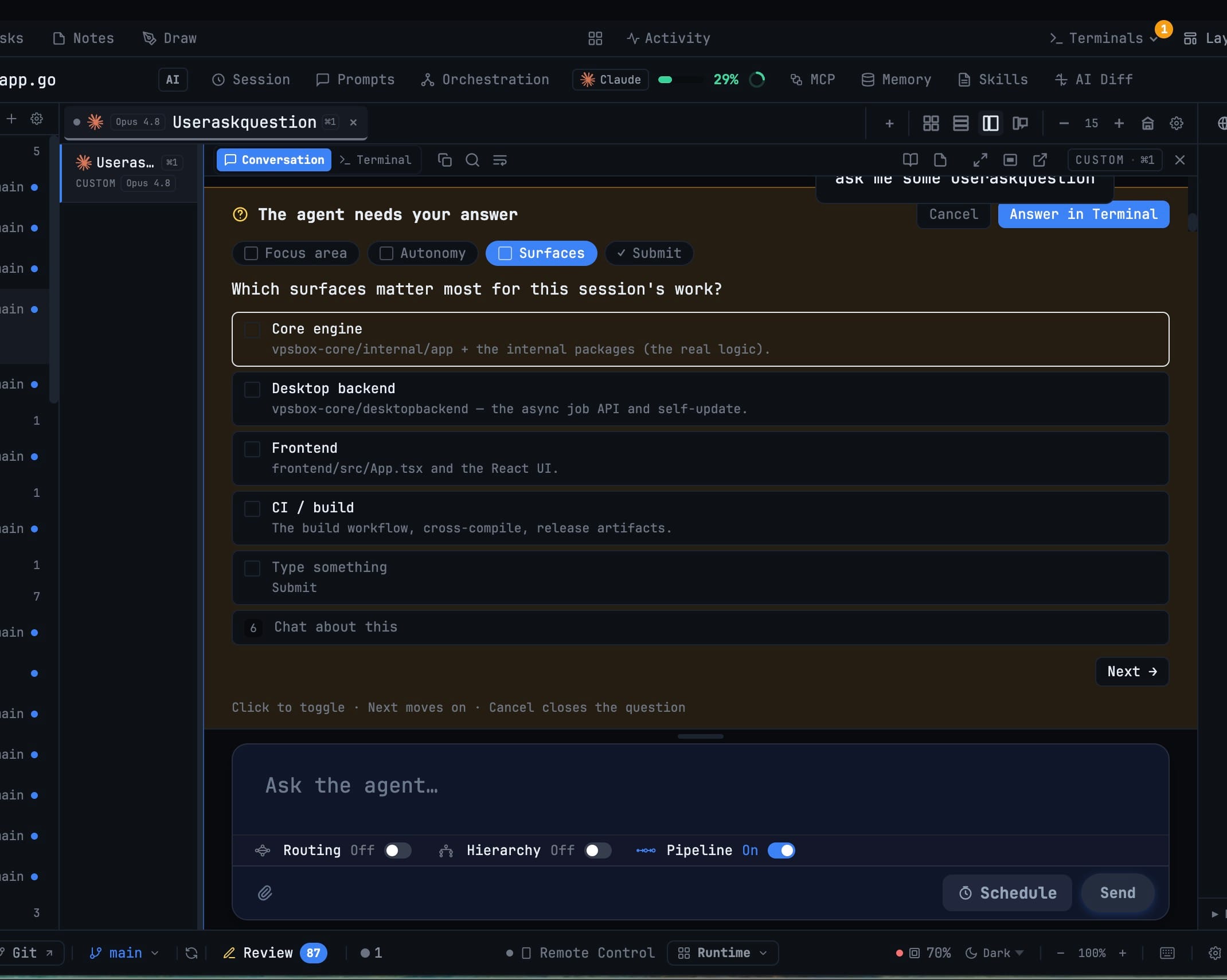
Numbered options each carry a one-line description; click one to answer. Prefer to say something that was not listed? The "Type something" row takes a free-text reply to the same question.
Check several, then Next
For multi-select questions the options become checkboxes — toggle everything that applies and press Next to move on, instead of being forced into a single pick.
Review, then Submit answers
A final tab lists exactly what you chose. Confirm with Submit answers, drop back with Answer in Terminal, or Cancel to close the question without sending anything.
Without 1DevTool
The manual way vs. the 1DevTool way
The Hard Way
The 1DevTool Way
Key Capabilities
Everything included with Answer Agents in Conversation
Why It Matters
The productivity impact of having terminal & ai agents built into your workspace
No Context-Switch Tax
The one moment an agent stops to ask you something is the one moment you no longer have to leave the chat for — the decision happens where you are already reading.
Answers That Land Right
Every pick is turned into the exact keystrokes the agent expects, so you never miscount a menu or fat-finger a number in the raw terminal.
Say What Was Not Offered
The "Type something" row lets you give a free-text answer to the same question, instead of cancelling and starting a whole new prompt.
The Terminal Is Still There
Answer in Terminal rides along on every card, so the raw prompt is one click away whenever you want it.
More in Terminal & AI Agents
Other features in this category you might find useful
Multi-Agent Terminals
Run Claude Code, Codex, Gemini CLI, Amp, OpenCode, Qwen, and custom AI commands in dedicated terminal tabs with recognizable agent logos, custom colors, and status indicators.
Flexible Terminal Layouts
View terminals in 2×2 grid, side-by-side columns, or single fullscreen mode with resizable panes.
Terminal Dashboard
Kanban-style board view of all terminal statuses — Idle, Running, and Review — with real-time polling.
Session Persistence
Terminal sessions persist across app restarts with full scrollback history via tmux integration.
Ready to boost your workflow?
Download 1DevTool for free and experience Answer Agents in Conversation along with 322 other features — all in one app.