Full Terminal Right Controls
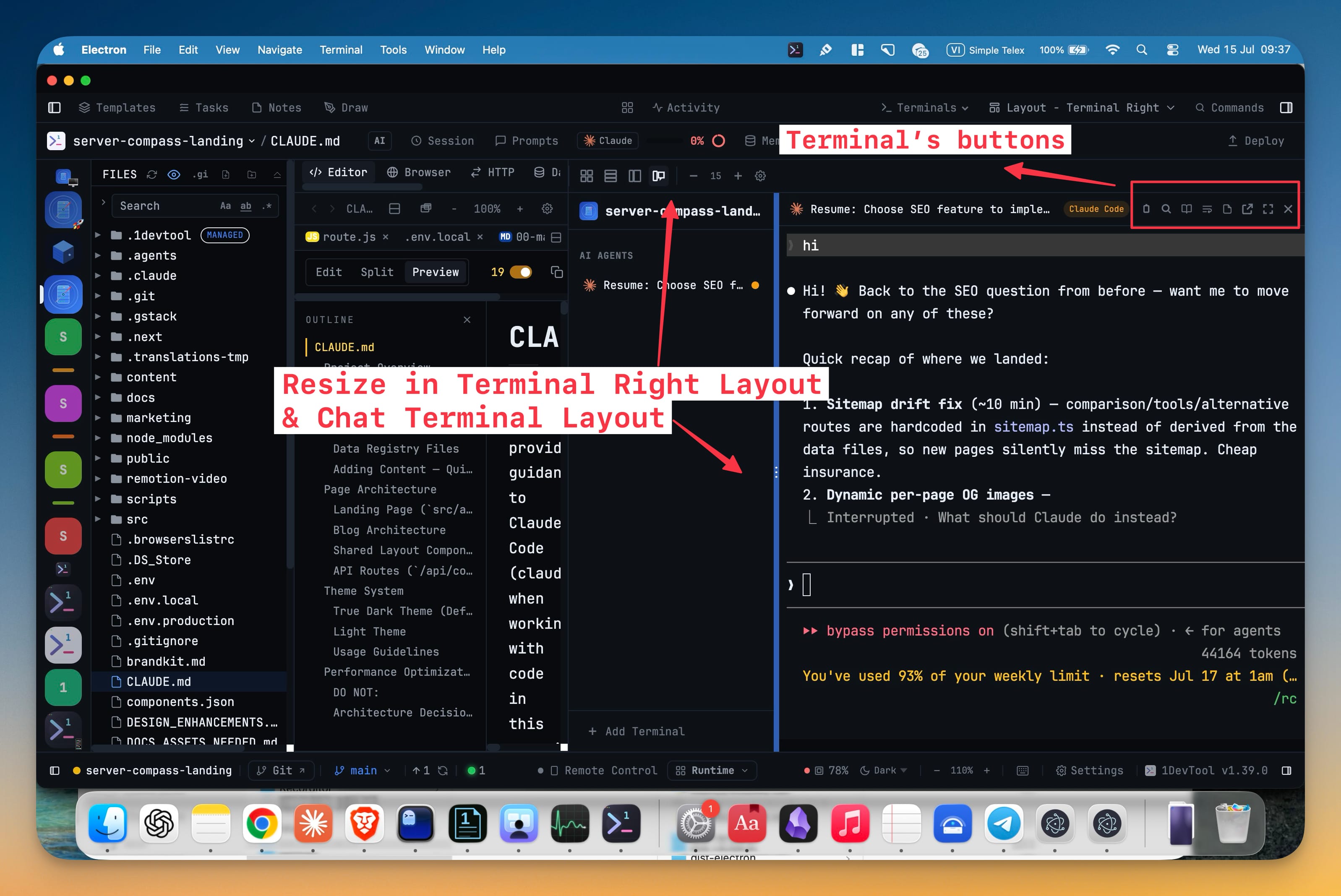
The active terminal in the Terminal Right layout now carries the same control row as every other layout — copy as Markdown, search, Reader Mode, reformat, notes, pop-out, fullscreen, and close. The channel-list divider drags to rebalance names against output, and your width is remembered per project.
Why You Need This
How this feature boosts your daily productivity
Terminal Right gives you a tall, chat-shaped terminal beside your editor, which is exactly what you want when an AI agent is talking back to you. The catch used to be that choosing it cost you the terminal's toolbar: to copy a run as Markdown, open Reader Mode, or pop a terminal into its own window, you had to leave the layout you preferred and come back. Now the layout is a layout, not a trade — every action follows the active terminal, and the channel list resizes to fit however long your terminal names actually are.
How It Works
Get started in 4 simple steps
Switch to Terminal Right
Pick Terminal Right from the Layout menu in the top bar. Terminals stack in a channel list on the left, with the active one filling the pane.
Use the control row
The active terminal's header carries Copy output as Markdown, Search (Cmd+F), Open in Reader Mode, Reformat terminal, notes, Pop Out to New Window, Focus, and Close.
Rebalance the channel list
Drag the divider between the channel list and the terminal — "Drag to resize · double-click to reset" — anywhere between 160px and 480px.
Keep the width
The width you settle on is saved to the project, so reopening it restores your layout. Double-click the divider to snap back to the 220px default.
Without 1DevTool
The manual way vs. the 1DevTool way
The Hard Way
The 1DevTool Way
Key Capabilities
Everything included with Full Terminal Right Controls
Why It Matters
The productivity impact of having terminal & ai agents built into your workspace
No layout tax
The layout you read best in no longer costs you the terminal's toolbar.
Sized to your names
The channel list stretches to fit long terminal names, or shrinks to give output the room.
Remembered per project
Each project keeps its own channel-list width instead of a single global guess.
More in Terminal & AI Agents
Other features in this category you might find useful
Multi-Agent Terminals
Run Claude Code, Codex, Gemini CLI, Amp, OpenCode, Qwen, and custom AI commands in dedicated terminal tabs with recognizable agent logos, custom colors, and status indicators.
Flexible Terminal Layouts
View terminals in 2×2 grid, side-by-side columns, or single fullscreen mode with resizable panes.
Terminal Dashboard
Kanban-style board view of all terminal statuses — Idle, Running, and Review — with real-time polling.
Session Persistence
Terminal sessions persist across app restarts with full scrollback history via tmux integration.
Ready to boost your workflow?
Download 1DevTool for free and experience Full Terminal Right Controls along with 333 other features — all in one app.