Oct 16, 2026
Mention any project, or a whole group, from Agent Input
The @ picker's Projects tab now mirrors your sidebar, so you can hand an agent another project's context, or a whole group of projects, without setting up a workspace first.
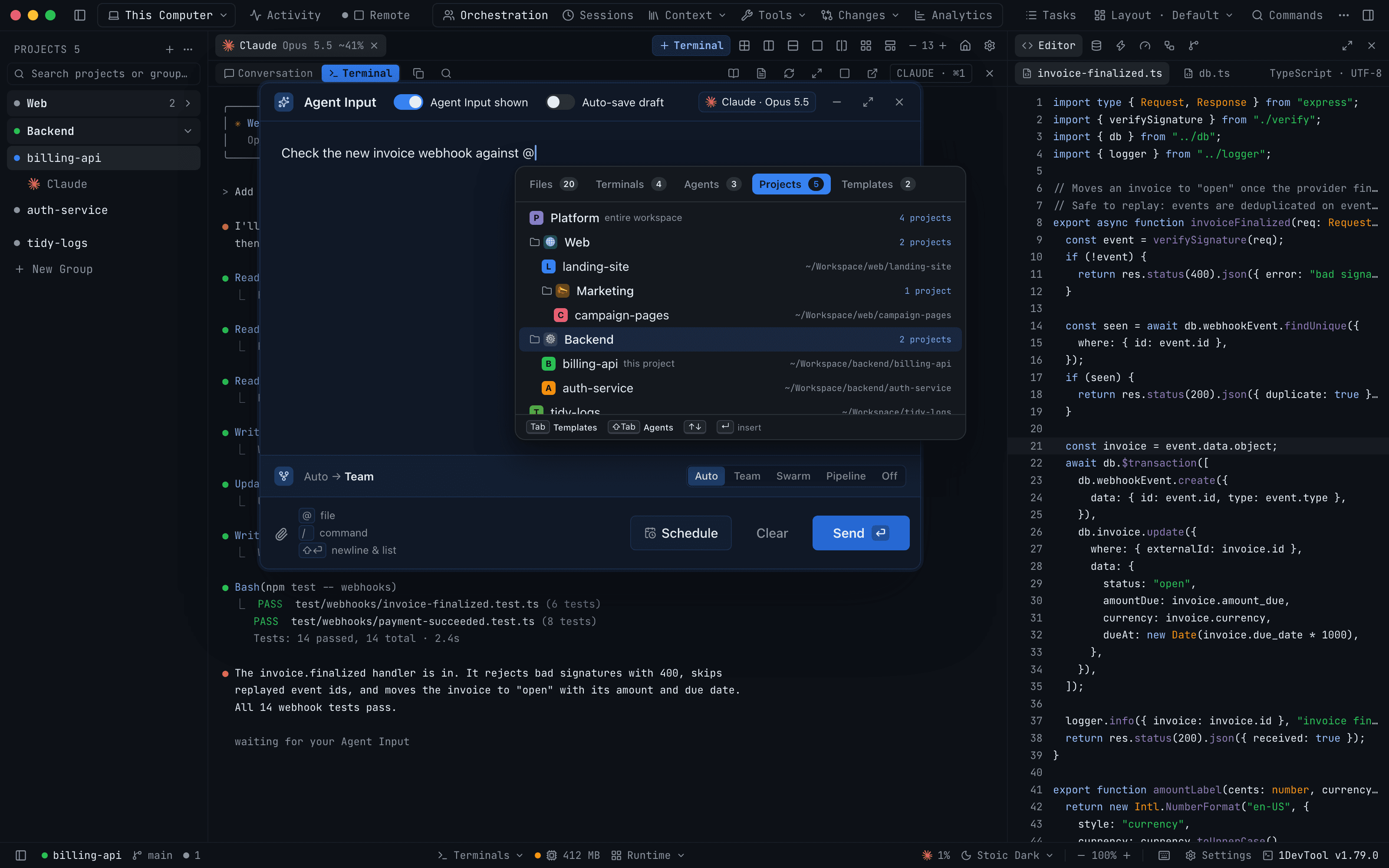
You are in billing-api, an agent is open in the terminal, and the bug you are chasing runs through auth-service. The agent can't see that repository. So you open it in a second window, hunt for the right files, copy them across, paste them into the prompt and hope you grabbed enough. Then the fix turns out to touch the web app too, and you do it all again.
1DevTool has let you mention a sibling project from Agent Input since 1.59, but only when both projects belonged to the same workspace. If you never set one up, and most people organise their projects with sidebar groups instead, the Projects tab had nothing to offer you.
What changed
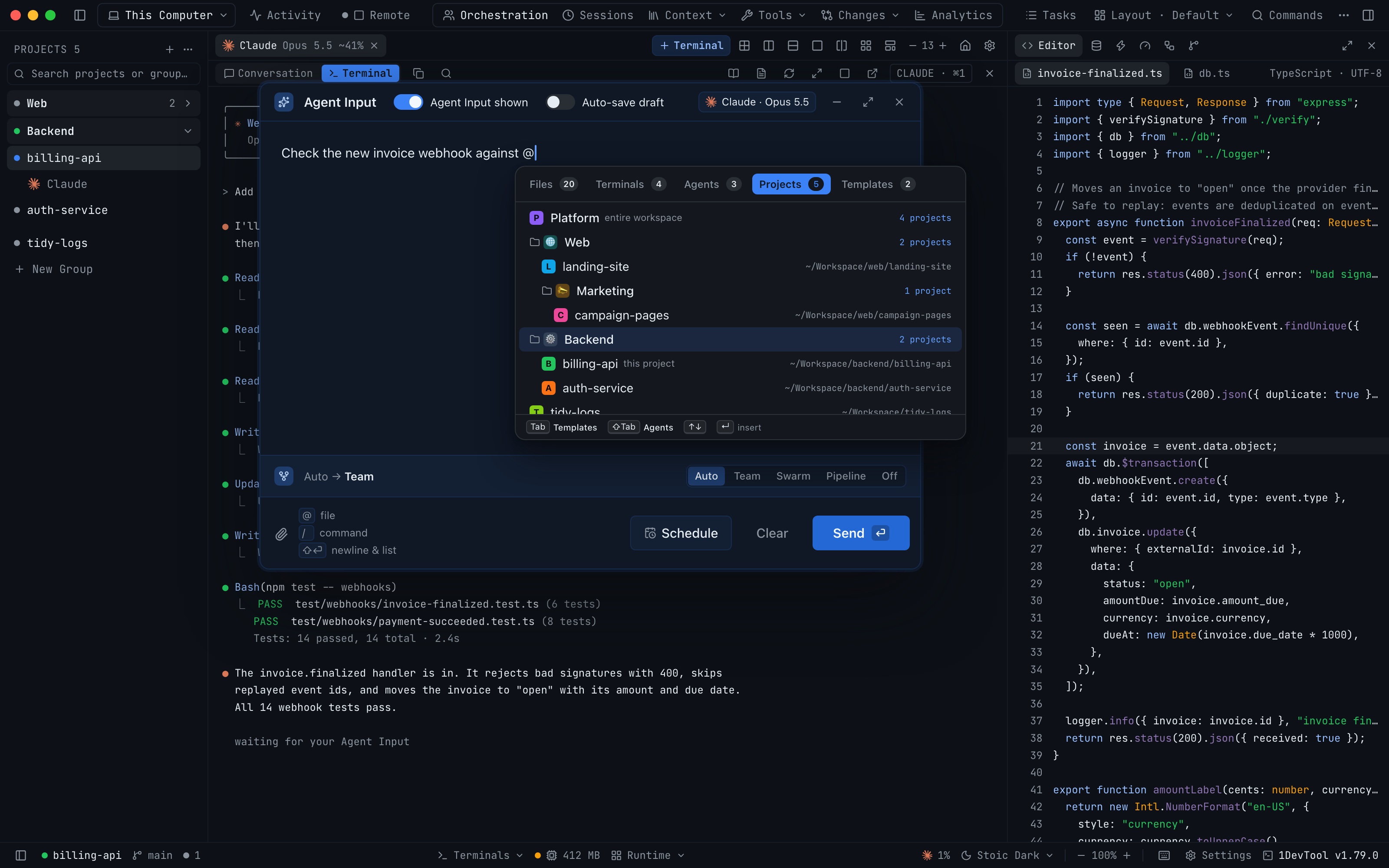
In 1DevTool 1.79.0, the Projects tab of the Agent Input @ picker lists your projects the way your sidebar does: the same groups, the same nested groups, the same order. Pick a project to mention it. Pick a group to mention every project in it. You no longer need a workspace for either.
How it works in practice
Mention one project
Type @ in Agent Input and move to Projects. Each project shows its folder on the right, and your own project is marked this project. Type a few letters and the list narrows by project name or folder name.
Pick auth-service and a chip lands in your prompt. When you press Send, the agent gets a short block for that project: its name, its root folder, the group it sits in, and the AI terminals that are already open in it. If no agent is running there, the block says so, so the agent knows it has to start one rather than assuming someone is listening.
Mentioning exactly one other project does one more thing. The Files tab now searches that project's folder instead of yours, so your next @ file mention can point straight at auth-service/src/session.ts without leaving the terminal you are in.
Mention a whole group
Most changes don't stop at one repository. A login fix can touch the API, the web app and the shared types package at once. If those live in one sidebar group, you can hand the agent all of them in one mention.
A group row in the picker shows how many projects it covers, such as 2 projects beside Backend. Pick it and every project under that group goes along, including the ones inside nested groups. In the screenshot above, mentioning Web includes landing-site and campaign-pages, which sits one level down in Marketing.
The group is resolved again when you press Send, not when you pick it. If you drag a new project into the group while you're still writing, the agent gets that one too.
Each project arrives as its own block, so the agent can tell them apart. If the list gets too long for one prompt, the last projects are left out and a line tells the agent how many were dropped. Nothing disappears without a note.
Workspaces still work
If you do use workspaces, nothing is lost. Any workspace this project belongs to leads the list as one row marked entire workspace, and it still mentions every member project in one go. The difference is that it now sits above the rest of your projects instead of being the only way in.
Two things called "Web"
Names collide. You might have a group called Web and a project that is also called Web. When two mentions in the same prompt share a name, the chip tells them apart: the group's chip reads Web · group and the project's chip carries its folder name, so you can see which one the agent will get before you send.
A picker that's easier to drive
The same release reworked the tab strip at the top of the picker, because the Projects tab now often holds most of the results.
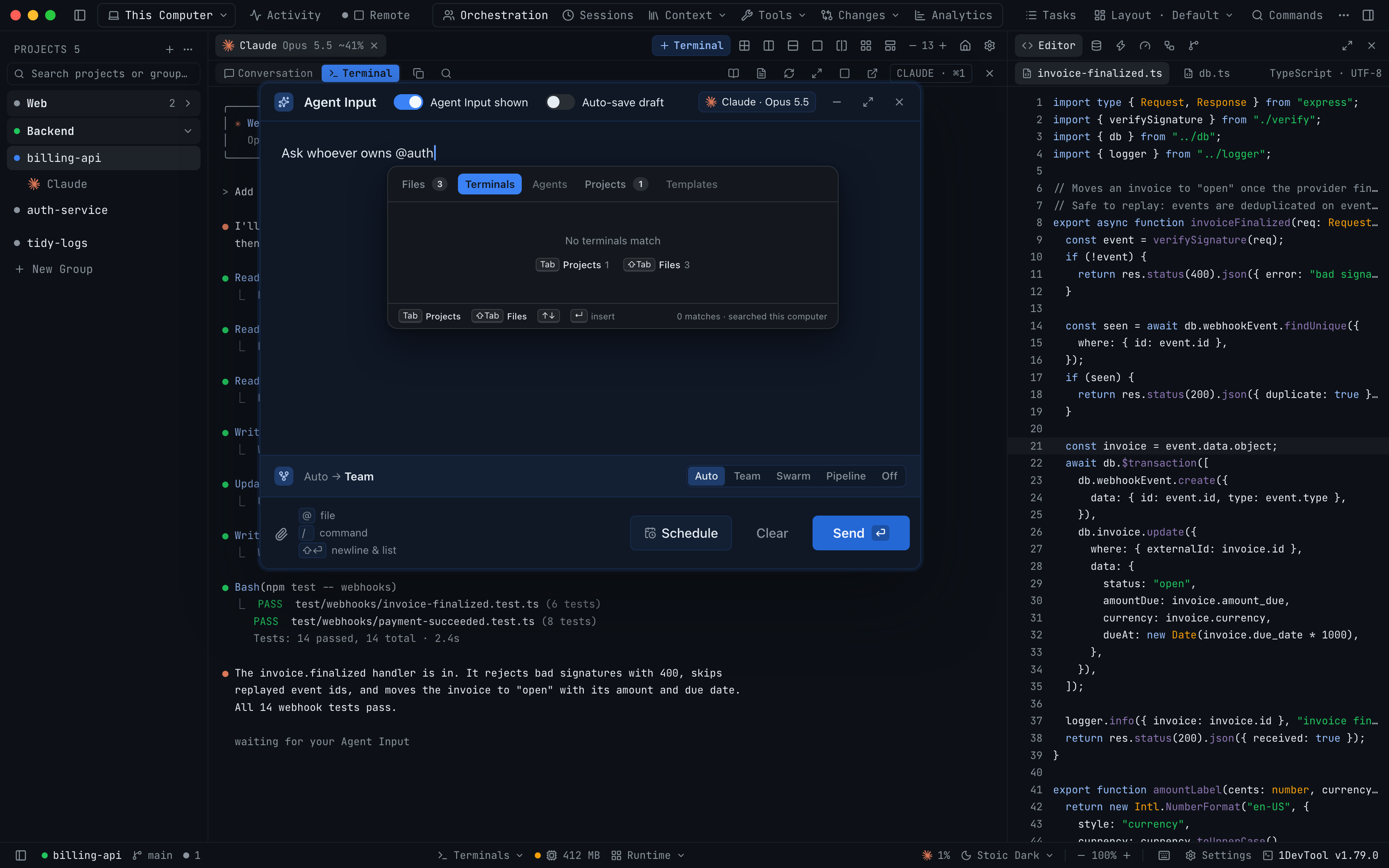
- Tabs fit their labels. Each tab is sized to its name with its count beside it, so Templates is no longer cut off. Tabs with nothing to show are dimmed.
- Tab and Shift+Tab skip empty tabs. Shift+Tab now moves back instead of forward, and both keys jump over tabs with no results. The footer names where each key will take you.
- Empty tabs point somewhere useful. Type
@authwhile you're on Terminals and it says No terminals match, then offers Tab Projects 1 and ⇧Tab Files 3, so you can reach the match in one key. - It fits narrow windows. In a pop-out terminal the picker shrinks to the window and its tabs scroll sideways instead of running off the edge.
Before vs After
| Step | Before 1.79.0 | With 1.79.0 |
|---|---|---|
| Mention a project outside a workspace | Not possible: open it, copy files, paste them in | @ → Projects → pick it |
| Brief an agent on a whole product | Build a workspace first, or paste from each repo | Pick the sidebar group |
| Include nested groups | Add each project by hand | Included automatically |
| Find a match in another tab | Tab through every tab, empty or not | Tab and Shift+Tab skip empty tabs |
| Tell two "Web" mentions apart | Guess from the name | The chip says Web · group |
Who benefits most
People who split a product across repositories. If your API, web client and shared packages each have their own repo, one group mention gives the agent the whole product without any setup.
People who organise by client or team. Sidebar groups such as Acme or Payments are already how you think about the work. The picker now uses the same structure, so the group you click in the sidebar is the group you mention.
People who never made a workspace. Workspaces are still useful for the Tasks board and the Team Map filter, but you no longer need one just to mention another project.
Try it
Update to 1DevTool 1.79.0, open Agent Input in any terminal, type @ and press Tab until you reach Projects. Pick a group you already have in your sidebar and send. The agent now knows where every project in that group lives and which agents are running in each one, and you don't have to copy a single file. For the details, see Agent Input in the docs.