@Mention a Terminal on Another Computer
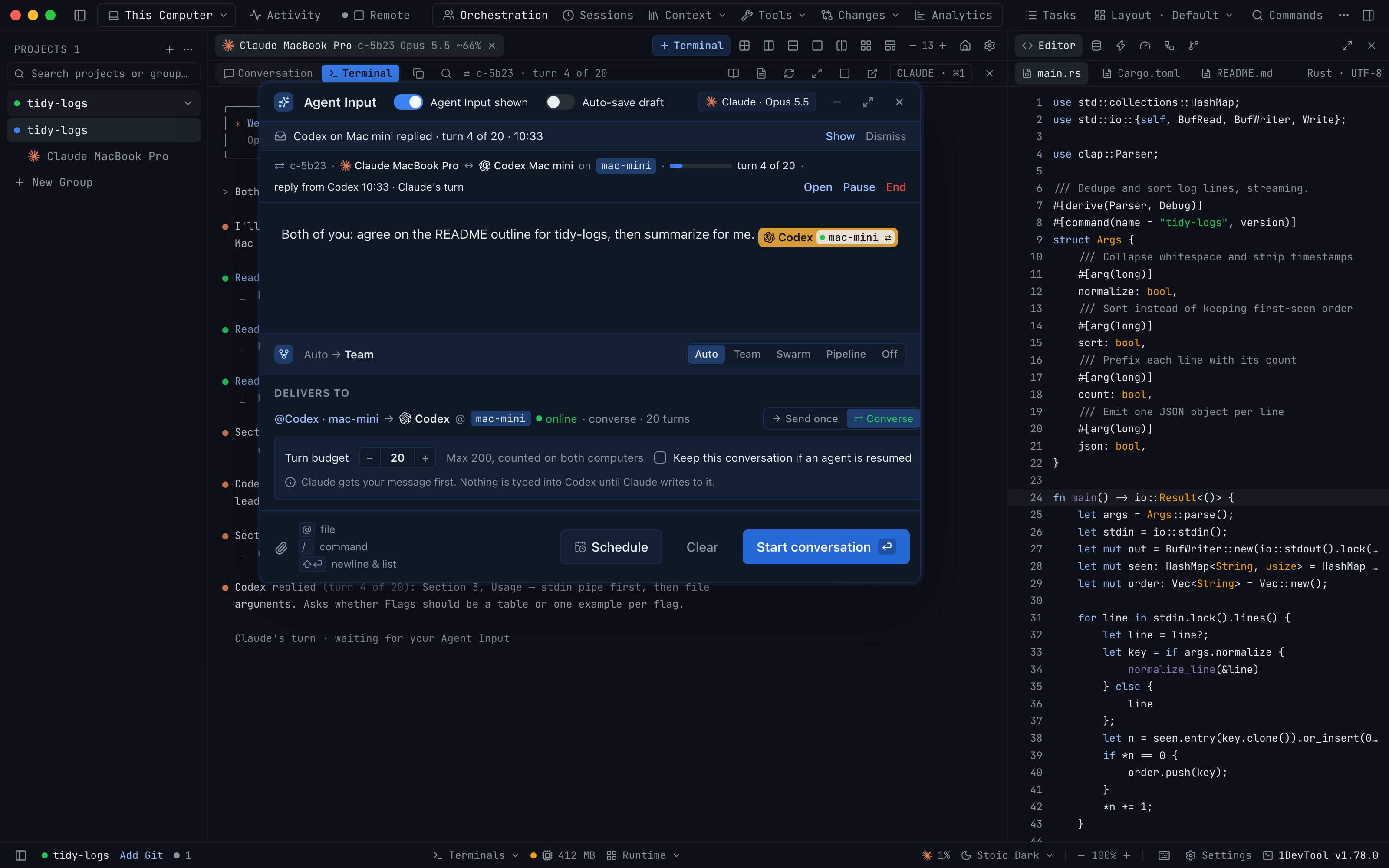
Type @ in Agent Input and every paired computer gets its own section of terminals, with each one marked ready, stopped or last known. Pick one and choose Send once to type your message into it a single time, or Converse to open a bounded two-agent conversation.
Why You Need This
How this feature boosts your daily productivity
Reaching an agent on another computer used to take a detour: switch machines, find the right terminal and paste, or settle for a one-shot delivery with no idea whether the other computer was even awake. Now the @ picker lists the terminals on each paired computer alongside your own, keeps an offline computer's terminals visible as last known, and the Delivers to panel says which computer the terminal runs on, whether it is reachable and how Send will deliver. If Send can't run yet, the reason sits next to the button with the one way out, such as Open Settings → Machines when the other computer hasn't granted Control terminals, or Switch to Auto when you are in Pipeline mode.
How It Works
Get started in 4 simple steps
Type @ in Agent Input
Each paired computer has its own section, showing online or offline since a time, and each terminal reads ready, stopped or last known.
Pick the terminal
Delivers to shows the computer it runs on and whether it is reachable, before anything is sent.
Choose Send once or Converse
Send once types the message into that terminal one time. Converse opens a conversation with a turn budget.
Send or queue
The button reads Start conversation, or Queue conversation when that computer is offline.
Without 1DevTool
The manual way vs. the 1DevTool way
The Hard Way
The 1DevTool Way
Key Capabilities
Everything included with @Mention a Terminal on Another Computer
Why It Matters
The productivity impact of having terminal & ai agents built into your workspace
Know Before You Send
The preview names the computer, its reachability and the delivery mode, so a message never lands somewhere you didn't expect.
One Composer for Every Machine
Terminals on paired computers sit in the same @ picker as your own, so you never switch machines to prompt them.
No Silent Failures
A send that can't run says why next to the button and offers the fix, instead of disappearing.
More in Terminal & AI Agents
Other features in this category you might find useful
Multi-Agent Terminals
Run Claude Code, Codex, Gemini CLI, Amp, OpenCode, Qwen, and custom AI commands in dedicated terminal tabs with recognizable agent logos, custom colors, and status indicators.
Flexible Terminal Layouts
View terminals in 2×2 grid, side-by-side columns, or single fullscreen mode with resizable panes.
Terminal Dashboard
Kanban-style board view of all terminal statuses — Idle, Running, and Review — with real-time polling.
Session Persistence
Terminal sessions persist across app restarts with full scrollback history via tmux integration.
Ready to boost your workflow?
Download 1DevTool for free and experience @Mention a Terminal on Another Computer along with 333 other features — all in one app.