Sep 17, 2026
Every Agent's Hooks, in One Dialog
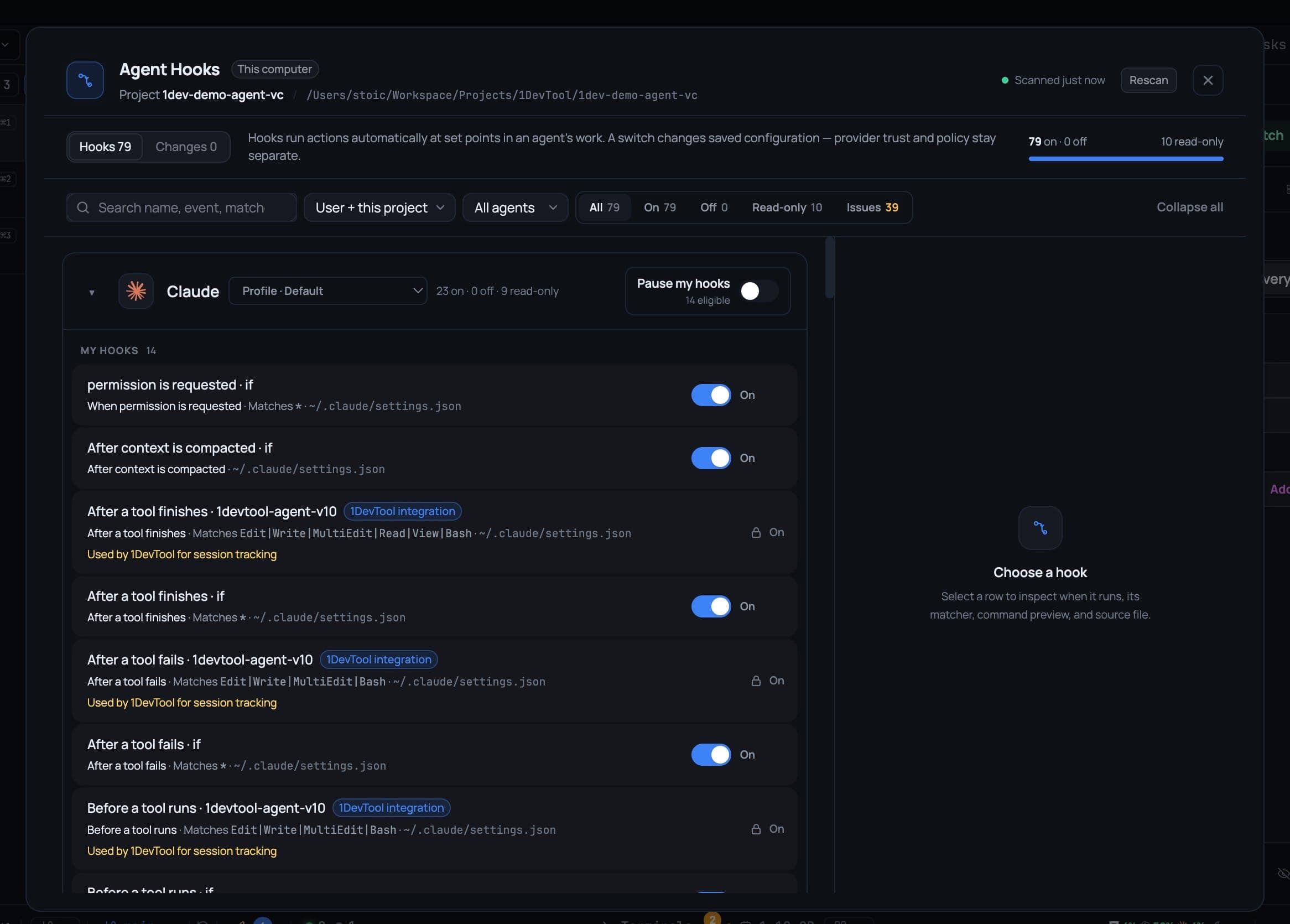
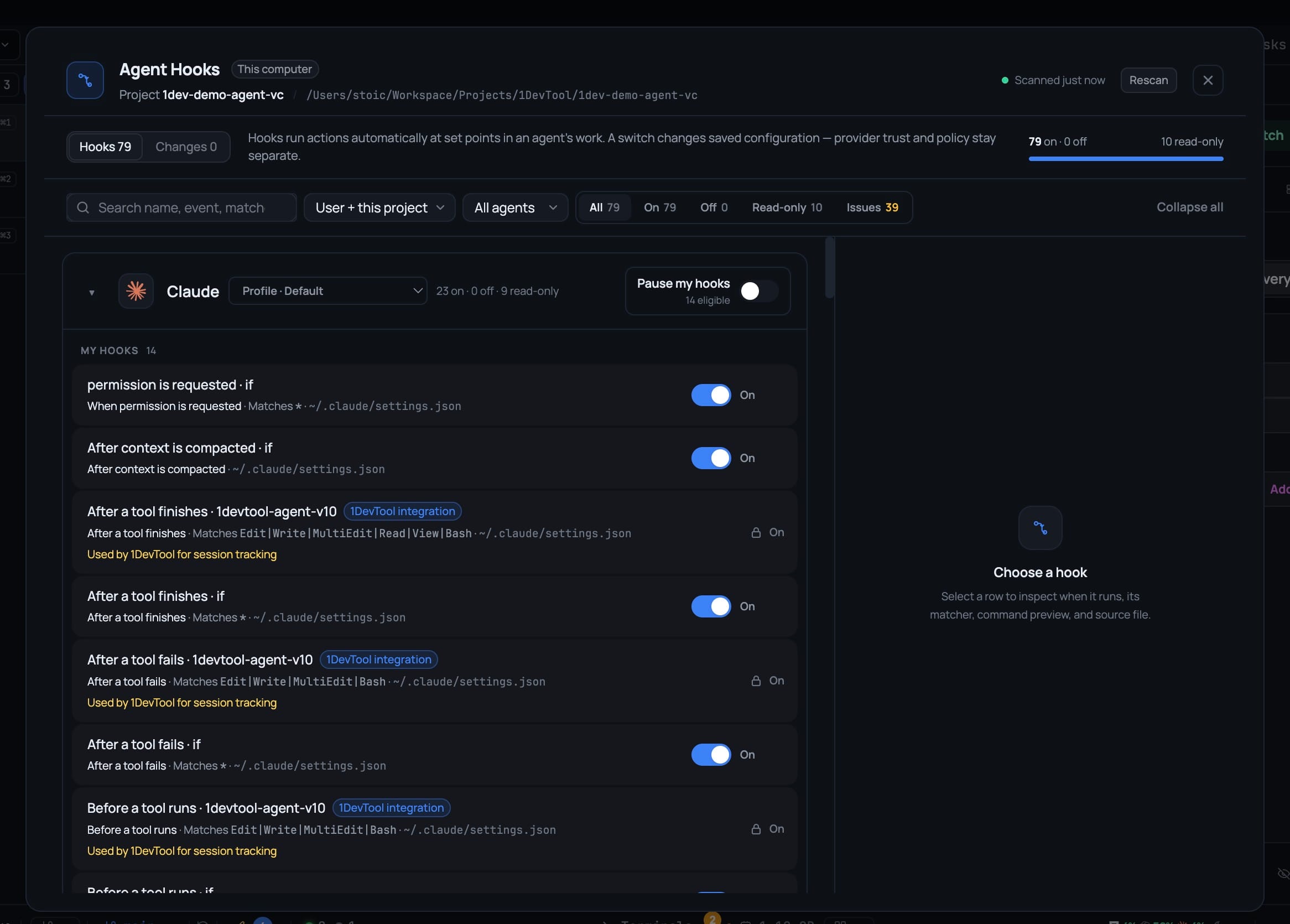
Hooks pile up across a dozen config files in three different formats, so a misbehaving one means grepping JSON. The hook manager lists every hook every agent has configured, says when each runs and who owns it, and turns one off with a switch.
A hook fired that should not have. Something ran before every Edit, it slowed the agent to a crawl, and you have no idea which of your agents owns it.
So you start opening files. ~/.claude/settings.json. Then .codex/config.toml, which uses a different shape. Then ~/.gemini/settings.json. Then the project-level copies of all three, because scope matters and you cannot remember which one wins. You find something plausible, comment it out, restart the agent, try again — and three days later you notice you never put it back.
Hooks are genuinely useful right up until you have enough of them to lose track, and the tooling for that second phase did not exist.
What changed
1DevTool v1.75.1 adds a hook manager: every hook every one of your agents has configured, in one dialog, with a switch on each row that edits the agent's real config file.
Open it from Tools → Hooks in the AI group, or from Settings → Agents → Open hook manager. Both land in the same place.
How it works in practice
Every agent, in one list
Claude, Codex, Gemini, Kimi, Antigravity, Cursor, Kiro, Devin, Qwen, Qoder, Grok and more — grouped by agent, with the config profile each group actually reads shown next to it. The header counts them honestly: how many are on, how many are off, how many are read-only.
A row tells you what the file would not
Each hook says when it runs in words rather than provider jargon — Before a tool runs, After a tool finishes, After a tool fails, When a session starts, When a session ends, When you send a prompt, When a sub-agent finishes, When the agent finishes responding. Alongside that: which config file it came from, whether it is user scope or project scope, and who owns it.
That last column is the one that ends the hunt. A hook that came from a plugin, or from an organization policy, or from 1DevTool's own session tracking, says so — and says it instead of looking like something you wrote and forgot.
Search by name, event or match, and filter by agent, scope or status, including a view of just the entries that need attention.
Turning one off is a switch, not an edit
Flip the toggle and the dialog writes the agent's real configuration file, verifies it, and offers Undo — which restores exactly the definitions that operation changed, nothing more. If a re-enabled hook needs the provider to trust it or reload before it takes effect, the dialog names that next step rather than leaving you to wonder whether the switch worked.
Pause an agent's hooks without losing your setup
This is the one worth knowing about. Pause my hooks captures the set that is currently enabled and turns it off. Unpausing restores exactly that set — hooks that were already off before you paused stay off.
That matters because the alternative is doing it by hand: disable eight hooks to isolate a problem, then try to remember which two were already disabled for good reason. Pause makes "run this agent clean for ten minutes" a single switch with a guaranteed way back.
Some things it will not touch, and says so
1DevTool's own session-tracking integrations, organization policies and plugin-owned hooks appear as Read-only, with the reason printed on the row. They are listed rather than hidden — you can see that they exist and what they do — but the manager never rewrites them.
Everything the manager does write is journaled. The Changes tab keeps a bounded log of what was written where, so a bad edit is recoverable, and external edits show up after a rescan. From any row you can open the hook's config file in the editor or reveal it on disk, for the times you do want to hand-edit.
Before vs after
| Tracking down a misbehaving hook | Before v1.75.1 | With the hook manager |
|---|---|---|
| Finding which agent owns it | cat four config files in two formats | One list, grouped by agent |
| Knowing when it runs | Decode PreToolUse / PostToolUse | "Before a tool runs", in words |
| Knowing if you may change it | Guess | Read-only, with the reason |
| Disabling it | Hand-edit JSON, restart, hope | A switch, verified, with Undo |
| Running an agent clean | Disable by hand, forget what was off | Pause my hooks → unpause restores it |
| Recovering a bad edit | Your shell history, maybe | The Changes journal |
The rest of v1.75.1
Two other things shipped alongside it:
Analytics gained an AI Control tab. Pick a session and read how it was actually spent — its tool histogram, the MCP servers it called, the skills it fired, how long it ran, and where the tokens went, split into input, output, cache and reasoning with an estimate of tool-turns against plain text-turns. An Orchestrate view grades team, swarm and headless runs on pass rate, timeouts, interruptions and median and p90 duration, with plain-language observations instead of a score. Compare puts two agents side by side on the same range. The scan is deliberately lazy and honest: it only runs while the tab is open, reads a bounded slice of recent session files, and tells you when coverage was partial rather than quietly dropping data.
MCP servers can be added and edited from Settings. Settings → MCP → Add server installs a server into every supported client from one form, writing the right native shape for Claude, Codex, Gemini, Kimi, OpenCode, Grok, Hermes, Cursor, Oh My Pi, Kiro and Devin — local (a command with args and environment) or remote (a URL with headers). Editing a third-party entry opens it back up in the same form with its real values decoded, so you never go config-file spelunking for a header you set last month.
And one small economy worth noting: an Autopilot diagnosis checker left on a blank model now runs on Claude's Haiku or Codex's gpt-5.6-luna rather than the account's priciest default — measured around 50× cheaper per check — with the model field naming what will actually run.
Who benefits most
If you run several agents across several projects, this is the first view that shows all their automations at once, instead of one config file at a time.
If a hook is making an agent misbehave, Pause my hooks isolates it in one switch and gives you a guaranteed way back to the setup you had.
If you share a machine or work under an org policy, the read-only rows tell you what you cannot change and why, before you try.
Try it
Update to v1.75.1 and open Tools → Hooks. Even if nothing is broken, the first scan is worth the thirty seconds — most people find at least one hook running on every tool call that they do not remember setting up.