Aug 1, 2026
Proof your prompt actually reached the agent
A prompt is now reported as sent only after 1DevTool confirms it left the agent's composer — so a delegation can no longer look live while the agent sits idle. Plus Markdown sticky notes, per-agent terminal counts, and a file tree you can resize or collapse.
You hand a task to an agent, watch the tab flip to running, and go do something else. Twenty minutes later you come back and the work isn't done — it was never started. The prompt is still sitting in the agent's composer, one Enter key away from having happened, and everything downstream believed it had. The tab named itself. The run timer started. Mission Control counted it as in flight. The only thing that didn't happen was the thing you asked for.
That failure is quiet in the worst way. Nothing errors, nothing turns red, and you only find out by going back and looking. When you are running several agents at once — which is the entire point of keeping them side by side — checking each one by hand defeats the arrangement.
What changed
A prompt is now reported as sent only after 1DevTool has confirmed it left the agent's composer. If the text is provably still there, it presses Enter again; if it still hasn't gone, the terminal tells you instead of pretending.
How it works in practice
The composer is checked, not trusted
After Send, 1DevTool looks at the agent's composer to see whether your message actually left it. If the text is still sitting there, one more Enter is attempted automatically — which is usually all a stuck prompt ever needed.
When it still hasn't gone, nothing downstream is allowed to pretend otherwise. Mission Control shows "not submitted — press Enter" and takes you straight to that terminal, and the tab keeps your text as a draft so none of it is lost. Starting the run, auto-naming the tab, and opening an AI Diff session all wait until the prompt is proven sent, so a delegation can no longer look live while the agent sits idle. Press Enter in the terminal yourself and the warning clears.
A held message tells you what it is waiting for
Not every delivery can go out the moment you send it — the receiving agent may be mid-turn. Instead of disappearing into a queue, a message held because the target's composer could not be proven empty now retries on its own every 15 seconds for up to 10 minutes.
When the target has no readiness contract at all, or the link is set to strict confirmation, it says so plainly and waits for your Submit now or Cancel. Mission Control, the Team Map, AI settings, and the phone all show the same reason for the same message, so you are never reading three different stories about one delivery. Linked agents read that reason off their delivery receipt too, instead of polling in a loop or peeking at a peer's terminal to work out whether the message landed.
Ten of the same agent, in one batch
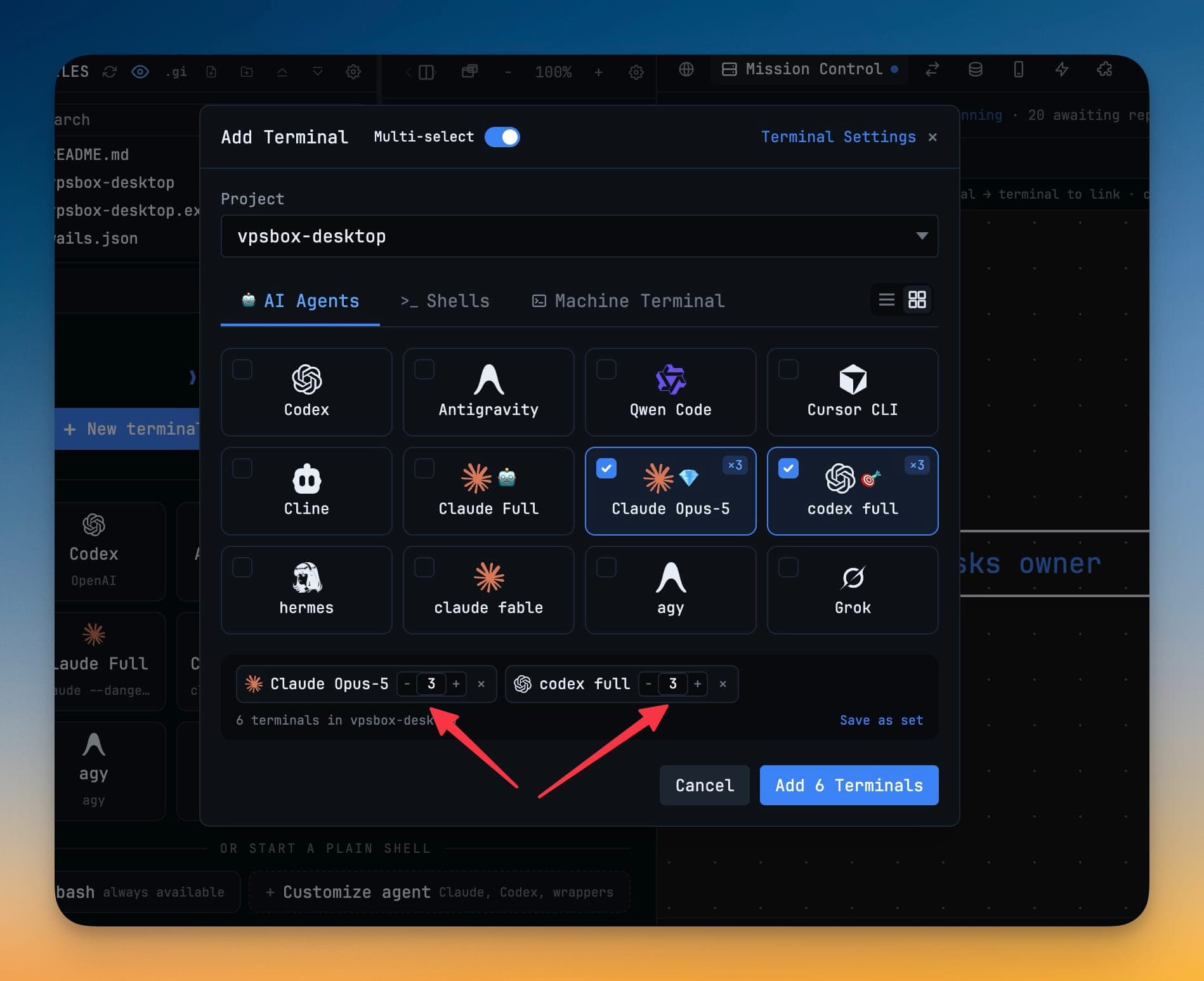
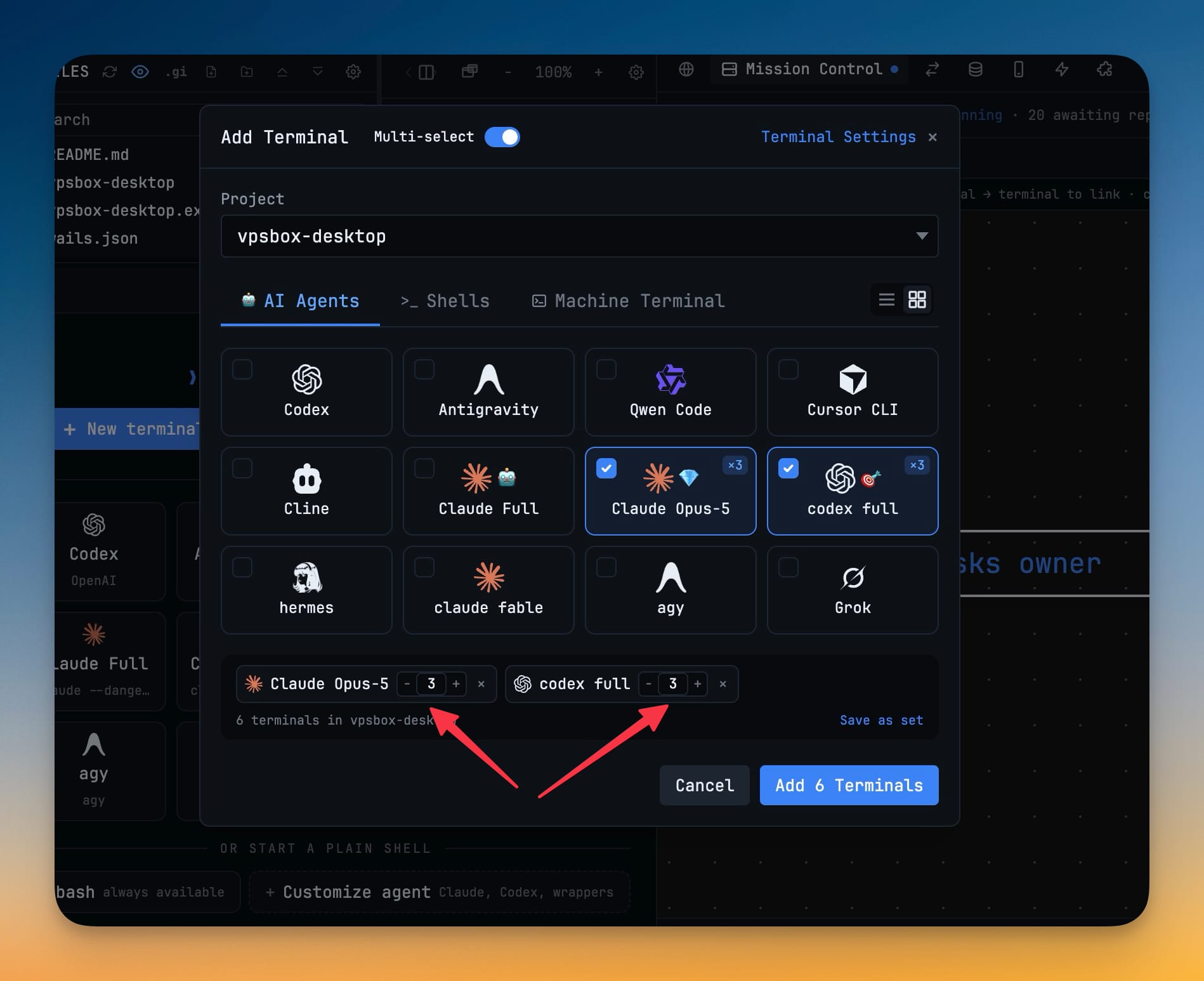
Opening several copies of one agent used to mean ticking the same card over and over. In the Add Terminal dialog's multi-select mode, every selected entry now carries a −/N/+ counter, so a single batch can open 10 Codex terminals and 5 Cline terminals together.
Type the number directly or step it — up to 20 per entry — and Enter commits the count without submitting the batch. A checked card shows a ×N badge, the summary counts real terminals rather than ticked cards, and the button reads Add 15 Terminals so you know exactly what is about to open. Copies are numbered Codex 1, Codex 2, which keeps a same-agent batch readable in the tab bar until the AI tabs rename themselves to their conversation titles. Saved terminal sets remember their counts, and the free-plan per-project limit compares against the total the batch would create, so you are told to trim before anything opens rather than halfway through.
Notes you can read, not just write
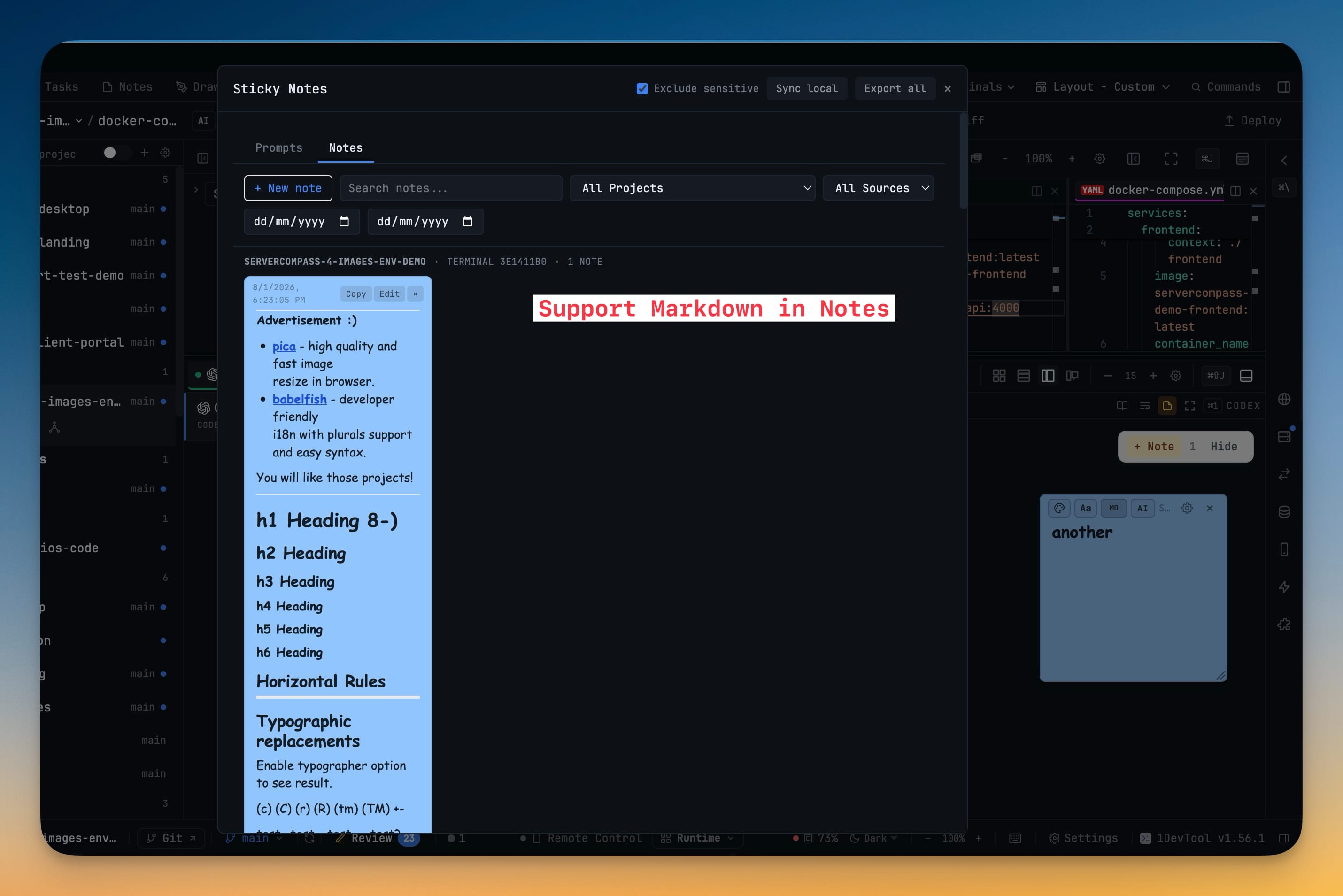
A sticky note you are not editing now renders as Markdown: headings, lists, checkboxes, quotes, tables, code blocks, and links, all as formatted text. Click anywhere on the note to go back to editing it, or use the MD button in the note toolbar to switch between writing and reading. Links open in your browser, and a link to a heading inside the same note scrolls to it. A new, empty note still opens ready to type in, so nothing about jotting something down quickly has changed.
Notes also stopped needing something to hang off. A + New note button in the Sticky Notes library opens a composer right in the notes list, so a thought that belongs to a project no longer needs a file or a terminal to attach to. Pick the project, choose the colour, and save with ⌘⏎ or Save note; Escape closes the composer without closing the library. Notes written this way are grouped under Manual notes, findable with the new Manual source filter, and they reach the phone labelled as Manual note.
The file tree is whatever width you need
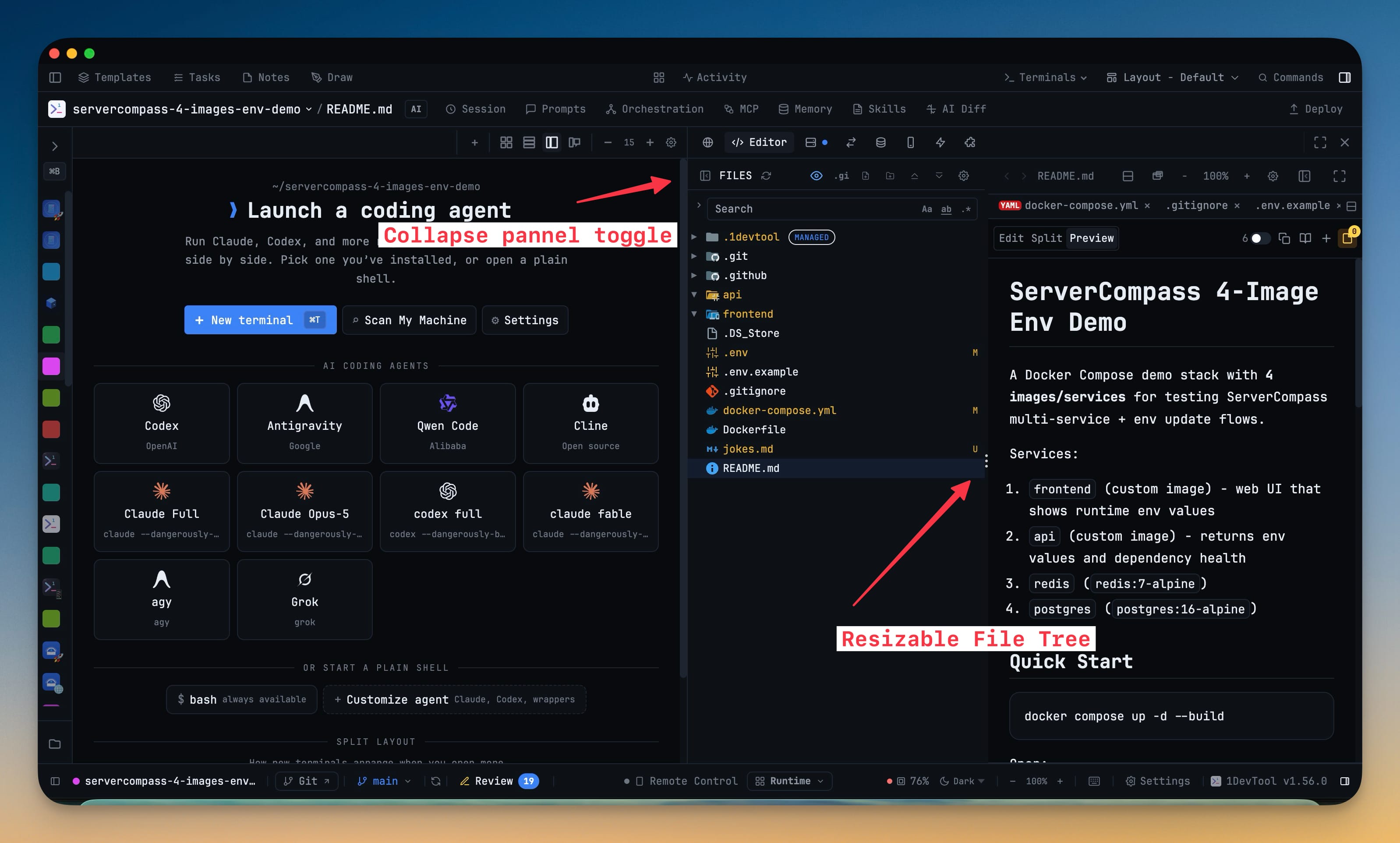
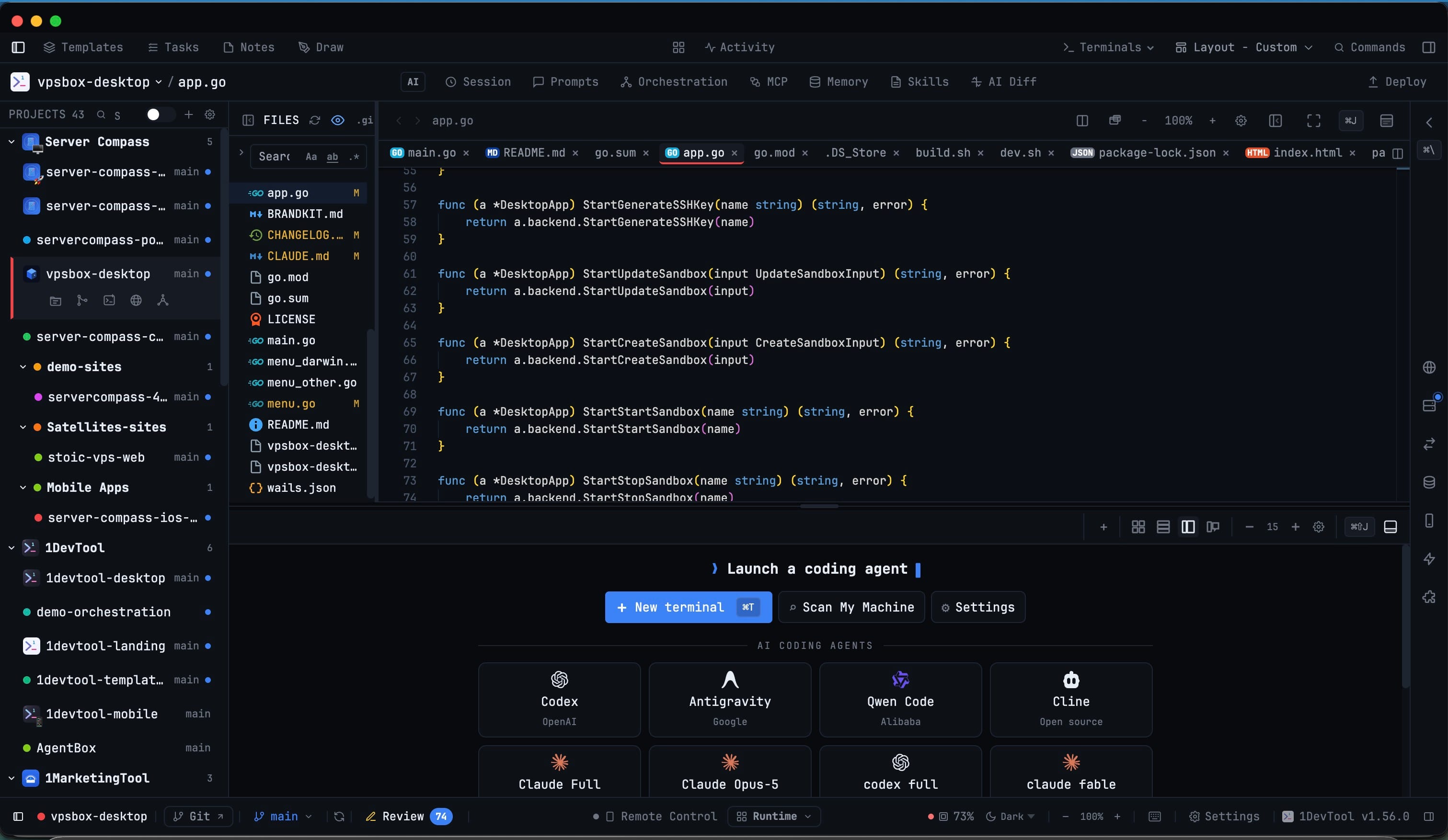
The divider inside the File Tree + Editor workspace now resizes the tree while the editor keeps painting behind it, so a deep path and a wide code column stop competing. Double-click the divider to snap back to the default width. Whatever you choose is remembered, and the editor always keeps enough room even when the workspace sits in a narrow sidebar.
When you don't need the tree at all, hide it from the workspace toolbar or from the Files header — a slim rail stays behind to bring it back in one click. The sidebar's File Explorer collapses to a single row, the project list above it keeps the height you dragged it to, and a collapsed tree stops watching the repository until you open it again.
That workspace also scrolls properly everywhere now. Moving File Tree + Editor into the centre slot used to leave both the tree and the editor stuck; they scroll in every layout slot.
Cursor, under its new command name
Cursor renamed its CLI command to agent, and installs that ship only the new name had started reading as "not found" in Settings → System. They're detected again on macOS, Linux, and Windows, and a terminal started with agent is treated as a real AI terminal — agent overlay, session detection, and resume included. Cursor is told apart from other tools that install a command by that same name, Windows now looks in the folder Cursor's installer actually writes to, and Cursor's full model list — roughly 200 models — reaches the @Cursor picker instead of a lone auto fallback.
Before vs after
| Step | Before | Now |
|---|---|---|
| Send a prompt to an agent | Reported sent the moment you pressed Send | Reported sent once the composer is confirmed empty |
| A prompt that never submits | Silent — tab named itself, run timer started | "not submitted — press Enter", with your text kept as a draft |
| A message held in the queue | Sat there with no reason given | Says what it is waiting for, retries every 15s for 10 min |
| Open 10 of one agent | Tick the same card 10 times | Set the count to 10, button reads Add 10 Terminals |
| Read a long sticky note | Raw Markdown source | Rendered headings, checkboxes, tables, and working links |
| Save a stray thought | Needed a file or terminal to attach to | + New note in the library, filed under Manual notes |
| A cramped file tree | Fixed width | Drag the divider, double-click to reset, collapse to a rail |
Who benefits most
If you delegate across several agents at once, the proven-send check is the difference between orchestration you can leave alone and orchestration you have to audit. A batch of ten agents is only useful if you can trust the report that all ten started.
If you run the same agent many times over — a reviewer per service, a builder per package — the per-entry counter turns a minute of repetitive ticking into one number and one click, with numbered tabs that stay readable.
If you live in the file tree, the drag divider and the collapse rail mean the workspace fits the task instead of the task fitting the workspace, and the centre slot finally scrolls like the sidebars always did.
Try it
Update to 1.57.0 and send a prompt to an agent that is mid-turn. Instead of a run that claims to have started, you'll watch the message wait, retry itself, and tell you exactly what it is waiting for — and when it does go out, the report that it went out will be one you can act on without checking.