Sep 10, 2026
Stop Being the Message Bus Between Your Own Agents
Ask for work that starts when another agent is done: 1DevTool v1.72.2 holds your follow-up until the upstream terminal's turn really ends, then sends it for you — plus a macOS notch strip, readable subagent history, and a folder tree over Git changes.
You know the shape of the afternoon. One agent is refactoring the data layer. You already know what you want to ask next — run the integration tests against what it just changed — but you cannot ask yet, because the second agent would read a half-rewritten repo and confidently do the wrong thing.
So you wait. Not working, exactly: watching a spinner so that the moment it stops you can paste the prompt you wrote twenty minutes ago. You are the message bus between your own agents, and it is the least interesting job in the building.
What changed
You can now ask for work that starts when another agent is done. Type the dependency into Agent Input in plain language and 1DevTool holds your prompt until that terminal's turn has really finished, then sends it for you.
wait for terminal 3 to finish, then implement the findings
No polling loop, no watcher script, no you. The follow-up lands the moment the upstream turn ends, whether you were looking or not.
How it works in practice
Queue the follow-up and go do something else
Turn orchestration on, write the prompt you would have sent by hand, and put the dependency in front of it. The prompt sits as a pending wait instead of going out immediately. Nothing is sent upstream while it waits — the agent you are waiting on is never nudged, never asked "are you done", never has its context disturbed by a check-in. 1DevTool listens to the completion signal the agent itself emits and does nothing until it fires.
That last detail is the difference between this and a shell loop. A polling script has to touch the thing it is measuring. This does not.
Chain more than one dependency
A follow-up can wait on several terminals at once, which is what you actually want when two agents are working different halves of the same change:
wait for terminal a and terminal b to finish, then run the integration checks
The prompt goes out once every dependency has finished, not on the first one home. You can also name a dependency by its Codex or Claude session id when exactly one open terminal owns that session — useful when you are thinking in terms of the conversation rather than the pane.
Waits refuse the cases that cannot mean anything: a terminal waiting on itself, a duplicate of a wait you already armed, and cycles where two prompts each wait on the other. You get told, rather than getting a queue that silently never drains.
Watch the queue in Mission Control
Pending waits are visible, not implied. Mission Control lists each one, what it is waiting on, and a Cancel wait button. If you change your mind, Copy original prompt gives you the text back so a cancel does not throw away the thing you wrote.
The waits survive pane remounts and project switches — moving around the app does not quietly drop the queue you built.
The rest of the handoff
The same idea — stop making the human carry things between panes — shows up in four more places this release.
Know what needs you without opening the app
On macOS, a strip under the camera notch shows one brand mark per live AI terminal and a single line of text with the most urgent state: 1 needs you in amber, otherwise 2 working, otherwise 2 idle. Hover it and it expands into a list — mark, terminal name, project, state — and clicking a row jumps you straight to that terminal, switching project if it lives in another one.
The marks carry state on their own: a working agent pulses, one waiting on you flares, an idle one dims. It only exists while an AI terminal is alive, so an idle Mac has nothing hovering over your work, and it turns off entirely in Settings → Notifications → Show agent status in the notch.
Read what the subagents actually did
When Claude Code or Codex spawns children, a count now sits beside the delegation badge. Open it for a searchable list of those subagents; pick one and you get its conversation, its tool calls, and its results.
Crucially, finished children stay in the list. A delegation used to disappear with its spinner, taking the only record of what it decided. Now you can read it afterwards. Follow log streams a child that is still running, Earlier logs pages back, Latest jumps to the end, and Copy follow-up for parent hands you a prompt to paste back into the parent conversation. It is read-only throughout — 1DevTool never starts, writes to, or steers a native child.
Send a file to an agent without typing its path
Right-click any file or folder in the explorer and there is a new Paste Into Terminals submenu listing every open terminal, grouped by project with the one you are in at the top, each row carrying its agent's brand mark so you can tell Claude from Codex at a glance.
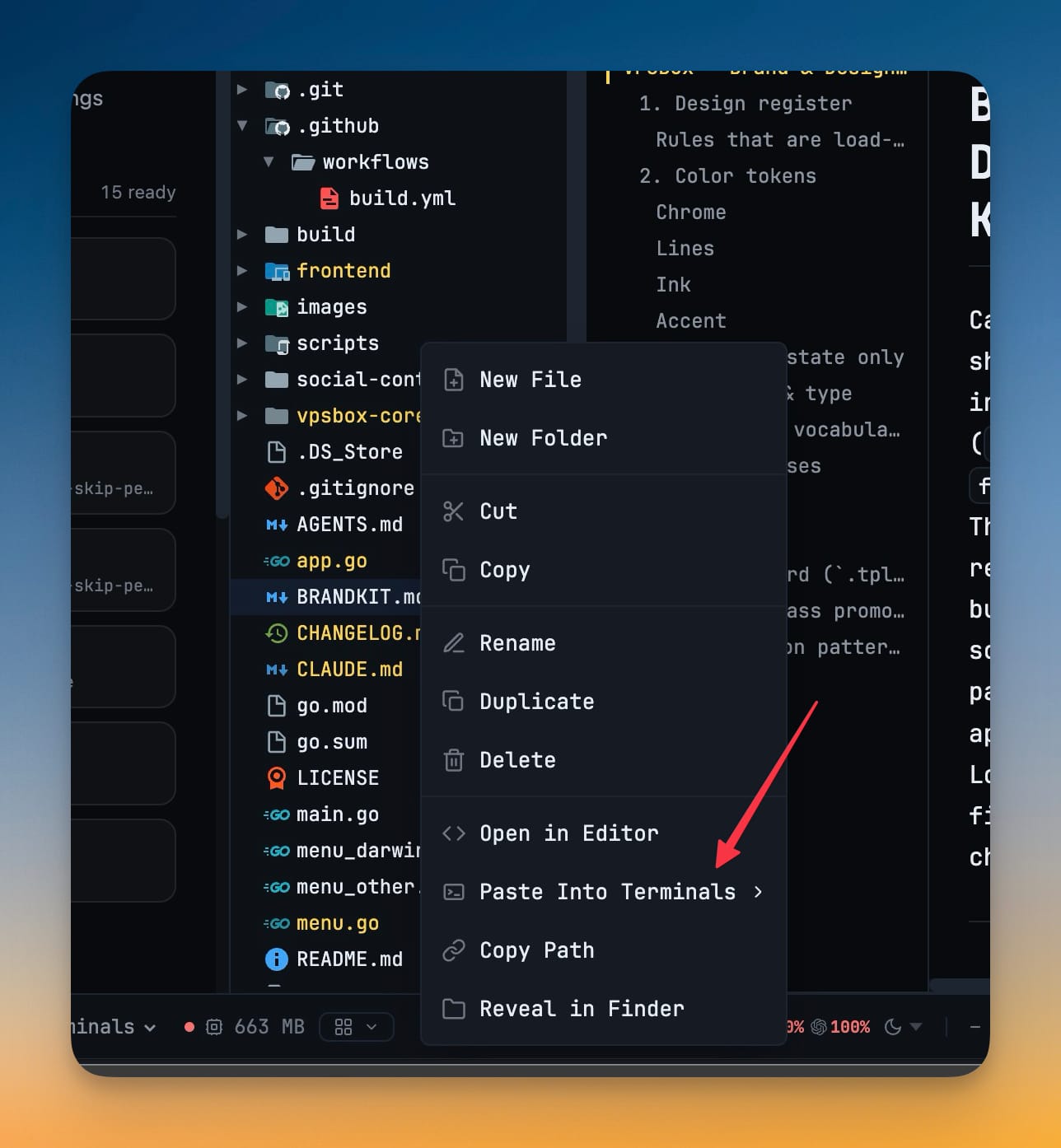
Pick a target and the path drops into that terminal. If the terminal lives in another project, 1DevTool switches to it; if its pane was collapsed, it opens; and the terminal takes focus. The path lands where you are already looking, instead of in a clipboard you then have to aim.
Reuse a prompt you can actually read
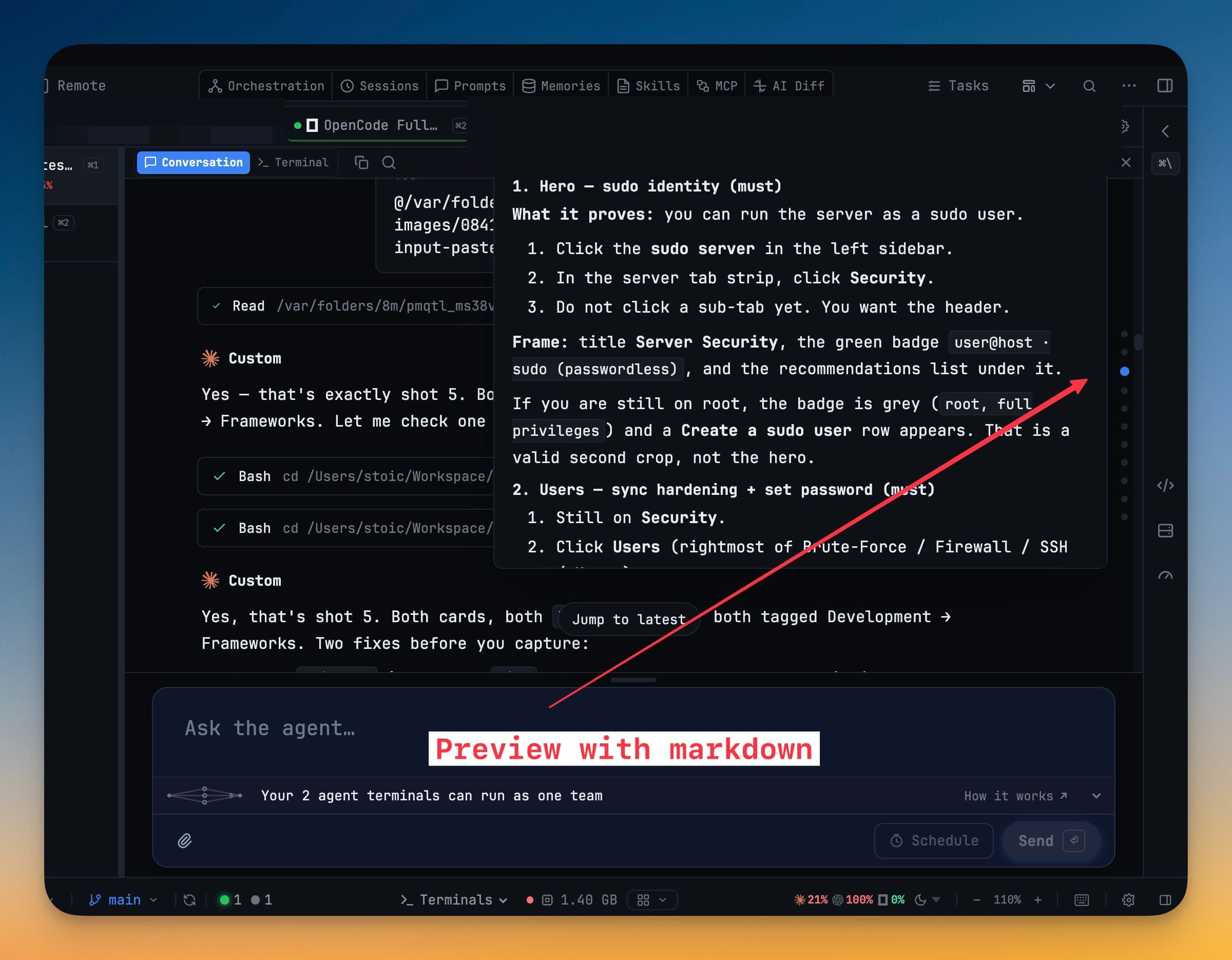
The message rail down the right edge of Conversation used to give you a clipped single line of raw text on hover — enough to know a message existed, not enough to know if it was the one you wanted. Hover a dot now and the message opens beside it rendered as markdown: headings, numbered steps, and inline code laid out the way you wrote them.
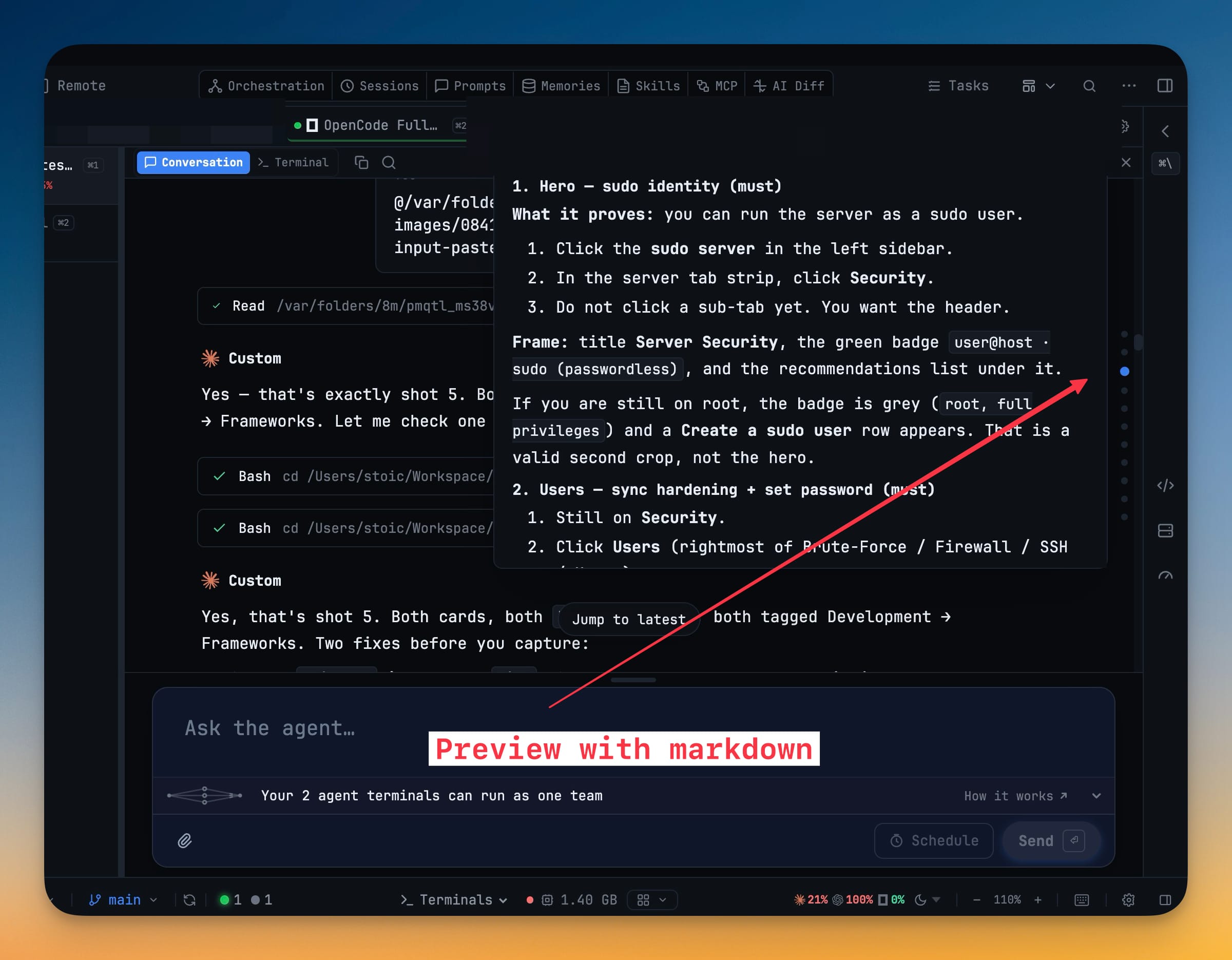
Finding the long brief you sent an hour ago is now a hover, not an archaeological dig back up the transcript.
Stage a large change set by folder
The Git Changes list has a second mode. A toggle next to the filter box switches between the flat list and a VS Code style folder tree, and your choice sticks for next time.
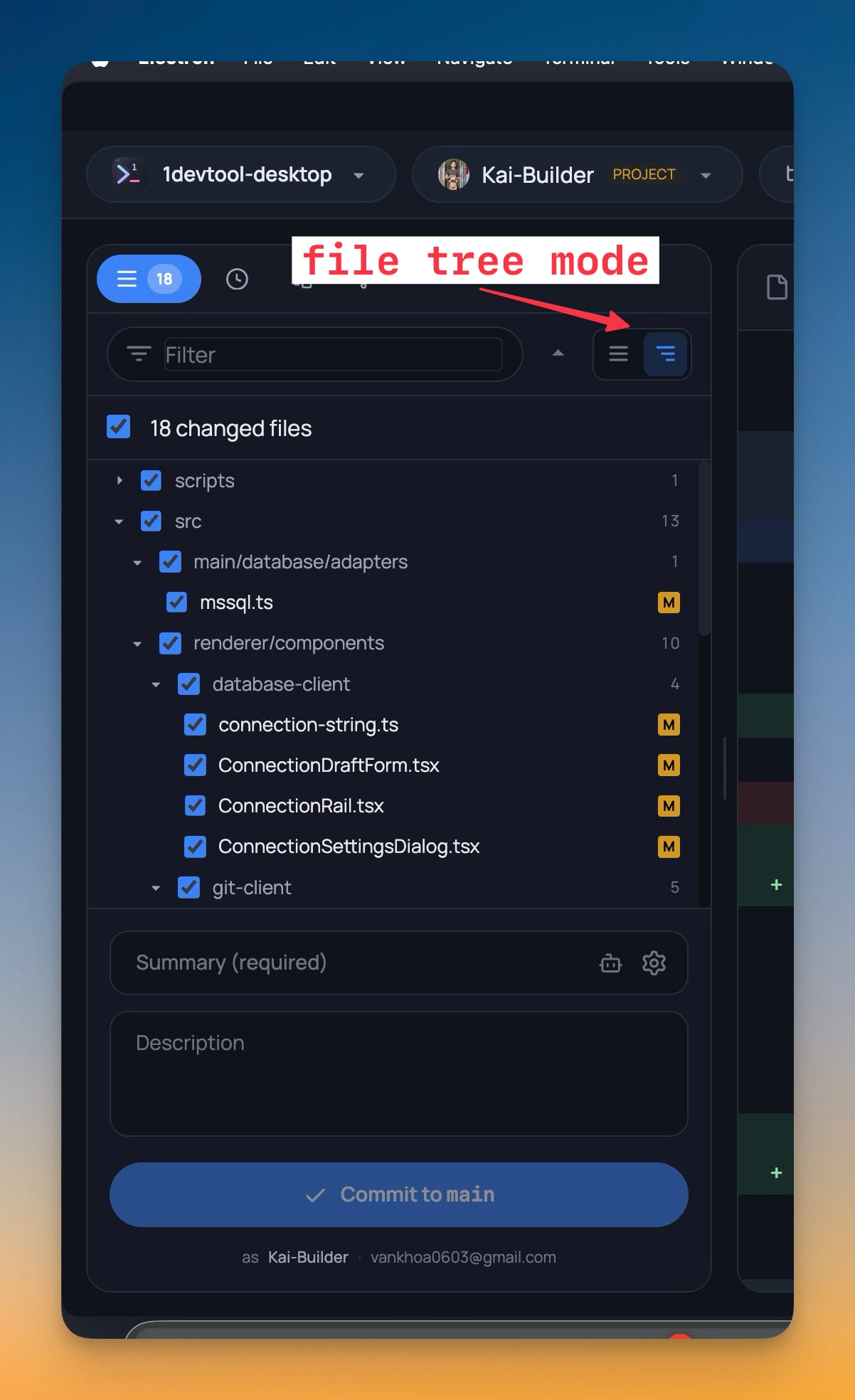
Each directory row has its own checkbox that stages or unstages everything beneath it in one click, and shows a dash when only part of that folder is staged — so you can see partial staging rather than having to reconstruct it from eighteen individual rows. Collapse all and expand all handle a change set that spans many directories. The flat list is still there, still showing the full path on every row, for when that is what you want.
Agents produce wide, shallow diffs — a change touching four directories and eighteen files is normal now. This is the view that fits it on screen.
Also in this release
SQL Server connections over Windows Authentication. Pick the auth mode in the connection form and add a domain if you need one, instead of being forced onto a SQL login. Pasting a connection string that already says authentication=windows, trusted_connection or integrated security fills the form in correctly, and copying one back out keeps it.
Quota Center only shows the agents you use. Providers you turned off in Settings → Agents, or never signed into, no longer take up room; Show all reveals them with a note saying why each was hidden. Claude's per-model weekly caps get their own rows too — the same breakdown you see in claude.ai's plan-usage dialog.
There is also a fix worth naming, because it looked like a hallucination and was not: an AI answer could appear twice in the terminal with the two copies wrapped at different widths. A resize made the agent redraw its whole answer over history it could no longer erase, and pane changes that only re-measured the font were triggering it on ordinary tab switches. Resizes now happen only when the pane really moved.
Before vs after
| Getting the second agent started | Before | Now |
|---|---|---|
| Knowing the first agent finished | Watch the pane, or check back every few minutes | The follow-up fires on the real completion signal |
| Sending the follow-up | Paste it yourself, when you notice | Sent automatically, in order |
| Two upstream agents | Wait for the slower one, by eye | wait for terminal a and terminal b to finish, then … |
| Changing your mind | Retype the prompt | Cancel wait → Copy original prompt |
| Checking on agents | Raise the app, scan the panes | Glance at the notch |
| Reading a finished delegation | Gone with the spinner | Still in the subagent list |
Who benefits most
If you run two or more agents at once, this is the release that stops them from needing a human relay. Chained waits mean the sequencing you already had in your head can be stated once and then executed.
If you delegate to Claude Code or Codex heavily, subagent history closes the loop that has been open since delegation shipped: you can finally read what the children decided rather than inferring it from the parent's summary.
If you review agent output before committing, the folder tree and per-folder staging are aimed squarely at you — wide diffs across many directories are now something you can triage by area rather than file by file.
Try it
Update to 1.72.2, turn orchestration on, and the next time you catch yourself watching a spinner so you can send the prompt you already wrote — write it now instead, with wait for terminal <id> to finish in front of it. Then go and do something that needs you.