Sep 19, 2026
Which Agent Changed This File? Now You Can Just Look
Run three agents in one checkout and a file changes with no name on it. Agent Changes records who wrote what while it happens, keeps every version so an overwrite is recoverable, and opens a review when two agents hit the same lines.
You started three agents this morning because one agent is slow and three are not. Cursor took the widget, one Devin took the registry, another Devin took the activity log. For twenty minutes it felt like the best decision you had made all week.
Then you ran git status and eleven files had changed. Not one of them says who changed it. You read the diff — four hundred lines — trying to reverse-engineer which agent had which idea, and halfway through you find a function you wrote yourself an hour ago, rewritten. You never committed it. It is not in a stash. Your editor's undo history went away with the last reload. It is simply gone, and you have no way to prove which agent took it or what it looked like before.
That is the tax on running agents in parallel, and until now you paid it with your afternoon.
What changed
1DevTool v1.76.0 adds Agent Changes: a record of which agent is changing which file, kept while it happens, with every version of every touched file preserved so you can read it back and put one in place.
Open it from the right dock or from the top bar's new Changes menu, beside Git Diff. The home screen answers three questions on one page: what needs you, where two agents collide, and who is working on what right now.
How it works in practice
You pick how far it goes, per project
Agent Changes is off by default, and you choose its level per project and per working tree. There are three:
- Off — nothing is tracked, and nothing is backed up.
- Watch — record who's changing what and keep every version. Never gets in the way.
- Guide — also tells agents what they are about to write over. Never blocks anything.
That last sentence is the important one. Guide does not hold a write, veto an agent or edit a file. It tells a cooperating agent what it is about to overwrite and lets the agent decide; the write still lands, and the version it replaced is preserved either way. The setup screen is honest about reach, too — a Works for N of M pill tells you which of your agents get told before they write and which are simply watched after the fact.
The map shows the collision before it costs you
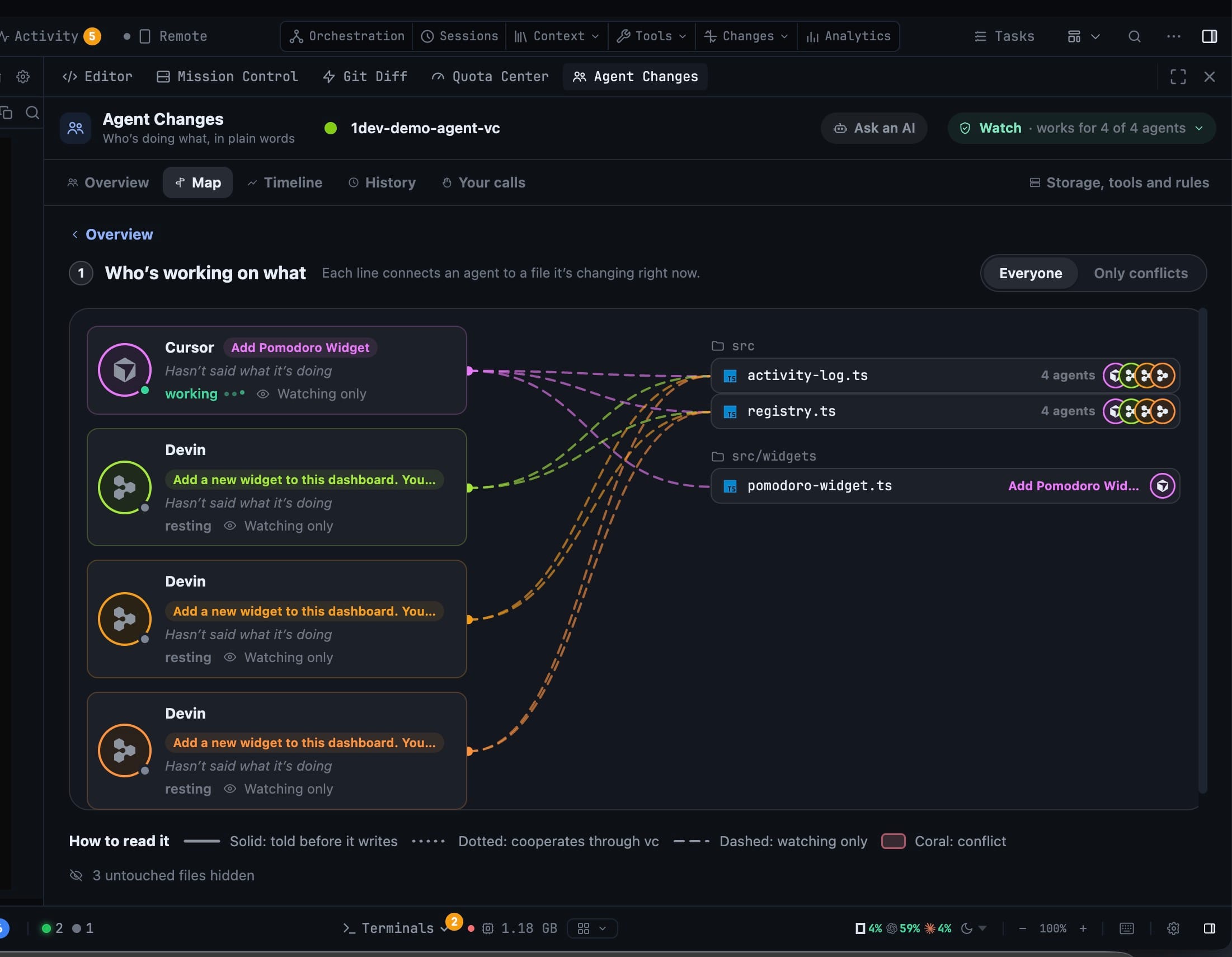
The Map draws one line per agent to each file it is changing right now. Switch it between Everyone and Only conflicts and the picture narrows to the two files that actually matter.
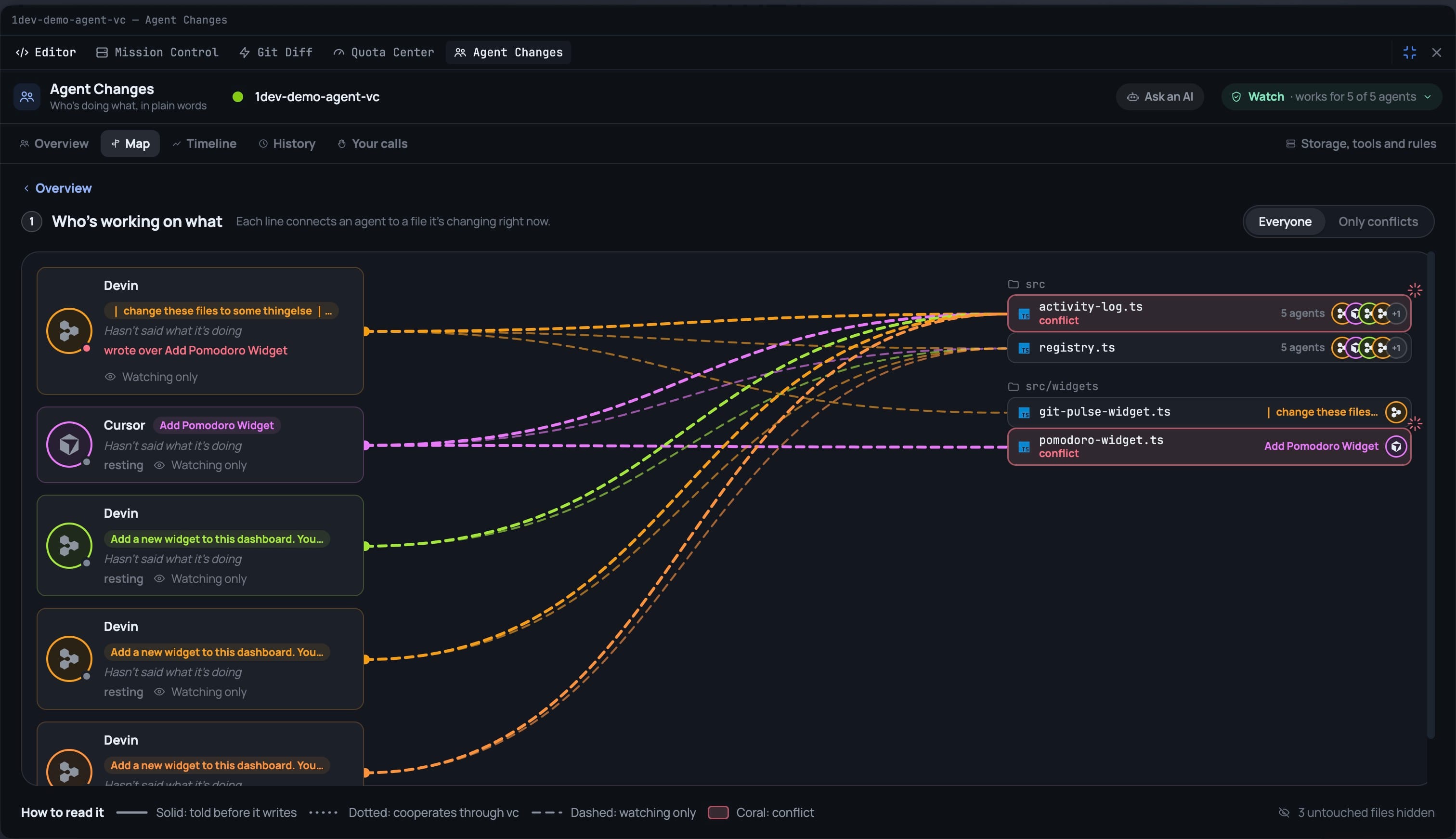
The legend tells you what each line means — solid for an agent that is told before it writes, dotted for one that cooperates through the vault, dashed for one that is only watched, coral for a conflict. Two agents converging on activity-log.ts is visible as it happens, not as an archaeology exercise afterwards.
Every version is kept, and you can put one back
This is the part that pays for itself the first time it fires. Open a file's history and you get every version 1DevTool captured, newest first, each labelled by who wrote it: Captured just before an agent wrote, Seen after it was saved · writer unknown, Saved outside an agent, Applied from a conflict, You restored this.
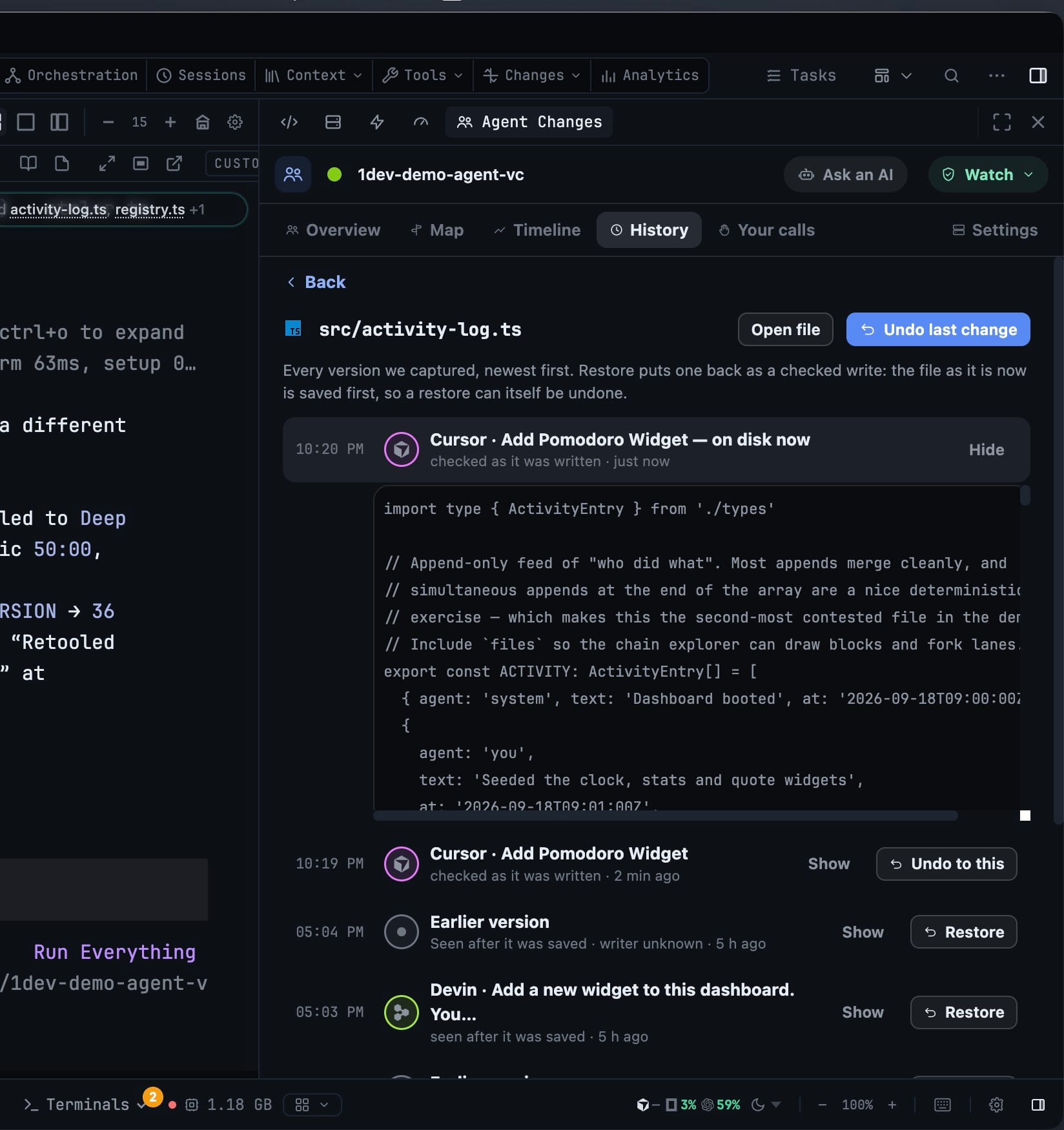
Show expands any version so you read the actual text before you commit to it. Restore puts it back as a checked write — the file as it stands right now is saved first, so a restore can itself be undone. Those versions that were never committed, never staged, and are no longer on disk are recoverable here and nowhere else.
When two agents hit the same file, you get the call
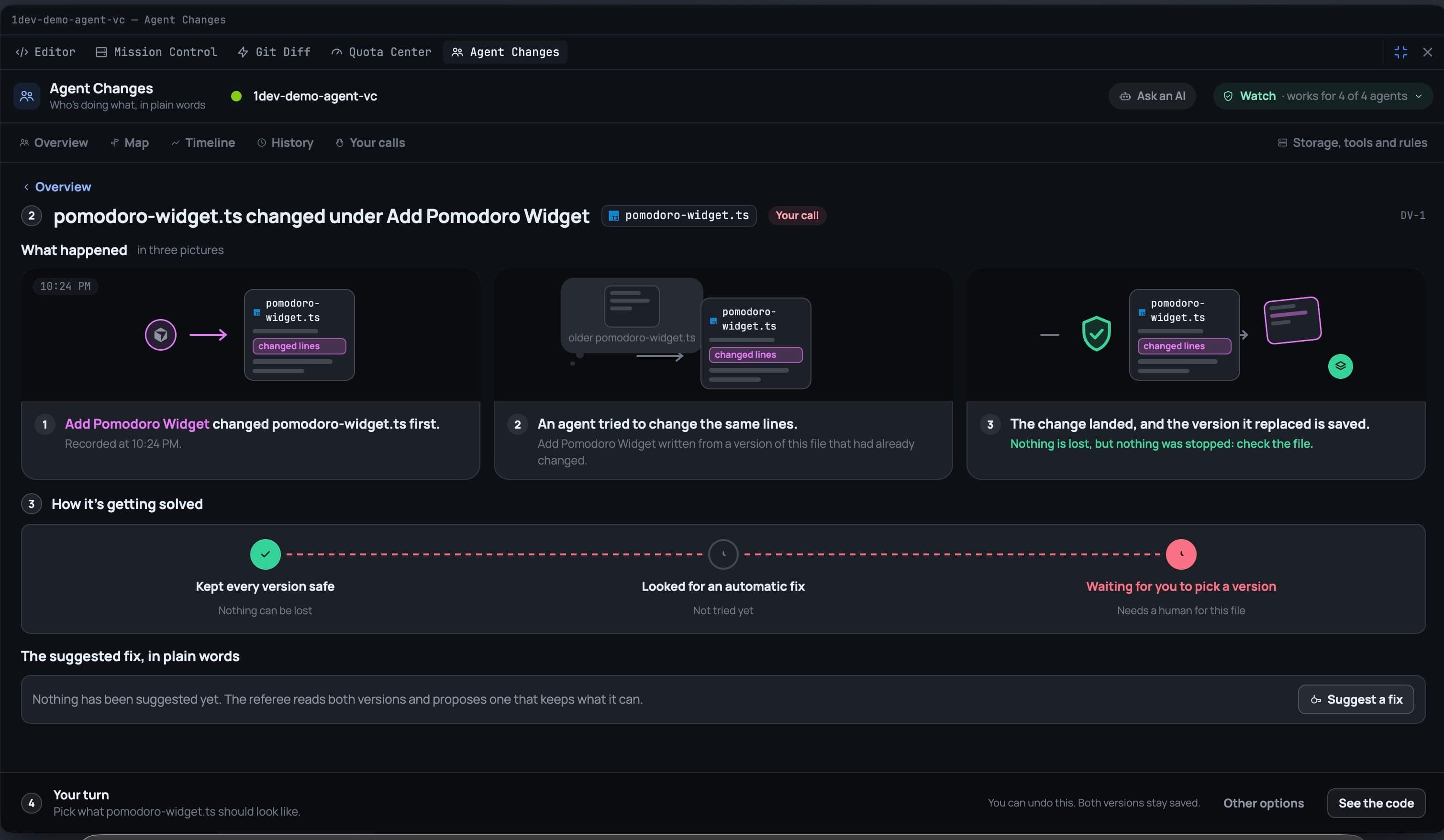
A collision opens a review instead of a merge conflict. It explains what happened in three plain pictures: who wrote first, that a second agent wrote from a version that had already changed, and whether the change landed or was stopped — with the line that matters printed in green: Nothing is lost.
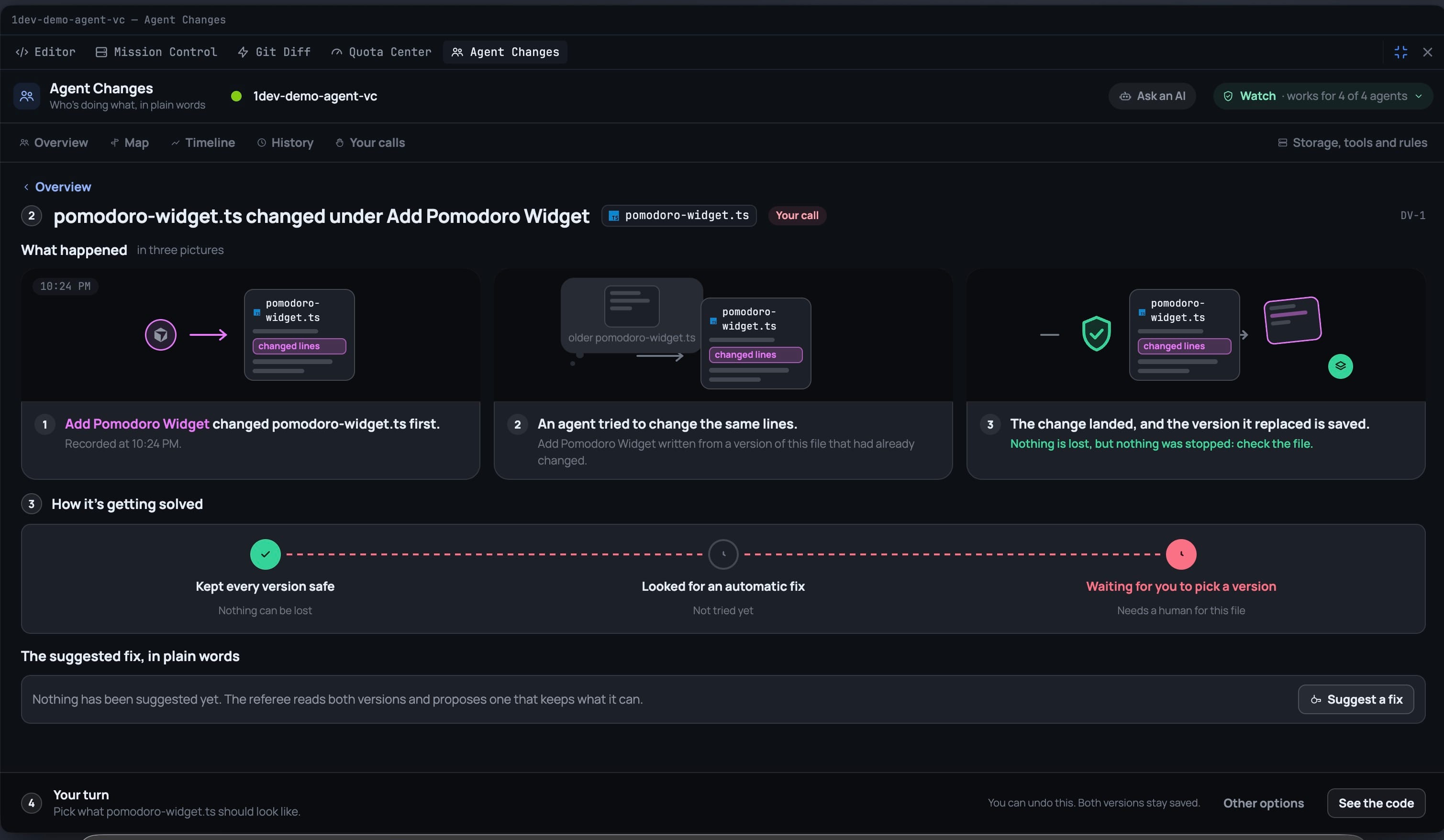
Below that, How it's getting solved walks the same three beats every time — every version kept safe, then whether an automatic fix was tried (a deterministic merge, when the two sets of changes did not overlap), then whether it still needs a human. You take one agent's version, the merged one, or ask an AI referee to read both and propose a fix. Or you press Decide later and leave the file flagged.
Your calls keeps every decision you made and whether it can still be taken back. And if you would rather not adjudicate at all, Ask an AI hands the whole recorded conflict — who wrote what, when, and the versions themselves — to an AI terminal with its context attached, instead of making you re-explain it from scratch.
It finds you where you already are
You should not have to open a panel to learn that something went wrong. So there is a count on the top bar's Changes menu, a ring in the File Explorer on files an agent is working in, and a pill over the terminal when the agent in that tab changed files.
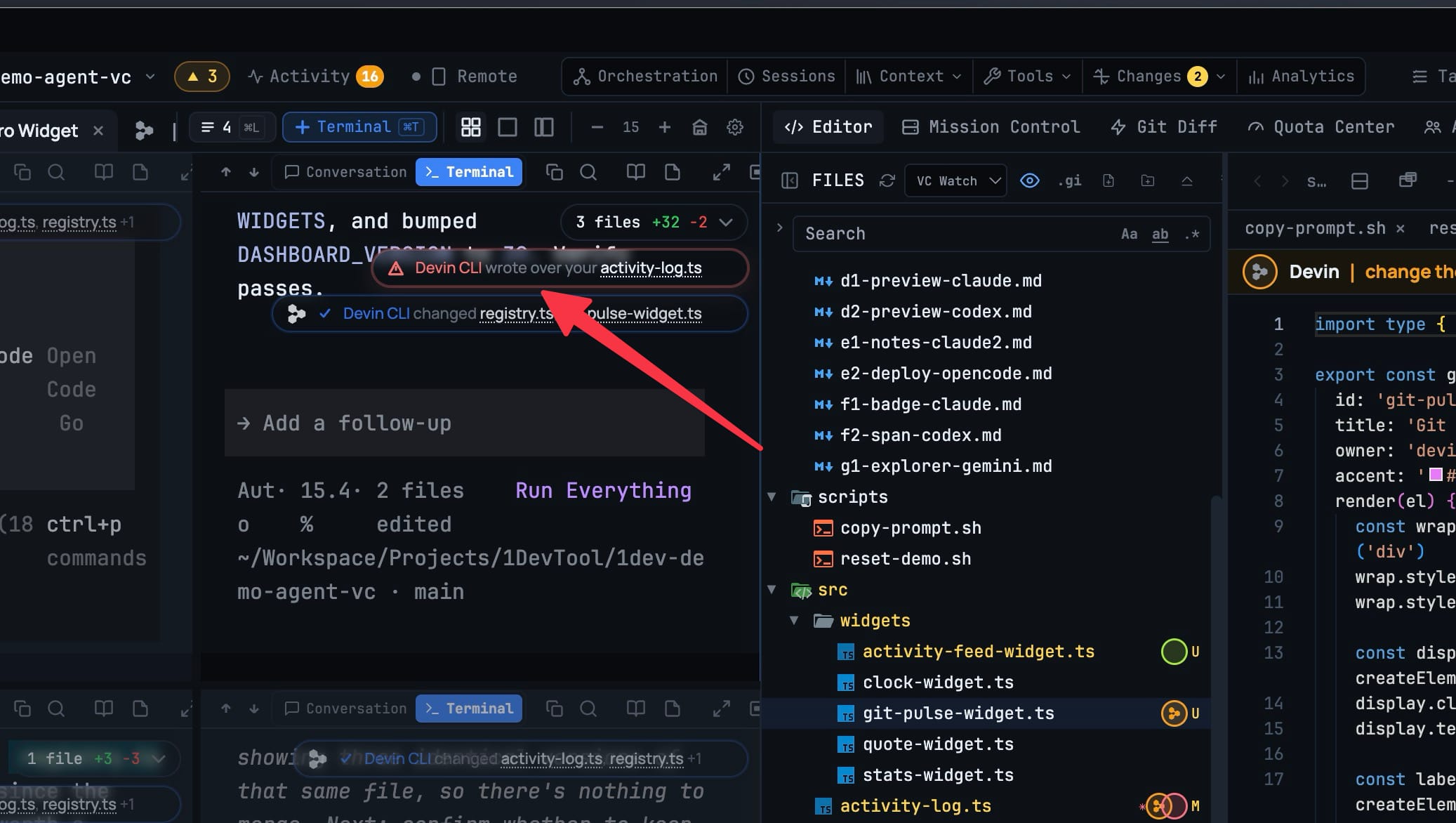
When the news is bad the pill says so outright — Devin CLI wrote over your activity-log.ts — and expanding it tells you plainly that your version is not on disk any more, that it is kept, and that nothing was lost.
Before vs after
| Two agents, one file | Before v1.76.0 | With Agent Changes |
|---|---|---|
| Who changed this file? | Read the diff and guess | Named on the row, as it happened |
| Your uncommitted edit got overwritten | Gone — never staged, no stash, no undo | Kept in the vault, restorable |
| Two agents on the same lines | You find out later, by hand | A review opens with both versions |
| Getting a second opinion | Re-explain the whole thing to an AI | Ask an AI, context attached |
| Turning it on | — | Off by default; Watch or Guide per project |
Who benefits most
If you run more than one agent in one checkout, this is the missing instrument panel. The failure mode you have been absorbing — a silent overwrite between commits — now has a record and an undo.
If you hand work to agents and review it later, the timeline and history tell you what happened while you were away, per agent and per file, without reading a single diff.
If you have been avoiding parallel agents precisely because you did not trust them near the same files, Guide is the level worth trying: it tells cooperating agents what they are about to write over, and never blocks or alters a write to do it.
Try it
Update to v1.76.0, open Changes → Agent Changes on a project where you run more than one agent, and set it to Watch. It records and keeps versions; it will not get in your way. The next time an agent writes over something you wanted, the version will still be there — and putting it back is one click, not an afternoon.