Prompt history in the composer, and a cleanup that leaves your agents alone
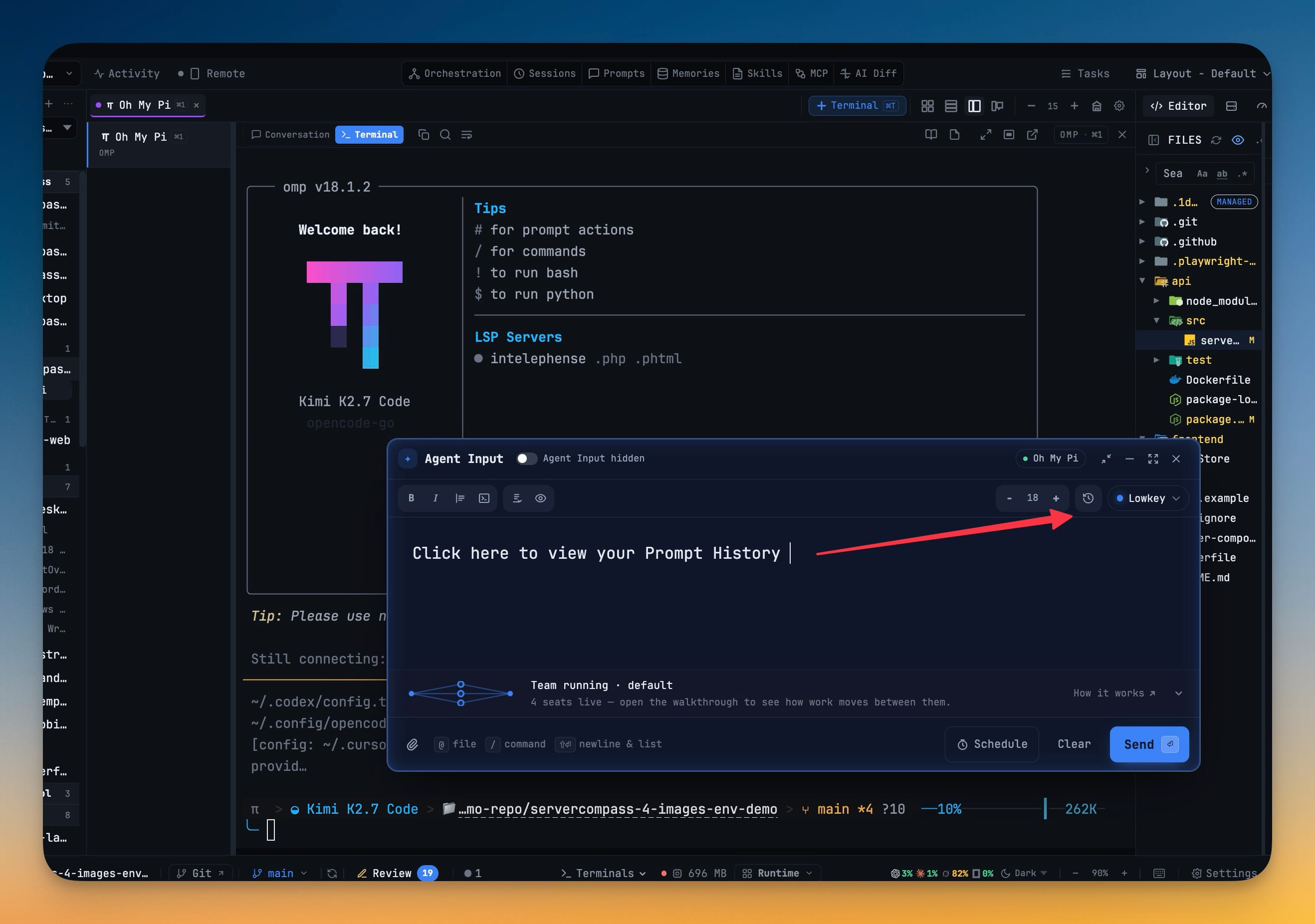
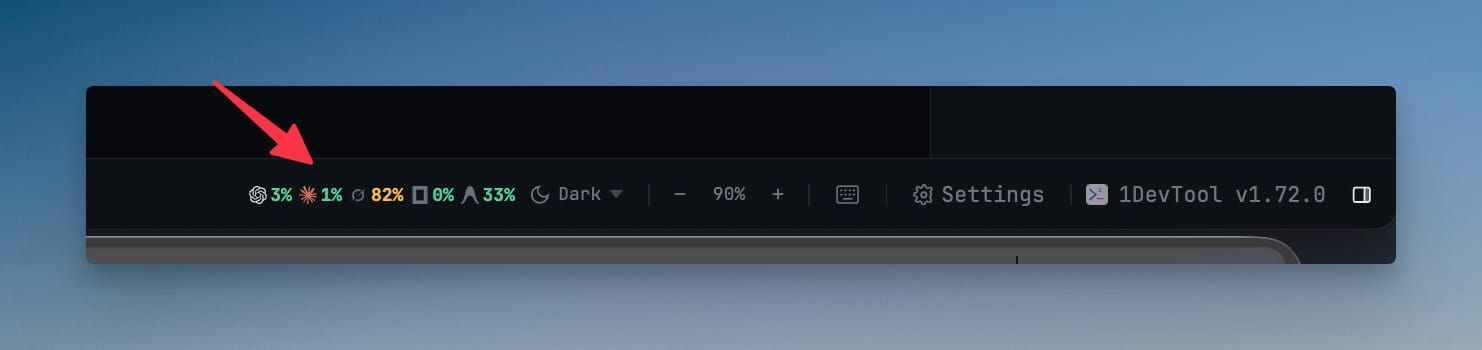
The prompt you want to send again is now one click from where you are writing. A history button on the Agent Input toolbar opens Prompt History above the composer, and Use drops the past prompt in at the caret — replacing a selection, or landing blank-line separated beside what you have already written — so borrowing a prompt never costs you an unsent draft. Teams got their memory back too: a stopped writer can be recovered onto the same dedicated worktree it was already using, keeping dirty allowed changes where they are instead of starting a fresh checkout. Improve performance no longer stops running agents — it sleeps idle browser tabs and leaves every CLI and its screen history alone — and the AI tools are named on the bar again, with plan quota moved into the status bar as a strip of logos and percents for the agents you actually have open.
Download v1.72.1
The download page always has the newest build; installers for this version are on GitHub.
What changed
New features
6- Reuse a prompt you already sent without leaving Agent Input — a history button on the composer toolbar opens Prompt History above the draft, even when the composer is expanded or detached.
- Use drops the past prompt in at the caret, replacing a selection or sitting blank-line separated next to what you have already written — it never overwrites the unsent draft.
- Escape closes the dialog and leaves the composer standing, and Copy is still there when you opened history from the top bar instead.
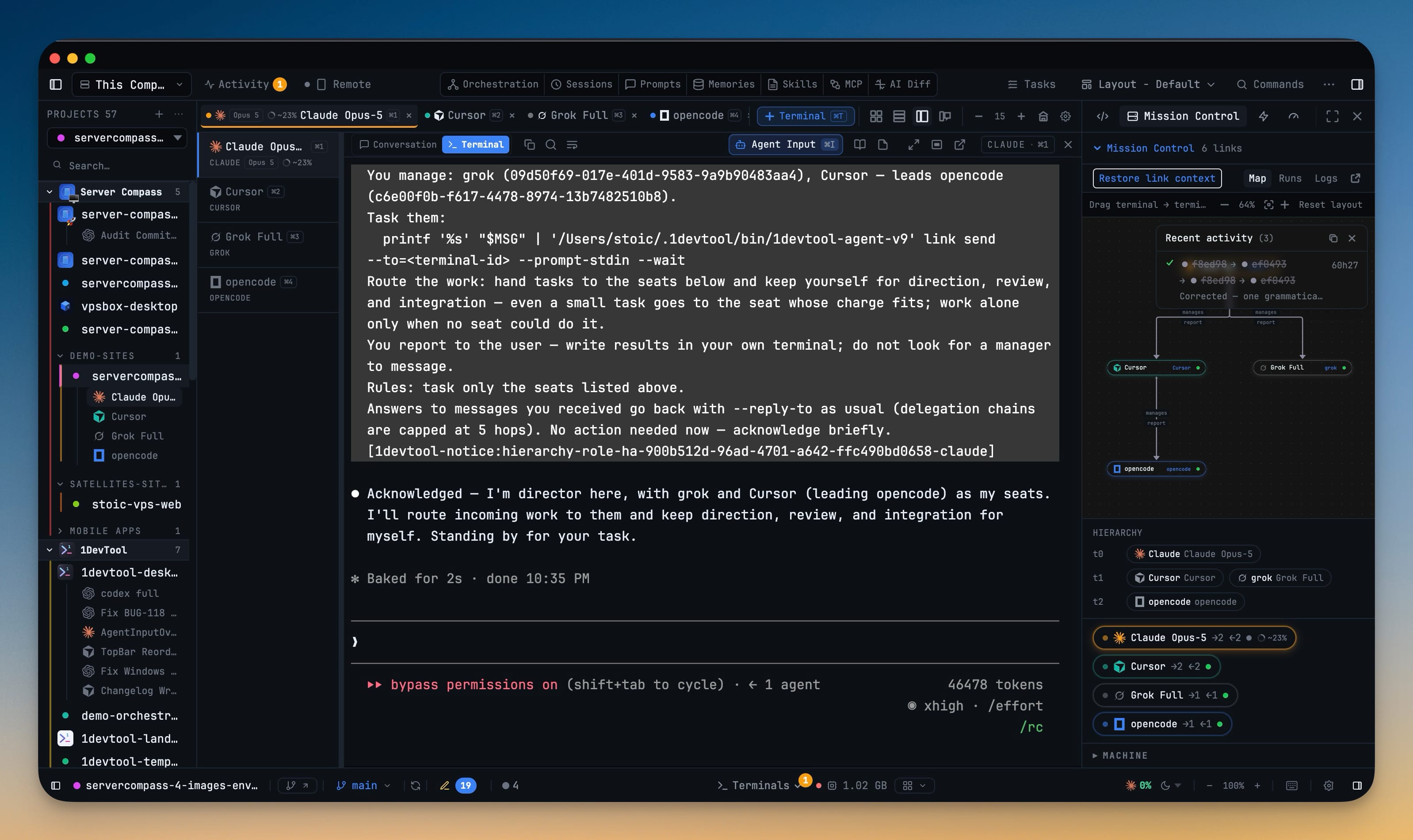
- A stopped team writer can come back on the same dedicated worktree — closing a seat no longer forces its replacement into the project root or a brand-new checkout, so dirty, allowed changes stay where they were.
- From the team host,
team capabilitiesreports what recovery can do andteam recoverbrings the member back with its transcript handed to the replacement. - Point a new terminal team member at an existing worktree and it is kept, not recreated; a missing path is refused rather than silently replaced.
Improvements
8- The AI tools stay named on the bar — Sessions, Prompts, Memories, Skills, MCP and AI Diff sit in a centre group with their labels pinned, instead of hiding behind a sparkle menu.
- Remote moved up next to Activity, so pairing sits with the other live-state controls.
- Terminals and plan quota moved to the status bar — quota is now a strip of logos and percents for the agents you actually have open, collapsing to the focused one when the bar runs out of room.
- Activity is the button and its unread count; recent-event chips no longer take a strip of the bar.
- Every AI entry point uses the same robot mark, including Agent Input, git's commit-message button, and Describe with AI.
- Improve performance no longer stops your agents — it sleeps inactive browser tabs and leaves every CLI and its screen history running. Hibernate is still there when you ask for it, and only for an idle agent with a saved session.
- A hibernated or failed terminal stays readable — Conversation keeps the session you were in, with Resume, Retry and Close in a footer instead of a live composer on top of a blank pane. Resume is a button that runs once; Close cannot start it by accident.
- Reduce Motion actually stills the empty-state team glyph — with macOS Reduce Motion on, the travelling spark no longer loops in every pane that has no terminals.
Bug fixes
6- Fixed Hibernate and Improve performance stopping work that was still running — an agent that looked quiet could be mid-tool; generic relief no longer kills CLIs, a stop that cannot prove the process is idle is refused, and Resume no longer races a second kill against the session it is restoring.
- Fixed Windows terminals requiring Ctrl+Shift+C to copy — with text selected, Ctrl+C copies it; with nothing selected, the same key still interrupts PowerShell. Ctrl+Shift+C still copies.
- Fixed a machine terminal typing its startup command before the shell was ready — the first prompt used to eat the line as keys and execute a fragment of it, including an SSH key path. Startup commands now wait for the shell's first prompt.
- Fixed a Mac machine listing empty folders — listing files through the login shell aborted on unmatched globs, so the file tree looked empty even when the host had content.
- Fixed tmux on a Mac machine reporting
env: tmux: No such file or directory— a Native Terminal that needs tmux now sees the same PATH as your login shell, including Homebrew. - Fixed the empty-state team glyph keeping a core busy under Reduce Motion — the override shipped in 1.71 and 1.72 never won, so the animation ran in most panes.
Screenshots