v1.74.1September 14, 2026
Run several Claude accounts at the same time
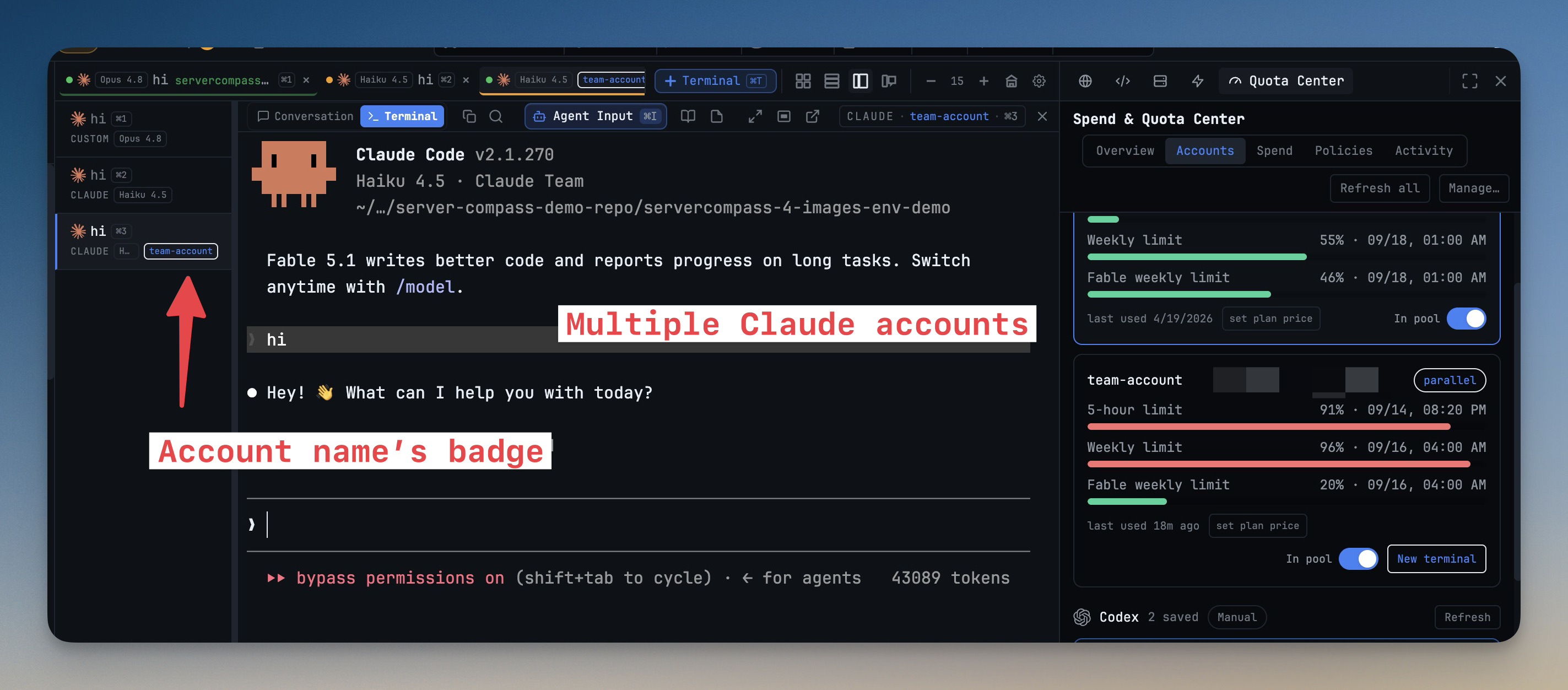
Run several Claude accounts at the same time. Every Claude account you add now signs in to its own config home, so a terminal billing your personal account and one billing your team account run side by side — no logging out, no swapping the machine-wide login underneath running work. Pick the account when you open a terminal, see its name on the tab, and let quota alerts relaunch a terminal onto a spare account with its session resumed. Alongside it: Settings → Terminal → Context Menu lets you switch off, trim or quiet the terminal's right-click menu, and scrambled scrollback gets a one-click Repair view.
Download v1.74.1
The download page always has the newest build; installers for this version are on GitHub.
What changed
New features
4- Run several Claude accounts at the same time — each account you add in Settings → Agents → Accounts signs in to its own config home, so Claude terminals on different accounts run side by side instead of sharing one machine-wide login (needs Claude Code 2.1.270 or newer). Pick the account under Account: in New Terminal, see its name on the tab and pane header, and choose the default for new Claude terminals.
- Quota follows the terminal's account — the quota pill and quota alerts report the account the focused terminal is on, each account's five-hour and seven-day limits are read from Claude's own status line (macOS and Linux), and a quota alert that names a spare account offers Relaunch on it: the terminal restarts on that account and resumes its session.
- Accounts saved before this release keep working — they run one live login at a time and Quota Center tags them legacy; Re-login moves one into its own config home so it runs in parallel, and repairs an expired token in place. Rename any account from the pencil next to its name in Quota Center, and a terminal that comes up on a different account than assigned raises an attention item.
- Make the terminal's right-click menu yours — Settings → Terminal → Context Menu turns the menu off entirely, stops text selection from popping it, and toggles Copy, Look Up, Paste, Send to AI, Add task, File actions, Set Title and the Copy Session/Terminal/Pane ID items one by one; Context Menu Settings… always stays at the bottom of the menu.
Improvements
3- Reopening a terminal replays cleaner history — the transcript an AI terminal restores now starts on a whole screen frame instead of mid-screen, so remounting after a resize leaves far less leftover garbage behind.
- Remounting a terminal no longer repaints it — re-asserting an unchanged size used to make the agent redraw its whole screen; equal-size asserts are now ignored.
- A terminal's hover preview matches its real screen — the background mirror now sizes itself to the pane instead of a fixed grid.
Bug fixes
3- Fixed scrambled, overlapping text in terminal scrollback when history painted at one width was replayed into a different-sized pane — an amber Repair view pill now appears on the terminal and rebuilds the view from its width-true rows.
- Fixed an AI terminal printing its first screen twice — Claude, Codex and Gemini now launch at the size you actually see instead of a fallback grid.
- Fixed the Default Browser URL setting doing nothing — new browser tabs, and projects that have never browsed anywhere, now open the page configured in Settings → Browser.
Screenshots