Open Several Of The Same Agent At Once
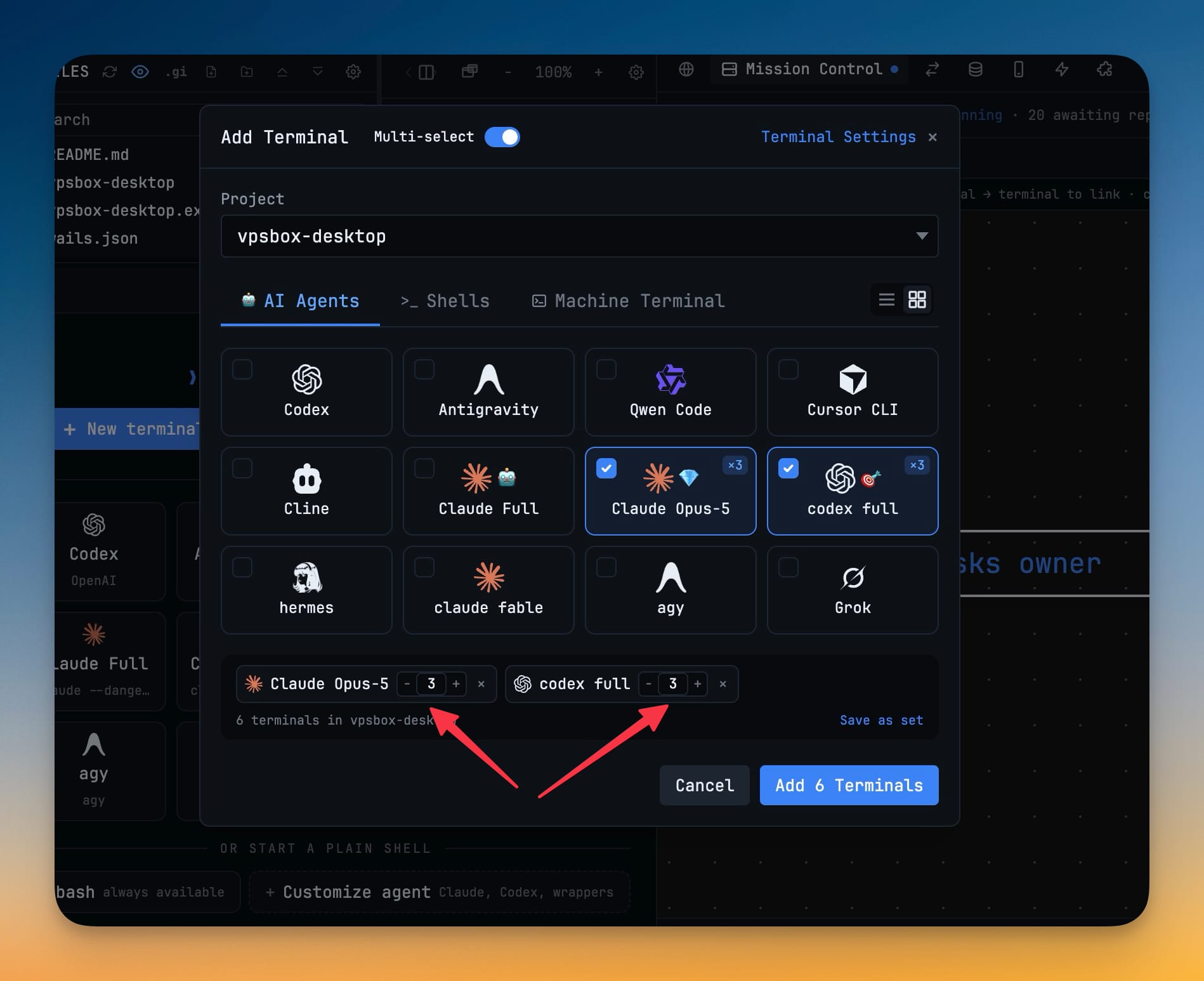
Every entry picked in Add Terminal's multi-select mode carries a −/N/+ counter, so one batch can open 10 Codex terminals and 5 Cline terminals together. A checked card shows a ×N badge, copies are numbered Codex 1 and Codex 2, and the button reads Add 15 Terminals rather than the number of cards you ticked.
Why You Need This
How this feature boosts your daily productivity
Fanning one agent across a repo — a reviewer per service, a builder per package — meant ticking the same card over and over, then working out which pane was which. A count per entry turns that into one number and one click, capped at 20 per entry so a typo cannot open a hundred terminals. The summary counts real terminals rather than ticked cards, saved terminal sets remember their counts and show how many terminals they will actually open, and the free-plan per-project limit compares against the summed batch so you are told to trim before anything opens.
How It Works
Get started in 4 simple steps
Flip Multi-select
Open Add Terminal and turn on Multi-select, then tick the agents, shells or machine terminals you want in this batch.
Give an entry a count
Each selected entry carries a −/N/+ counter. Type the number directly or step it, up to 20 per entry; Enter commits the count without submitting the batch.
Check what will open
A checked card shows a ×N badge, the summary counts real terminals rather than ticked cards, and the button reads Add 15 Terminals.
Open the batch
Copies are numbered Codex 1, Codex 2 so a same-agent batch stays readable, until AI tabs rename themselves to their conversation titles.
Without 1DevTool
The manual way vs. the 1DevTool way
The Hard Way
The 1DevTool Way
Key Capabilities
Everything included with Open Several Of The Same Agent At Once
Why It Matters
The productivity impact of having terminal & ai agents built into your workspace
One Number Beats Ten Clicks
Fanning one agent across a repo used to mean ticking the same card over and over. A count per entry turns that into a single field.
The Button Tells The Truth
The summary and the button count real terminals, not ticked cards, so Add 15 Terminals means exactly fifteen panes are about to open.
A Batch You Can Still Read
Copies arrive numbered Codex 1, Codex 2 rather than as identical tabs, until each AI tab renames itself to its conversation title.
Told Before, Not During
The free-plan per-project limit compares against the summed batch, so you trim up front instead of discovering the cap halfway through opening.
More in Terminal & AI Agents
Other features in this category you might find useful
Multi-Agent Terminals
Run Claude Code, Codex, Gemini CLI, Amp, OpenCode, Qwen, and custom AI commands in dedicated terminal tabs with recognizable agent logos, custom colors, and status indicators.
Flexible Terminal Layouts
View terminals in 2×2 grid, side-by-side columns, or single fullscreen mode with resizable panes.
Terminal Dashboard
Kanban-style board view of all terminal statuses — Idle, Running, and Review — with real-time polling.
Session Persistence
Terminal sessions persist across app restarts with full scrollback history via tmux integration.
Ready to boost your workflow?
Download 1DevTool for free and experience Open Several Of The Same Agent At Once along with 347 other features — all in one app.