1DevTool vs T3 Code · privacy
A T3 Code alternative that asks before it sends anything
This week developers found that T3 Code's analytics had been on by default since March, and had been reading account IDs from Claude Code and Codex login files. If you're looking for another app to run your coding agents, here is exactly what 1DevTool sends, what it never sends, and how to check every claim on your own machine with Proxyman.
Checked on 25 November 2026 against T3 Code’s own repository and 1DevTool 1.87.2.
The short version
- 1DevTool sends no analytics until you click Allow on a first-run dialog. One switch in Settings turns it off again, with no restart.
- Its analytics events carry no user ID, device ID or account ID. Each launch gets a new random session ID.
- T3 Code's product analytics are on unless you set an environment variable (
T3CODE_TELEMETRY_ENABLED=false) or an admin policy. Its docs list no in-app switch for them. - From 20 March to 24 November 2026, T3 Code read account IDs from
~/.claude.jsonand~/.codex/auth.jsonand sent a SHA-256 hash of them with its events. It removed that on 24 November. - 1DevTool isn't open source, so don't take our word for it. The guide below shows you every analytics request it makes, byte for byte.
1DevTool vs T3 Code: privacy side by side
What each desktop app does today. T3 Code’s column comes from its own docs.
| 1DevTool | T3 Code | |
|---|---|---|
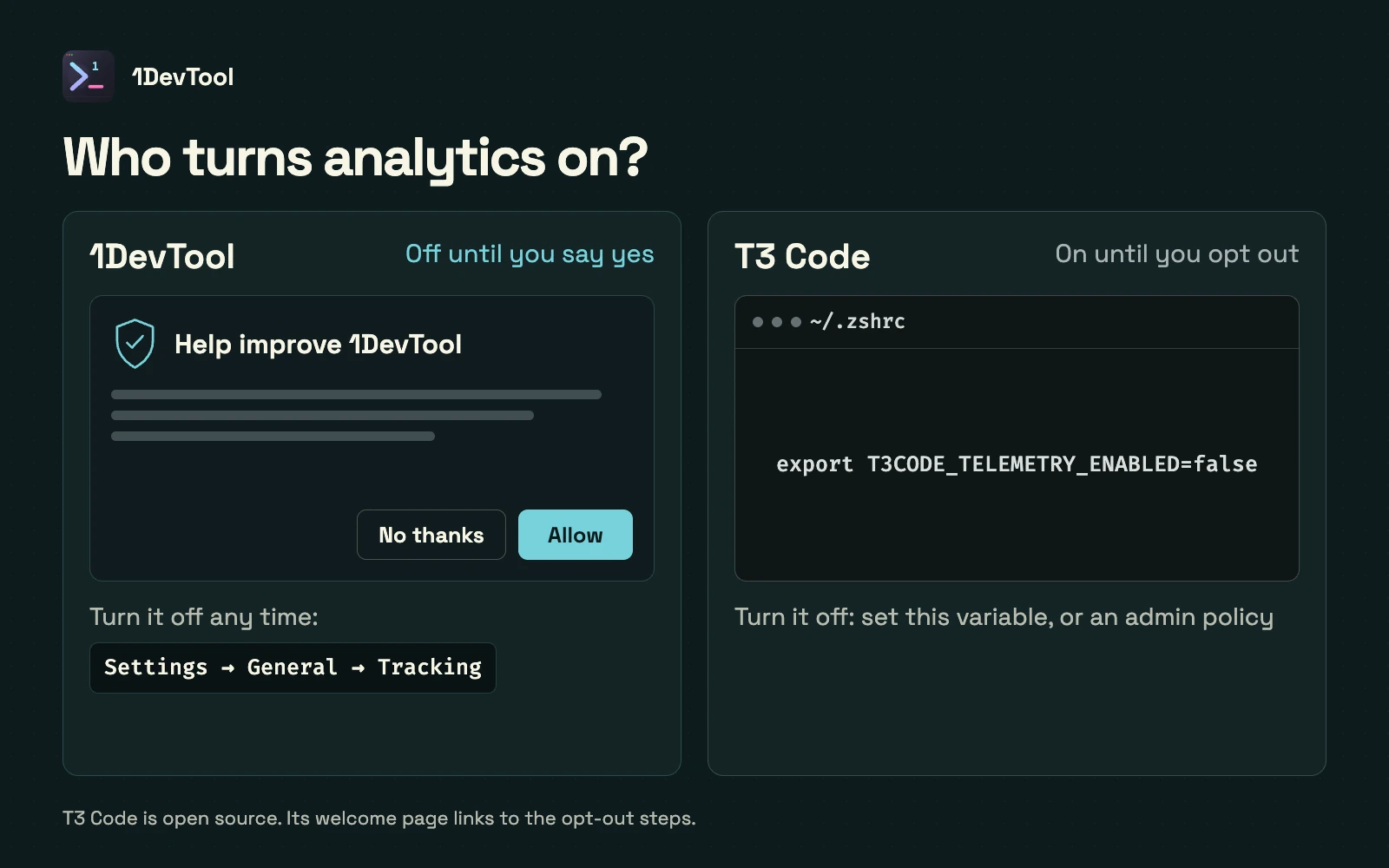
| Usage analytics by default | Off until you click Allow on the first-run dialog | On unless you turn it off. A note on the welcome page links to the opt-out steps |
| How to turn it off | Settings → General → Tracking. Takes effect at once | T3CODE_TELEMETRY_ENABLED=false in your shell profile or Windows user environment, or an admin policy |
| Where events go | Aptabase (us.aptabase.com) | ingest.t3.codes, which keeps a copy and forwards to PostHog |
| ID attached to each event | None. A random session ID that changes every launch | Hashed random install ID; hashed T3 Connect account ID when signed in; a random ID per connected device |
| Reads Claude or Codex login files for analytics | No | Yes from 20 Mar to 24 Nov 2026; removed in #42299 |
| Prompts, code or terminal output in analytics | Never | Never, per its docs (opt-in agent feedback can attach conversation text you approve) |
| Crash and connection reports | Sentry, behind the same switch, with your home folder path replaced by ~ | Relay connection traces to Axiom (same env var turns them off); mobile crash reports with their own switch |
| Source code | Closed. Verify on the wire with the guide below | Open source (MIT). You can read every line |
| Price | Free plan, no account. Pro from $29, paid once | Free |
Usage analytics by default
1DevTool
Off until you click Allow on the first-run dialog
T3 Code
On unless you turn it off. A note on the welcome page links to the opt-out steps
How to turn it off
1DevTool
Settings → General → Tracking. Takes effect at once
T3 Code
T3CODE_TELEMETRY_ENABLED=false in your shell profile or Windows user environment, or an admin policy
Where events go
1DevTool
Aptabase (us.aptabase.com)
T3 Code
ingest.t3.codes, which keeps a copy and forwards to PostHog
ID attached to each event
1DevTool
None. A random session ID that changes every launch
T3 Code
Hashed random install ID; hashed T3 Connect account ID when signed in; a random ID per connected device
Reads Claude or Codex login files for analytics
1DevTool
No
T3 Code
Yes from 20 Mar to 24 Nov 2026; removed in #42299
Prompts, code or terminal output in analytics
1DevTool
Never
T3 Code
Never, per its docs (opt-in agent feedback can attach conversation text you approve)
Crash and connection reports
1DevTool
Sentry, behind the same switch, with your home folder path replaced by ~
T3 Code
Relay connection traces to Axiom (same env var turns them off); mobile crash reports with their own switch
Source code
1DevTool
Closed. Verify on the wire with the guide below
T3 Code
Open source (MIT). You can read every line
Price
1DevTool
Free plan, no account. Pro from $29, paid once
T3 Code
Free
Green marks the more private or cheaper option in each row.
What happened with T3 Code
Every date links to T3 Code’s own repository or a public issue.
6 Mar 2026
T3 Code adds PostHog product analytics, on by default. (source)
20 Mar 2026
A change titled “Prefer Claude user ID for telemetry identity” makes the analytics identify people by a hash of their Claude or Codex account ID, read from
~/.claude.jsonand~/.codex/auth.json. (source)23–24 Nov 2026
Developers point out the default-on analytics and the login-file reading. A GitHub issue asks for informed consent and user data controls, and filter-list maintainers are asked to block
ingest.t3.codes. (source)24 Nov 2026
Separately, a dispute over an unofficial fork that used the T3 Code name draws wide attention, especially among Chinese developers. T3 Code adds a trademark policy: forks must use their own branding. (source)
24 Nov 2026
T3 Code merges “analytics no longer reads or sends Codex and Claude account IDs” (#42299), and its mobile app moves to its own random device ID (#42394). (source)
Today
T3 Code’s docs say events go to
ingest.t3.codes, which keeps a copy and forwards them to PostHog, tied to a hashed random install ID, plus a hashed T3 Connect account ID when you are signed in. (source)
To be fair to T3 Code: its docs say events never included prompts, responses, file contents or auth tokens, and the team changed the code within a day. The complaints were about collection being on by default, about reading another tool’s login files at all, and about how hard it is to opt out.
Everything 1DevTool sends, and when
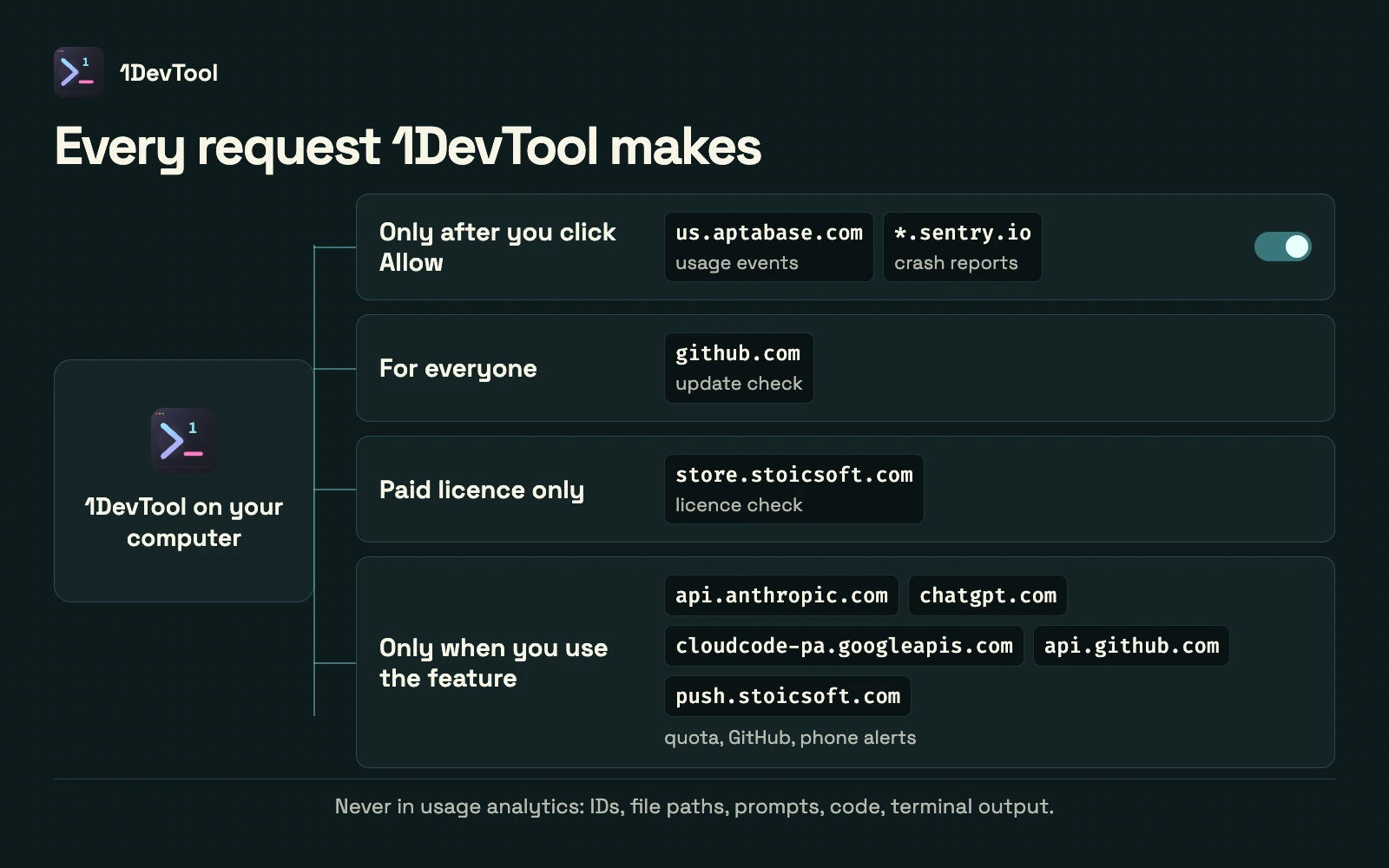
This is the full list from the 1.87.2 source code. If you see a request that isn’t on it, tell us and we will explain it or fix it.
Usage analytics
Only if you clicked Allow. Nothing is sent while the first-run dialog is unanswered.
us.aptabase.com- An event name such as
app_started,terminal_created,git_commitordatabase_query_run. - A few fixed values: the agent type (
claude,codex…), layout name, database engine, HTTP method and status code. - App version, OS name and version, locale, and whether it is a debug build.
- A timestamp and a random session ID that is new on every launch and after an hour idle.
- Every 4 hours and at quit, one
session_shapeevent with ranges only, such asterminals: "6-10",ram: "upto32gb"and how quickly the app switched projects. - No user ID, device ID, install ID or account ID.
- No file paths, project or branch names, prompts, code, terminal output, SQL, URLs or host names.
- Aptabase sees your IP address when the request arrives, like any server. Its privacy policy says it only uses it in memory and never stores it.
Crash reports
Only if you clicked Allow. The same switch controls them.
*.sentry.io- The error message and stack trace, app version and OS. Only errors, crashes and reports of the app freezing, not routine logs.
- Your home folder path is replaced with
~before sending. Keystroke and console breadcrumbs are turned off.
Update check
For everyone, so you get new versions.
github.com- A plain download of the release feed from
stoicsoft/1devtool-releases. No ID.
Licence check
Only if you entered a paid licence key. The free plan sends none of this.
store.stoicsoft.com- Your licence key and its instance ID.
- When you activate: your computer’s name plus 8 characters of a random install ID, so you can tell your devices apart.
- At start-up and once a day: a SHA-256 hash of your machine’s hardware ID (with a fixed product salt), the product name and the app version. This is how per-device licences are enforced.
Things you start yourself
Only when you use the feature.
api.anthropic.comchatgpt.comcloudcode-pa.googleapis.comapi.github.compush.stoicsoft.com- Accounts & Quota: your own login token goes to the provider that issued it, to read your usage, the same numbers the CLI shows. Only when you open or refresh it, or turn on auto-switch.
- GitHub features (pull requests, skills, templates) talk to GitHub with your own token.
- Phone notifications, if you paired a phone: end-to-end encrypted with a key only your phone has. The push server sees sealed bytes.
Claude Code, Codex and the other agents you run in 1DevTool’s terminals are separate programs with their own telemetry and settings. Their requests are theirs, not 1DevTool’s, and they show up in Proxyman under their own names.
Yes, 1DevTool reads ~/.claude.json too. Here is why
We would rather say it than have you find it. To show your usage limits in Accounts & Quota and to switch between several Claude or Codex accounts, 1DevTool reads the login files those CLIs keep: ~/.claude.json, the Claude Code Keychain entry or ~/.claude/.credentials.json, and ~/.codex/auth.json. To add the 1DevTool MCP server to your agents, it edits their config files.
The difference is where the data goes. A token is only ever sent to the company that issued it (Anthropic, OpenAI or Google) to read your own usage. Nothing from these files goes to StoicSoft, and nothing from them is in our analytics, hashed or otherwise.
Check it yourself with Proxyman
Proxyman is a Mac app (there are Windows and Linux versions too) that shows the HTTPS requests passing through your system proxy, decrypted. The free version is enough. Ten minutes is plenty.
- 1
Install Proxyman
Download it from proxyman.com, or install it with Homebrew:
brew install --cask proxyman - 2
Let it read HTTPS
Open Proxyman and choose Certificate → Install Certificate on this Mac…. Follow the steps so macOS trusts Proxyman’s root certificate. While Proxyman runs, it sets itself as the system proxy.
- 3
Restart 1DevTool
Quit 1DevTool fully (⌘Q) and open it again so it picks up the proxy. In Proxyman’s sidebar, under Apps, select 1DevTool (it may be listed as “1DevTool Helper”).
When a host’s requests show as encrypted, select it and press Enable only this domain, or add it under Tools → SSL Proxying List. Do this for
us.aptabase.comand your Sentry host. - 4
Test 1: analytics off means silence
In 1DevTool open Settings → General → Tracking and turn Anonymous Usage Analytics off. Now open a few terminals, switch projects, run a git commit, send an HTTP request.
Filter Proxyman by
aptabaseandsentry. You should see nothing new. The switch applies at once; there is no restart and no last “goodbye” event. - 5
Test 2: analytics on, read the body
Turn the switch back on and open a new terminal. A
POST https://us.aptabase.com/api/v0/eventappears. Open it and look at the request body. It looks like this:{ "timestamp": "2026-11-25T09:12:44.120Z", "sessionId": "179559790004918273", "eventName": "terminal_created", "systemProps": { "isDebug": false, "locale": "en-US", "osName": "macOS", "osVersion": "26.1", "engineName": "Chromium", "engineVersion": "…", "appVersion": "1.87.2", "sdkVersion": "[email protected]" }, "props": { "agent_type": "claude" } } - 6
Test 3: look for yourself in it
Use Proxyman’s search to look for your user name, your computer’s name, a project folder name or an email address across every 1DevTool request to
us.aptabase.comandsentry.io. You should find none. Restart the app and thesessionIdchanges, so events from two launches can’t be joined. - 7
Test 4: see every connection, including the ones that skip the proxy
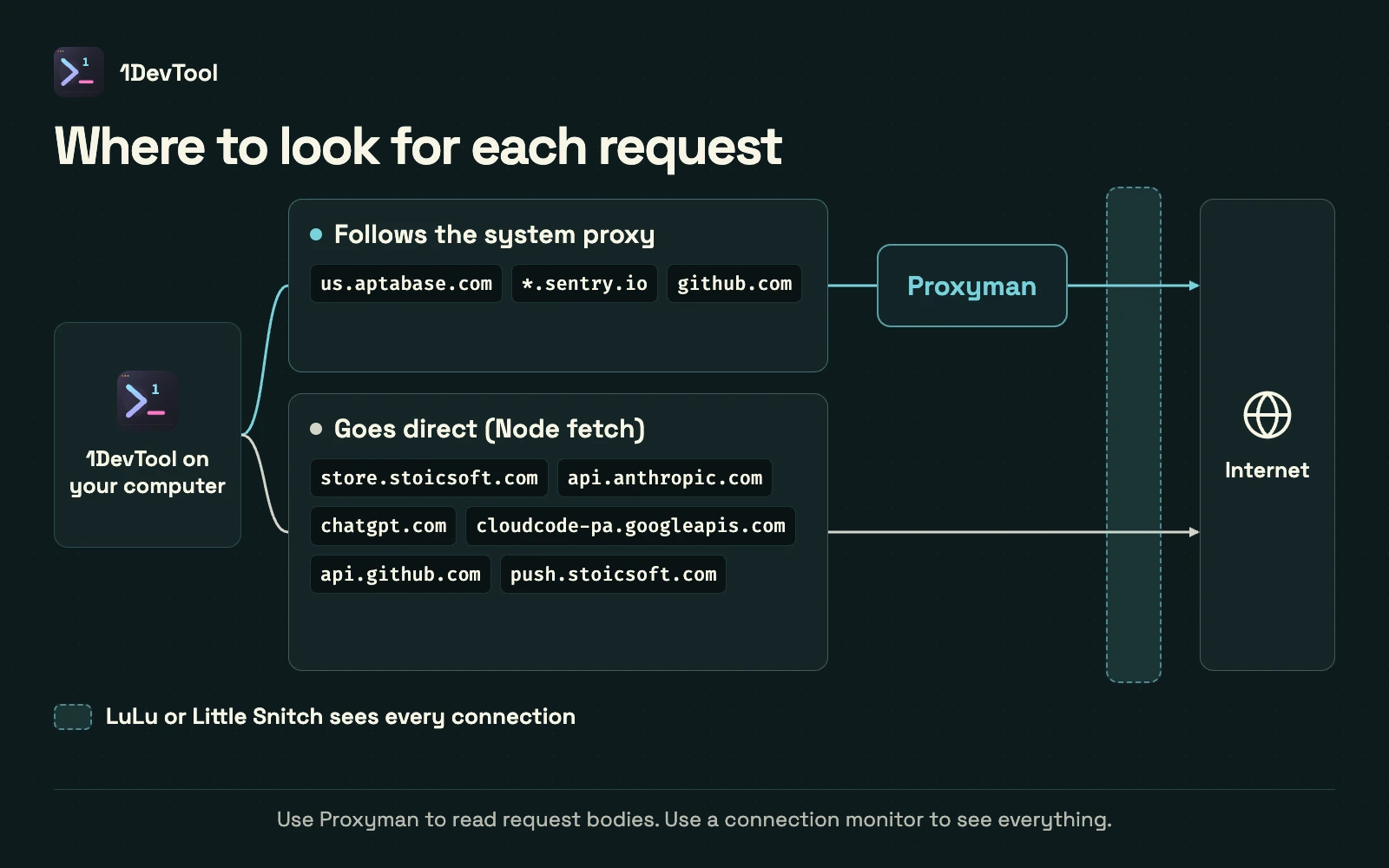
One honest limit: the licence check, the quota checks and GitHub lookups use Node’s built-in
fetch, which does not follow the macOS system proxy. Proxyman’s default setup won’t list them, so for those use a connection monitor.LuLu (free, open source) or Little Snitch shows every host an app connects to. Allow 1DevTool to run for a while and compare the list with the table below.
What you should see
Every host 1DevTool itself talks to, and the tool that shows it.
us.aptabase.com | Usage analytics, only with analytics on | Proxyman |
*.sentry.io | Crash reports, only with analytics on and only after an error | Proxyman |
github.com + GitHub’s download host | Update check and downloads | Proxyman |
store.stoicsoft.com | Licence check, paid licences only | LuLu / Little Snitch |
api.anthropic.com, chatgpt.com, cloudcode-pa.googleapis.com | Accounts & Quota, when you use it | LuLu / Little Snitch |
api.github.com, raw.githubusercontent.com | GitHub features and templates, when you use them | LuLu / Little Snitch |
push.stoicsoft.com | Encrypted phone notifications, only with a paired phone | LuLu / Little Snitch |
On Windows, Proxyman for Windows works the same way for the first three hosts. For the rest, open Resource Monitor → Network and watch the 1DevTool processes.
How to turn each one off
1DevTool
- Open Settings → General → Tracking and switch off Anonymous Usage Analytics.
- That one switch covers analytics and crash reports, and applies straight away.
- Never answered the first-run dialog? Then nothing has been sent.
T3 Code (from its docs)
export T3CODE_TELEMETRY_ENABLED=false- Add the variable to your shell profile (for example
~/.zshrc) on macOS or Linux and restart the app. On Windows, set it as a user environment variable. - An administrator can also turn it off with a managed policy.
- In the mobile app, turn off Send crash reports and Send connection traces in Settings → About T3 Code → Diagnostics.
Which one should you use?
T3 Code is the better pick if
- You want open source. You can audit it, build it and fork it under your own name.
- You want something free.
- You like a thread-based chat view of your agents with remote access from a phone or browser.
- You are happy to set one environment variable to turn analytics off. The team fixed the login-file issue within a day and documents what it collects.
1DevTool is the better pick if
- You want nothing sent until you say yes, and one switch to change your mind.
- You run several agents at once in real terminals: Claude Code, Codex, Gemini CLI, OpenCode and 19 other agent CLIs, side by side.
- You want agent teams, quota failover, git, a database client and an HTTP client in the same window.
- You prefer to pay once ($29) over a subscription, or the free plan is enough.
Questions
Is 1DevTool a fork of T3 Code?+
No. 1DevTool is a separate app made by StoicSoft. It shares no code with T3 Code and is not affiliated with T3 Tools, Inc.
Does T3 Code still read ~/.claude.json?+
Not for analytics. T3 Code merged #42299 on 24 November 2026: “analytics no longer reads or sends Codex and Claude account IDs”. Update to the latest version to get it.
How do I turn off T3 Code telemetry?+
Set T3CODE_TELEMETRY_ENABLED=false in your shell profile on macOS or Linux, or as a user environment variable on Windows, then restart T3 Code. Admins can use a managed policy.
Can I use 1DevTool without sending anything to StoicSoft?+
Yes. Click “No thanks” on the first-run dialog, or turn tracking off later, and use the free plan. The only request left is the update check, which goes to GitHub.
Does 1DevTool read my Claude or Codex login?+
Only for features that need it: Accounts & Quota (to show your usage limits and switch accounts) and adding the 1DevTool MCP server to your agents. Tokens are sent only to the provider that issued them, never to StoicSoft.
Why should I trust a comparison written by a competitor?+
You shouldn’t have to. Every T3 Code fact links to T3 Code’s own repository, and every 1DevTool claim can be checked with Proxyman and a connection monitor in ten minutes.
Sources
- T3 Code docs: Product usage data
- T3 Code commit ec3778bb: add PostHog telemetry (6 Mar 2026)
- T3 Code #1249: prefer Claude user ID for telemetry identity (20 Mar 2026)
- T3 Code #42299: analytics no longer reads Codex and Claude account IDs (24 Nov 2026)
- T3 Code issue #42283: request for transparency and consent
- EasyList issue #26521: ingest.t3.codes
- T3 Code README: Trademarks and forks
- Aptabase privacy policy
- Proxyman
- LuLu by Objective-See
Try the app that asks first
Free plan, no account needed. macOS, Windows and Linux.
Found something we got wrong about either app? Tell us at feedback.stoicsoft.com and we will correct it.
T3 Code is a trademark of T3 Tools, Inc. 1DevTool is made by StoicSoft and is not affiliated with or endorsed by T3 Tools, Inc. Facts about T3 Code come from its public repository and docs as of 25 November 2026.