Sep 16, 2026
Autopilot: AI Agents That Pick Themselves Back Up
Autopilot in 1DevTool 1.75.0 restarts an agent that crashed or dropped its connection mid-task on the same tab with its session resumed, hands the task to a backup seat when it can’t, and never types over a question or a half-written prompt.
You gave three agents their tasks, checked that each one had started working, and went to make lunch. When you came back, one had finished, one was still going, and the third was sitting at a shell prompt. Its connection had dropped four minutes after you left, the CLI had exited, and everything that terminal was supposed to do in the last forty minutes simply hadn't happened.
Recovering was mechanical and annoying. Find the dead tab. Work out which session it was on. Relaunch the CLI with the right resume flag for that particular agent. Then type something like "you got cut off, carry on — but don't redo what you already did," and hope it listens. If you run agents overnight or across a team chart, that babysitting is the real cost of running agents unattended: you can't actually leave.
What changed
1DevTool 1.75.0 adds Autopilot. When an agent dies or drops its connection in the middle of a task, Autopilot restarts it in the same terminal with its session resumed and asks it to continue. If there is no session to resume, a chart seat with a backup agent hands the task over instead. Now you can leave agents running without coming back to a dead tab and a lost hour.
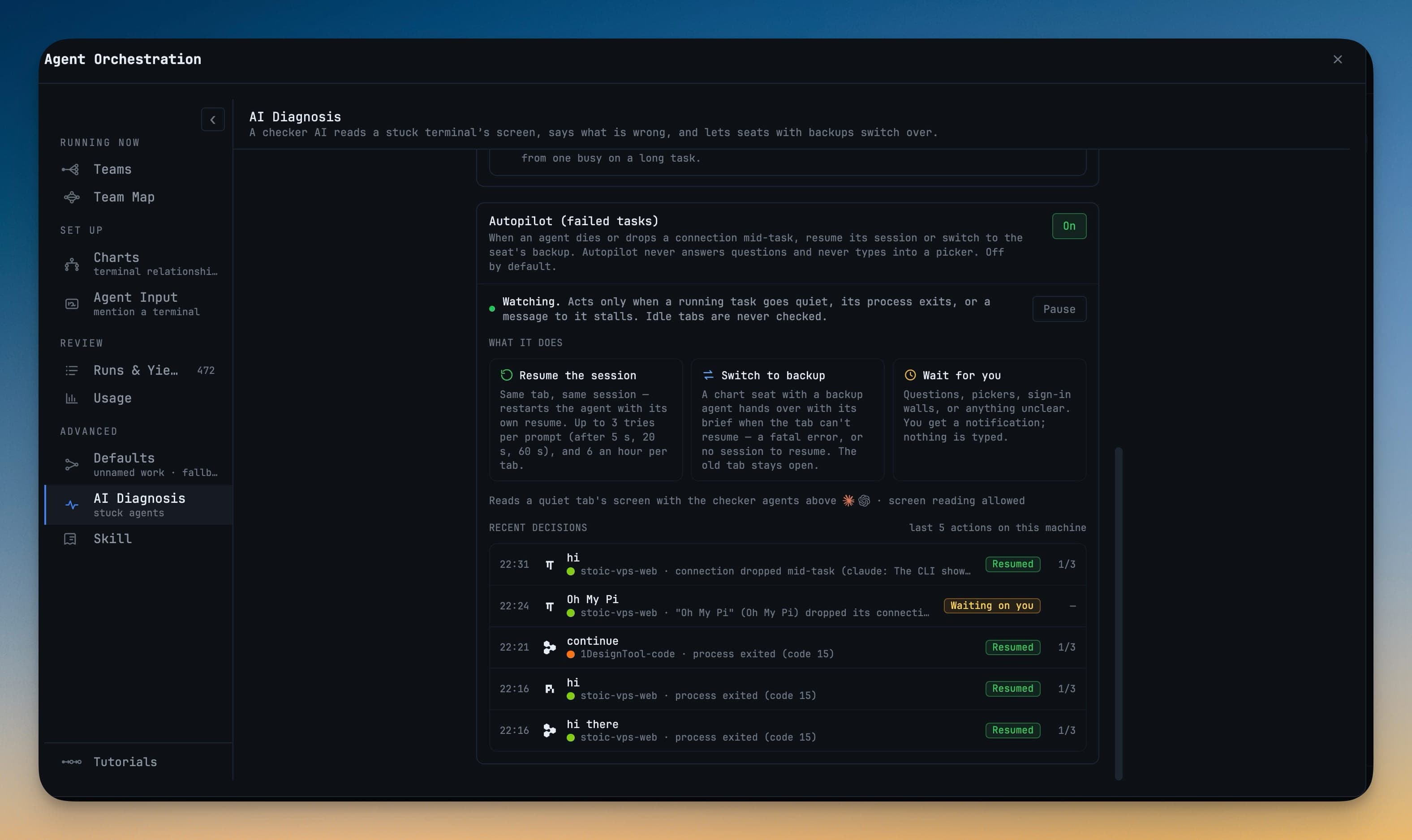
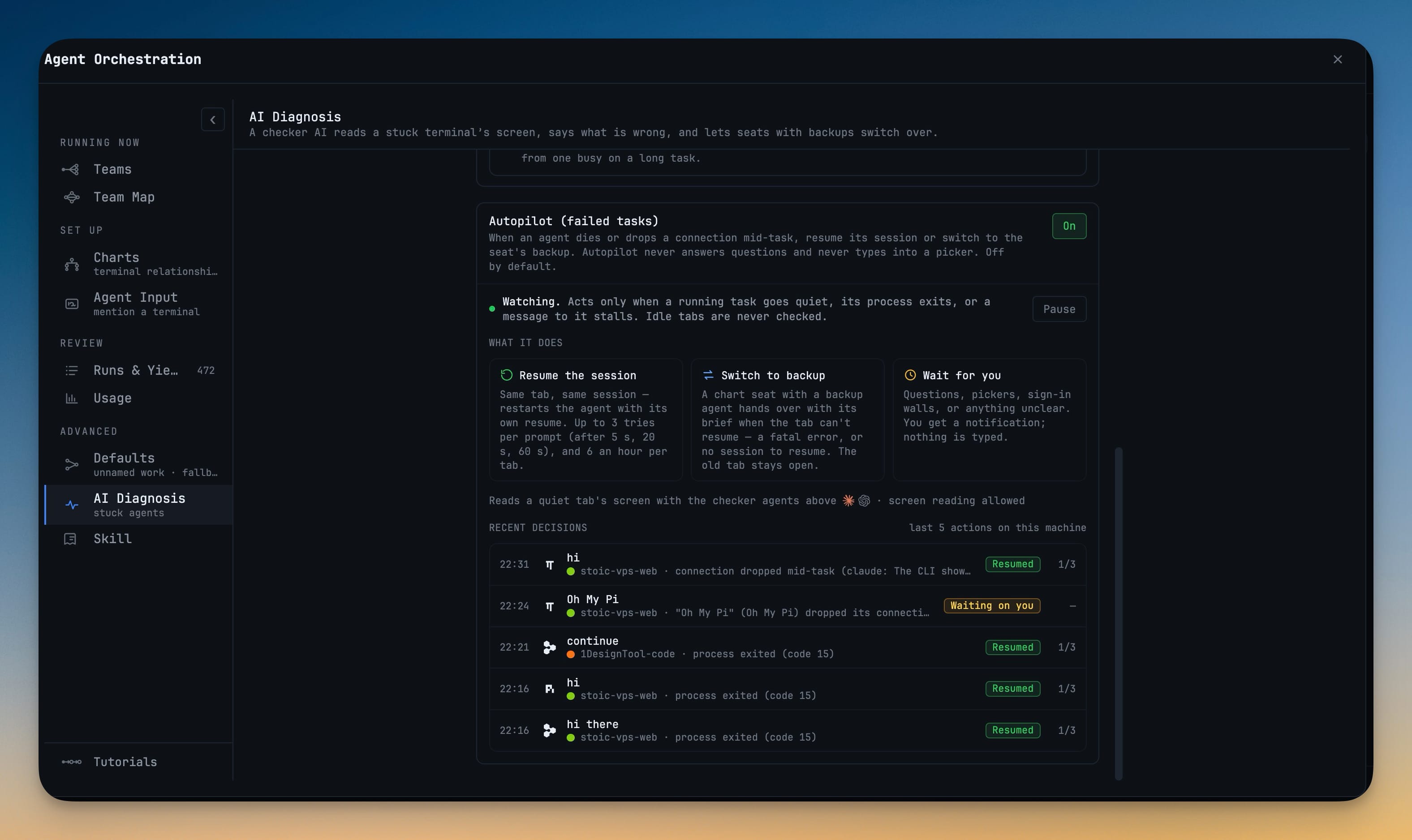
It is off by default. Open the Orchestration Dashboard from the top bar or with Open Orchestration Dashboard in the Command Palette, go to Advanced → AI Diagnosis, and switch the Autopilot (failed tasks) card to On. The card then reads Watching. Acts only when a running task goes quiet, its process exits, or a message to it stalls. Idle tabs are never checked.
How it works in practice
A crashed agent comes back on the same tab
Autopilot watches for three things on a terminal that is actually working on a prompt: the process exits with an error while a prompt is still unfinished, the task goes quiet, or a message delivered to it stalls. When one happens, it restarts the agent in the same terminal with the CLI's own resume command, so the session, transcript and tab you already know stay put. There's no new tab to find and no resume flag to look up. It works for Claude Code, Codex, Gemini, Cursor, OpenCode, Grok, Kimi, Qwen, Amp, Cline, Hermes, Antigravity and Qoder.
Right after the resume, it sends one short instruction: Continue where you left off. Do not redo steps that already completed; if the result of the interrupted step is unknown, check before repeating it. That is the message you would have typed yourself. If you'd rather resume silently, turn off After a resume, ask the agent to continue.
A deliberate exit is left alone. Quitting a CLI with /exit or Ctrl-D exits cleanly, and Autopilot treats that as your decision, not a crash.
A seat with a backup hands the task over
Sometimes there is nothing to resume: the agent hit a fatal error, or it never got a session ID. If that terminal sits in a chart seat with backup agents, Switch to backup kicks in. The next agent in the seat's list takes over with the task's brief, and the old tab stays open so you can read what went wrong. On a multi-agent pipeline, that is the difference between one seat failing and the whole run stalling behind it.
It waits instead of typing over you
The worst possible recovery tool is one that types "continue" into a question the agent asked you. Before it acts on a quiet terminal, Autopilot reads the terminal's screen and checks for an idle, empty prompt. If the agent is asking you something, a picker is open or you left a half-typed draft in the composer, it does nothing. It doesn't type, and it doesn't restart.
Sign-in walls and screens it can't read with confidence get a notification instead of an action. The Wait for you tile sums it up: nothing is typed.
Three spaced tries, then it pages you
A restart loop is its own kind of outage, so the retries are capped. Autopilot waits 5 seconds before the first restart. If the same prompt fails again, it waits 20 seconds before the second, and 60 seconds before the third. Then it stops and puts an Activity card in front of you: Stopped retrying "…" after 3 resumes; waiting on you. Open the tab to see the last error. A new prompt from you starts the count over, and no terminal is ever restarted more than six times in an hour.
Every decision is on the record
Under the card, Recent decisions lists the last five actions on this machine. Each row shows the time, the prompt, the project and why Autopilot acted — "connection dropped mid-task", "process exited (code 15)" — with a badge: Resumed, Switched to backup, Couldn't resume or Waiting on you. The full ledger is written to ~/.1devtool/orchestration/autopilot-ledger.jsonl, so you can see exactly what happened overnight.
Need to take over for a while? Pause stops every resume and switch without losing your setup, and How it works walks through the whole flow step by step.
Pick the model each checker runs on
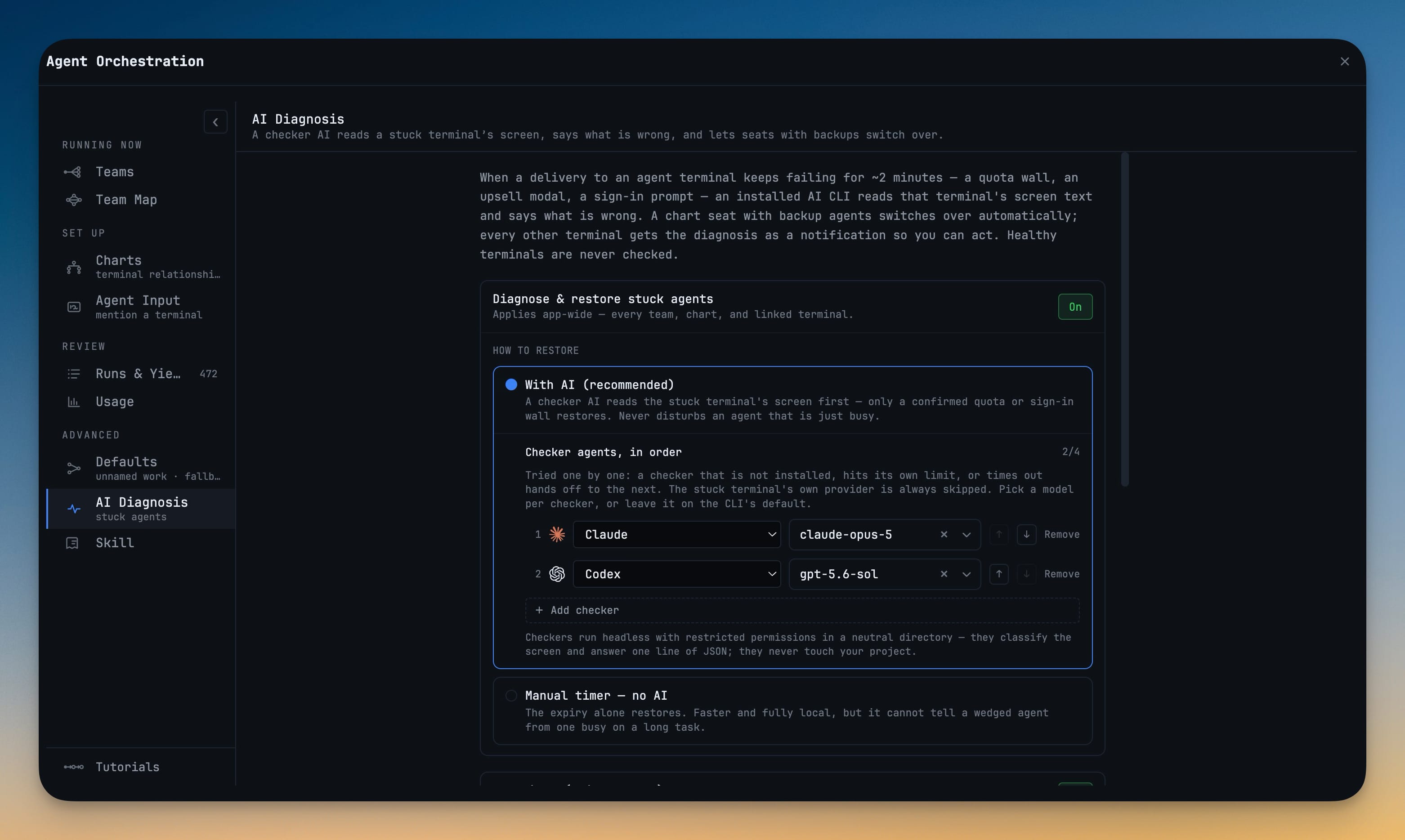
To tell "quiet because it's working" from "quiet because it's stuck", Autopilot relies on AI Diagnosis. An installed checker CLI reads the stuck terminal's screen and returns a one-line verdict. 1.75.0 lets you choose the model for each checker. Under Checker agents, in order, every row now has its own model picker next to the agent, so Claude can check on one model and Codex on another, or you can leave it on Default model.
Checkers are tried in order, and the stuck terminal's own provider is always skipped. They run headless, with restricted permissions and in a neutral directory, and they never touch your project.
Before vs After
| Before 1.75.0 | With Autopilot | |
|---|---|---|
| Agent's connection drops mid-task | Tab sits dead until you notice | Restarted on the same tab within seconds |
| Getting the session back | Look up that CLI's resume flag, relaunch by hand | CLI's own resume command, same session and transcript |
| Telling it to carry on | Type your own "continue, don't redo" message | One continue instruction sent for you |
| No session to resume | Task dies with the tab | Seat's backup agent takes the task over |
| Agent was asking you a question | — | Left alone; nothing is typed |
| Repeated failures | Whatever you do by hand | 3 spaced tries, then an Activity card |
| What happened overnight | Scroll back and guess | Recent decisions and a ledger file |
Who benefits most
- People who run agents overnight or over lunch. A dropped connection at minute four no longer costs the whole session. You come back to finished work, or to a card telling you exactly why it stopped.
- Teams on orchestration charts. One dead seat no longer freezes everything downstream. It resumes or hands off to its backup, and the pipeline keeps moving.
- Anyone running more agents than they can watch. Idle tabs cost nothing, so you can enable it everywhere and only pay attention when it pages you.
Also in 1.75.0
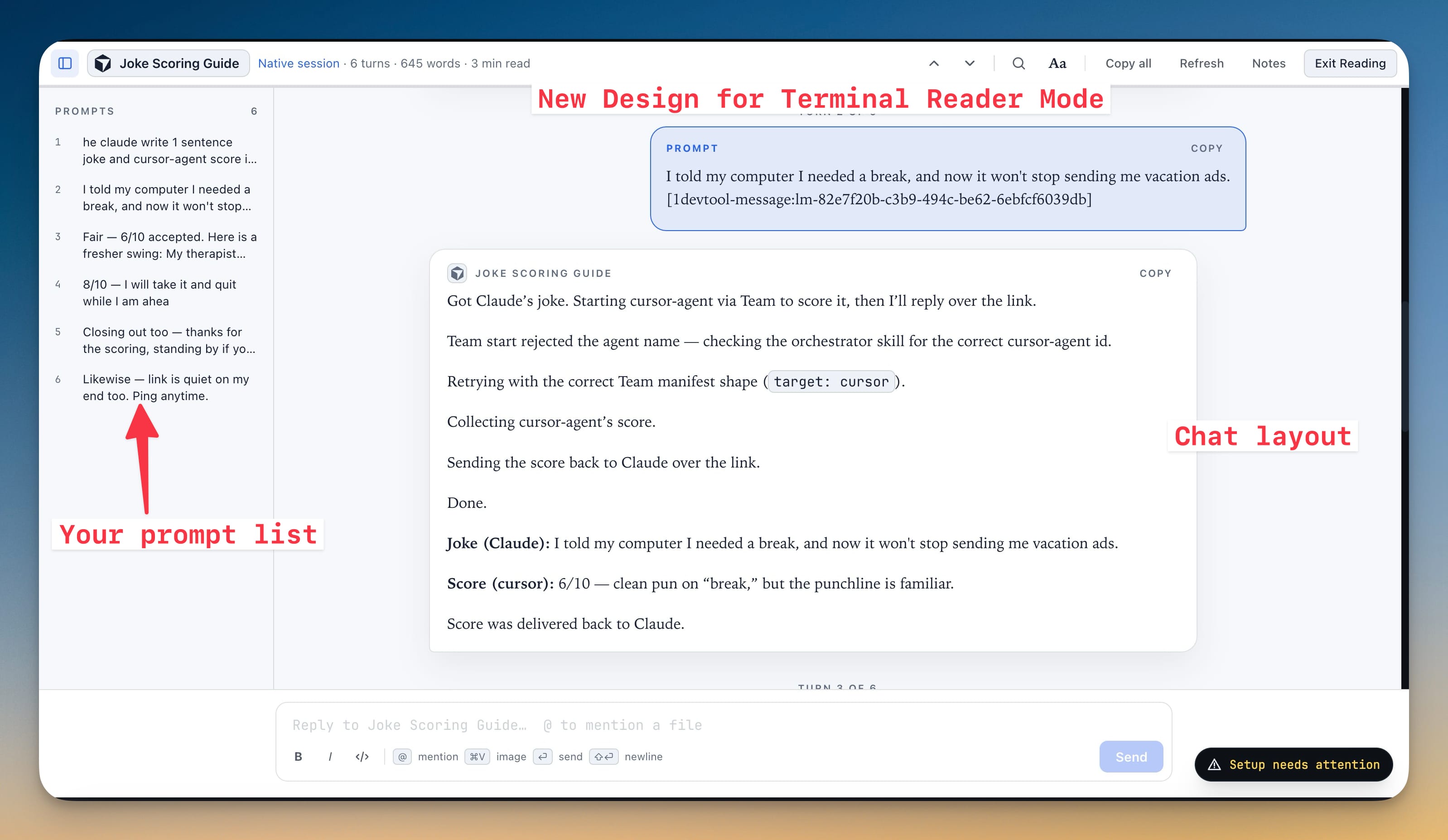
Projects can now live on a paired computer. Add Project lists your other machines as "name · paired", agents start there with that computer's own logins, and you prompt them from a mirrored terminal with no SSH. Reader mode is rebuilt as a real reading view with Dark, Black, Sepia, Paper and Forest canvases, a Prompts rail you can hop through with ⌥↑ and ⌥↓, Document or Chat layout and its own reply composer. And in the Git client, double-clicking a diff line opens the file with the cursor on that line.
Try it
Update to 1DevTool 1.75.0, open Orchestration Dashboard → AI Diagnosis, and switch Autopilot (failed tasks) on before your next long run. The next time an agent drops mid-task, you'll find it already back at work, with a line in Recent decisions saying so. Download 1DevTool and stop babysitting your agents.