Proven Sends, Markdown Notes & Agent Batches
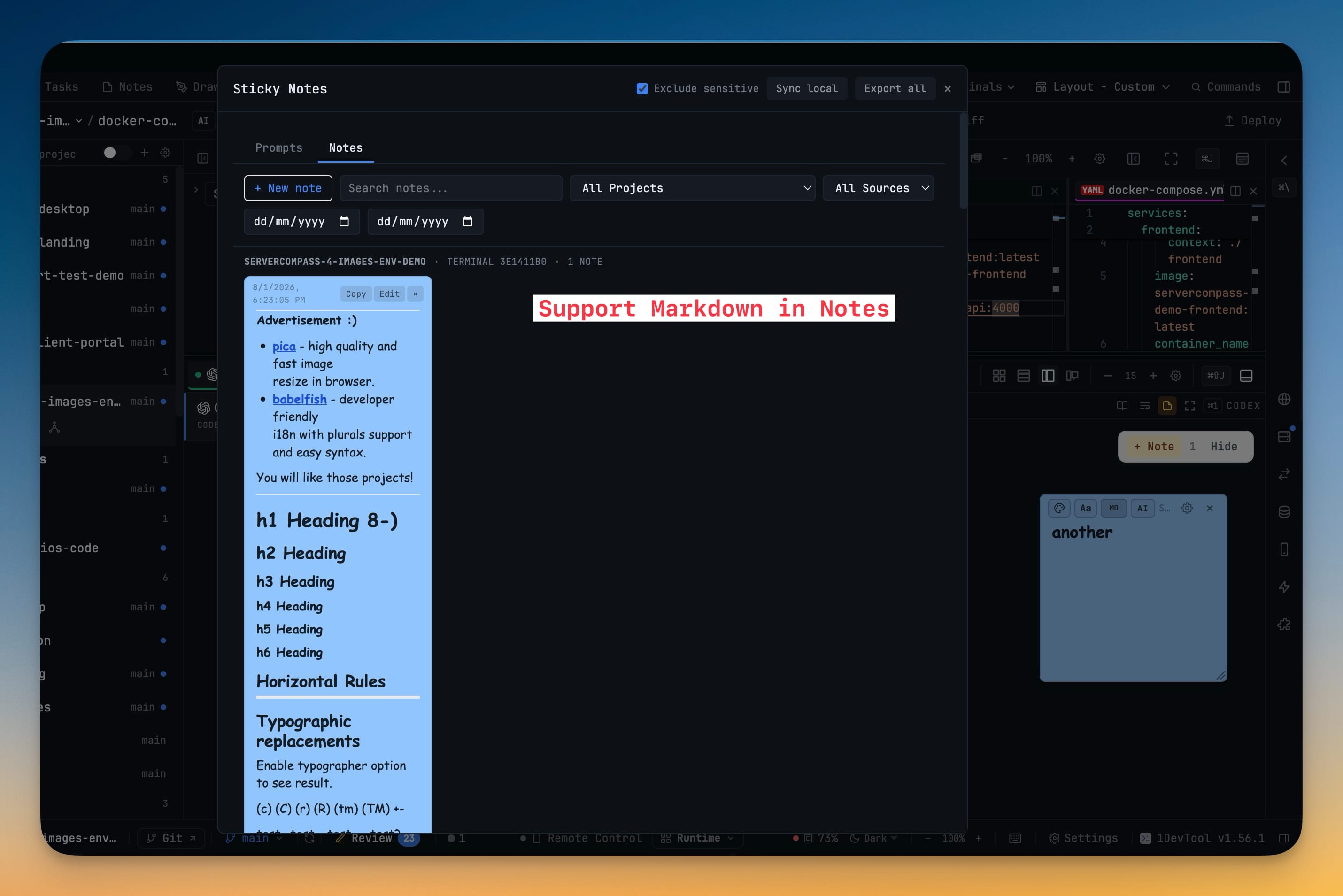
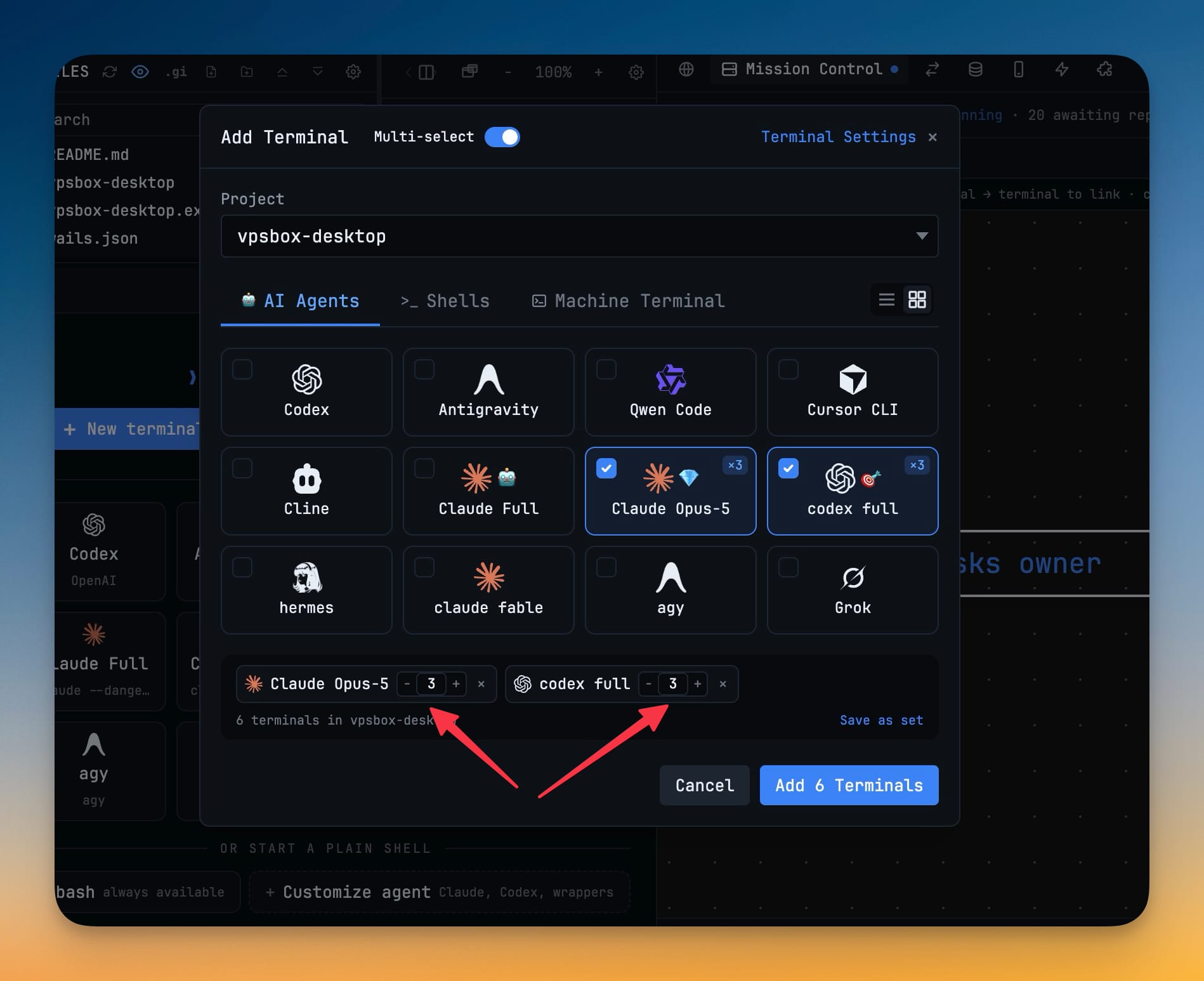
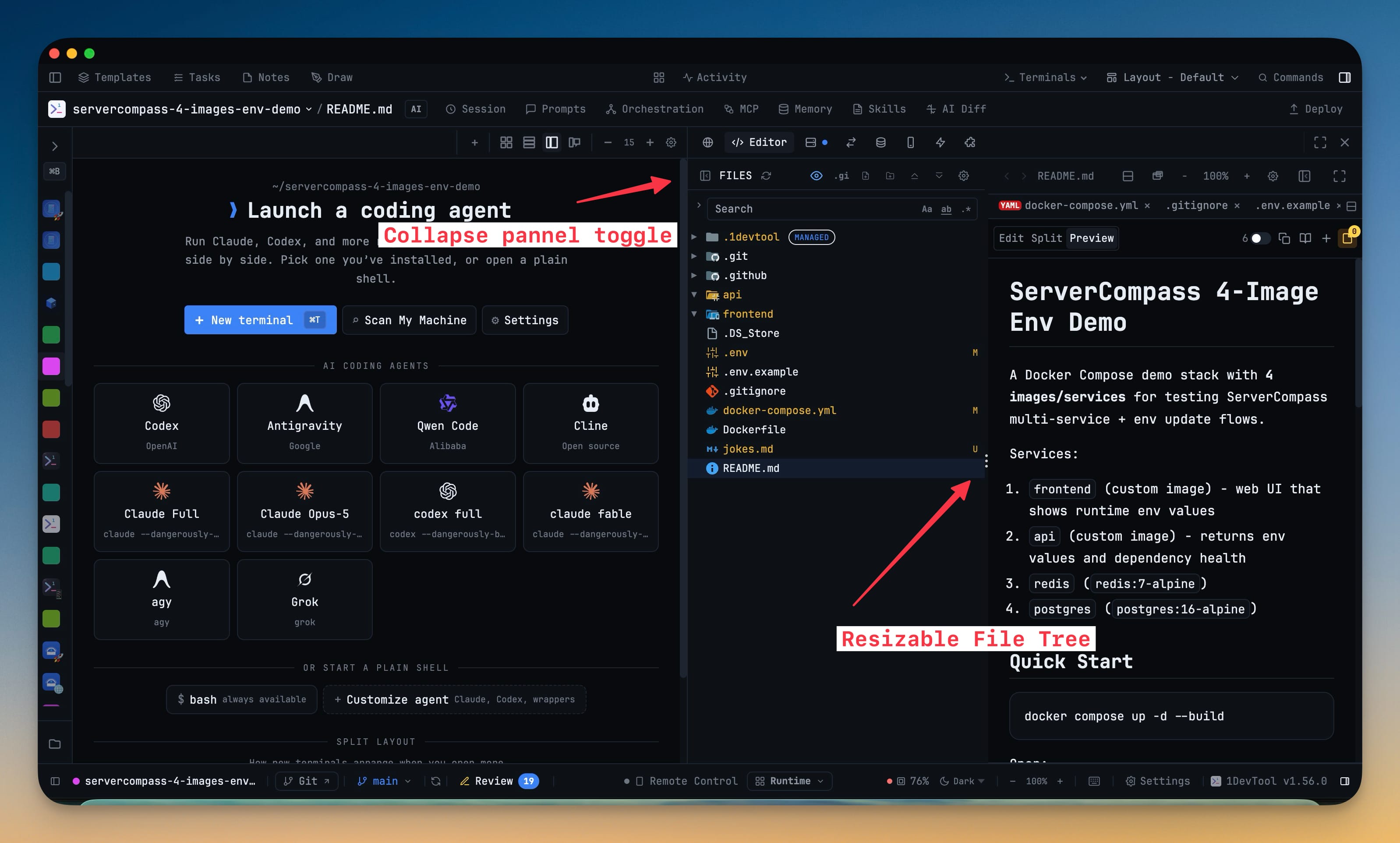
A prompt you send is now proven sent: 1DevTool checks the agent's composer after Send, retries once, and tells you "not submitted — press Enter" instead of reporting a run that never started — so a delegation can no longer look live while the agent sits idle. Sticky notes you are not editing render as Markdown, with headings, checkboxes, tables and working links, and a + New note composer in the Sticky Notes library saves a thought straight to a project. The Add Terminal dialog gives every picked agent a count, so one batch opens ten Codex terminals and five Cline terminals with numbered tabs instead of ticking the same card over and over. The File Tree + Editor workspace gains a drag divider and a collapse rail, and Cursor is detected again after renaming its command to agent, with its full model list back in the @Cursor picker.
Download v1.57.0
The download page always has the newest build; installers for this version are on GitHub.
What changed
New features
7- Sticky notes render Markdown — a note you are not editing shows as formatted text: headings, lists, checkboxes, quotes, tables, code blocks and links. Click anywhere on the note to go back to editing, or use the MD button in the note toolbar to switch between writing and reading. Links open in your browser, and a link to a heading inside the same note scrolls to it. A new, empty note still opens ready to type in.
- Write a note straight from the Sticky Notes library — a + New note button opens a composer in the notes list, so a thought that belongs to a project no longer needs a file or a terminal to hang off. Choose its project, pick its colour, and save with ⌘⏎ or Save note; Escape closes the composer without closing the library. Notes written this way are grouped under Manual notes, findable with the new Manual source filter, and reach the phone labelled as Manual note.
- Give any picked agent a count — in the Add Terminal dialog's multi-select mode each selected entry carries a −/N/+ counter, so one batch can open 10 Codex terminals and 5 Cline terminals together instead of ticking the same card over and over. Type the number or step it, up to 20 per entry. A checked card shows a ×N badge and the button reads Add 15 Terminals rather than the number of cards you ticked.
- Same-agent batches stay readable — copies are numbered Codex 1, Codex 2 in the tab bar, while AI tabs still rename themselves to their conversation title once they have one. Saved terminal sets remember their counts and the set chip shows how many terminals it will actually open, and the free-plan per-project limit compares against the total the batch would create so you are told to trim before anything opens.
- Drag the file tree to the width you want — the divider inside the File Tree + Editor workspace resizes the tree while the editor keeps painting behind it, and double-clicking the divider snaps it back to the default width. The width you choose is remembered, and the editor always keeps enough room even when the workspace sits in a narrow sidebar.
- Collapse the tree out of the way — hide it from the workspace toolbar or from the Files header and a slim rail stays behind to bring it back in one click. The sidebar's File Explorer collapses to a single row, the project list above it keeps the height you dragged it to, and a collapsed tree stops watching the repository until you open it again.
- Cursor is detected again after it renamed its command to
agent— installs that ship only the new name no longer read as "not found" in Settings → System, on macOS, Linux and Windows. A terminal started withagentis treated as a real AI terminal, with the agent overlay, session detection and resume, and Cursor is told apart from other tools that install a command with the same name. Windows now looks in the folder Cursor's installer actually writes to, and Cursor's full model list — around 200 models — reaches the@Cursorpicker instead of a loneautofallback.
Improvements
4- A sent prompt is now checked, not assumed — after Send, 1DevTool looks at the agent's composer to confirm the message actually left it, and attempts one more Enter if the text is provably still sitting there. When it still hasn't gone, the terminal says so instead of reporting a run that never started: Mission Control shows "not submitted — press Enter" and takes you to the terminal, and the tab keeps your text as a draft. Starting the run, auto-naming the tab and opening an AI Diff session all wait until the prompt is proven sent.
- A queued delivery now tells you what it is waiting for — a message held because the receiving agent's composer could not be proven empty retries on its own every 15 seconds for up to 10 minutes, while a target with no readiness contract, or a link set to strict confirmation, says plainly that it needs your Submit now or Cancel. Mission Control, the Team Map, AI settings and the phone all show the same reason for the same message.
- Agents stop guessing about their own deliveries — a linked agent reads the reason on its delivery receipt instead of polling in a loop or peeking at its peer's terminal to see whether the message landed.
- macOS downloads are built on the hardware they run on — the Intel and Apple Silicon packages are each produced natively and published together, so terminals in a shipped build start on both architectures. Code signing was also repaired for the current macOS build machines.
Bug fixes
8- Fixed a prompt sent to Codex on Windows sitting in the composer forever — the message arrived as
[Pasted Content …]and never ran, while Mission Control, link receipts and the run record all reported it delivered; prompts now land in one piece and submit, from the Agent Input overlay, a linked send, a team delegation, a resumed session or a scheduled prompt. - Fixed the Agent Input overlay opening prefilled with somebody else's transcript — on Cline, and on every AI terminal on Windows, opening the overlay could pick up the agent's own thinking, tool output and delivered-message headers as if you had typed them; the overlay now only picks up text you actually typed.
- Fixed "Add task" doing nothing — right-clicking a terminal selection or code in the editor and choosing Add task now opens the dialog with your selection captured, instead of silently failing.
- Fixed File Tree + Editor refusing to scroll after you move it to the center — the tree and the editor both scroll in every layout slot, not just in the sidebars.
- Fixed messages to a linked Cursor terminal never arriving — an idle Cursor composer is now recognized, so linked sends and
@Cursordelegations deliver instead of sitting queued until they expire. - Fixed one busy moment parking a delegation forever — a supported agent that was mid-turn when a message arrived keeps waiting behind a fresh check rather than needing you to submit it by hand.
- Fixed a delegation being marked answered before its reply was delivered — a reply that is still queued, cancelled or failed leaves the original visibly outstanding, and existing history is repaired on upgrade.
- Fixed delegating to Cursor starting the wrong program — a background Cursor run now launches the Cursor CLI instead of the editor launcher.
Screenshots