Draw Your Agent Team
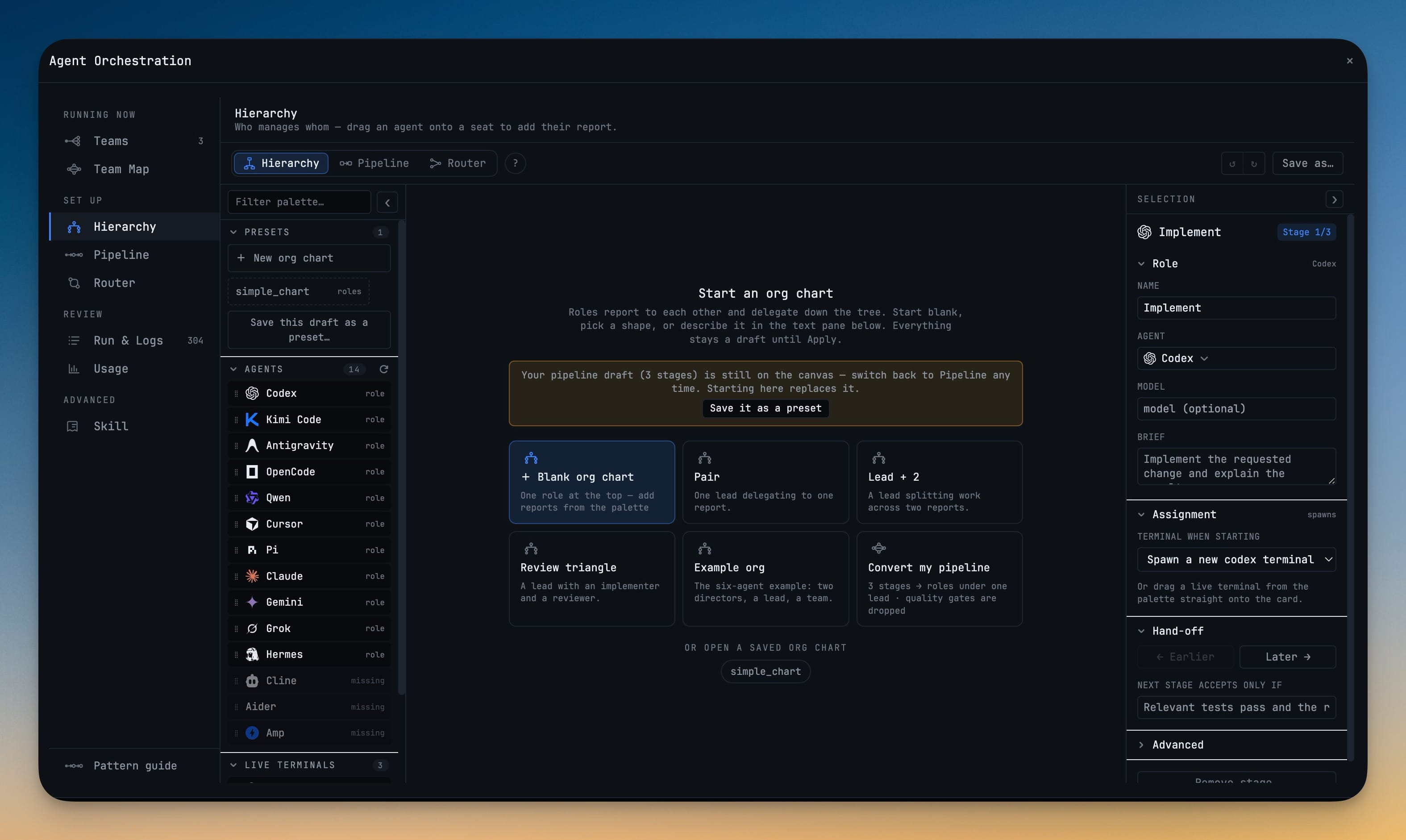
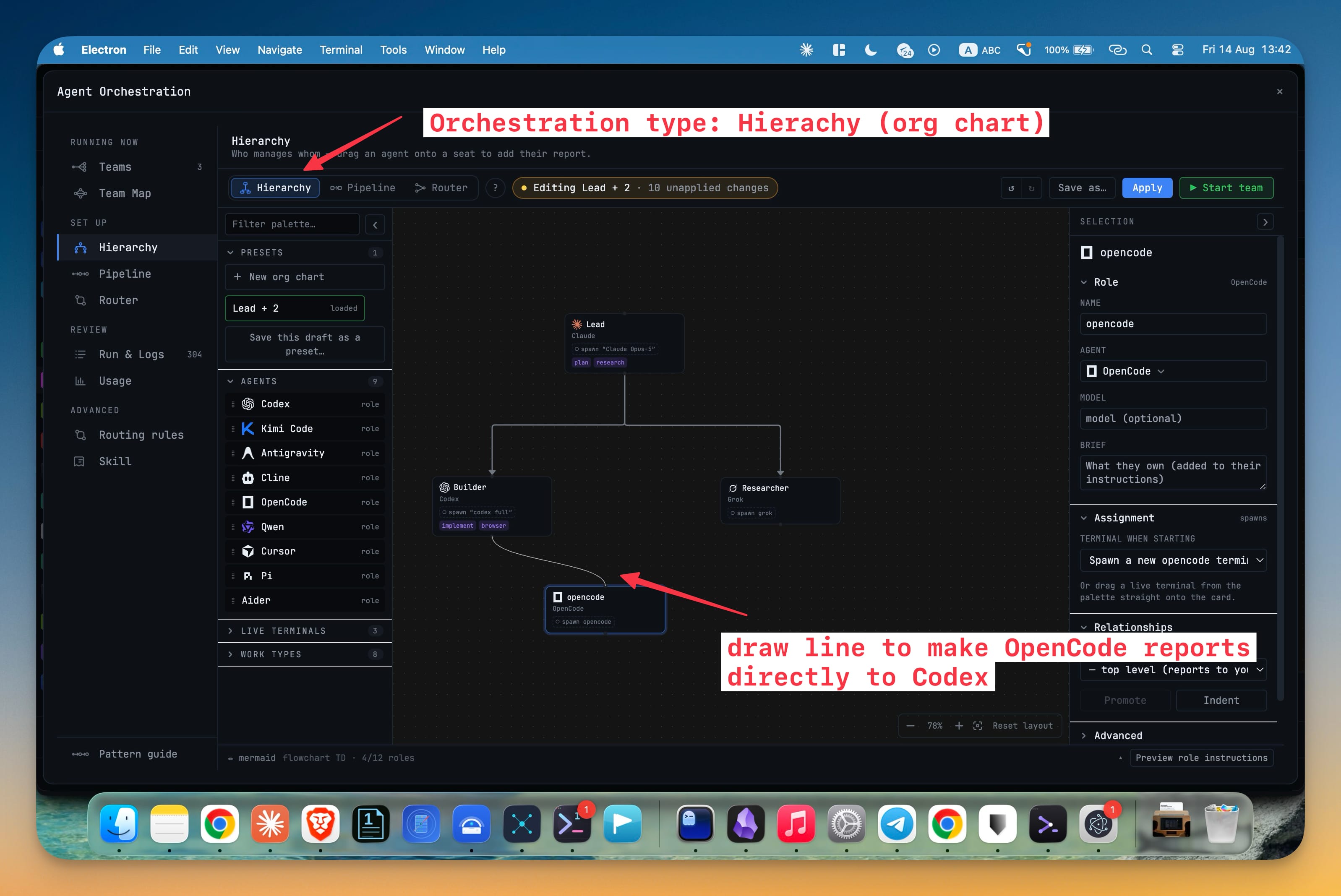
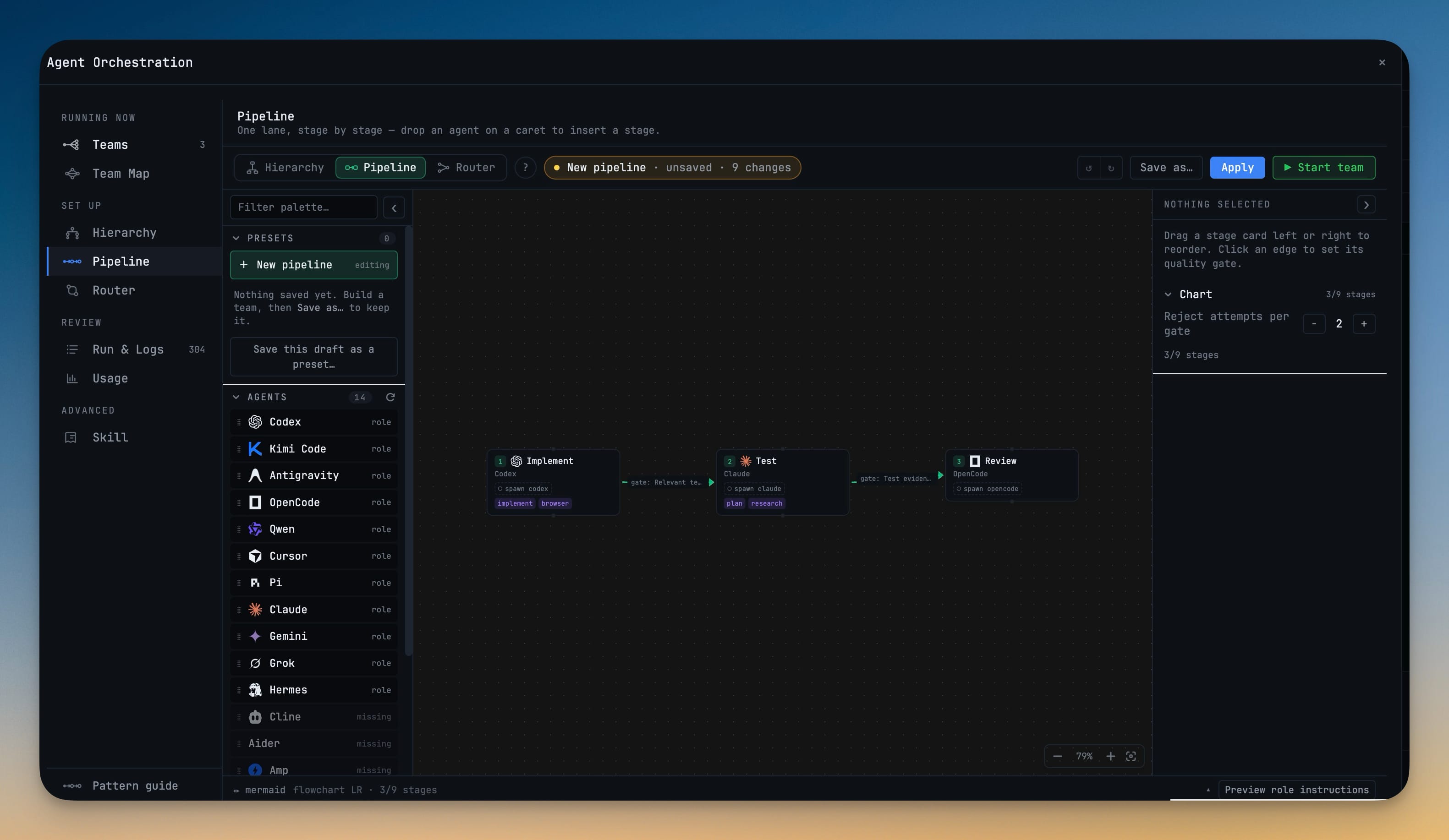
The Builder replaces the orchestration set-up forms with a canvas: drag agents in, wire them together, and see the team you are describing before you start it. One segmented control switches between Hierarchy, Pipeline and Router on ⌘1 / ⌘2 / ⌘3, and switching never touches your work — your org chart is still there when you come back from Pipeline. Agent hierarchy gives your agents a real chain of command: an agent may task only its own subordinates and reports upward, and anything else is refused with the route it should have taken. Pipeline runs ordered stages that pass work forward, with quality gates that let a stage reject a bad handoff before the next agent polishes it. Agent Input's mode control is now Auto Team Swarm Pipeline Off, where Auto reads what you typed and names the pattern it picked. Pi joins as a first-class AI terminal, and Qwen Code renders as the full-screen app it has become.
Download v1.63.0
The download page always has the newest build; installers for this version are on GitHub.
What changed
New features
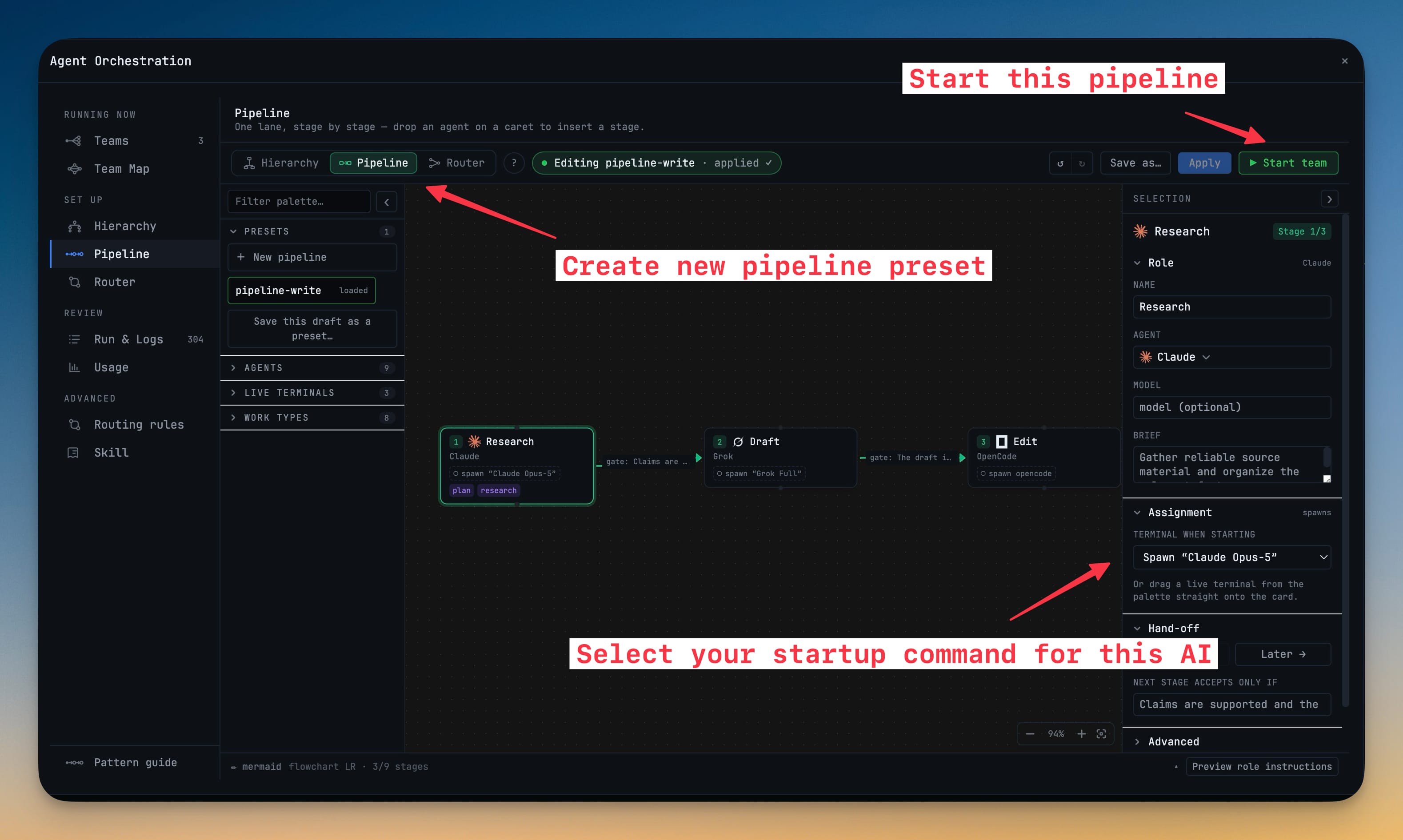
20- One canvas replaces the whole set-up flow — open the Orchestration dashboard and you land on a canvas where you drag agents in, wire them together, and see the team you are describing. A palette rail on the left holds agents, live terminals, work types and your saved presets; start a drag and the canvas raises the places you can drop. A seat that cannot take what you are dragging simply dims, so a refusal never costs you a dialog. Click any seat or wire to edit it in the inspector — role, agent, model, brief — and ⌘Z undoes anything.
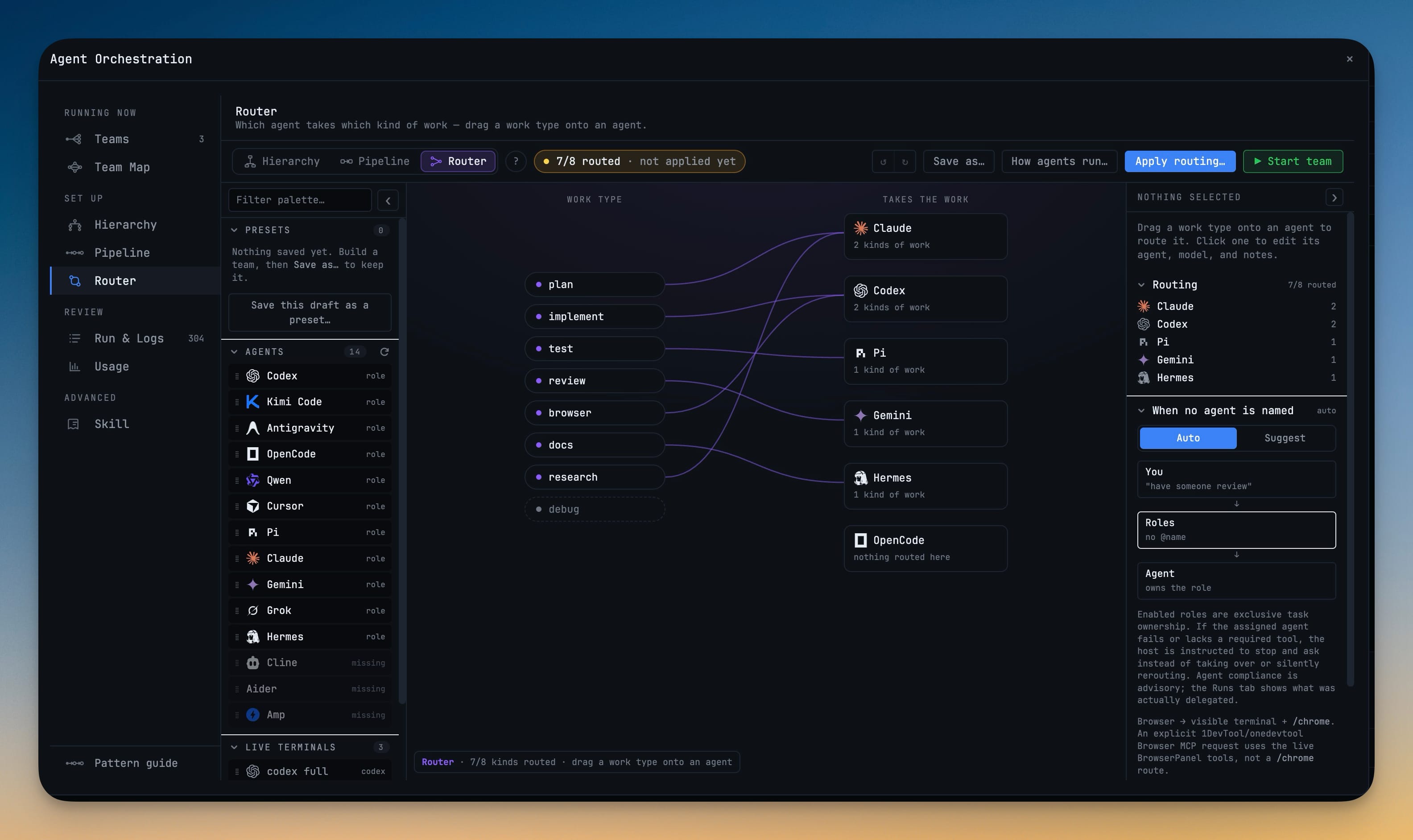
- Three modes, one segmented control — Hierarchy, Pipeline and Router, on ⌘1 / ⌘2 / ⌘3, each with its own colour so you always know which one you are editing. Switching modes never touches your work: your org chart stays on the canvas while you look at Pipeline, and switching back shows it exactly as you left it. Converting one shape into the other is now an explicit card you choose, not something a tab click does to you.
- Every consequential action says what it will do first — Apply shows the difference between your draft and what is live, Start opens the seat table so you can see which terminals will be used, and removing a role tells you what happens to everyone reporting to it.
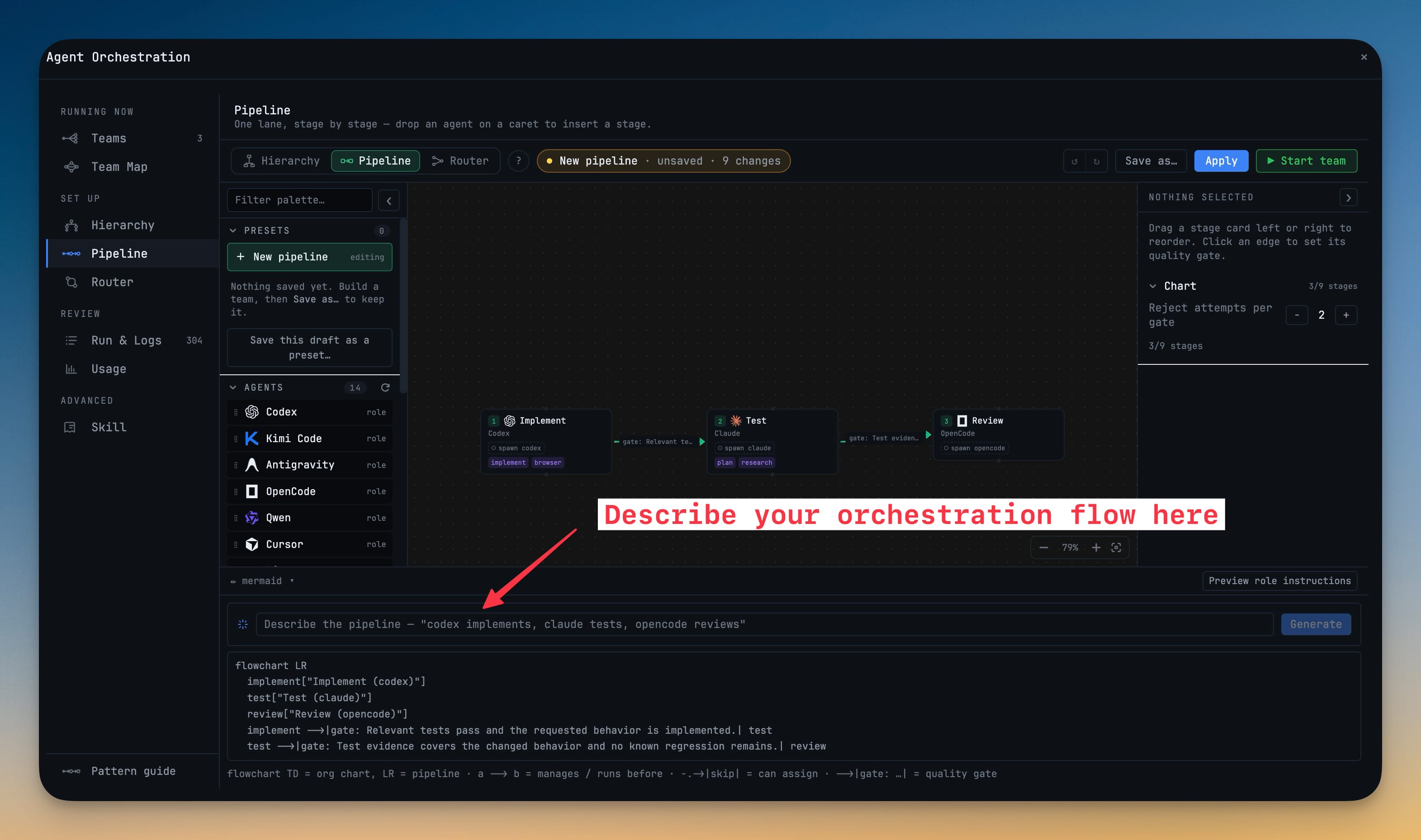
- Describe it and get a chart — write "a lead that reviews two implementers" in the generate bar and an AI agent drafts the chart into your editor, with full undo.
- Or write it as text — a text pane round-trips your chart to a readable diagram syntax and back, live, so you can paste a team in or copy one out.
- Save teams as presets — name a chart, reopen it later, and start it in one click from Add Terminal.
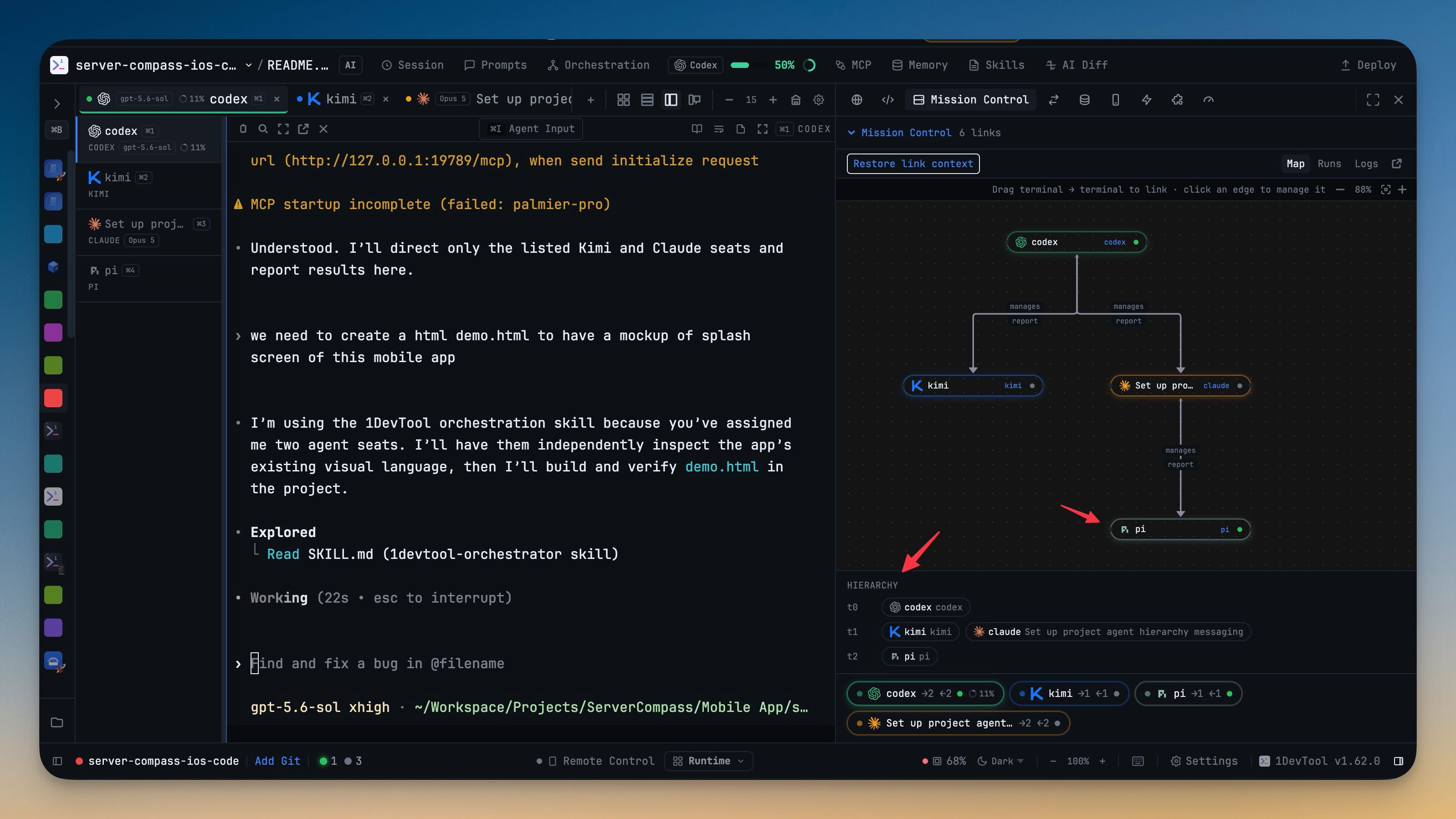
- Give your agents an org chart — seats with managers and subordinates, applied to your project and activated onto real terminals.
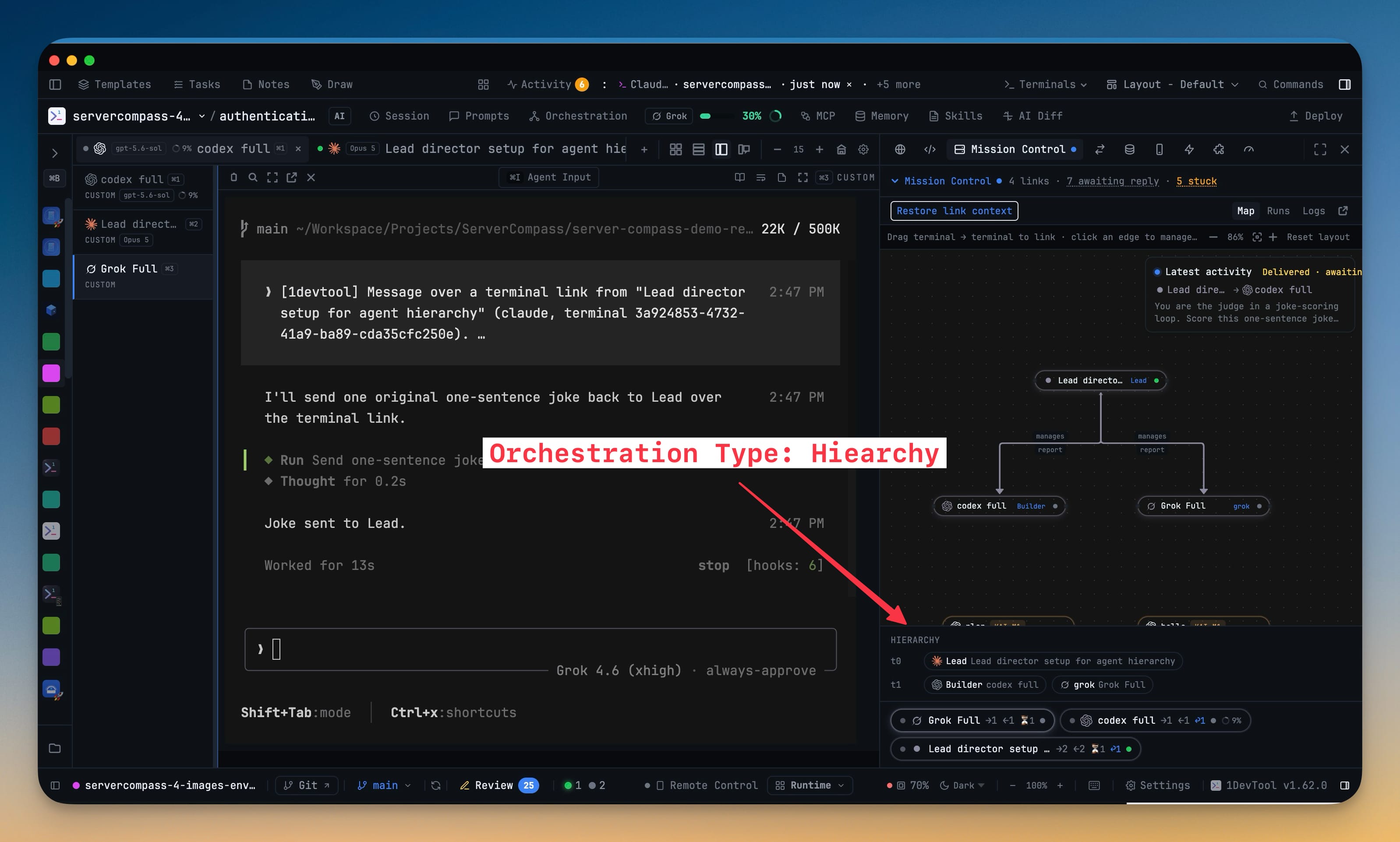
- The chart is enforced, not decorative — an agent may task only its own subordinates and reports its results upward; anything else is refused with a message explaining the route it should have taken. A director reports to you; a seat marked "chain ends here" finishes in place instead of reporting up. Hierarchies decide by escalation, so an agent cannot open a vote to overrule its manager.
- Repair a team without rebuilding it — Mission Control shows every seat grouped by level, flags vacancies and orphaned branches, and offers Rebind or Promote on the spot.
- Refusals and blocked escalations are visible — a counter opens a panel showing who tried to reach whom, when, and where the message should have gone.
- Run a chain with zero setup — write "claude requests grok to draft the fix, review back to grok, do not report to me" and that sentence becomes the chain of command for that prompt only.
- Manage it from your phone — the Teams page shows each active org by level, with vacancy and violation markers, and approver devices can rebind a seat with one tap.
- The pattern every coding session actually uses — research, then implement, then review, each agent's output becoming the next agent's input.
- Quality gates stop bad work early — a stage can accept or reject the handoff it receives, so a polished review of a broken first draft never happens. Rejects are capped (two rounds by default); after that the pipeline escalates to you instead of looping forever.
- Run one straight from the composer — "research the auth bug, then grok drafts a fix, then opencode reviews it" is recognized as a pipeline, with your current terminal as stage 1.
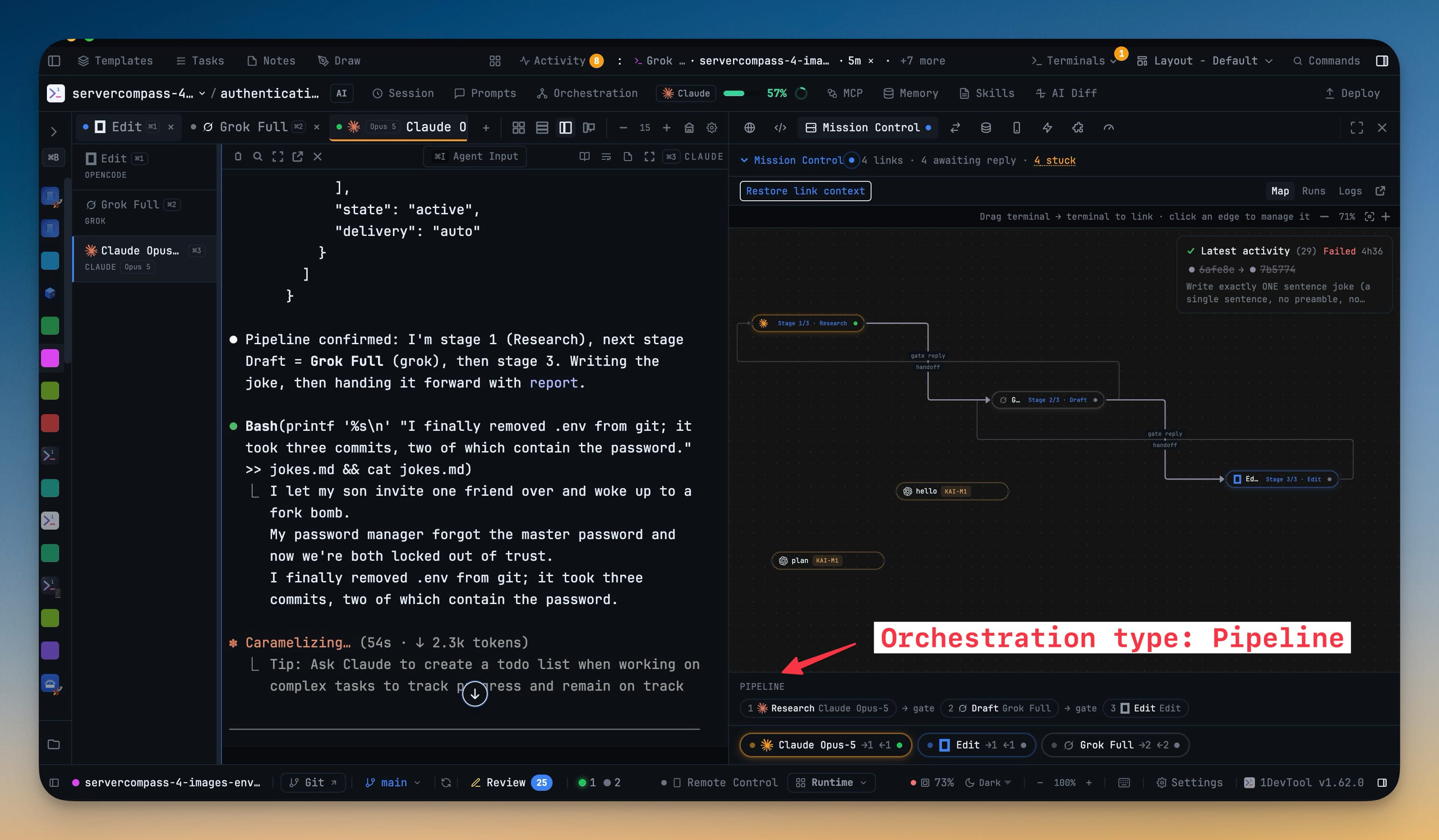
- Watch it run — Mission Control shows the stage strip, so debugging a four-stage review no longer looks like debugging an org chart.
- The mode control is now Auto / Team / Swarm / Pipeline / Off — Auto reads what you are typing and applies the right pattern, telling you why (
Using Pipeline · you wrote "then"). Clicking any other mode is a lock — it stays put no matter what you type next, until you choose Auto again. When Auto is not sure, it says so and asks you to pick rather than guessing. Your existing choice is kept as a lock, so nothing changes underneath you. - A Pattern Guide answers "which one do I want?" — a
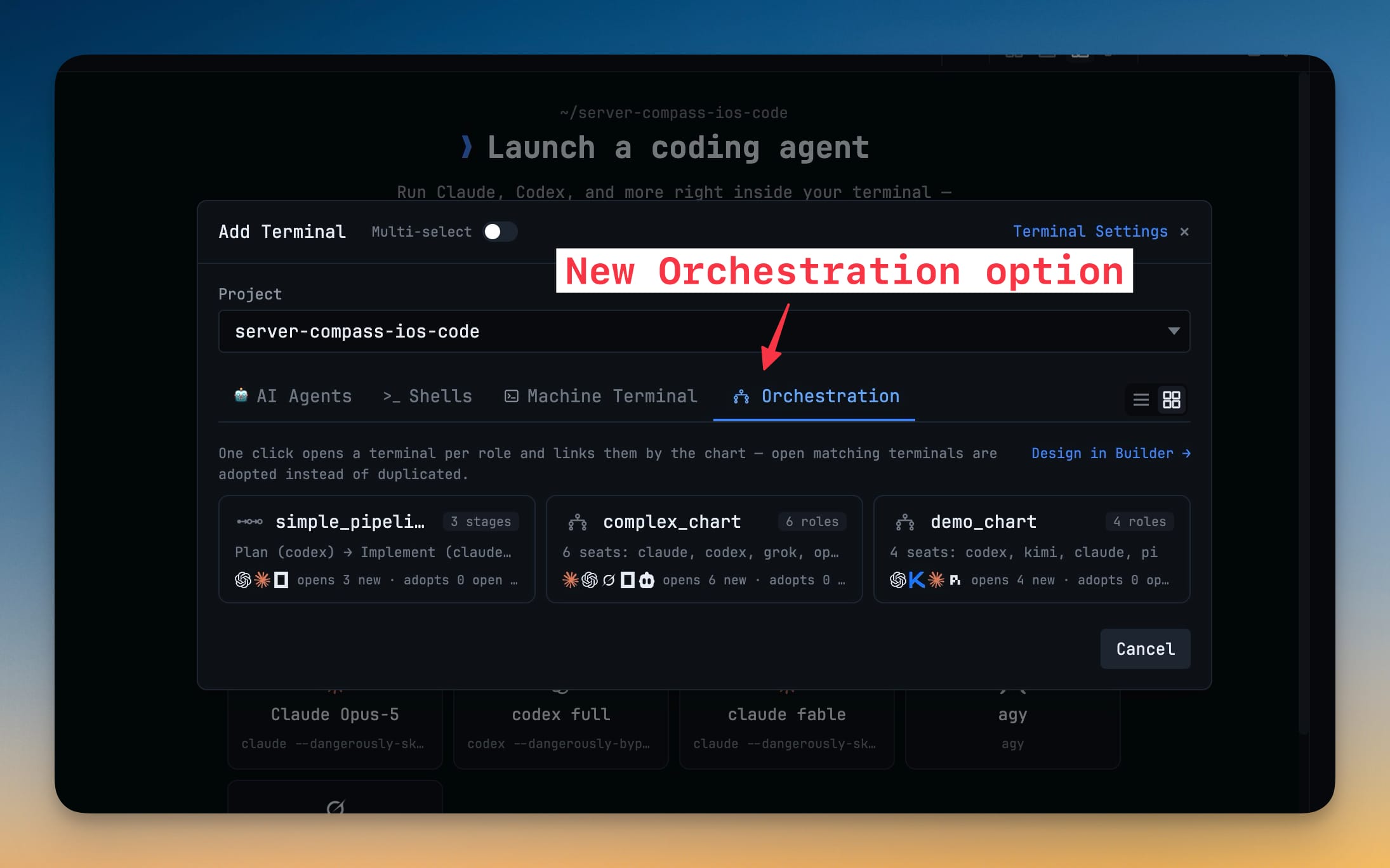
?beside the mode control opens a side-by-side comparison of Team, Swarm, Hierarchy, Pipeline and Mesh, with the one verb that separates each from the others. - Start a whole team from Add Terminal — a new Orchestration tab lists your saved charts, pipelines and routing presets; one click opens the terminals, links them and starts the team.
- Run Pi as a first-class AI terminal — install the
piCLI and open it from Add Terminal, Change AI, or any other agent picker. Prompt delivery, model chips, slash commands, headless sends and team delegation work the way they do for your other agents. Resume past Pi sessions from the Resume panel, and read them turn by turn in Sub-agent History.
Improvements
8- Qwen Code renders as the full-screen app it has become — Qwen 0.21 rewrote its interface, and 1DevTool now treats it accordingly: no more flickering, no more duplicated fragments of earlier screens, and its own scrolling, scrollbar and jump-to-bottom all work.
- Startup commands tell you whether the CLI is actually installed — the command form checks your machine as you type, warns when the tool is not on your PATH, and offers Rescan so a CLI you just installed is picked up without restarting.
- Export the logs behind what you are looking at — Mission Control gains Export current, and any log file can be revealed in your file manager.
- Memory works with more agents — the Memory manager now covers Claude, Codex, Gemini and Hermes.
- Agent filters list every agent you have set up — Prompt History and Memory build their filters from your configured agents and custom presets instead of a fixed short list.
- Grok tabs name themselves from what you actually asked — a Grok terminal picks up its title from your first message and keeps retrying while Grok's own title is still being generated, without ever replacing a name you typed.
- Long transcripts open instantly on your phone — Reader mode renders the most recent messages first with a Show earlier messages button; copy and word count still cover the whole conversation.
- Double-click any card in Add Terminal to open it — the mouse equivalent of pressing Enter, without disturbing multi-select.
Bug fixes
11- Fixed Grok collapsing into a small leftover card after a long session — coming back to a Grok tab from another project no longer leaves the conversation in a shrunken box surrounded by leftover borders.
- Fixed Qwen losing prompts and scrolling through duplicated output — submitted messages stay visible and the conversation scrolls properly.
- Fixed Grok's quota stuck at 99% after a usage reset — the pill and popover now follow a real reset instead of snapping back to the old figure a minute later.
- Fixed a
write EPIPEerror popup on Windows — a closed pipe during shutdown or a background helper's exit can no longer raise a fatal JavaScript error over the app. - Fixed a deleted project coming back after Restart & Install — removing a project is now final, even when background work was still saving that project when you deleted it.
- Fixed Escape closing the entire Orchestration dashboard — pressing Escape in a modal or picker on top of it now closes just that layer.
- Fixed Spend & Quota Center cards painting over each other — a provider whose status is a sentence rather than a percentage no longer pushes its card across its neighbour or off the panel edge.
- Fixed Claude missing from the Builder's agent palette — hiding an agent in Add Terminal is a display preference and no longer removes it from surfaces that need every agent you can orchestrate.
- Fixed not being able to start a team after closing its terminals — a finished run whose terminals are all gone no longer blocks Start on every surface with an empty terminal picker.
- Fixed starting a team failing on a terminal it had just opened itself — a seat that the app spawns is now waited for properly instead of being reported as "not a running AI terminal".
- Fixed hierarchy presets in Agent Input staying Off — choosing a saved chart now applies and activates it from the one click you made.
Screenshots