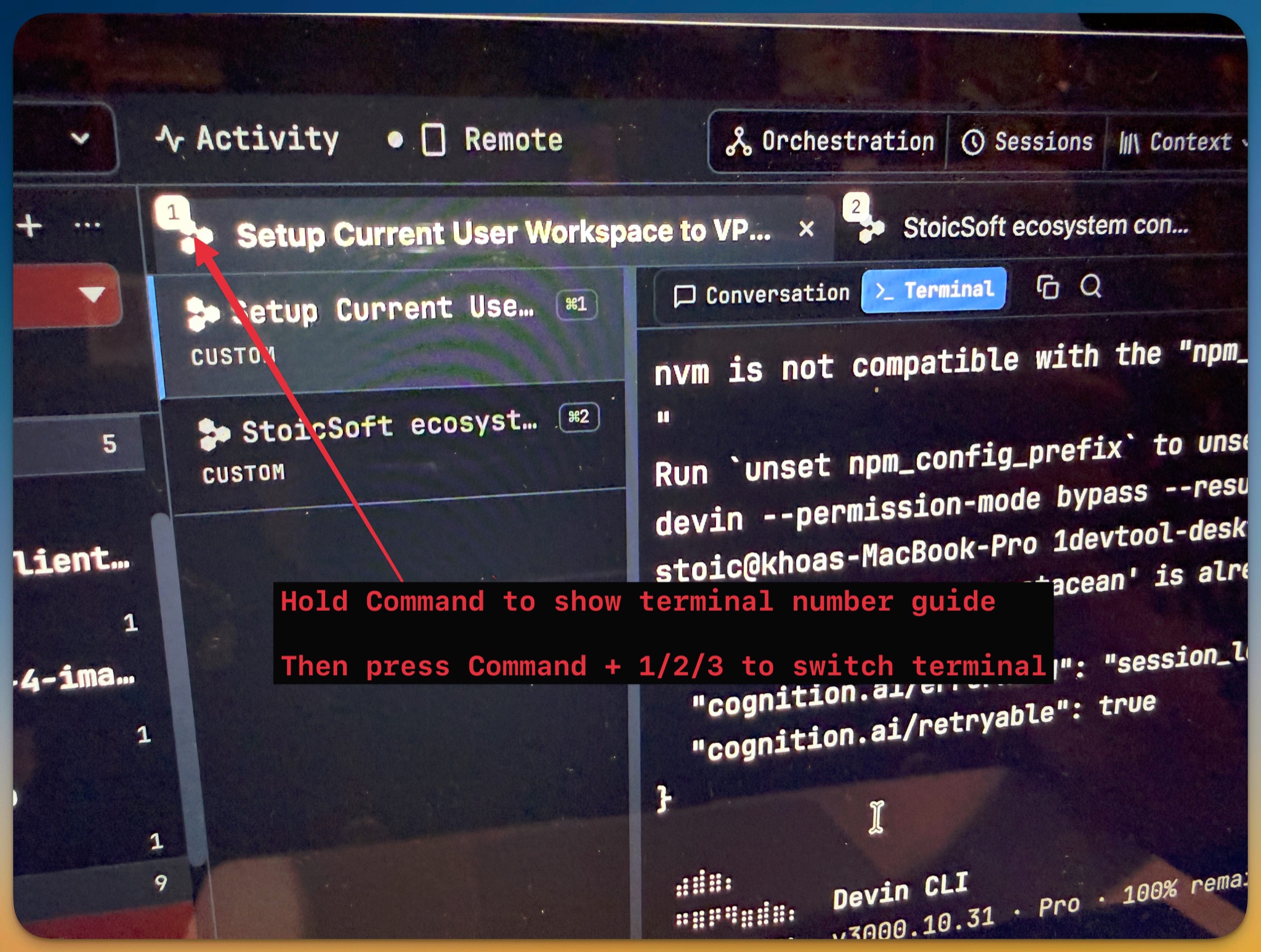
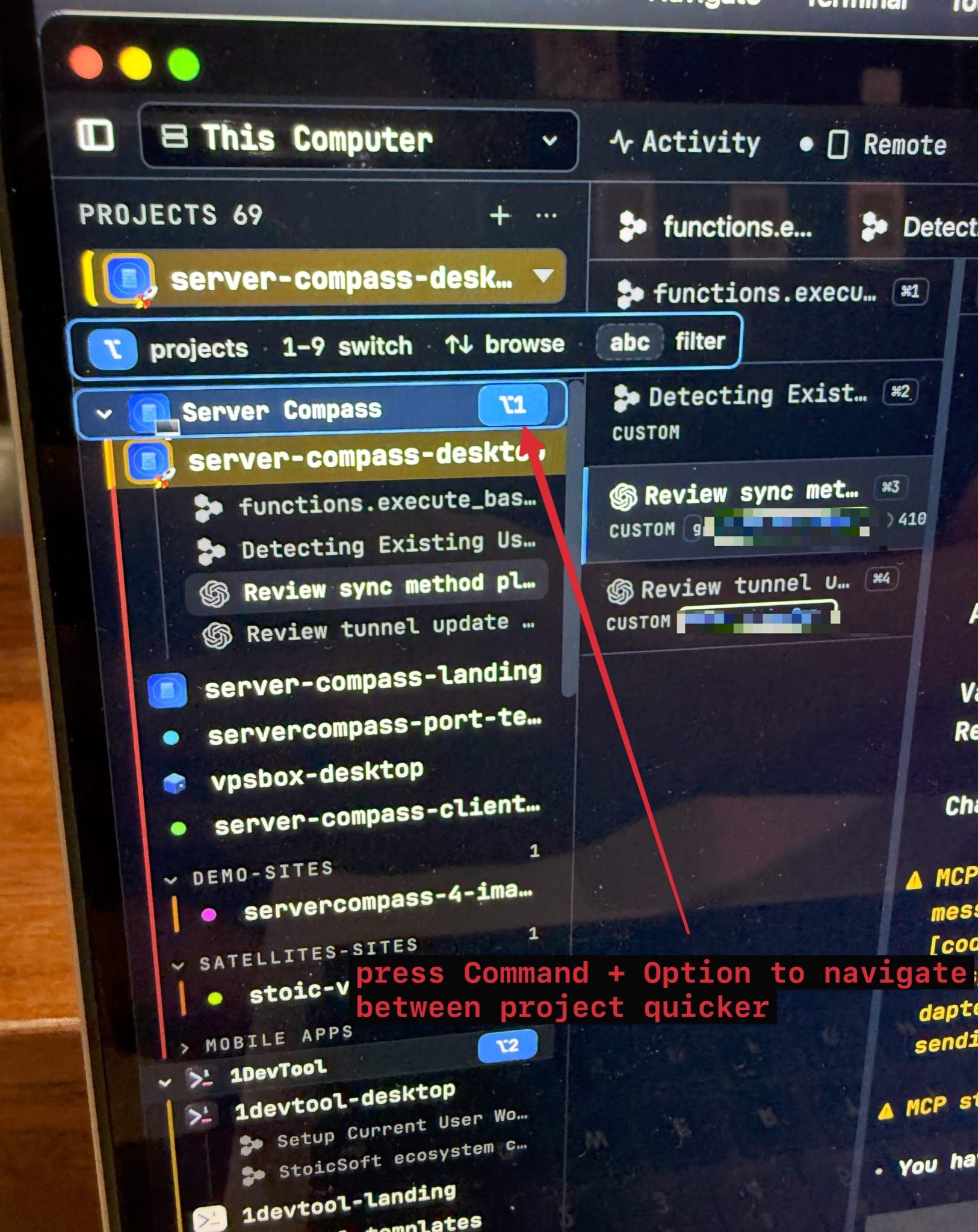
Keyboard planes — hold a modifier, work the whole window
Keyboard planes — hold a modifier, work the whole window. Hold ⌘ and numbered badges appear over the terminal tab strip; hold ⌥ and they appear over the sidebar's project list — press the digit to jump. The two planes hand over to each other instead of cancelling, project groups renumber as you drill into them, and typing letters while ⌥ is held filters the sidebar with the badges following the rows that survive. Terminal Overview now takes arrows, Home and End; All Terminals marks AI runs that finished since you last looked as Needs review; and ⌥1–9 replaces the macOS ⍃1–9 project shortcuts that Mission Control used to swallow before the app ever saw them.
Download v1.76.2
The download page always has the newest build; installers for this version are on GitHub.
What changed
New features
13- Hold ⌘ for your terminals, hold ⌥ for your projects — after a short hold, numbered badges appear over the tab strip or over the sidebar's project list; press the digit to jump (⌥ is Alt on Windows/Linux, so the same hold works everywhere)
- The planes hand over instead of cancelling — while ⌘ is held for the terminal numbers, adding ⌥ switches straight to the project badges, and each plane advertises the other's key right where you are looking
- Project groups are addresses, not walls — a digit pressed on a group opens it (collapsed groups expand) and renumbers its children for the next digit; Backspace steps back out a level
- Type letters while ⌥ is held to filter — the sidebar's own search narrows the list and the badges renumber on the rows that survive, so a project whose name starts with a digit is still reachable
- ↑/↓ browse the level, ↵ opens, Esc or a click dismisses — and once part of an address is typed, letting go of ⌥ keeps the plane up rather than throwing it away
- Sidebar hidden? The numbers float instead — layouts that show no project list get a floating numbered list that selects the same projects
- ⌥1–9 switches projects on every platform — replacing ⌃1–9 on macOS, which Mission Control claims for switching desktops and swallowed before the app ever saw it; project search moved to ⌥F to match
- A quick press and a held press always agree — ⌥3 means the third entry of whatever level you are on, badges or no badges
- Layout presets moved to ⌘⌃1–7 (Ctrl+Shift+1–7 on Windows/Linux) to hand the ⌥ digits to projects — existing setups are re-keyed once automatically, and a key you chose yourself is never touched
- Arrows, Home and End walk the card grid — ⌘⇧O opens the overview with the terminal you came from already selected; ←/→ wrap around the ends, ↑/↓ move by row, ↵ opens the highlighted card
- Focus can't fall through to the terminals underneath — the overview keeps the keyboard while it is open and hands it back to what you were typing in when it closes
- "Needs review" is now a status — the ⌘L list marks AI runs that finished since you last looked, in amber with its own filter pill — the same set the dashboard board and the notification bell report
- Opening a terminal from the list clears the flag, so the row, the board and the bell always agree
Improvements
1- Windows/Linux: tapping Alt no longer pops a menu bar — the project plane lives on Alt there, so the app window keeps its menu bar hidden instead of flashing it on every hold
Bug fixes
6- Fixed the project badges dying on the third keystroke — following the on-screen hint (hold ⌘, add ⌥) left ⌘ held down, so the very next key — a digit, a letter, an arrow — closed the overlay and did nothing; a modifier that opened the plane no longer reads as a new shortcut
- Fixed arrow keys leaking out of the badge overlay — browsing with ↑/↓ while ⌘ was still down could also fire the Mosaic split bindings; the keys the overlay owns are now fully claimed
- Fixed floating project numbers that selected nothing — with no sidebar on screen the overlay numbered one list while your digits read another; both now come from the same source, so every painted digit lands
- Fixed "Main panel crashed" during a terminal switch or rename — the tab strip's fold measuring could loop until the whole panel was replaced by a crash screen; the strip now measures once per change and stays settled
- Fixed held-key hints that could fail to appear — an internal refresh could cancel the reveal timer mid-hold; both planes now share a single, stable hold detector
- Fixed changed shortcut defaults never reaching existing setups — if you had ever opened Settings, a moved default kept firing the old keys while the new binding did nothing; moved defaults are now re-keyed once, automatically
Screenshots