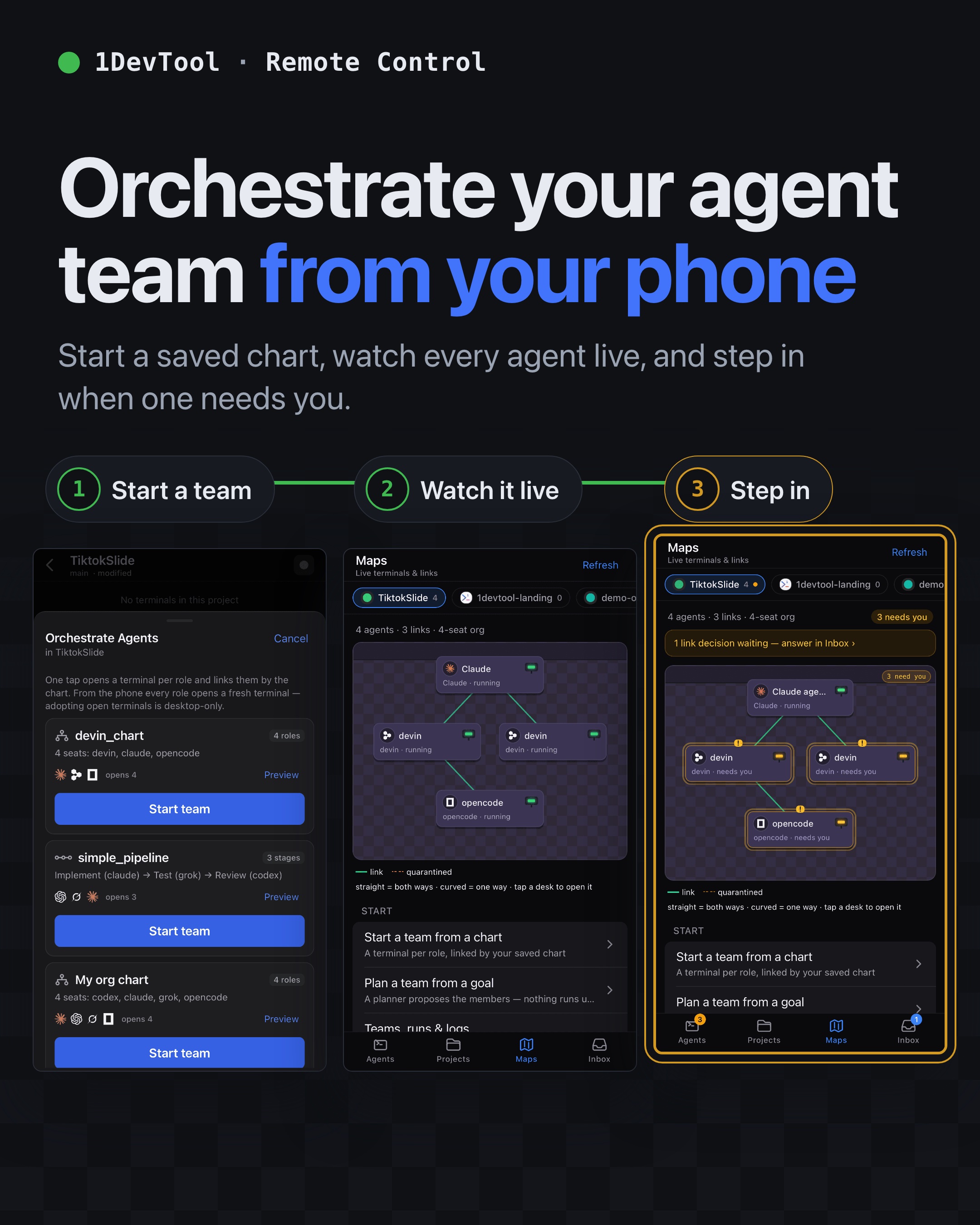
Maps — mission control on the phone
Maps — mission control on the phone. A new Maps tab gives every project a live map on your phone: each agent terminal is a desk, each link between agents is a line, laid out by chain of command, with every desk showing whether it is running, idle, closed or waiting on you. Tap a desk to open that terminal. The org charts and pipelines you saved in the desktop Builder now start from the phone too, from Add Terminal → Orchestration or a project's new Orchestrate Agents sheet: one tap opens a fresh, already-linked terminal per seat, a running team is never replaced, and a retried start after a dropped connection returns the first team instead of doubling it. The Light and Stoic Light themes were rebuilt as a neutral white workbench, newly launched Claude terminals follow the app theme, Esc in the Terminal Dashboard no longer interrupts the agent underneath, and a failed push to a workflow file now says exactly which token scope to grant.
Download v1.76.5
The download page always has the newest build; installers for this version are on GitHub.
What changed
New features
9- A new Maps tab on the phone — every project gets a live map where each agent terminal is a desk and each link between agents is a line between them, arranged by chain of command: an org chart keeps its tiers, a team's host sits above its members, and lone agents wait in a list under the map
- Desks show their state — running, idle, closed — and agents waiting on you are marked, so the map doubles as a triage view
- Tap a desk to open that terminal — the map is a shortcut, not just a picture
- The old Team tab is one tap away — teams, runs and logs moved into "Teams, runs & logs" at the top of the map
- One tap opens a whole team — the org charts and pipelines saved in the desktop Builder now appear in Add Terminal → Orchestration and in a project's new Orchestrate Agents sheet, each with a mini preview drawn like the Builder canvas: role cards, reporting lines, numbered pipeline stages
- Every seat opens as a fresh terminal, already linked by the chart — handing a seat to a terminal that's already open stays a desktop-only move
- A running team is never replaced from the phone — the start button stands down and names the chart currently holding the project
- A dropped connection can't spawn a second team — a retried start returns the first result instead of doubling the seats
- No saved chart fits? "Plan a team from a goal" is still one tap away
Improvements
3- The light themes are a real workbench now — Light and Stoic Light were rebuilt as a neutral white canvas with layered chrome and hairline separators, and every hard-coded colored text in the app — errors, success states, links, badges — was re-inked to a shade that stays readable on white instead of washing out
- Agent Input's Lowkey persona and the selected-project highlight were re-tuned for the lighter canvas too
- Claude terminals follow your theme — Claude's own surfaces (diff blocks, the composer, dimmed text) stayed dark no matter what theme the app was in; newly launched Claude terminals now start in follow-the-terminal mode, so switching dark ↔ light repaints them too — a theme you deliberately set in Claude's own settings is respected and left alone
Bug fixes
3- Fixed Esc in the Terminal Dashboard interrupting the agent underneath — opening the dashboard while a terminal had the keyboard left Esc, arrows and Enter going into that hidden terminal, so Esc could interrupt a running agent and Enter could submit a half-typed prompt you couldn't see; the dashboard now owns the keyboard while it's open and Esc closes it
- Fixed a failed push ending in a dead-end error — pushing a change to a GitHub Actions workflow file with a token that can't update workflows now names the file and says exactly what to grant (repository contents plus workflows), with a button straight to Settings → Git; "repository not found" now tells you whether the remote URL is wrong or the signed-in account simply can't see that repo — and the Publish dialog shows the same guidance as the push banner
- The "Create one" token link in Settings → Git now pre-selects the workflow scope so new tokens work the first time
Screenshots