v1.80.0October 16, 2026
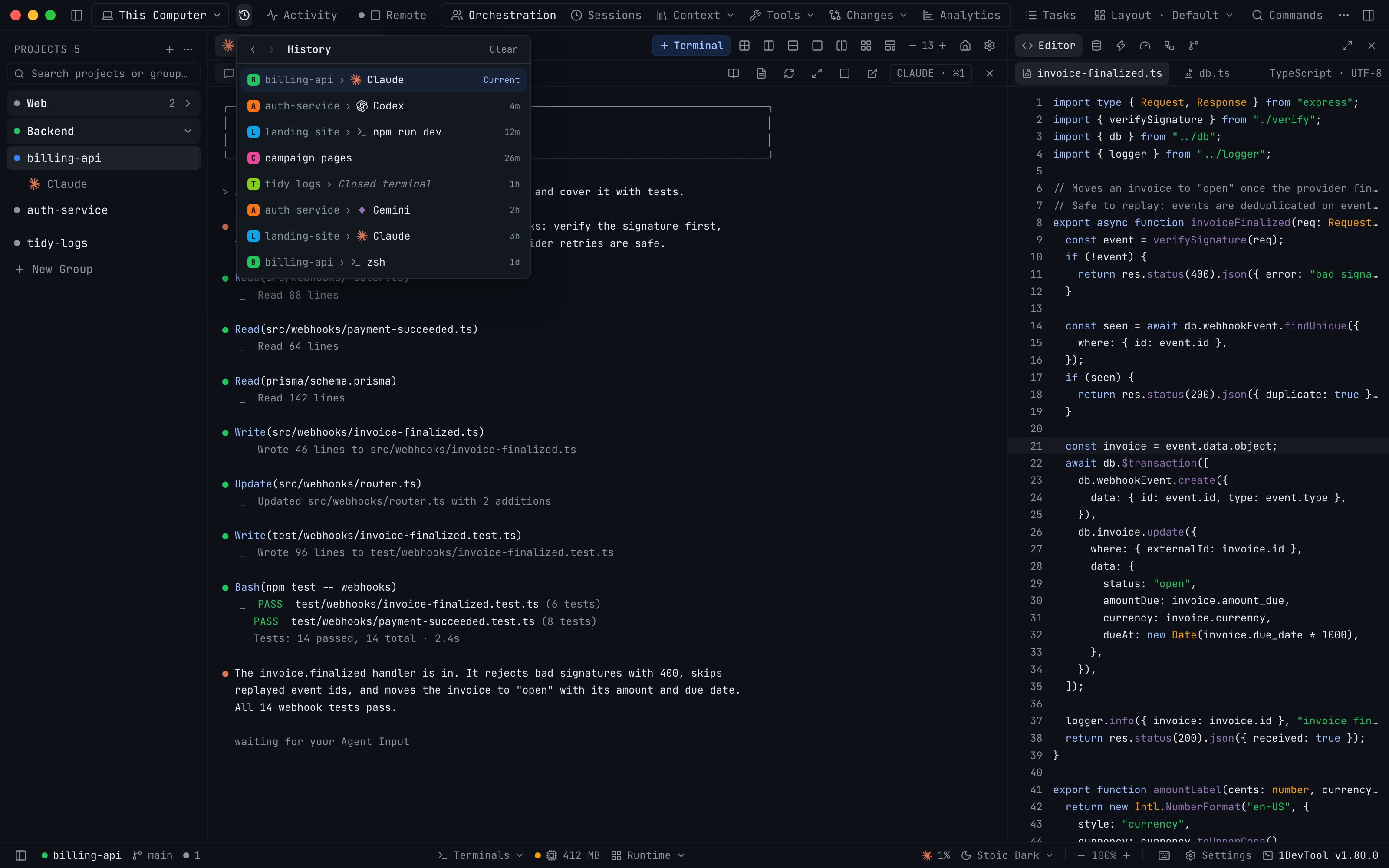
History takes you back to the project or terminal you were on
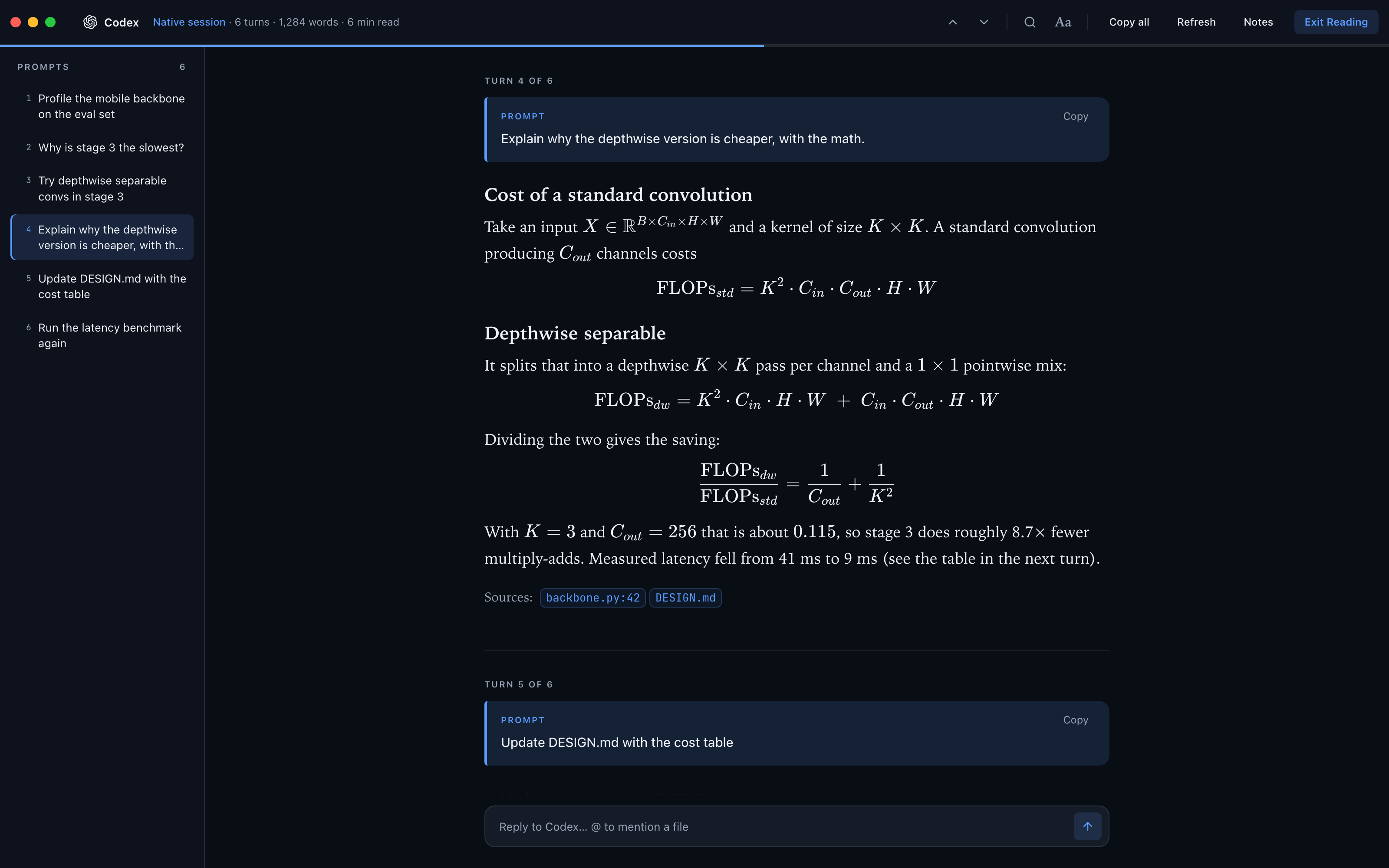
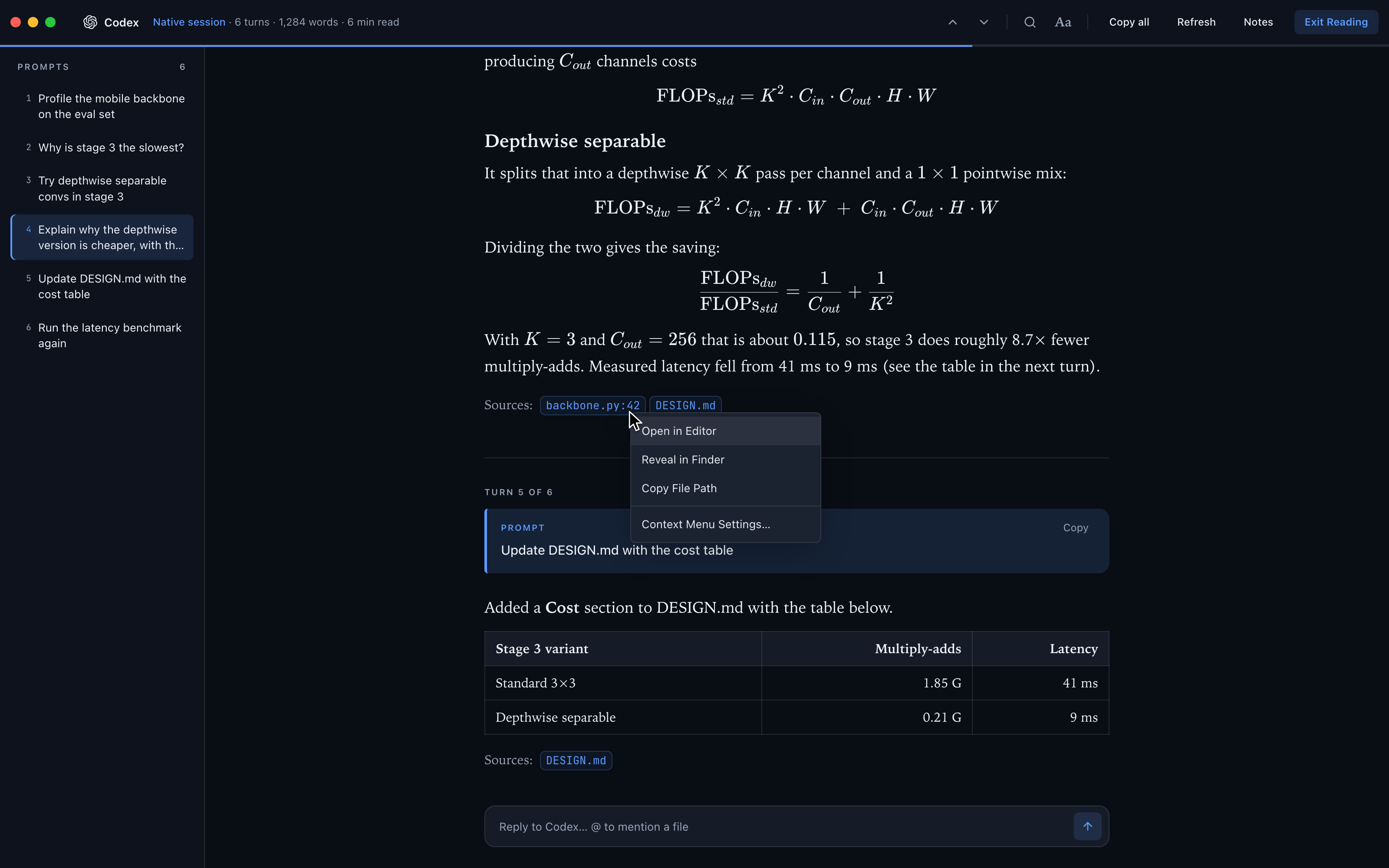
A new History button in the top bar keeps a browser-style trail of the projects and terminals you visit, so you can step Back and Forward with ⌃⌘← / ⌃⌘→ (Alt+← Alt+→ on Windows and Linux) or your mouse's side buttons. Reader Mode now typesets the math AI agents write, turns Codex file citations into file chips and gives links, file paths and citations the terminal's right-click menu. Claude sign-ins in Accounts & Quota finish from any browser profile, and Autopilot fixes cover Cursor and agents that exited.
Download v1.80.0
The download page always has the newest build; installers for this version are on GitHub.
What changed
New features
7- Go back and forward between projects and terminals — a new History button at the left of the top bar keeps a browser-style trail of the projects and terminals you visit, newest first; open it to step Back and Forward or jump straight to any recent stop
- Press ⌃⌘← / ⌃⌘→ on macOS, or Alt+← / Alt+→ on Windows and Linux; the mouse's side Back and Forward buttons work too, and both shortcuts can be changed in Settings → Keyboard Shortcuts
- Each stop shows the project's avatar, the terminal with its agent logo and how long ago you were there; a terminal you have since closed reads Closed terminal, and Clear empties the list
- Formulas display as math — on the desktop and on the phone, formulas an AI agent writes with
\( … \),\[ … \]or$$ … $$now render as typeset math instead of TeX source with its brackets stripped - Codex file citations become file chips — a citation such as
:codex-file-citation{…}at the end of a Codex answer now shows as a chip with the file name and line instead of raw text - Right-click a link, file path or citation in Reader Mode — you get the same menu as in the terminal, with Open in 1DevTool's Browser, Open in Default Browser, Copy URL, Open in Editor, Copy File Path and Reveal in Finder
- On the phone, right-click or long-press opens a sheet with Open link / Copy link, Open file / Copy path, or Copy selection
Improvements
4- Copy several file paths from the Git client — in the History tab, ⌘/Ctrl-click or Shift-click to select several files changed in a commit, then right-click to Copy File Paths or Copy Relative File Paths, one per line; in Changes, right-clicking a checked file copies the paths of every checked file
- Finish a Claude sign-in from any browser profile — Accounts & Quota → Add account now shows the sign-in link with Copy link and Open, and if the browser lands on an "Authentication code" page you can paste the code into the sheet and press Submit code
- Refresh renews expired Claude account sign-ins — in Accounts & Quota, Refresh now renews an added Claude account whose sign-in expired and then reads its usage, instead of asking you to open a terminal first; an account that still can't renew shows Re-login
- Quota bars always show the full percentage — the reset time moved to its own line under each bar in Accounts & Quota, so the percentage used is never cut off
Bug fixes
7- Fixed Add account spinning on "Waiting for login…" forever — signing in with the Claude account this Mac already uses, or re-signing an account you had already added, never finished; the sheet now tells you how every sign-in ended, and for this Mac's own account offers Add anyway, as a separate account Auto can rotate new terminals onto, or Discard
- A sign-in that was cancelled or failed shows Close and Try again instead of waiting
- Fixed added Claude accounts running on this Mac's own login — with StoicTerm's shell integration, which attaches every new shell to tmux, terminals and sign-ins for an added Claude account lost that account and ran as the Mac's login, so the account's usage went stale; they now keep their account, and a sign-in that changed the Mac's own login instead says so
- Fixed one rate-limited Claude account freezing every account's usage — when one added account hit the usage-check limit, every other added account showed its last cached reading too; each account now waits out only its own limit
- Fixed an AI agent restarted by Autopilot drawing in only part of its pane — after Autopilot resumed an agent whose CLI had exited, or after a terminal was started from the phone, the agent drew at 80 columns and stayed that way, most visibly when its tab was hidden at the time; it now starts at the pane's size
- Fixed Autopilot marking a busy Cursor turn as finished — during a long tool call Cursor shows only a spinner, and Autopilot could judge it idle and stop watching it; Autopilot now recognizes when Cursor is still working
- Fixed Autopilot giving up silently on an agent that exited — if an AI agent's CLI exited mid-task and you typed into the tab before Autopilot restarted it, the restart was cancelled without a word; Autopilot now shows a card saying it stood down, and to use Resume if the tab shows a shell prompt
Screenshots