Find Any Terminal Without the Mouse
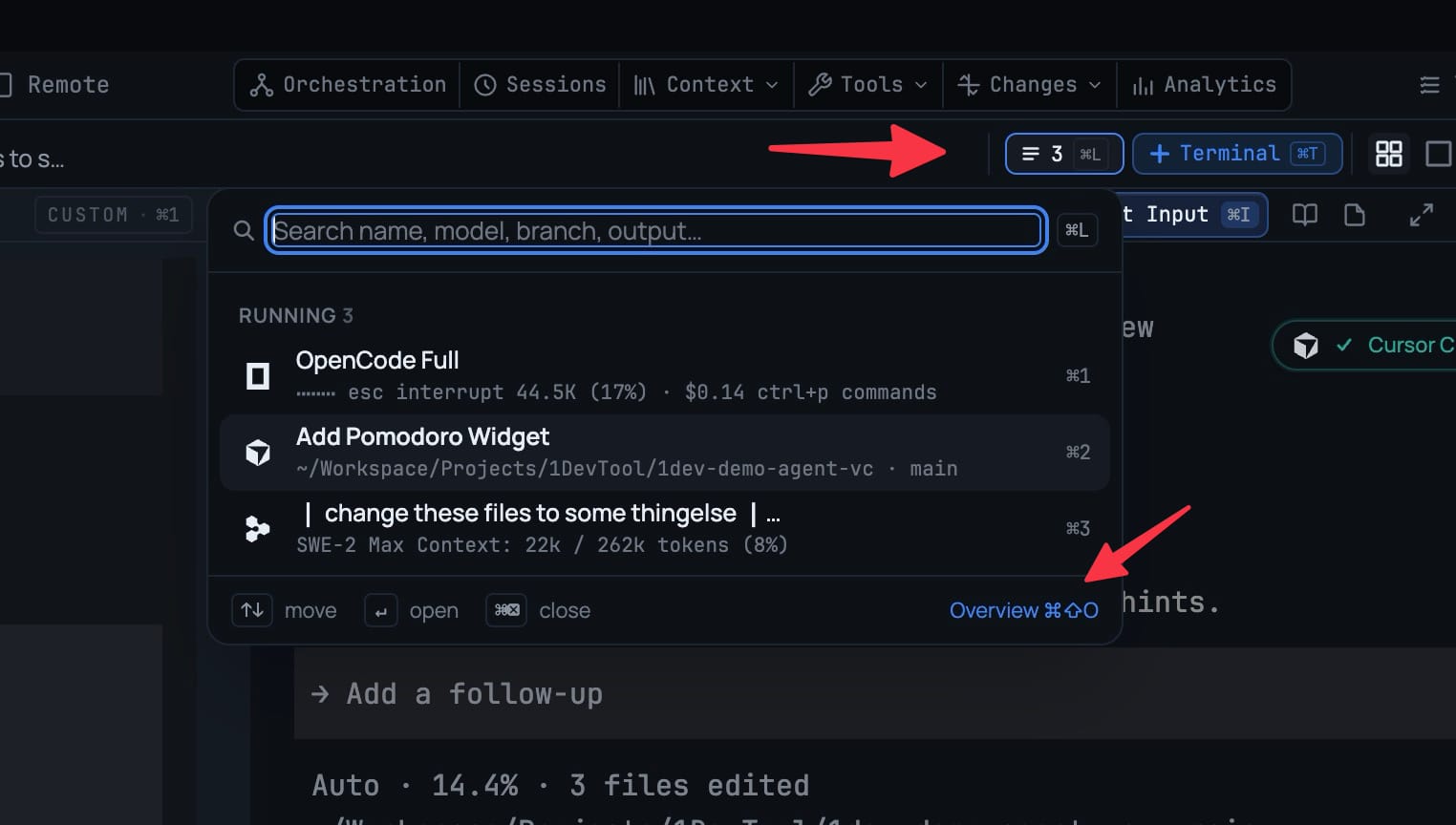
⌘L opens a searchable list of the terminals in the current project, grouped Running / Done / Idle / Hidden; ⌘⇧O lays them all out as cards you can filter and drag to reorder. Search matches agent, model, branch, account — even the last line of output. Agent runs that have finished sit under Done, and ⌥1–9 (Alt+1–9 on Windows and Linux) switches project when the terminal you want lives elsewhere.
More Screenshots
Click any image to zoom in
Why You Need This
How this feature boosts your daily productivity
Past about a dozen tabs the strip stops being navigation. ⌘L (or the tab strip's new All N button) gives you a “Search name, model, branch, output…” field over every terminal in the project, each row showing its agent, worktree or machine, context use and its last line of output — move with ↑↓, open with ↵, close with ⌘⌫, and picking a hidden terminal brings it back. ⌘⇧O is the survey view: every terminal in the project as a card with its latest output, status, model, worktree, account and context use. ⌥1–9 (Alt+1–9 on Windows and Linux) switches project by number, following the sidebar exactly as shown; hold ⌥ to see the numbers.
How It Works
Get started in 4 simple steps
Press ⌘L
Or click the tab strip's All N button. “Search name, model, branch, output…” opens over every terminal in this project, grouped Running / Done / Idle / Hidden.
Search by anything you remember
Agent, model, branch, account — even the last line of output. Each row shows its agent, worktree or machine, context use and that last line.
Move without the mouse
↑↓ moves, ↵ opens, ⌘⌫ closes. Picking a hidden terminal brings it back.
Survey them all with ⌘⇧O
Every terminal in the project as a card with its latest output, status, model, worktree, account and context use — filter by state, click to jump, drag to reorder your tabs. ⌥1–9 switches project by sidebar number.
Without 1DevTool
The manual way vs. the 1DevTool way
The Hard Way
The 1DevTool Way
How it compares
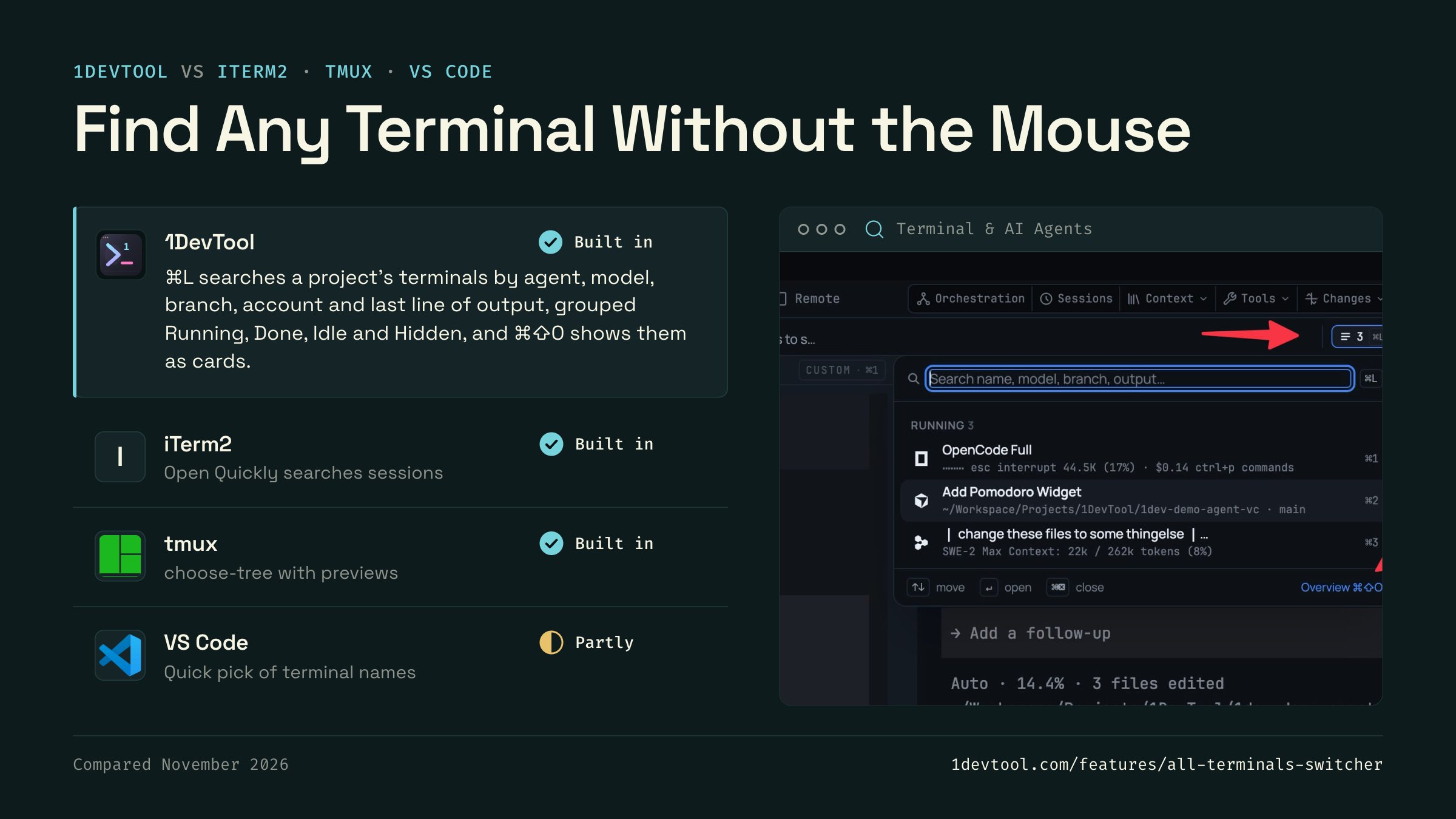
Past a dozen tabs, people jump between terminals with a quick switcher such as iTerm2's Open Quickly or tmux's session tree.
 1DevToolBuilt inBuilt in
⌘L searches a project's terminals by agent, model, branch, account and last line of output, grouped Running, Done, Idle and Hidden, and ⌘⇧O shows them as cards.
- iTerm2Built inBuilt in
iTerm2's Open Quickly (⌘⇧O) searches sessions by name, command, directory and host, and jumps to the one you pick.
- Built in
tmux's choose-tree (prefix w) lists sessions, windows and panes with a preview, and can filter the list.
- Partly
VS Code's Quick Open lists open terminals by name when you type term followed by a space.


Checked November 2026 against each app's public docs. These products change quickly. If a row is out of date, tell us at feedback.stoicsoft.com/1devtool.
Key Capabilities
Everything included with Find Any Terminal Without the Mouse
Why It Matters
The productivity impact of having terminal & ai agents built into your workspace
Zero Context Switching
All your AI agents and terminals live in one window. No more alt-tabbing between 5 different terminal apps.
Visual Status Tracking
Color-coded tabs and the Kanban dashboard tell you which agents are done, running, or need attention — at a glance.
Persistent Sessions
Tmux-backed persistence means your terminal state survives crashes and restarts. Never lose scrollback history again.
Flexible Arrangements
One-click layouts adapt to your task: grid for monitoring, columns for comparing, fullscreen for deep focus.
More in Terminal & AI Agents
Other features in this category you might find useful
Multi-Agent Terminals
Run Claude Code, Codex, Gemini CLI, Amp, OpenCode, Qwen, and custom AI commands in dedicated terminal tabs with recognizable agent logos, custom colors, and status indicators.
Flexible Terminal Layouts
View terminals in 2×2 grid, side-by-side columns, or single fullscreen mode with resizable panes.
Terminal Dashboard
Kanban-style board view of all terminal statuses — Idle, Running, and Review — with real-time polling.
Session Persistence
Terminal sessions persist across app restarts with full scrollback history via tmux integration.
Ready to boost your workflow?
Download 1DevTool for free and experience Find Any Terminal Without the Mouse along with 342 other features — all in one app.