Click-to-Open HTTP Collections
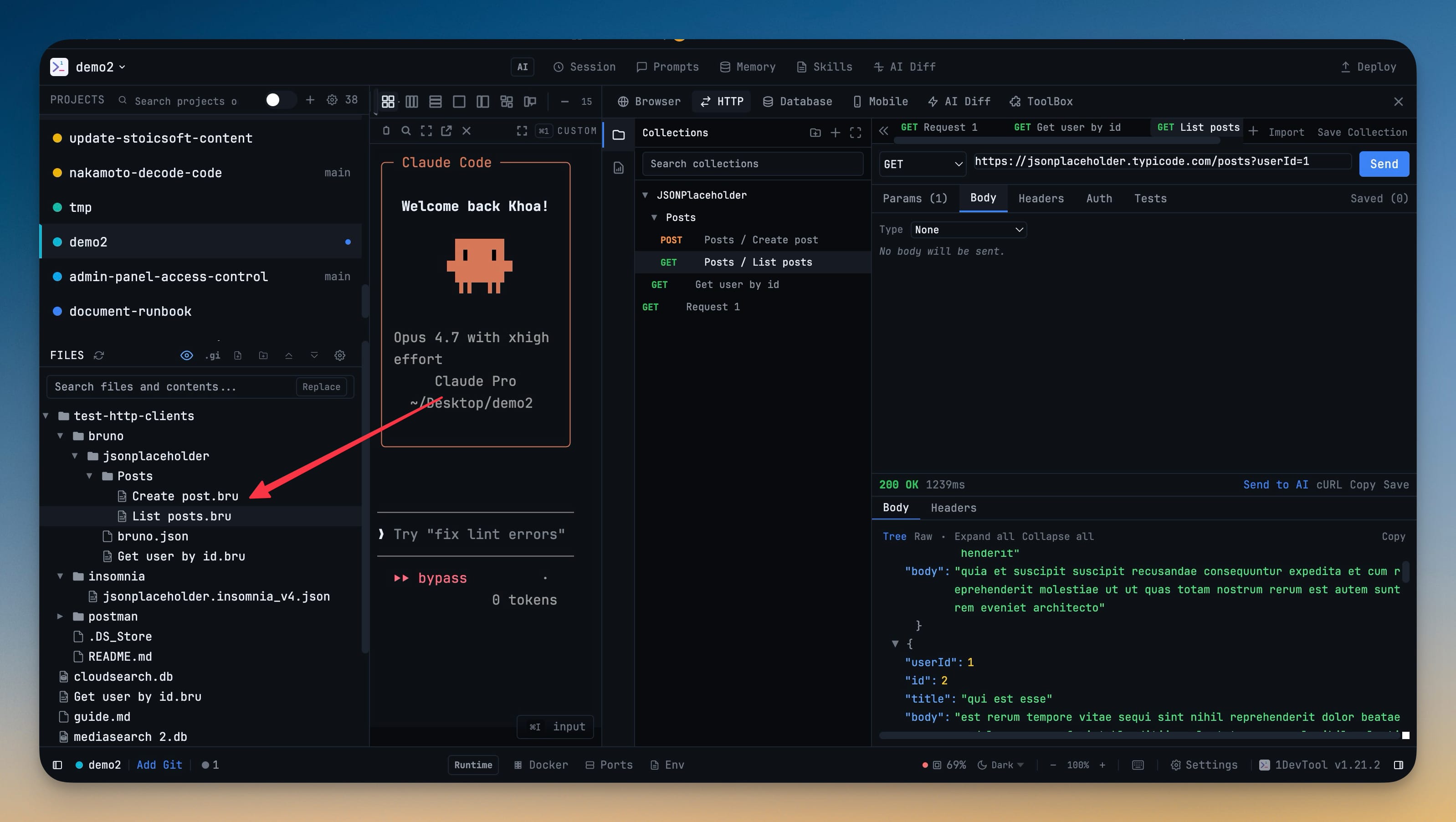
Click a Postman v2.1, Insomnia v4, or Bruno collection in the file explorer and every request opens in the HTTP client immediately — no import dialog, no format picker, no copy-paste. Folder hierarchies and environment files are preserved, and re-clicking an already-imported file fast-jumps to that request instead of re-importing.
Why You Need This
How this feature boosts your daily productivity
Sharing an API collection with teammates breaks down the moment importing it takes longer than running the test. Multi-step file → import → confirm dialogs get skipped, collections go stale, and everyone ends up running slightly different versions of the same call. Treating `*.postman_collection.json`, `*.insomnia.json`, and `.bru` files like any other file in your project — clickable, navigable, automatically picked up when git pulls — keeps the source of truth in version control and the HTTP client always in sync. You navigate your API the same way you navigate code.
How It Works
Get started in 4 simple steps
Set Up Your Request
Choose the HTTP method, enter the URL, and configure headers, auth, and body in the tabbed interface.
Send & Inspect
Hit send and see the response instantly — formatted JSON, headers, status code, and latency metrics.
Save & Organize
Save requests in tabs for quick re-use. Each project maintains its own request workspace and URL history.
Share & Debug
Copy as cURL for sharing. Send response data to your AI agent for analysis or debugging assistance.
Without 1DevTool
The manual way vs. the 1DevTool way
The Hard Way
The 1DevTool Way
Key Capabilities
Everything included with Click-to-Open HTTP Collections
Why It Matters
The productivity impact of having http client built into your workspace
No App Switching
Test APIs right next to your terminal and code. No more copying tokens to Postman or Insomnia.
Organized Requests
Multi-tab workspaces and saved requests keep your API testing organized per project.
Instant Debugging
Formatted responses, latency metrics, and copy-as-cURL make API debugging fast and shareable.
AI Integration
Send response data directly to your AI agent for analysis, documentation, or debugging assistance.
More in HTTP Client
Other features in this category you might find useful
API Request Builder
Full Postman-like request builder with method selector, custom headers, body editor, and auth support.
Response Inspector
Inspect formatted JSON, headers, status codes, latency, and response structure with a readable tree viewer.
Request Tabs & Collections
Organize API work in nested collections with folder trees, saved tabs, request history, and reusable environments.
Postman, Insomnia & Bruno Import/Export
Bring existing API collections into 1DevTool and export them back out without rebuilding your request library.
Ready to boost your workflow?
Download 1DevTool for free and experience Click-to-Open HTTP Collections along with 327 other features — all in one app.