Confirm Before ⌘W Closes a Terminal
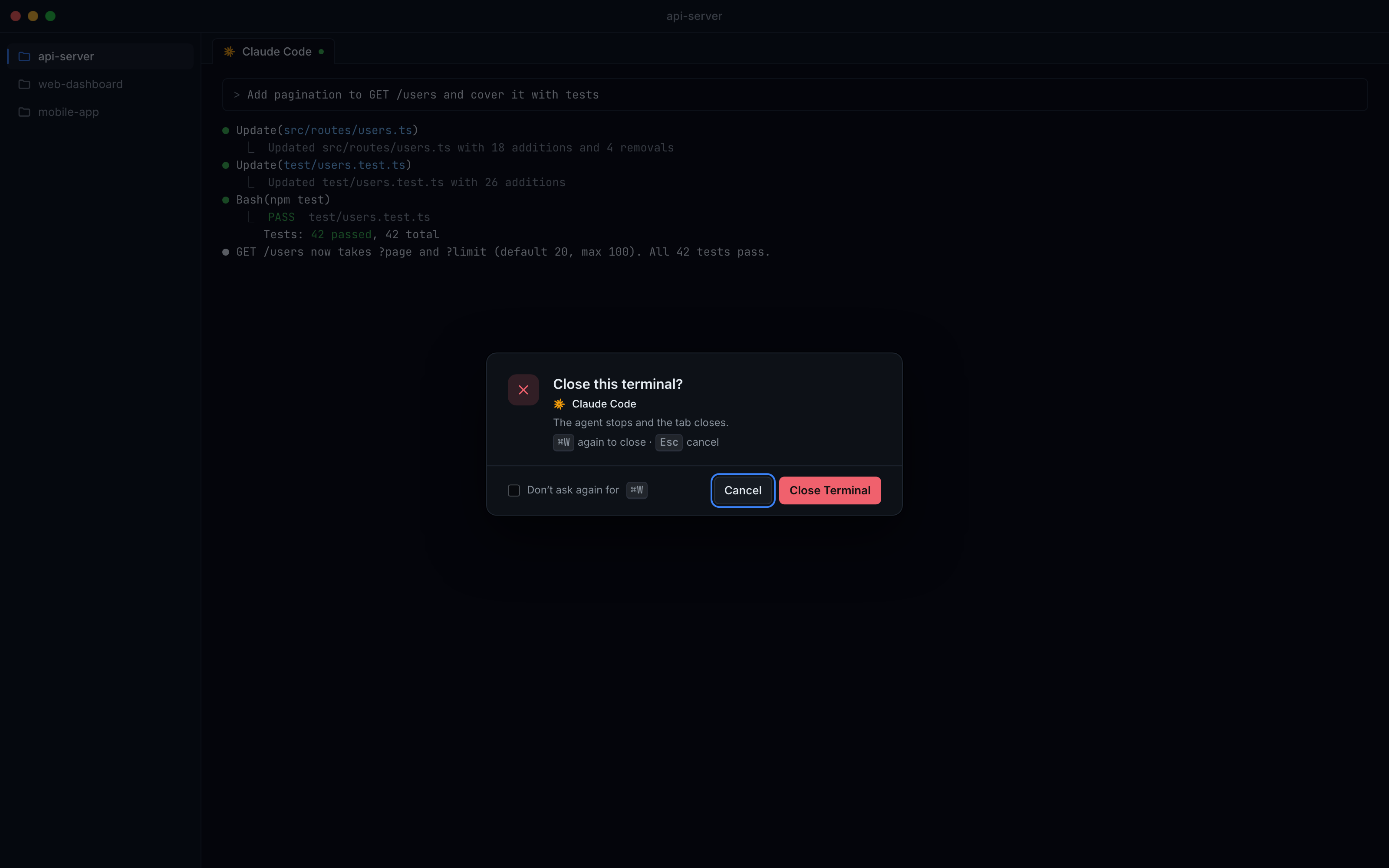
Turn on Confirm disruptive shortcuts and ⌘W, ⌘K or ⇧⌘H ask before closing, clearing or hiding a terminal. The confirm is built for the keyboard, with focus on Cancel so a stray Enter is safe.
Why You Need This
How this feature boosts your daily productivity
⌘W is one key away from ⌘Q and ⌘E, and in 1DevTool it closes the active terminal. If that terminal is an AI agent in the middle of a turn, the agent stops and its work in progress goes with it; ⌘K wipes the scrollback you were about to read. This setting puts one keyboard-friendly question in front of those shortcuts, without slowing down clicks or menu items.
How It Works
Get started in 4 simple steps
Turn it on
Settings → Terminal → Shortcuts → Confirm disruptive shortcuts. It is off until you turn it on.
Pick which shortcuts ask
Close Terminal and Clear Terminal are ticked, Hide Terminal is not. The confirm follows your own key bindings.
Answer from the keyboard
Focus starts on Cancel. ←/→ or Tab move, Enter chooses, Esc cancels, and pressing the shortcut again goes ahead.
Or stop asking
Don't ask again turns the confirm off for that one shortcut. A tab's close button or a menu item never asks.
Without 1DevTool
The manual way vs. the 1DevTool way
The Hard Way
The 1DevTool Way
Key Capabilities
Everything included with Confirm Before ⌘W Closes a Terminal
Why It Matters
The productivity impact of having terminal & ai agents built into your workspace
A Stray ⌘W Costs Nothing
An agent mid-turn keeps working when your finger slips, because the shortcut asks first and Enter means Cancel.
Still Fast When You Mean It
Press the shortcut twice to close at once, or turn the confirm off for one shortcut with Don't ask again.
Clicks Stay Instant
Only the keyboard path asks; a tab's close button and menu items act at once.
More in Terminal & AI Agents
Other features in this category you might find useful
Multi-Agent Terminals
Run Claude Code, Codex, Gemini CLI, Amp, OpenCode, Qwen, and custom AI commands in dedicated terminal tabs with recognizable agent logos, custom colors, and status indicators.
Flexible Terminal Layouts
View terminals in 2×2 grid, side-by-side columns, or single fullscreen mode with resizable panes.
Terminal Dashboard
Kanban-style board view of all terminal statuses — Idle, Running, and Review — with real-time polling.
Session Persistence
Terminal sessions persist across app restarts with full scrollback history via tmux integration.
Ready to boost your workflow?
Download 1DevTool for free and experience Confirm Before ⌘W Closes a Terminal along with 347 other features — all in one app.