Keyboard Shortcut Guide
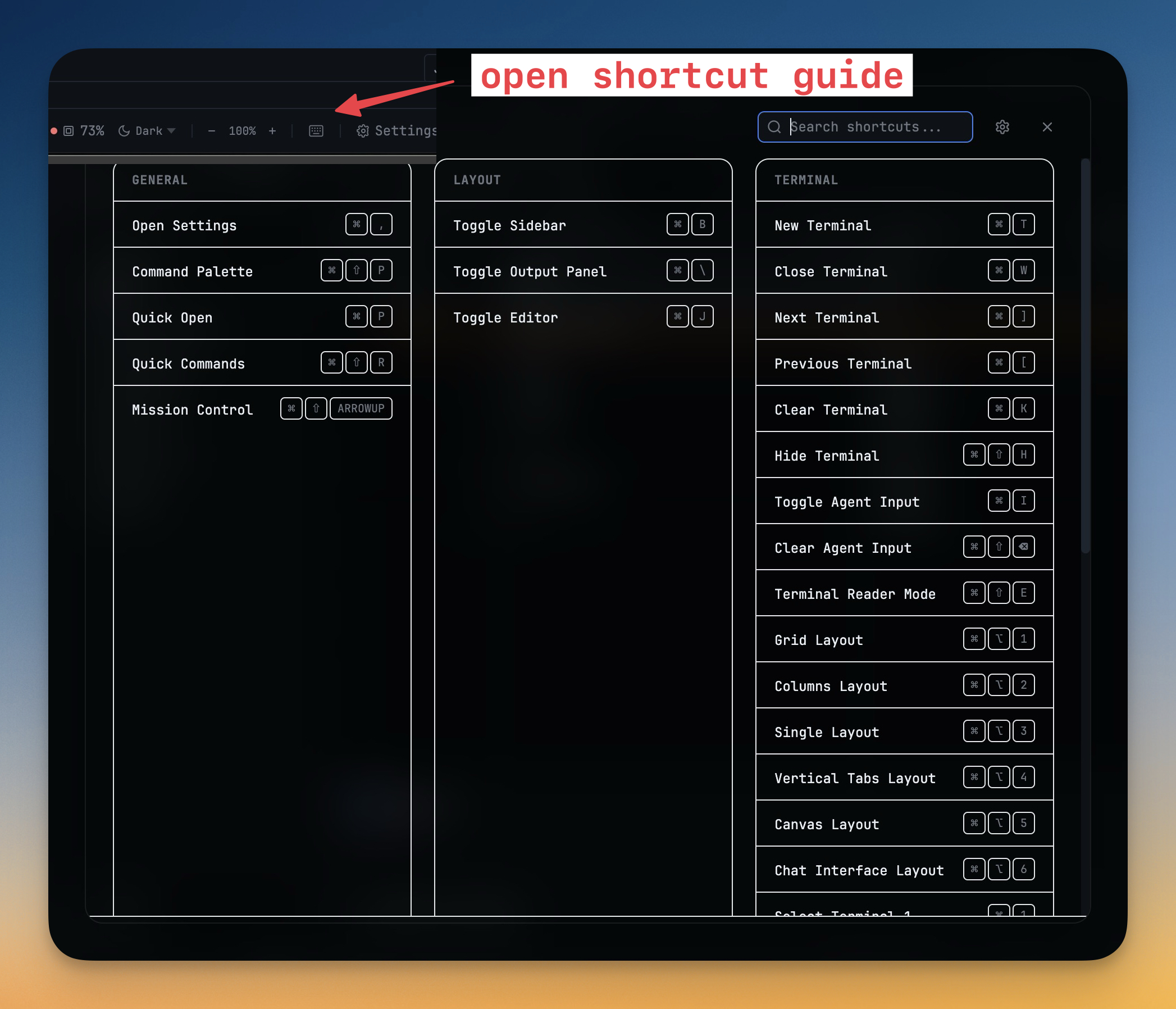
Press `⌘/` to open a searchable, full-screen overlay listing every keyboard shortcut in 1DevTool — organised by General, Layout, Terminal, Editor, Browser, and Tasks. Search by name, key combination, or description, and jump straight to Settings → Shortcuts to rebind anything.
Why You Need This
How this feature boosts your daily productivity
Power users don't memorise shortcuts — they discover them. Every IDE accumulates more bindings than any one person can hold in working memory, and the answer to "what's the shortcut for switching panel?" is almost always *somewhere in a settings page I'll find later*. The shortcut guide collapses that to one keystroke: `⌘/` shows you everything, filtered live as you type, with a direct link to rebind. Discoverable shortcuts are used shortcuts; used shortcuts speed up your day.
How It Works
Get started in 4 simple steps
Open Preferences
Press Cmd+, (or Ctrl+,) to open the Preferences panel. All settings are organized in clear categories.
Choose Your Theme
Select Dark, Light, or System-following themes. Each is carefully tuned for readability and comfort.
Configure Shortcuts
Remap any keyboard shortcut to match your muscle memory. Conflict detection prevents overlapping bindings.
Fine-Tune Details
Set terminal fonts, font sizes, line heights, scrollback lines, and default behaviors per project.
Without 1DevTool
The manual way vs. the 1DevTool way
The Hard Way
The 1DevTool Way
Key Capabilities
Everything included with Keyboard Shortcut Guide
Why It Matters
The productivity impact of having customization built into your workspace
Your Editor, Your Rules
Every shortcut, font, theme, and layout is configurable. Make 1DevTool feel like home.
Eye Comfort
Dark and light themes tuned for all-day coding. Reduce eye strain with the right contrast for your environment.
Muscle Memory Friendly
Remap shortcuts to match your existing habits. No relearning required when switching from VS Code or Vim.
Per-Project Defaults
Different projects can have different terminal types, default URLs, and behavior settings.
More in Customization
Other features in this category you might find useful
Theme Options
Choose between Dark, Light, or System-following themes designed for comfortable all-day coding.
Keyboard Shortcuts
Customize every shortcut to match your muscle memory. Conflict detection prevents accidental duplicates.
Terminal Fonts
Choose from JetBrains Mono, Fira Code, Cascadia Code, or use custom fonts. Adjust size and line height.
MCP Settings
Configure MCP servers for Claude Code, Gemini CLI, and Codex from a unified settings tab — install, enable, and troubleshoot with one click.
Ready to boost your workflow?
Download 1DevTool for free and experience Keyboard Shortcut Guide along with 327 other features — all in one app.