Kilo Code
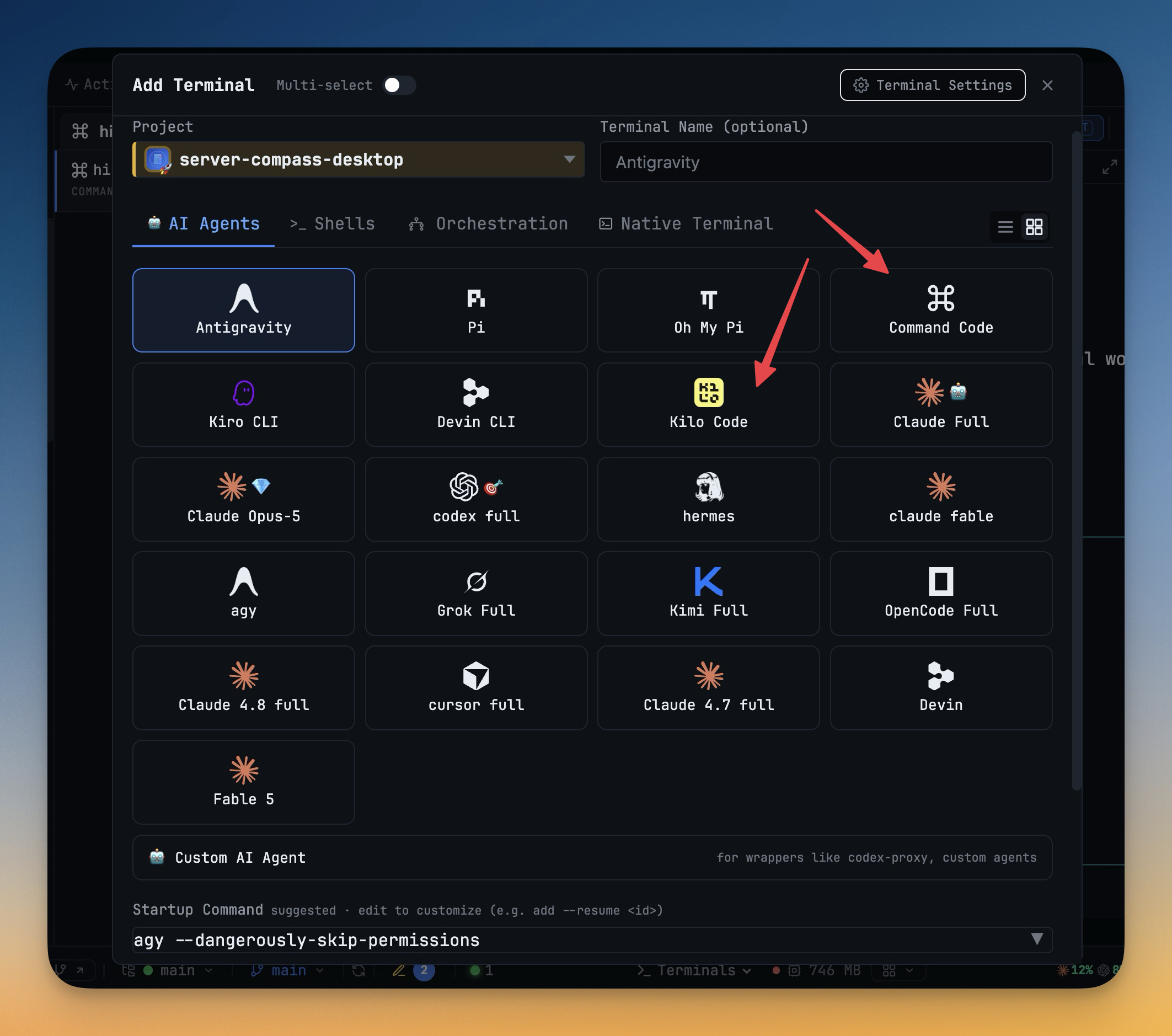
Kilo Code (`kilo`, from `@kilocode/cli`) is now a built-in agent with its own logo in Add Terminal, Resume and on the phone. 1DevTool knows when Kilo's composer is empty and idle before delivering a prompt, resumes past sessions with `kilo -s <id>`, launches full-permission terminals with `--auto`, and lists every model `kilo models` reports.
Why You Need This
How this feature boosts your daily productivity
Kilo CLI is a fork of OpenCode, but it keeps its data in its own `kilo.db`, reads only its own `kilo.json` config, collapses pastes at a different size and uses `--auto` instead of OpenCode's approval flag, so treating it as OpenCode gets the details wrong. 1DevTool now handles it as its own agent. Prompts from Agent Input, Send to AI and other agents wait until Kilo's composer is empty and no turn is running. Past Kilo sessions are listed in Resume with their folder and model, a restarted terminal reopens its own session, and a rename is written to Kilo's own store, so `kilo session list` shows the same title. Other agents can delegate to it with `--to=kilocode`, it takes a seat in teams, Draw, commit messages and Task AI, and Settings installs 1DevTool's MCP servers into `kilo.json`. Servers you added to `kilo.jsonc` yourself are left alone. 1DevTool only accepts a `kilo` binary that is really Kilo Code, so the `kilo` text editor of the same name is never picked up. Install it with `npm install -g @kilocode/cli`.
How It Works
Get started in 4 simple steps
Install the CLI
Run npm install -g @kilocode/cli. 1DevTool accepts a kilo binary only when it is really Kilo Code, so the kilo text editor is never mistaken for it.
Pick Kilo Code in Add Terminal
It has its own logo in the AI Agents grid. Full-permission terminals launch with --auto, and the model picker lists everything kilo models reports.
Send prompts when it is ready
Prompts from Agent Input, Send to AI and other agents wait until Kilo's composer is empty and no turn is running; a collapsed paste is detected at Kilo's own size.
Resume a past session
Resume lists Kilo sessions with their folder and model. Restarting a terminal reopens its own session with kilo -s, and a rename is written to Kilo's own store.
Give it MCP servers
Settings installs 1DevTool's MCP servers into kilo.json. Servers you added to kilo.jsonc yourself stay Kilo's to manage.
Without 1DevTool
The manual way vs. the 1DevTool way
The Hard Way
The 1DevTool Way
Key Capabilities
Everything included with Kilo Code
Why It Matters
The productivity impact of having ai productivity built into your workspace
Kilo Treated as Kilo
Its own database, config file, paste threshold and --auto flag are handled directly, not guessed from OpenCode's.
Sessions You Can Find Again
Resume lists Kilo sessions with folder and model, and a rename shows up in kilo session list as well.
Your Own Config Stays Yours
1DevTool writes MCP servers only to kilo.json and refuses a file that is not strict JSON, so your commented kilo.jsonc is never replaced.
More in AI Productivity
Other features in this category you might find useful
Prompt History
Search prompts and sticky notes from Remote Control while away from the desktop. Switch between This project and All projects, filter prompts by agent or notes by source, copy entries, delete with Operator access, and sync local prompt history.
Resume UI
Browse, search, and resume past AI sessions from Claude Code, Codex, and Gemini CLI — or combine multiple sessions into one.
Combine Sessions
Select sessions from Claude Code, Codex, and Gemini CLI and merge them into a single conversation — giving your next agent the full cross-agent context.
AI Diff Review Panel
Track every file modification any AI agent makes — Claude Code, Codex, Gemini, Amp, custom — and review, accept, or revert their work per file from a dedicated panel with inline diff overlays in the editor.
Ready to boost your workflow?
Download 1DevTool for free and experience Kilo Code along with 321 other features — all in one app.