Live Run Timers on Terminals
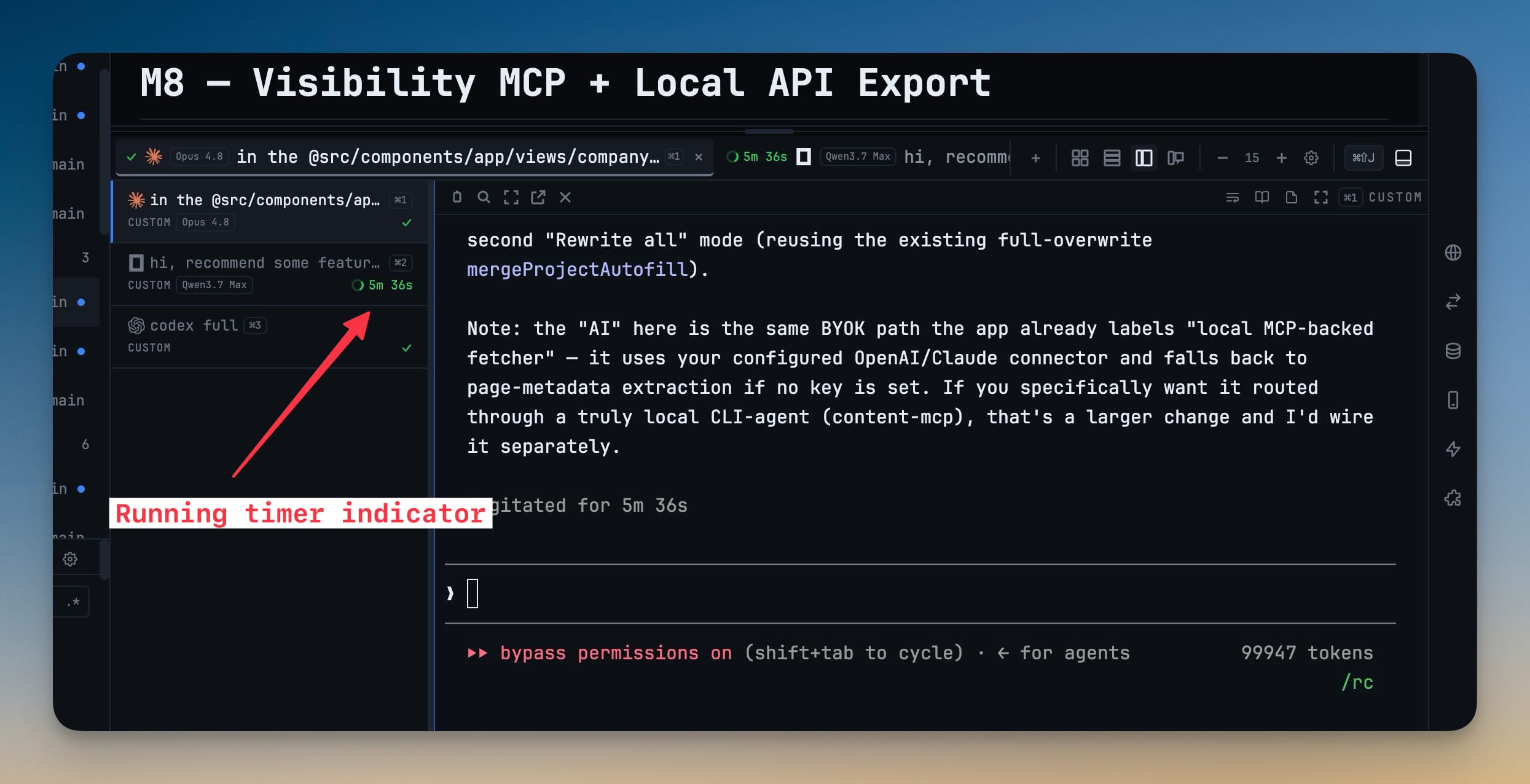
Every terminal running an AI agent shows a live elapsed timer and spinner while the run is in progress, then a check mark the moment it finishes — so you can tell which agents are busy and which are done at a glance.
Why You Need This
How this feature boosts your daily productivity
When you run several AI agents at once, it is easy to lose track of which are still working and which quietly finished. 1DevTool puts a live timer and run status right on each terminal tab, so a single glance replaces clicking into every tab to check. A failed or cancelled run stops cleanly, so a check mark always means the work is genuinely done.
How It Works
Get started in 4 simple steps
Run an AI agent
Start any AI agent in a terminal; the moment the run begins, its tab shows a spinner and a live elapsed timer counting up.
Read the tab at a glance
The timer sits right on the terminal tab, so you can scan a row of terminals and tell which agents are still working without opening any of them.
Watch it finish
When the run completes, the spinner turns into a check mark and the timer stops — a clear signal that the work is done.
Trust the final state
A failed or cancelled run stops the timer cleanly; it won't hang forever or come back to life after the agent has already stopped.
Without 1DevTool
The manual way vs. the 1DevTool way
The Hard Way
The 1DevTool Way
Key Capabilities
Everything included with Live Run Timers on Terminals
Why It Matters
The productivity impact of having terminal & ai agents built into your workspace
Glance, Don't Click
See whether an agent is still working from the tab itself, instead of opening each terminal to check the bottom of the buffer.
Know the Elapsed Time
The clock counts up on the tab, so you always know how long a run has taken without timing it yourself.
A Status Board for Parallel Agents
Rows of spinners and check marks turn a wall of terminals into a live view of which lanes are moving and which are ready for review.
An Honest Finish
A check mark always means done — the timer stops cleanly on failures and never reappears after a run ends.
More in Terminal & AI Agents
Other features in this category you might find useful
Multi-Agent Terminals
Run Claude Code, Codex, Gemini CLI, Amp, OpenCode, Qwen, and custom AI commands in dedicated terminal tabs with recognizable agent logos, custom colors, and status indicators.
Flexible Terminal Layouts
View terminals in 2×2 grid, side-by-side columns, or single fullscreen mode with resizable panes.
Terminal Dashboard
Kanban-style board view of all terminal statuses — Idle, Running, and Review — with real-time polling.
Session Persistence
Terminal sessions persist across app restarts with full scrollback history via tmux integration.
Ready to boost your workflow?
Download 1DevTool for free and experience Live Run Timers on Terminals along with 326 other features — all in one app.