Math, File Citations and Link Menus in Reader Mode
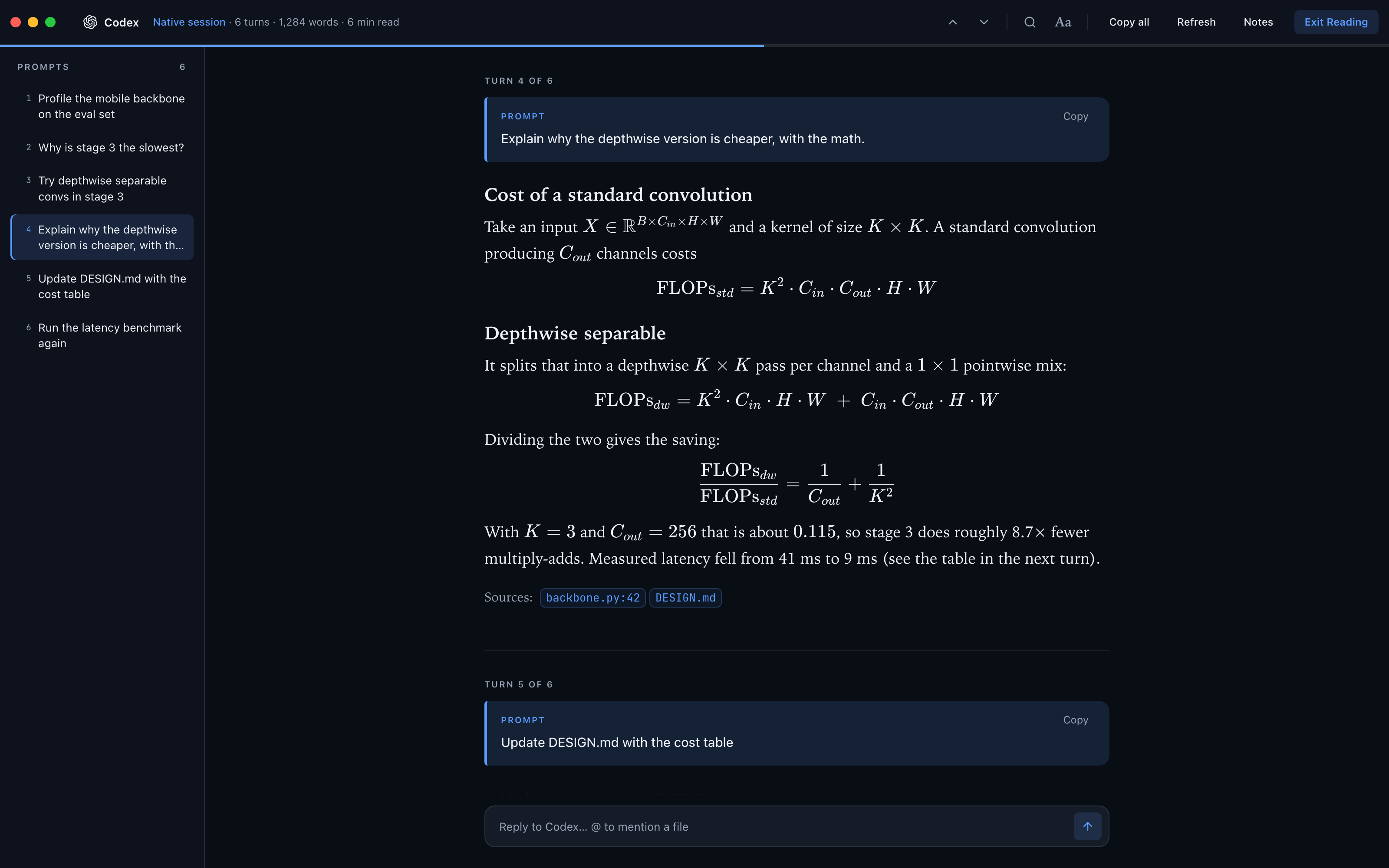
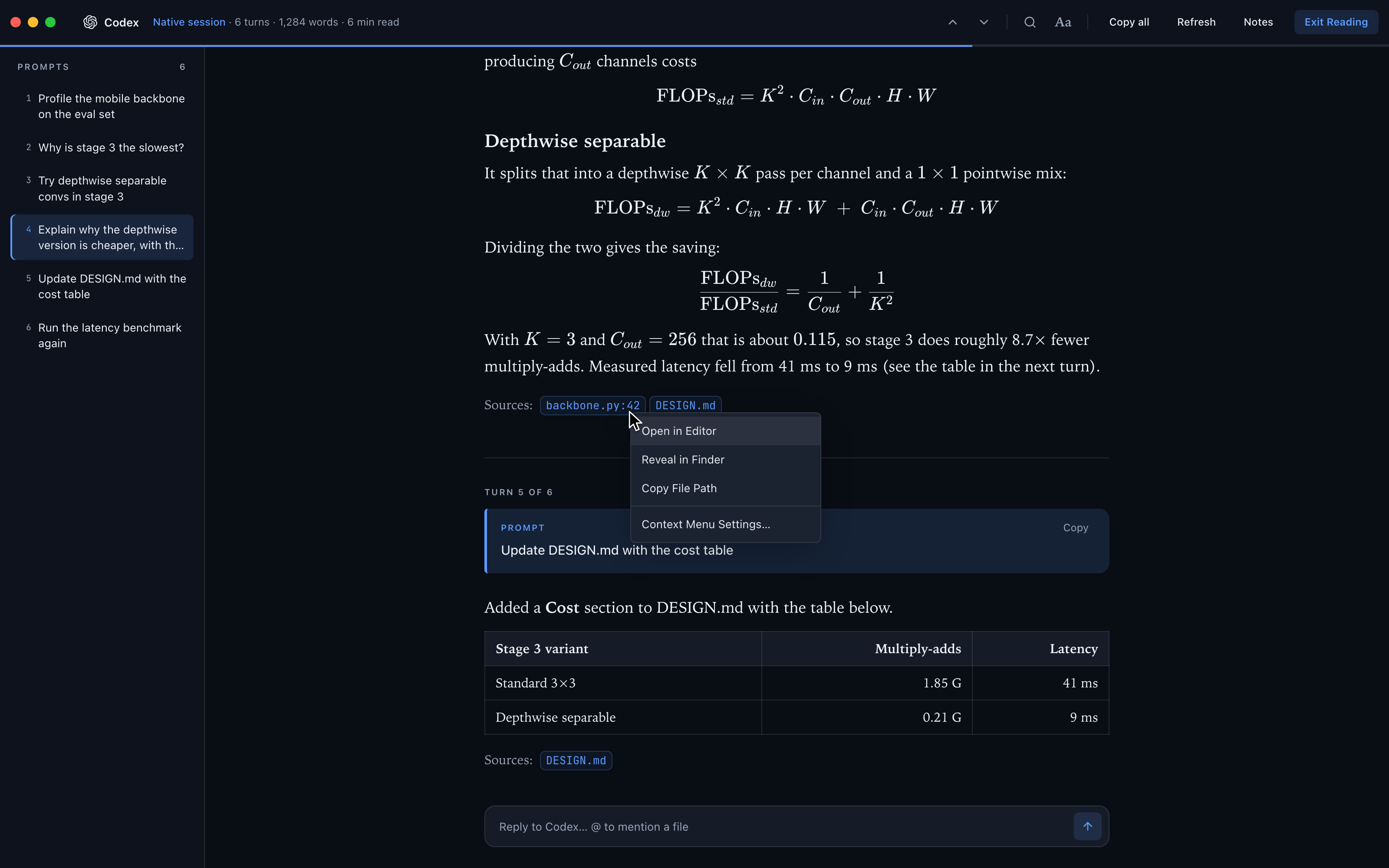
Reader Mode typesets the formulas AI agents write with \( … \), \[ … \] or $$ … $$, on the desktop and on your phone. Codex file citations show as file chips, and right-clicking a link, file path or citation gives you the terminal's menu: open it in the editor or a browser, reveal it or copy it.
More Screenshots
Click any image to zoom in
Why You Need This
How this feature boosts your daily productivity
Agents explain performance, statistics and ML code with TeX. Reader Mode used to read \( and \[ as Markdown escapes, so you got raw \cdot and C_{out} with the brackets stripped, and Codex's citations at the end of an answer showed as raw :codex-file-citation{…} text. Now formulas render as typeset math, inline and displayed, and each citation becomes a chip with the file name and line, such as backbone.py:42. Right-click a link to Open in 1DevTool's Browser, Open in Default Browser or Copy URL, or right-click a file path or chip to Open in Editor, Reveal in Finder or Copy File Path, the same menu the terminal gives you. On the phone a long-press opens a sheet with Open link / Copy link, Open file / Copy path, or Copy selection.
How It Works
Get started in 4 simple steps
Open Reader Mode
Open Reader Mode on an AI terminal on the desktop, or on the terminal's page in Remote Control on your phone.
Read the math
Formulas the agent wrote with \( … \), \[ … \] or $$ … $$ render as typeset math, inline or displayed.
Spot the sources
Codex citations such as :codex-file-citation{…} show as file chips with the file name and line, like backbone.py:42.
Right-click to act
On a link: Open in 1DevTool's Browser, Open in Default Browser, Copy URL. On a path or chip: Open in Editor, Reveal in Finder, Copy File Path. Long-press on the phone.
Without 1DevTool
The manual way vs. the 1DevTool way
The Hard Way
The 1DevTool Way
Key Capabilities
Everything included with Math, File Citations and Link Menus in Reader Mode
Why It Matters
The productivity impact of having terminal & ai agents built into your workspace
Math You Can Read
Formulas show as typeset math instead of TeX with its brackets stripped.
Sources at a Glance
Codex citations become file chips, so you see which files an answer relied on.
Act Without Leaving
The terminal's right-click menu works in Reader Mode, so a cited file opens in the editor from where you read it.
More in Terminal & AI Agents
Other features in this category you might find useful
Multi-Agent Terminals
Run Claude Code, Codex, Gemini CLI, Amp, OpenCode, Qwen, and custom AI commands in dedicated terminal tabs with recognizable agent logos, custom colors, and status indicators.
Flexible Terminal Layouts
View terminals in 2×2 grid, side-by-side columns, or single fullscreen mode with resizable panes.
Terminal Dashboard
Kanban-style board view of all terminal statuses — Idle, Running, and Review — with real-time polling.
Session Persistence
Terminal sessions persist across app restarts with full scrollback history via tmux integration.
Ready to boost your workflow?
Download 1DevTool for free and experience Math, File Citations and Link Menus in Reader Mode along with 335 other features — all in one app.