Batch Terminals & Terminal Sets
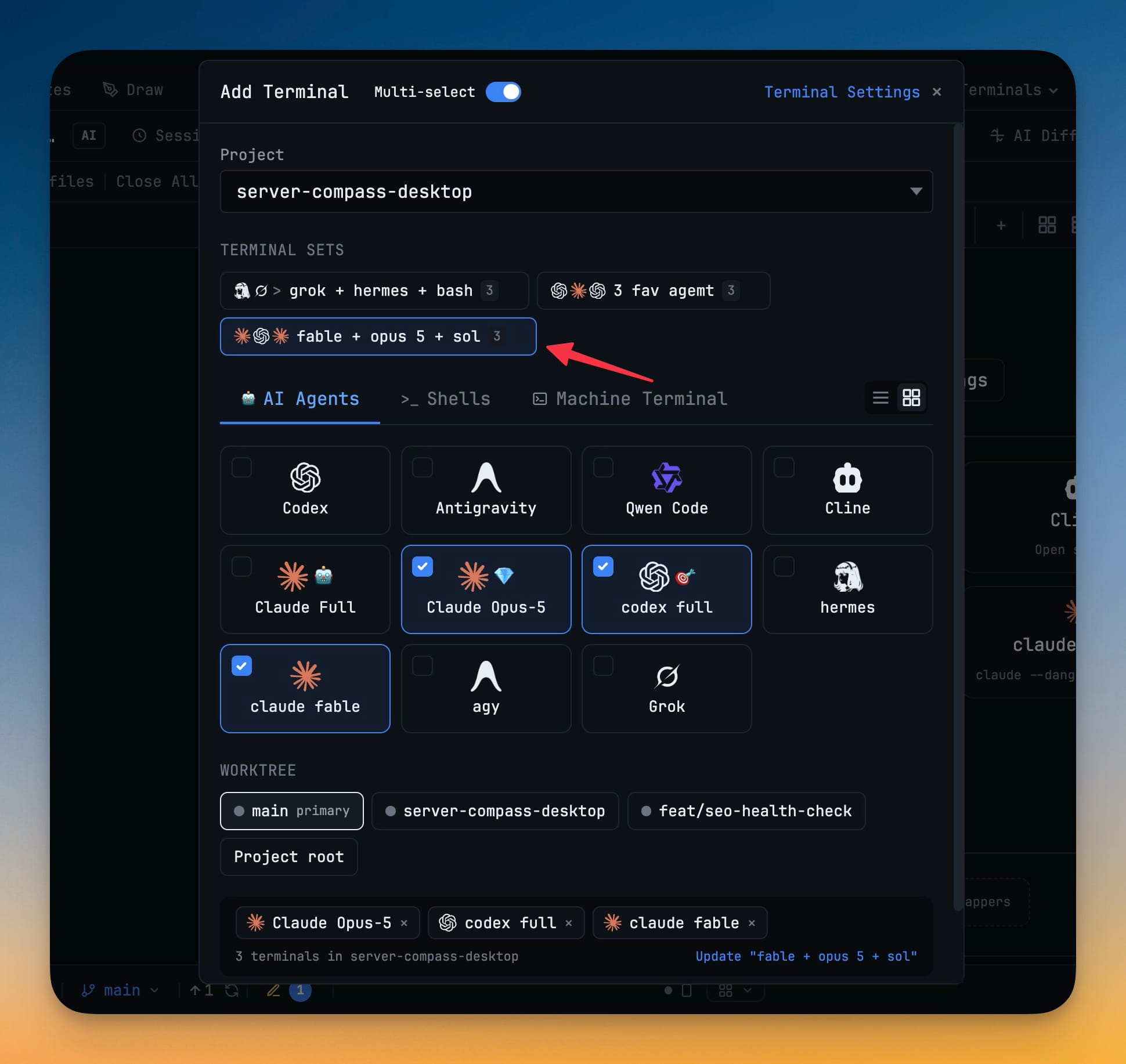
Flip Multi-select in Add Terminal, tick any mix of AI agents, shells, and machine terminals, and open the whole batch with one click. Save the combination as a named set and reopen your usual line-up from a chip.
Why You Need This
How this feature boosts your daily productivity
Most sessions start the same way: a reviewer, a builder, and a shell. Opening those one at a time is four dialogs and four waits, and then you still have to click into each pane to make the agent actually boot. A saved set turns that ritual into one chip and one click, with every agent already running by the time you switch to its tab.
How It Works
Get started in 4 simple steps
Open Add Terminal and flip Multi-select
The toggle sits next to the dialog title. With it on, the terminal cards become checkboxes instead of one-shot picks.
Tick any mix across the tabs
AI Agents, Shells, and Machine Terminal stay selectable in the same batch. The selection starts empty, and an agent hidden in Terminal Settings is never ticked by default.
Open the whole batch
Selected terminals appear as chips with a count. One click opens them all, and every agent boots in the background at the right size.
Save it as a named set
The combination becomes a chip under TERMINAL SETS in the dialog. Reopen it any time, or update and delete it in place.
Without 1DevTool
The manual way vs. the 1DevTool way
The Hard Way
The 1DevTool Way
Key Capabilities
Everything included with Batch Terminals & Terminal Sets
Why It Matters
The productivity impact of having terminal & ai agents built into your workspace
Zero Context Switching
All your AI agents and terminals live in one window. No more alt-tabbing between 5 different terminal apps.
Visual Status Tracking
Color-coded tabs and the Kanban dashboard tell you which agents are done, running, or need attention — at a glance.
Persistent Sessions
Tmux-backed persistence means your terminal state survives crashes and restarts. Never lose scrollback history again.
Flexible Arrangements
One-click layouts adapt to your task: grid for monitoring, columns for comparing, fullscreen for deep focus.
More in Terminal & AI Agents
Other features in this category you might find useful
Multi-Agent Terminals
Run Claude Code, Codex, Gemini CLI, Amp, OpenCode, Qwen, and custom AI commands in dedicated terminal tabs with recognizable agent logos, custom colors, and status indicators.
Flexible Terminal Layouts
View terminals in 2×2 grid, side-by-side columns, or single fullscreen mode with resizable panes.
Terminal Dashboard
Kanban-style board view of all terminal statuses — Idle, Running, and Review — with real-time polling.
Session Persistence
Terminal sessions persist across app restarts with full scrollback history via tmux integration.
Ready to boost your workflow?
Download 1DevTool for free and experience Batch Terminals & Terminal Sets along with 345 other features — all in one app.