Visual Mermaid Diagram Editor
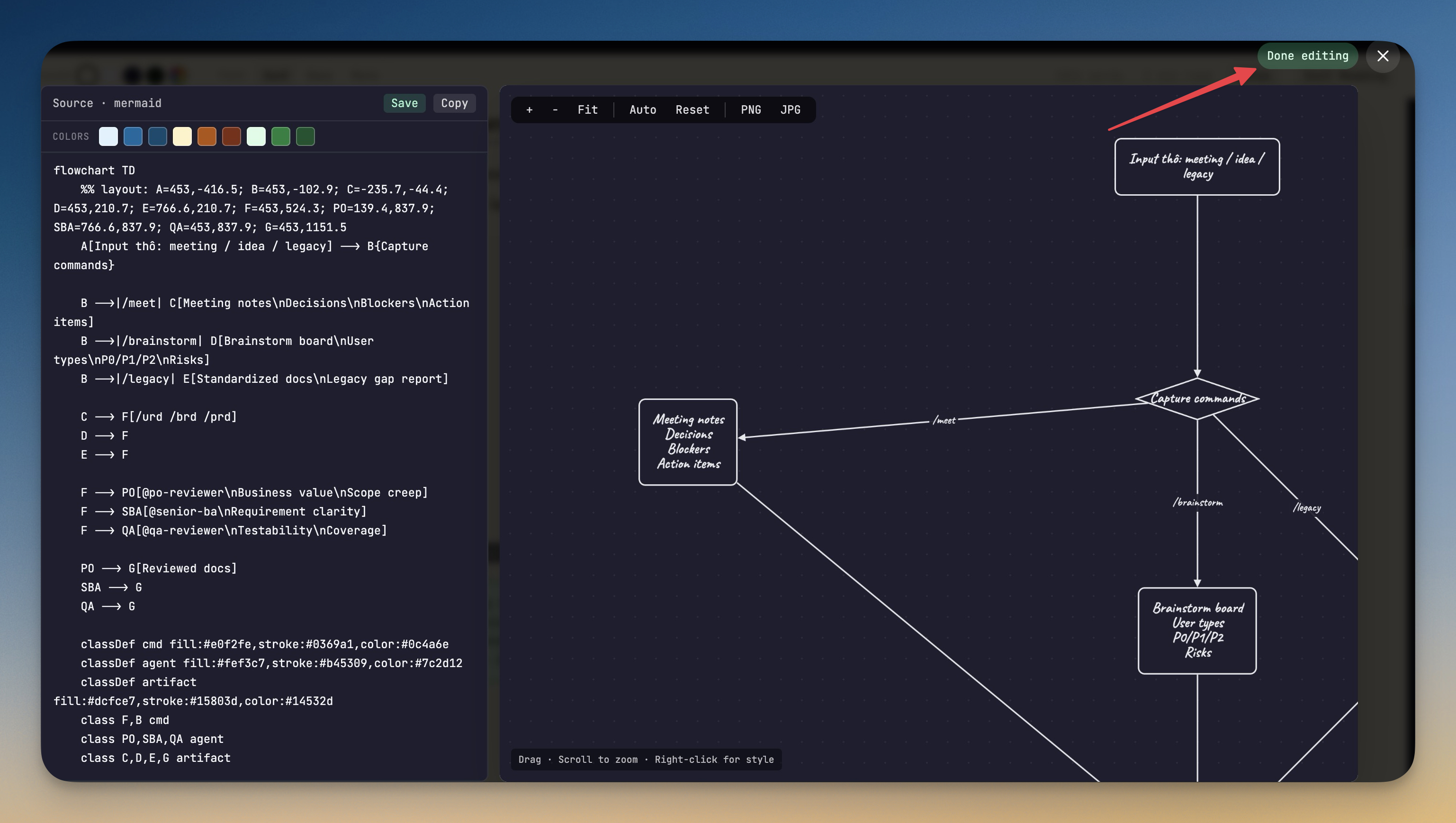
Click any rendered Mermaid diagram in a markdown preview to open a full lightbox editor — drag nodes, recolor them, restyle edges, and save the layout back into the markdown file. Live source-and-canvas split view keeps the raw Mermaid syntax in sync with the visual edits.
More Screenshots
Click any image to zoom in
Why You Need This
How this feature boosts your daily productivity
Hand-tweaking a Mermaid diagram after AI generates it usually means abandoning the rendered preview, going back to the source, and editing positions and colors blind — then re-rendering, re-checking, and repeating. The visual editor closes that loop. You drag the nodes you want where you want them, right-click to color and restyle, and Save writes the updated Mermaid source straight back to disk with the layout encoded as native `style` directives so the diagram looks the same anywhere it renders.
How It Works
Get started in 4 simple steps
Open the ToolBox
Access the ToolBox from the output panel. Browse the grid of available tools organized by category.
Select Your Tool
Click any tool to open it. Each tool has a focused, purpose-built interface for its specific task.
Use & Transform
Paste your input and get instant results. Most tools update in real-time as you type.
Copy & Continue
Copy results to clipboard and continue your work. Switch between tools as needed without losing state.
Without 1DevTool
The manual way vs. the 1DevTool way
The Hard Way
The 1DevTool Way
Key Capabilities
Everything included with Visual Mermaid Diagram Editor
Why It Matters
The productivity impact of having developer toolbox built into your workspace
Always Available
Every developer utility you need is one click away. No searching for web tools or installing CLI utilities.
Data Stays Local
Unlike web-based tools, your data never leaves your machine. Safe for JWT tokens, API keys, and sensitive data.
Instant Results
Real-time updates as you type. No submit buttons, no loading spinners, no ads.
Comprehensive Coverage
Formatters, encoders, converters, generators, and testers — 15+ tools covering the most common developer needs.
More in Developer ToolBox
Other features in this category you might find useful
JSON Formatter
Format, validate, and minify JSON with syntax highlighting and error detection.
JWT Decoder
Decode and inspect JWT tokens — view header, payload, and signature with expiration checking.
Regex Tester
Write and test regular expressions with real-time matching, capture group highlighting, and match details.
Diff Viewer
Compare two text blocks side-by-side with line-by-line diff highlighting.
Ready to boost your workflow?
Download 1DevTool for free and experience Visual Mermaid Diagram Editor along with 321 other features — all in one app.