Resume AI Sessions — find the right session, then continue it safely
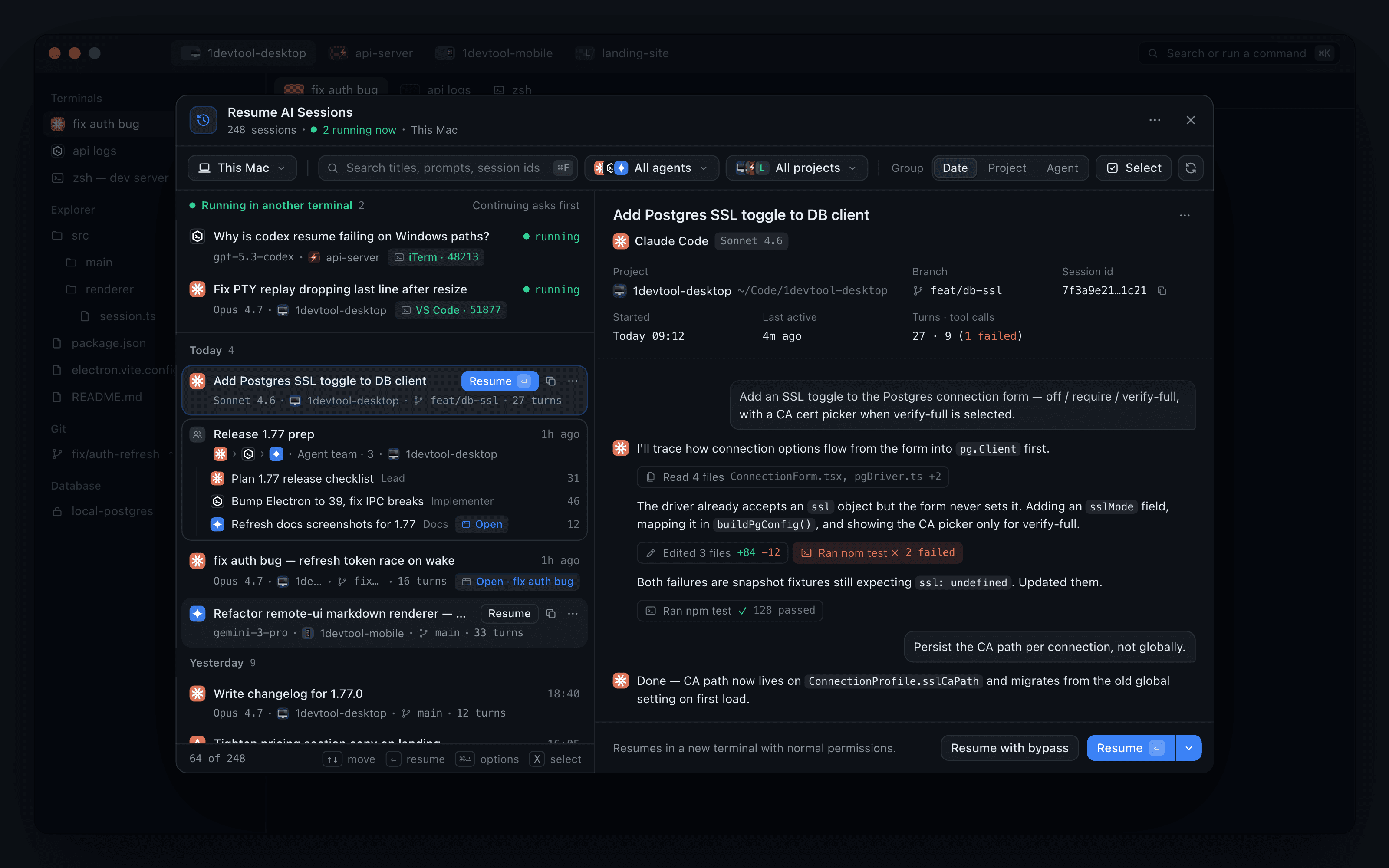
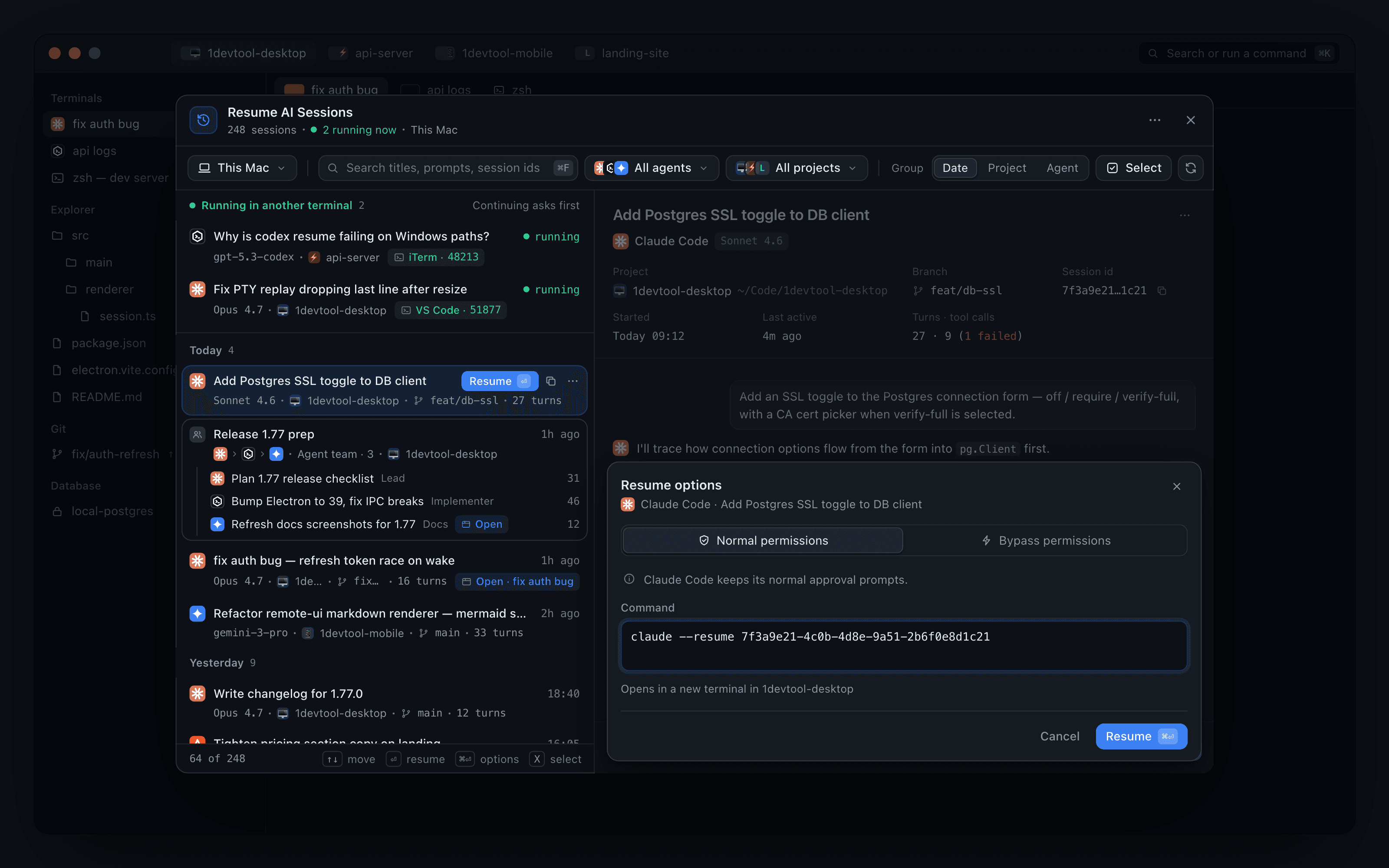
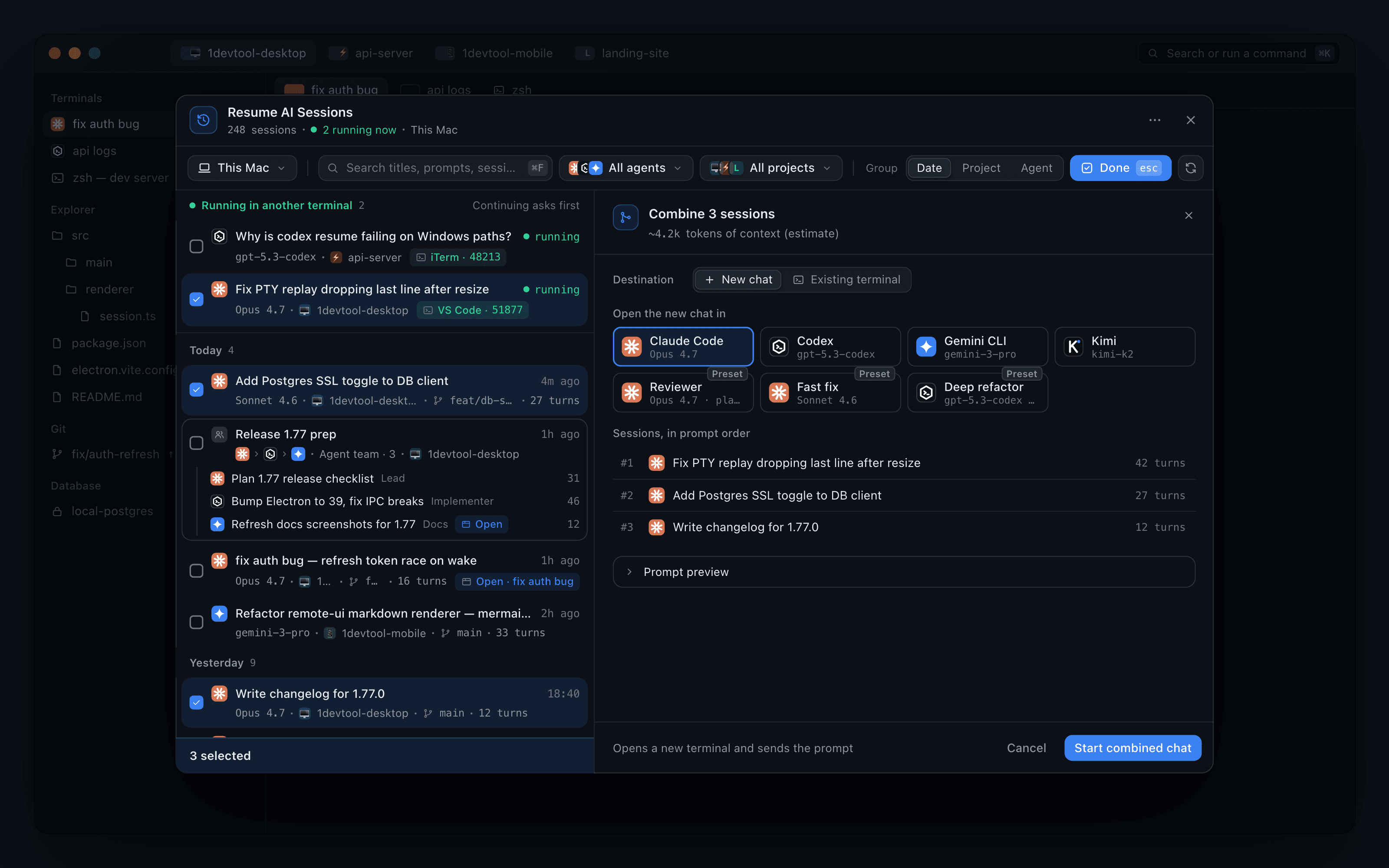
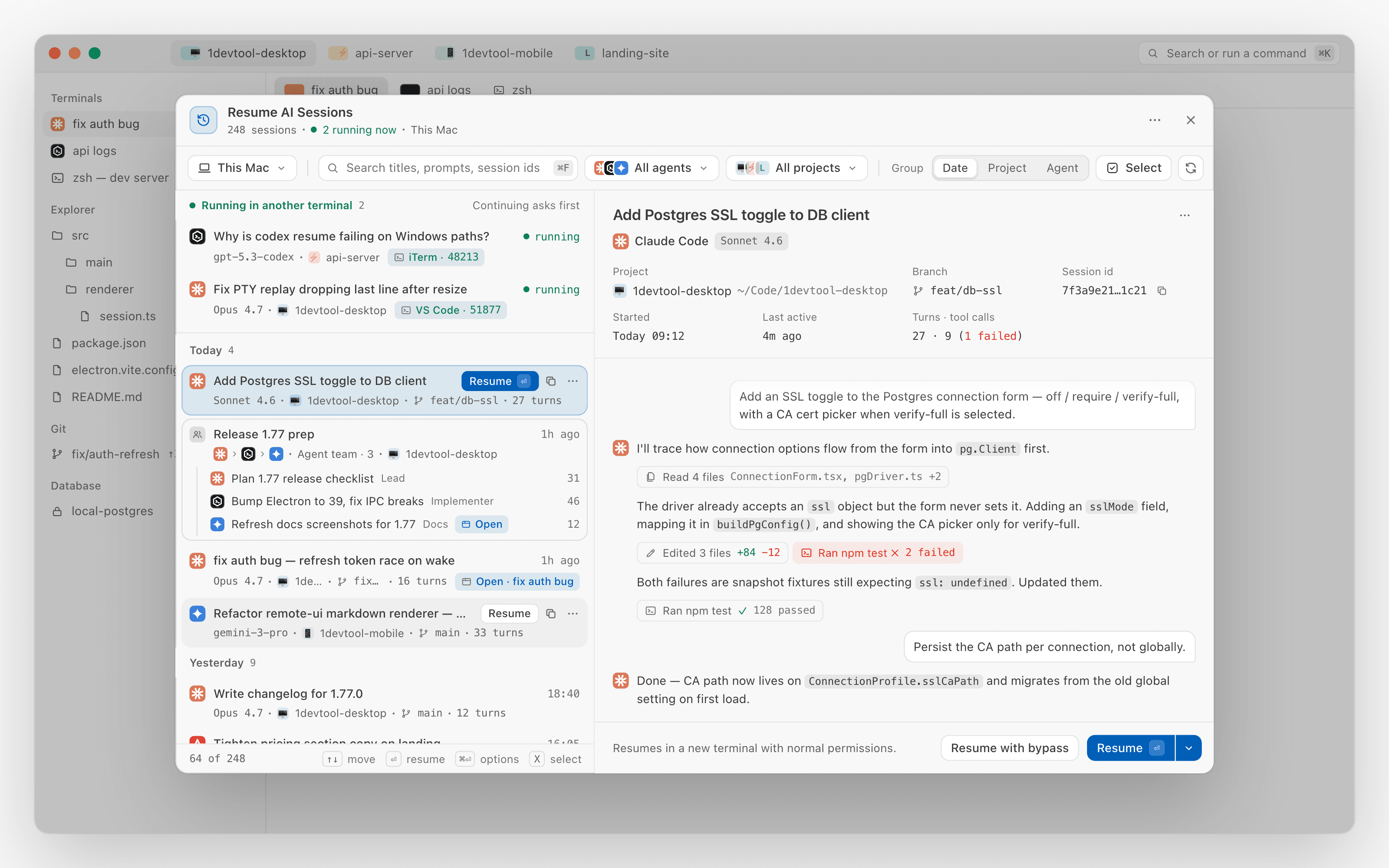
Resume AI Sessions — find the right session, then continue it safely. Resume AI Sessions is now a split view: a quiet two-line list on the left and a live preview on the right that shows the project, branch, session id, turns and tool calls (failed calls in red) and the conversation itself, so you can read a session before you resume it. Search matches titles, prompts and session ids, Group sorts by Date, Project or Agent, and a Machine filter covers this computer, your SSH machines and paired devices. Sessions still live elsewhere sit on top under Running in another terminal with Continue here →, agent teams resume as one card, and one Resume split button holds Resume with options… (normal or bypass permissions, an editable command, the target terminal) and Copy transcript. Select lets you hand a session to another agent or combine several into one chat, sent to a New chat or an Existing terminal with a context estimate, and the whole panel works from the keyboard. Also in this release: Start on Launch in Settings → Remote brings the remote server up every time 1DevTool opens so a paired phone reconnects on its own, hang reports now name what was actually blocking the app, and fixes for Mermaid diagrams stuck on "Rendering mermaid diagram..." in Reader Mode and Antigravity tool output showing up as the agent's replies.
Download v1.77.1
The download page always has the newest build; installers for this version are on GitHub.
What changed
New features
22- See a session before you resume it — Resume AI Sessions is now a split view: a two-line list on the left and a live preview on the right, so picking a row no longer replaces the list
- The preview shows the project and its path, branch, session id, when it started and was last active, and turns · tool calls (with failed calls in red), followed by the conversation itself
- Tool calls in the transcript are compact chips you can expand; long conversations open on the last 40 messages, with Show N earlier messages above
- In a narrow window the preview slides in over the list, with Back to sessions to return
- Search and arrange the whole history — search now matches titles, prompts and session ids, and Group switches the list between Date, Project and Agent; your choice is remembered
- Date grouping splits sessions into Today, Yesterday, This week, This month and Older, with headers that stay in view as you scroll
- A Machine filter narrows the list to This computer, one of your SSH machines or a paired device, next to the project filter
- The list keeps loading as you scroll instead of paging
- Sessions that are still running sit on top — a Running in another terminal section shows what's live before you resume it, with Continue here → on each row
- Agent teams appear as one card with their member chain and a single Resume team action
- Quieter rows, actions where you need them — rows have no buttons at rest; on hover or selection, Resume, copy id and a ⋯ menu take the place of the time
- The ⋯ menu covers Resume with bypass permissions, Resume with options…, Copy session id and Hand off to another agent
- One Resume button with every option behind it — the preview's Resume split button adds Copy transcript, and Resume with options… opens a sheet inside the preview instead of a separate window
- Pick Normal permissions or Bypass permissions, edit the exact command, and see which terminal it opens in before you press Resume
- The permission mode you used last becomes the default for the next plain Resume
- Work from the keyboard — ↑↓ moves the selection and updates the preview, ⏎ resumes, ⌘⏎ opens the options, X enters select mode, ⌘C copies the session id and Esc backs out
- Combine or hand off sessions from the same window — Select ticks sessions; pick one to hand it to a different agent, or several to merge them into one chat in the order shown
- Send the result to a New chat with any agent or preset, or to an Existing terminal you can search for, and see an estimate of how much context it adds before you start
- Clearer warnings before two copies diverge — resuming a session that is live elsewhere offers Close it & continue here, and one that is already open in a tab offers Go to tab instead of opening a duplicate
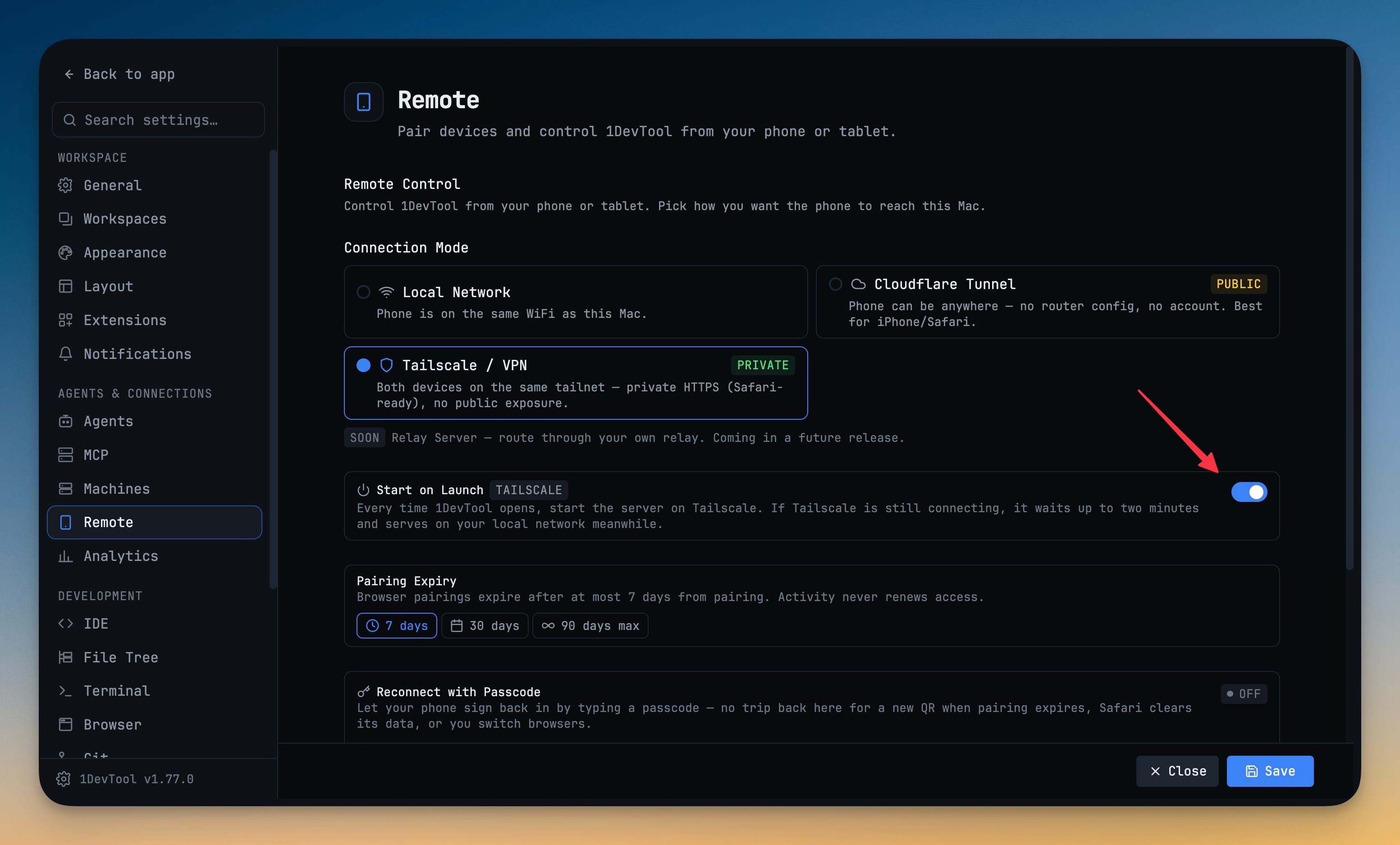
- Start on Launch — a new switch in Settings → Remote starts the remote server every time 1DevTool opens, so a paired phone reconnects on its own
- On Tailscale it waits up to two minutes for Tailscale to connect and serves on your local network meanwhile
- Cloudflare Tunnel is public, so it never starts by itself; the switch is turned off for it
Improvements
1- Hang reports name the real cause — pause reports in Settings → General → System and the Resource Manager now say what was actually blocking the app, and a request that was only waiting is listed as pending rather than blamed
Bug fixes
2- Fixed diagrams in Reader Mode stuck on "Rendering mermaid diagram..." — Mermaid blocks now draw as charts on desktop and phone, redraw in the right colours when you switch the canvas between dark and light, and fall back to their source with a note if a chart can't be drawn
- Fixed Antigravity tool output showing up as the agent's replies — timestamps, background-task notices and folder listings no longer appear as answers in Reader Mode, Resume previews or on the phone
Screenshots