Team-Aware Resume
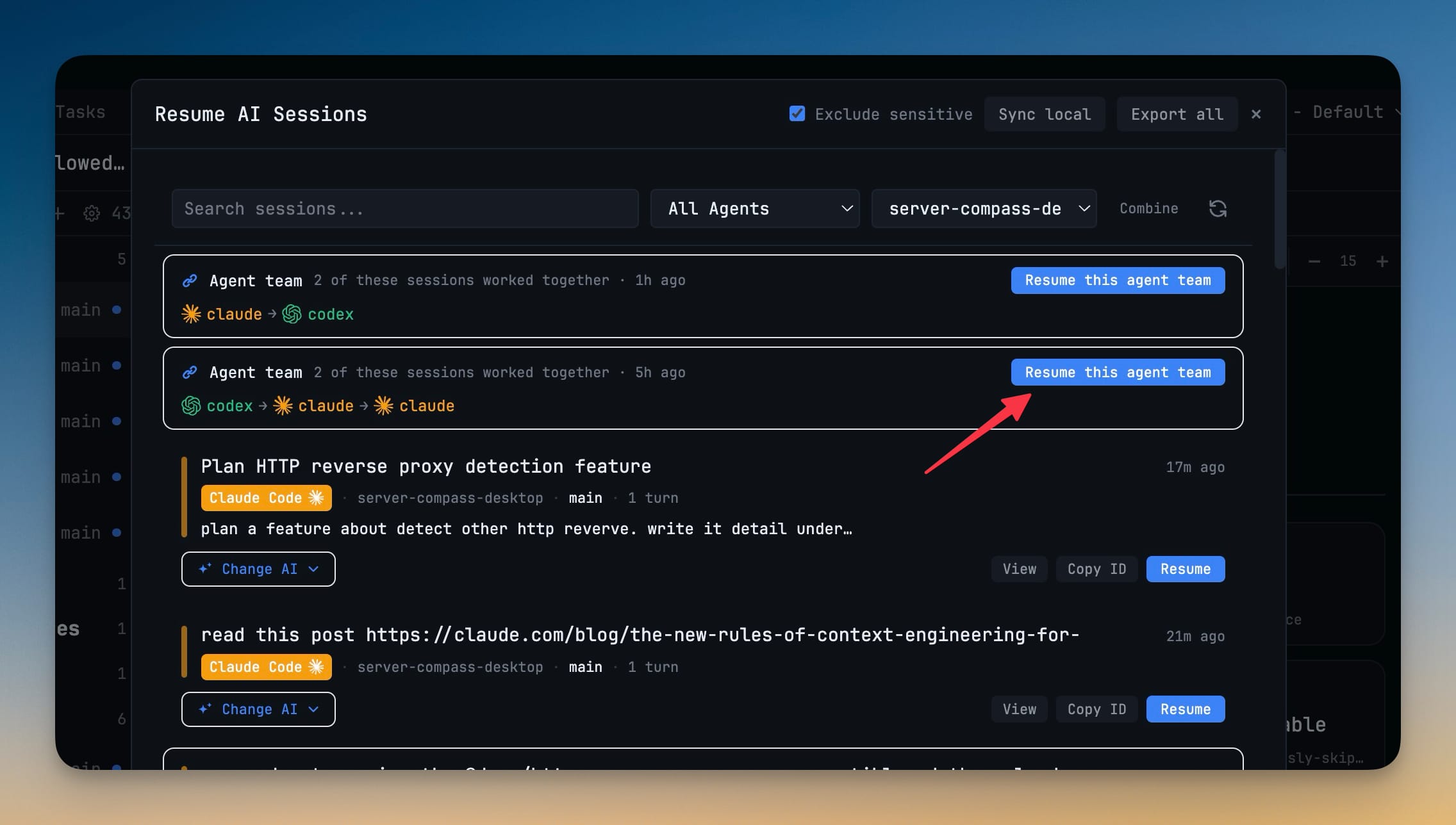
Sessions that ran as one linked team are marked in Resume AI Sessions, and a banner offers to bring every member back in one confirmation. Once the terminals are running, Mission Control's Resume team reconnects them.
Why You Need This
How this feature boosts your daily productivity
Restoring a collaboration used to be archaeology. Resume AI Sessions listed a dozen sessions with no hint of which three had been working together, so you resumed them one by one, guessed at the line-up, and then discovered every link between them was quarantined anyway. Now the team is recognised as a team on both halves of the problem: the sessions come back together, and the links come back after them.
How It Works
Get started in 4 simple steps
Open Resume AI Sessions
Sessions that ran as one linked team appear under an Agent team banner reading “2 of these sessions worked together”, with the agent chain and how long ago it ran.
Click Resume this agent team
One confirmation brings every member back, instead of resuming each session individually and hoping you picked the right ones.
Spot team sessions in the list
Members carry a team chip, so a collaborative session is distinguishable from a solo one even outside the banner.
Reconnect the links in Mission Control
With the terminals running, Resume team relinks the project’s revivable links and gives each terminal a single catch-up notice instead of one per link.
Without 1DevTool
The manual way vs. the 1DevTool way
The Hard Way
The 1DevTool Way
Key Capabilities
Everything included with Team-Aware Resume
Why It Matters
The productivity impact of having ai productivity built into your workspace
Searchable Prompt Library
Every prompt you've ever sent is captured and searchable. Find and reuse your best AI interactions.
Visual AI Communication
Annotate screenshots and embed them in prompts. Show your AI agent exactly what you see.
Session Knowledge Base
AI conversations become searchable history. Find how you solved a similar problem last week.
Power Navigation
Command palette gives you instant access to any feature. Navigate 1DevTool at the speed of thought.
More in AI Productivity
Other features in this category you might find useful
Prompt History
Search prompts and sticky notes from Remote Control while away from the desktop. Switch between This project and All projects, filter prompts by agent or notes by source, copy entries, delete with Operator access, and sync local prompt history.
Resume UI
Read any past AI session before you resume it. Resume AI Sessions is a split view with a searchable list of every Claude Code, Codex, Gemini CLI and other agent session on the left and a live preview of the project, branch, tool calls and conversation on the right, with replies rendered as Markdown, with Resume, bypass permissions and an editable command one click away.
Combine Sessions
Merge several past AI sessions into one opening prompt, or hand a single session to a different agent. Tick sessions in Resume AI Sessions, see a token estimate of the context they add, and send the result to a new chat with any agent or preset or to a terminal that is already open.
AI Diff Review Panel
Track every file modification any AI agent makes — Claude Code, Codex, Gemini, Amp, custom — and review, accept, or revert their work per file from a dedicated panel with inline diff overlays in the editor.
Ready to boost your workflow?
Download 1DevTool for free and experience Team-Aware Resume along with 345 other features — all in one app.