Terminals Sized for Your Phone
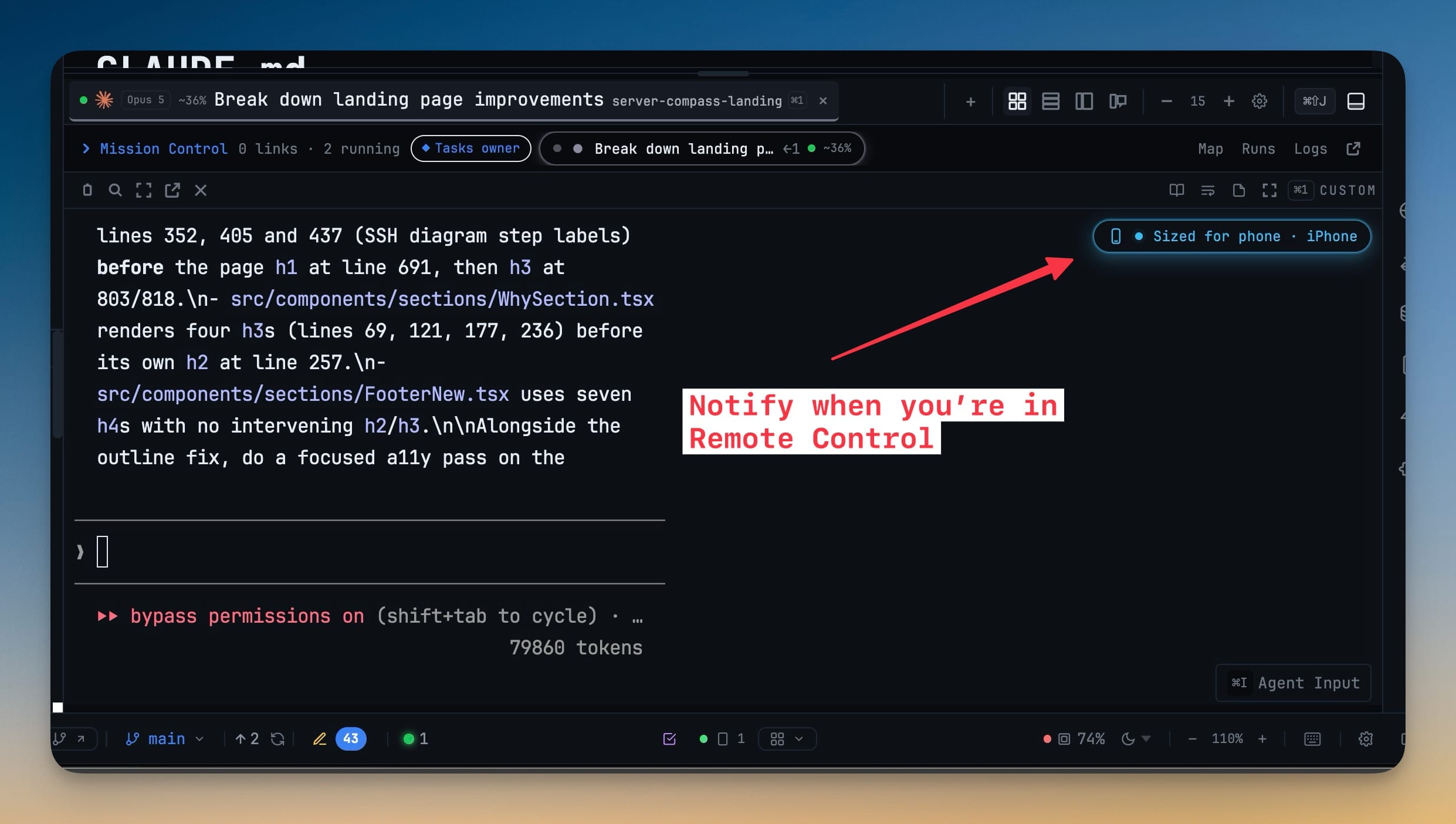
A phone actively viewing a terminal owns its width, so output wraps for your screen instead of forcing you to pan across a desktop-width grid. That now includes terminals you open through the Host picker on a paired computer, and the desktop pane shows a Sized for phone badge until you close the terminal on the phone and it gets its own size back.
Why You Need This
How this feature boosts your daily productivity
Remote terminals used to be mirrored at the desktop's dimensions, which is unreadable on a phone: every line ran off the right edge, and the newest output sat under the composer with nothing to scroll. Handing size authority to the phone that is actually reading the session fixes both — and handing it back on detach means checking a run from the sofa does not reshape the grid you left on your desk.
How It Works
Get started in 4 simple steps
Pair your phone
Settings → Remote, then open Remote Control on the phone and pick the terminal you want to read.
The phone takes the width
While it is actively viewing, the phone owns the session dimensions, so lines wrap for your screen instead of running off the right edge.
The desktop says so
The pane carries a Sized for phone badge with a shortcut into Reader Mode, which re-renders the transcript at any width.
Same for a paired computer
A terminal opened through the Host picker on a paired computer fits too, and that computer’s pane reads Sized for phone · <phone> via <computer>.
Close it and the desk heals
When the last phone viewer detaches, the session returns to the dimensions the desktop pane had set.
Without 1DevTool
The manual way vs. the 1DevTool way
The Hard Way
The 1DevTool Way
Key Capabilities
Everything included with Terminals Sized for Your Phone
Why It Matters
The productivity impact of having terminal & ai agents built into your workspace
Zero Context Switching
All your AI agents and terminals live in one window. No more alt-tabbing between 5 different terminal apps.
Visual Status Tracking
Color-coded tabs and the Kanban dashboard tell you which agents are done, running, or need attention — at a glance.
Persistent Sessions
Tmux-backed persistence means your terminal state survives crashes and restarts. Never lose scrollback history again.
Flexible Arrangements
One-click layouts adapt to your task: grid for monitoring, columns for comparing, fullscreen for deep focus.
More in Terminal & AI Agents
Other features in this category you might find useful
Multi-Agent Terminals
Run Claude Code, Codex, Gemini CLI, Amp, OpenCode, Qwen, and custom AI commands in dedicated terminal tabs with recognizable agent logos, custom colors, and status indicators.
Flexible Terminal Layouts
View terminals in 2×2 grid, side-by-side columns, or single fullscreen mode with resizable panes.
Terminal Dashboard
Kanban-style board view of all terminal statuses — Idle, Running, and Review — with real-time polling.
Session Persistence
Terminal sessions persist across app restarts with full scrollback history via tmux integration.
Ready to boost your workflow?
Download 1DevTool for free and experience Terminals Sized for Your Phone along with 345 other features — all in one app.