AI Usage Dashboard
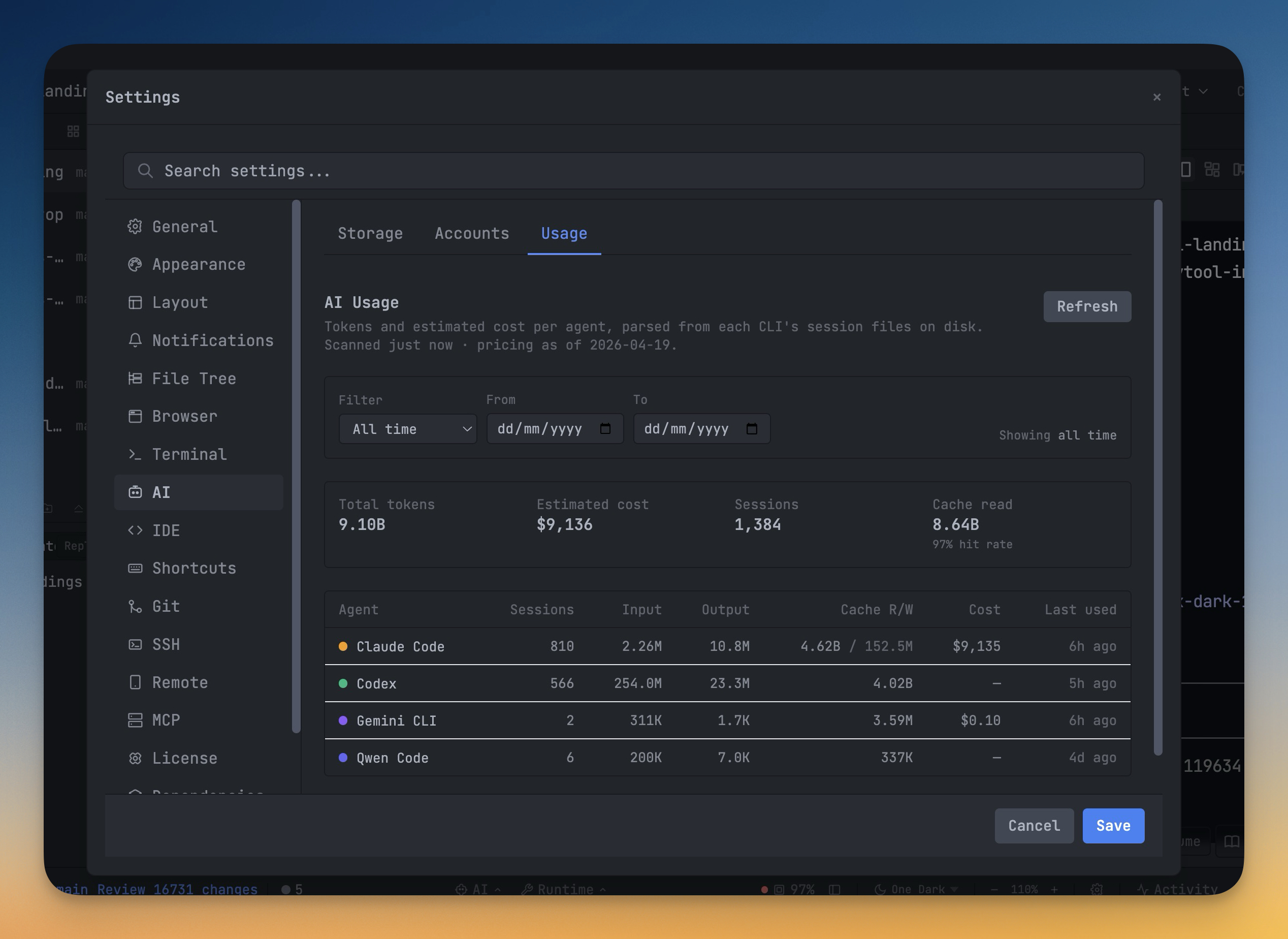
See tokens spent and estimated cost per AI agent and per model, parsed straight from your local session files — with Codex rate-limit windows baked in.
Why You Need This
How this feature boosts your daily productivity
Every AI agent burns tokens, but until now you had no unified way to see *how many* or *how much* without squinting at four different billing dashboards — and none of them show you what Codex has left in its 5-hour window. The Usage sub-tab under Settings → AI parses the session JSONL files each agent writes to disk and tallies tokens and estimated dollar cost per agent and per model (Claude Sonnet vs. Opus, Codex GPT-5 vs. mini, Gemini Pro vs. Flash, Qwen). Numbers come from actual recorded session data, not a network estimate, so what you see is what the agent logged. A per-file mtime cache persisted to disk means even months of session history loads in milliseconds, not seconds. For Codex specifically, the dashboard parses `rate_limits` events from session logs and shows your current 5-hour and weekly utilization windows with the exact reset timestamp — so before kicking off a long refactor you know whether you have headroom or you're about to hit a cap.
How It Works
Get started in 4 simple steps
Work Naturally
Use AI agents in your terminals as you normally would. Prompts and sessions are captured automatically.
Search Your History
Open Prompt History to find past prompts. Search by keyword to find the exact prompt you used before.
Annotate Visually
Capture and annotate screenshots. Embed them in AI prompts for visual context that text alone can't convey.
Build Your Library
Your prompt history becomes a personal knowledge base. Reuse proven prompts and refine your AI workflow over time.
Without 1DevTool
The manual way vs. the 1DevTool way
The Hard Way
The 1DevTool Way
Key Capabilities
Everything included with AI Usage Dashboard
Why It Matters
The productivity impact of having ai productivity built into your workspace
Searchable Prompt Library
Every prompt you've ever sent is captured and searchable. Find and reuse your best AI interactions.
Visual AI Communication
Annotate screenshots and embed them in prompts. Show your AI agent exactly what you see.
Session Knowledge Base
AI conversations become searchable history. Find how you solved a similar problem last week.
Power Navigation
Command palette gives you instant access to any feature. Navigate 1DevTool at the speed of thought.
More in AI Productivity
Other features in this category you might find useful
Prompt History
Search prompts and sticky notes from Remote Control while away from the desktop. Switch between This project and All projects, filter prompts by agent or notes by source, copy entries, delete with Operator access, and sync local prompt history.
Resume UI
Read any past AI session before you resume it. Resume AI Sessions is a split view with a searchable list of every Claude Code, Codex, Gemini CLI and other agent session on the left and a live preview of the project, branch, tool calls and conversation on the right, with replies rendered as Markdown, with Resume, bypass permissions and an editable command one click away.
Combine Sessions
Merge several past AI sessions into one opening prompt, or hand a single session to a different agent. Tick sessions in Resume AI Sessions, see a token estimate of the context they add, and send the result to a new chat with any agent or preset or to a terminal that is already open.
AI Diff Review Panel
Track every file modification any AI agent makes — Claude Code, Codex, Gemini, Amp, custom — and review, accept, or revert their work per file from a dedicated panel with inline diff overlays in the editor.
Ready to boost your workflow?
Download 1DevTool for free and experience AI Usage Dashboard along with 335 other features — all in one app.