Decompose a Goal
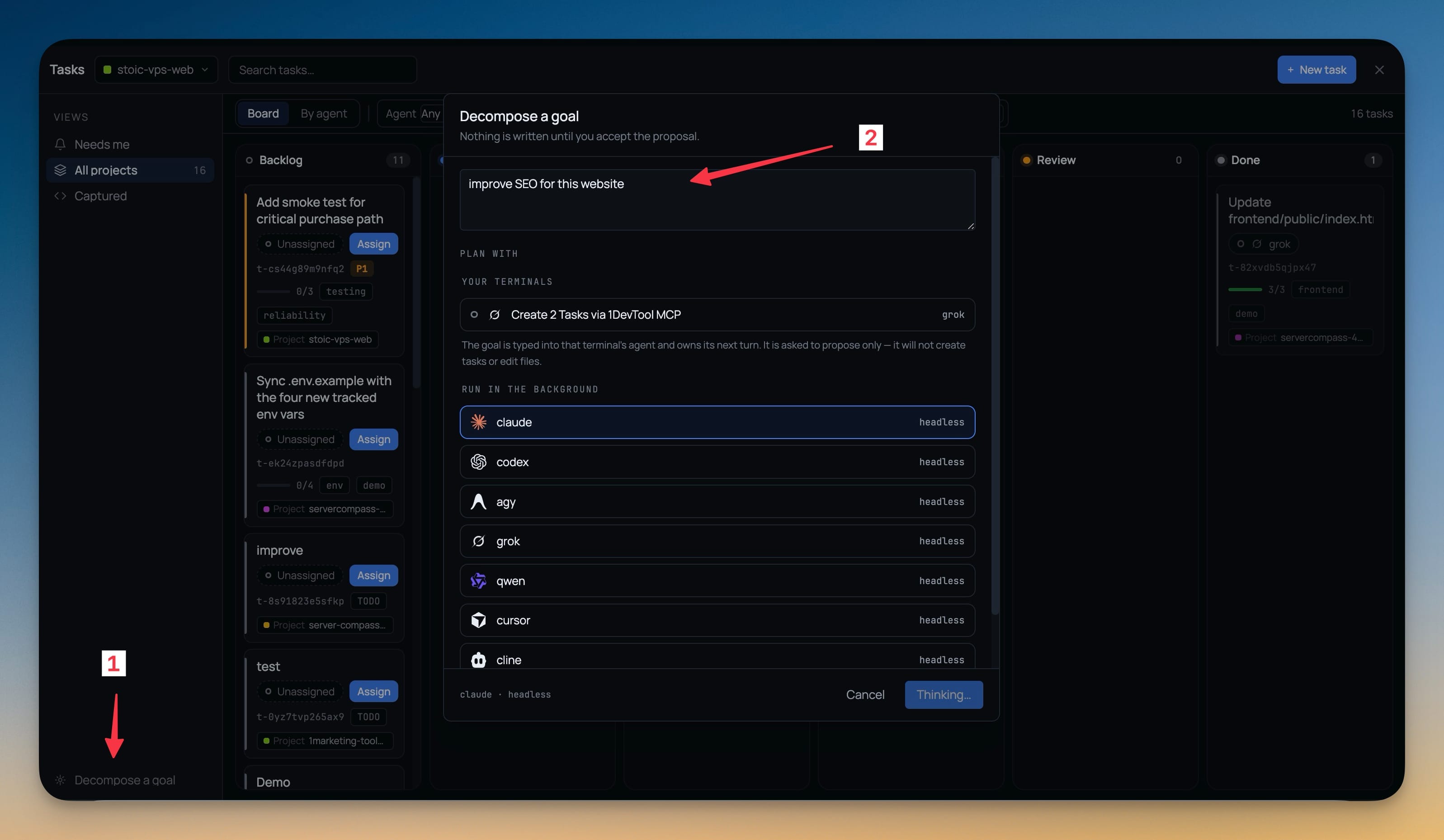
Describe an outcome and have an agent propose the task set — with a picker that lets you choose who does the thinking, either one of your live AI terminals or an installed agent running headless. A live log streams the run, and nothing is written until you accept the proposal.
Why You Need This
How this feature boosts your daily productivity
Turning a goal into tasks is the part of planning you want done for you, but not by whichever agent happened to be wired in. Sometimes the right planner is the terminal already holding your repo in its context; sometimes it is a cheap headless run you do not want to watch. Choosing the planner makes the proposal worth reading — and because the run is a proposal, a bad one costs you a Cancel rather than a board full of tasks to delete.
How It Works
Get started in 4 simple steps
Describe the outcome
Type the goal — “Add OAuth login with Google and GitHub, including tests”. Nothing is written until you accept the proposal.
Pick who plans it
Plan with lists your live AI terminals and every installed agent that can run headless — claude, codex, agy, grok, qwen, cursor, cline.
Watch the run
A live log streams with an elapsed-seconds counter, names the binary it started and where, and says when an agent prints nothing until it finishes.
Edit and accept
Change the proposed tasks before they land. A borrowed terminal is always given back — never closed, never left claimed, even if the run times out.
Without 1DevTool
The manual way vs. the 1DevTool way
The Hard Way
The 1DevTool Way
Key Capabilities
Everything included with Decompose a Goal
Why It Matters
The productivity impact of having project management built into your workspace
Instant Project Switching
Switch between projects in one click with complete state restoration. No more 5-minute setup rituals.
Visual Organization
Color-coded projects, file type icons, and layout presets keep your workspace organized and recognizable.
Smart File Navigation
.gitignore-aware filtering, instant search, and context menus make finding and opening files effortless.
Workspace Memory
Every project remembers its terminals, open files, database connections, and layout. Pick up exactly where you left off.
More in Project Management
Other features in this category you might find useful
Multi-Project Workspace
Work on multiple projects simultaneously with instant switching. Entire workspace state is preserved per project.
Smart File Explorer
Real-time file tree with type icons, .gitignore filtering, search, and right-click context menus.
Per-Project Code Intelligence
Spawn real typescript-language-server, gopls, pyright, rust-analyzer, clangd, solargraph, intelephense, or sourcekit-lsp for the projects you opt into — with project-aware errors and zero false positives.
Color-Coded Projects
Assign accent colors to each project for instant visual identification across your workspace.
Ready to boost your workflow?
Download 1DevTool for free and experience Decompose a Goal along with 345 other features — all in one app.