Git Across Machines
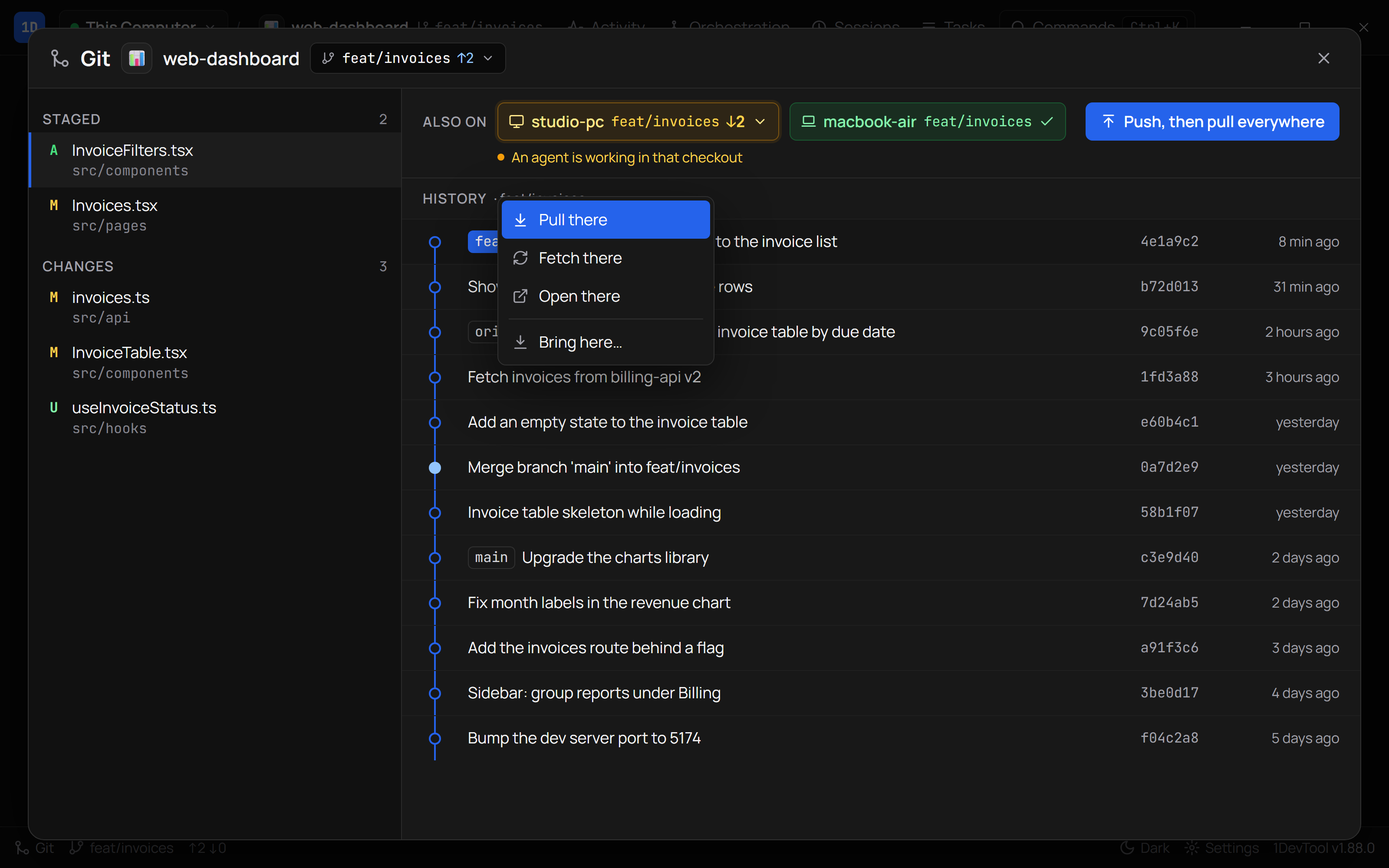
The Git client's Also on strip shows the same repository on your other computers, in sync, ahead, behind, diverged or offline, and whether an agent is working in that checkout. Push, then pull everywhere syncs them in one click with each computer's own git accounts.
Why You Need This
How this feature boosts your daily productivity
Keeping copies of one repository in step across computers means pushing here, connecting there and pulling there, then checking each copy again. Here each copy's menu has Pull there, Fetch there, Open there and Bring here…, which brings unpublished commits to this computer without checking anything out. Network steps never force and never touch a checkout with uncommitted changes, and a pull on a checkout where an agent is working waits until it finishes unless you choose Pull anyway. The Repo panel's Machines tab shows every repository against every computer, with Fetch everywhere, which fetches and never merges.
How It Works
Get started in 4 simple steps
Add Your Projects
Click the "+" button to add project folders. Assign unique colors for instant visual identification.
Browse & Navigate
Use the file explorer to browse your project. Filter files, toggle hidden items, and search instantly.
Switch Instantly
Click any project to switch. Your entire workspace state — terminals, files, layout — restores automatically.
Choose Your Layout
Select a preset layout or create a custom one. Your layout is saved per project for consistent workflows.
Without 1DevTool
The manual way vs. the 1DevTool way
The Hard Way
The 1DevTool Way
Key Capabilities
Everything included with Git Across Machines
Why It Matters
The productivity impact of having project management built into your workspace
Instant Project Switching
Switch between projects in one click with complete state restoration. No more 5-minute setup rituals.
Visual Organization
Color-coded projects, file type icons, and layout presets keep your workspace organized and recognizable.
Smart File Navigation
.gitignore-aware filtering, instant search, and context menus make finding and opening files effortless.
Workspace Memory
Every project remembers its terminals, open files, database connections, and layout. Pick up exactly where you left off.
More in Project Management
Other features in this category you might find useful
Multi-Project Workspace
Work on multiple projects simultaneously with instant switching. Entire workspace state is preserved per project.
Smart File Explorer
Real-time file tree with type icons, .gitignore filtering, search, and right-click context menus.
Per-Project Code Intelligence
Spawn real typescript-language-server, gopls, pyright, rust-analyzer, clangd, solargraph, intelephense, sourcekit-lsp, or csharp-ls for the projects you opt into — with project-aware errors and zero false positives.
Color-Coded Projects
Assign accent colors to each project for instant visual identification across your workspace.
Ready to boost your workflow?
Download 1DevTool for free and experience Git Across Machines along with 350 other features — all in one app.