Grok as a Built-In AI Agent
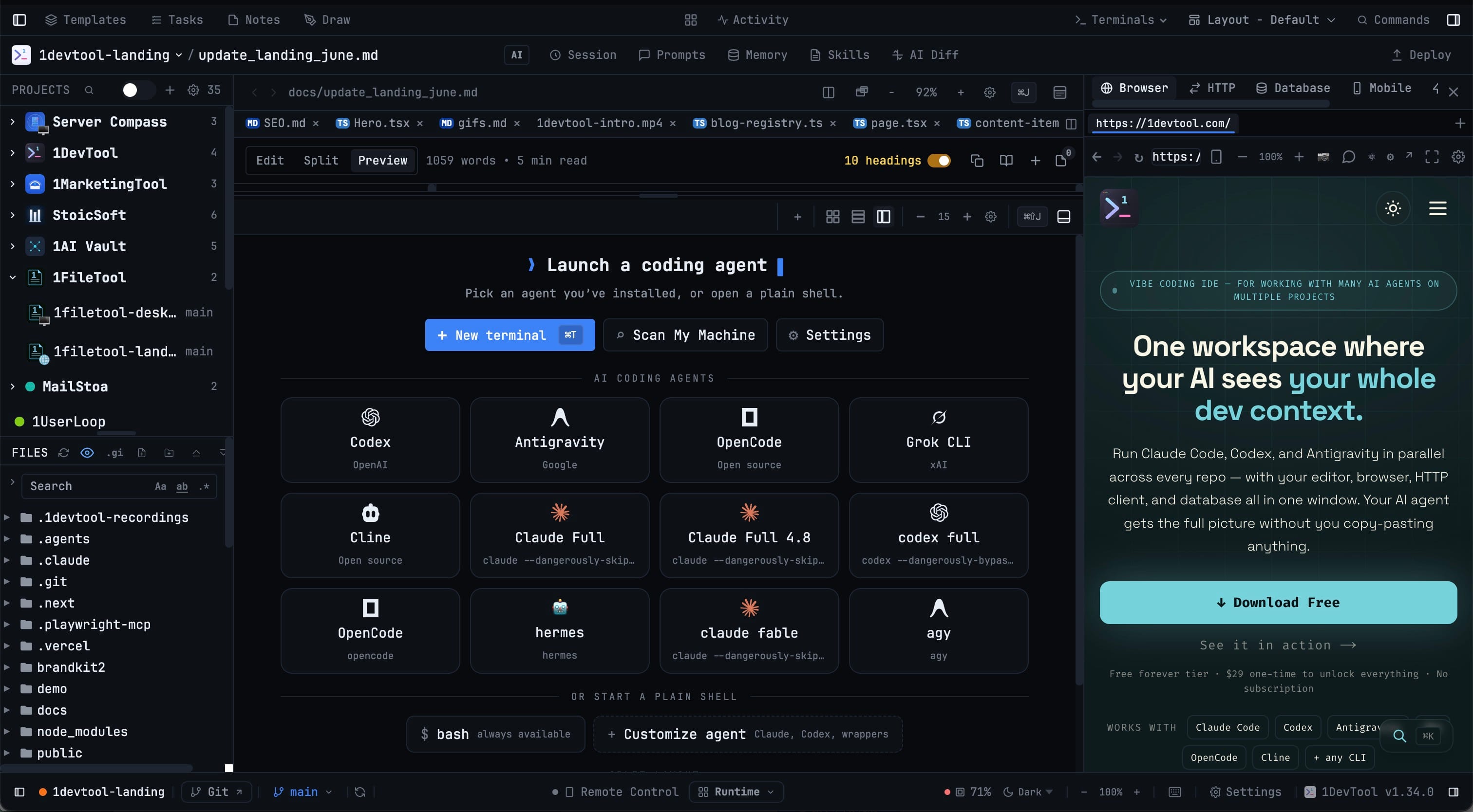
Launch Grok (xAI) as a first-class AI agent in 1DevTool, with the same prompt handling, session resume, and orchestration as Claude, Codex, and the rest. Grok terminals behave like every other agent instead of a plain shell you paste commands into.
Why You Need This
How this feature boosts your daily productivity
Trying a new coding agent usually means opening a bare terminal, pasting a command from a README, and giving up prompt handling, quota tracking, and orchestration in the process. Making Grok a built-in agent lets you evaluate it on equal footing with Claude and Codex — resume its sessions, hand work to it, and let it delegate back — without treating it as a second-class terminal.
How It Works
Get started in 4 simple steps
Launch Grok
Pick Grok from the empty-workspace launcher or the Add Terminal dialog; it sits in the AI Coding Agents grid next to Claude, Codex, and Antigravity.
Prompt it like any agent
Grok terminals use the same AI prompt handling, headless prompt mode, and sub-agent detection as every other supported agent.
Resume earlier conversations
Reopen past Grok sessions from Resume AI Sessions, complete with titles, previews, project folders, branches, and activity times.
Delegate across agents
Hand work to Grok through orchestration, or let Grok act as the host that delegates to other AI coding tools.
Without 1DevTool
The manual way vs. the 1DevTool way
The Hard Way
The 1DevTool Way
Key Capabilities
Everything included with Grok as a Built-In AI Agent
Why It Matters
The productivity impact of having ai productivity built into your workspace
A New Agent, Fully Wired
Grok gets the same prompt handling, headless mode, and sub-agent detection as Claude and Codex.
Resume Where You Left Off
Past Grok conversations reappear in Resume AI Sessions with titles, previews, and project context.
Orchestration Ready
Delegate to Grok or let it host and delegate out, and follow the chain in the sub-agent badges.
Judge It Fairly
Evaluate Grok on equal footing with the agents you already use, with no plain-shell workaround.
More in AI Productivity
Other features in this category you might find useful
Prompt History
Search prompts and sticky notes from Remote Control while away from the desktop. Switch between This project and All projects, filter prompts by agent or notes by source, copy entries, delete with Operator access, and sync local prompt history.
Resume UI
Browse, search, and resume past AI sessions from Claude Code, Codex, and Gemini CLI — or combine multiple sessions into one.
Combine Sessions
Select sessions from Claude Code, Codex, and Gemini CLI and merge them into a single conversation — giving your next agent the full cross-agent context.
AI Diff Review Panel
Track every file modification any AI agent makes — Claude Code, Codex, Gemini, Amp, custom — and review, accept, or revert their work per file from a dedicated panel with inline diff overlays in the editor.
Ready to boost your workflow?
Download 1DevTool for free and experience Grok as a Built-In AI Agent along with 324 other features — all in one app.