Parallel Claude Accounts
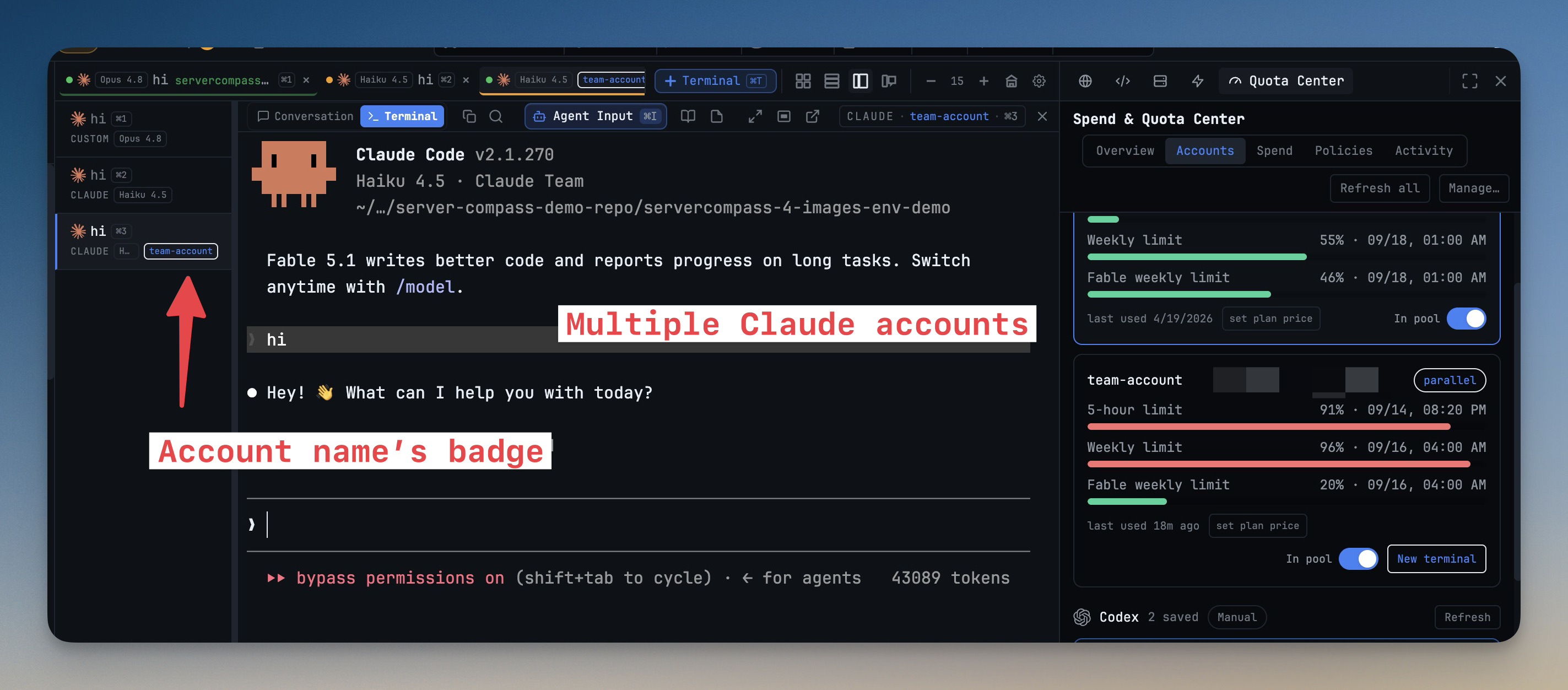
Run Claude terminals on different accounts at the same time — your Team seat in one pane, your personal plan in the next. Every saved Claude account signs in to its own config home, so no switch ever swaps the login underneath running work, and quota readouts follow the terminal you're looking at.
Why You Need This
How this feature boosts your daily productivity
Saving several Claude accounts used to make switching faster, but the machine still had one login: a switch changed it for every terminal, so work and side projects could never bill different accounts at once, and hitting a five-hour limit meant swapping logins under an agent mid-task. Parallel accounts give each account its own isolated config home and its own stored credential, while history, skills, plugins and settings stay shared. Terminals pick their account when they open and show it on the tab, and a quota alert can relaunch the focused terminal onto a spare account with its session resumed. Requires Claude Code 2.1.270 or newer.
How It Works
Get started in 4 simple steps
Add an account
In Settings → Agents → Accounts click Add account. A Claude sign-in terminal runs claude auth login inside a fresh config home, and the account appears named after your email.
Pick it for a terminal
New Terminal shows an Account: field for Claude — This Mac's login or any saved account. The account name rides on the tab and pane header.
Watch each account's quota
The quota pill follows the focused terminal's account, and Spend & Quota Center → Accounts shows each one's five-hour and weekly limits with a parallel tag.
Relaunch when a limit hits
A quota alert that names a spare account offers Relaunch on it: the terminal restarts on that account and resumes its session.
Without 1DevTool
The manual way vs. the 1DevTool way
The Hard Way
The 1DevTool Way
Key Capabilities
Everything included with Parallel Claude Accounts
Why It Matters
The productivity impact of having ai productivity built into your workspace
No More Cross-Billing
Company work stays on the Team seat and side projects on your own plan, at the same time, without logging out.
Quota That Tells the Truth
The pill and alerts report the account the focused terminal actually uses, not whatever the machine was last switched to.
Limits Stop Being Walls
Relaunch a terminal onto an account with room and keep the same conversation going.
Shared Setup, Separate Logins
History, skills, plugins, settings and CLAUDE.md stay shared, so every account works like your usual Claude.
More in AI Productivity
Other features in this category you might find useful
Prompt History
Search prompts and sticky notes from Remote Control while away from the desktop. Switch between This project and All projects, filter prompts by agent or notes by source, copy entries, delete with Operator access, and sync local prompt history.
Resume UI
Read any past AI session before you resume it. Resume AI Sessions is a split view with a searchable list of every Claude Code, Codex, Gemini CLI and other agent session on the left and a live preview of the project, branch, tool calls and conversation on the right, with replies rendered as Markdown, with Resume, bypass permissions and an editable command one click away.
Combine Sessions
Merge several past AI sessions into one opening prompt, or hand a single session to a different agent. Tick sessions in Resume AI Sessions, see a token estimate of the context they add, and send the result to a new chat with any agent or preset or to a terminal that is already open.
AI Diff Review Panel
Track every file modification any AI agent makes — Claude Code, Codex, Gemini, Amp, custom — and review, accept, or revert their work per file from a dedicated panel with inline diff overlays in the editor.
Ready to boost your workflow?
Download 1DevTool for free and experience Parallel Claude Accounts along with 347 other features — all in one app.