Split-View Code Editor
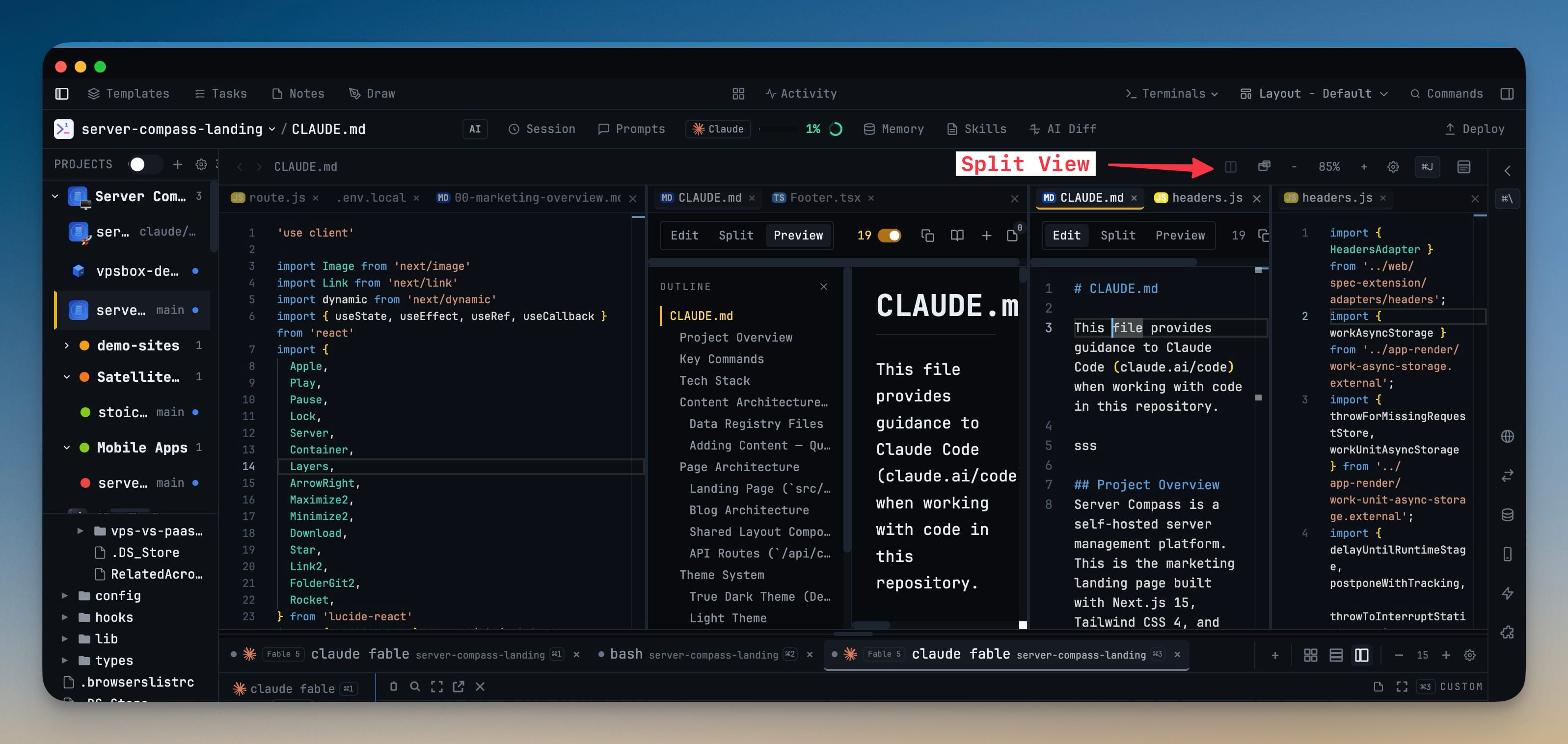
Open files in up to four side-by-side editor groups and drag the dividers to resize each one. Keep a component and the API route that feeds it in view at the same time instead of tabbing back and forth.
Why You Need This
How this feature boosts your daily productivity
Reading one file while editing another means constant tab-switching, and you lose your place every time. Splitting the editor into side-by-side groups lets you compare, reference, and edit across files at once — a wide code pane on the left, a narrow reference on the right — so the second file is always where you can see it.
How It Works
Get started in 4 simple steps
Open a file beside another
Split the editor and drop a second file into a new group next to the first instead of stacking it as a tab.
Add up to four groups
Keep splitting until you have as many as four side-by-side editor groups sharing the row.
Drag to resize
Drag the dividers between groups to give each one the width it needs for the file it holds.
Let empty groups close
When you close the last file in a group, that group closes itself so the split never leaves an empty column behind.
Without 1DevTool
The manual way vs. the 1DevTool way
The Hard Way
The 1DevTool Way
Key Capabilities
Everything included with Split-View Code Editor
Why It Matters
The productivity impact of having project management built into your workspace
Two Files, One Glance
Keep a component and the route that feeds it side by side instead of tabbing back and forth.
Sized to the Content
Drag the dividers so a wide code pane and a narrow reference each get the width they need.
No Stray Columns
Empty groups close themselves, so the split stays tidy as you open and close files.
Fewer Lost Places
You stop losing your scroll position every time you switch between two files.
More in Project Management
Other features in this category you might find useful
Multi-Project Workspace
Work on multiple projects simultaneously with instant switching. Entire workspace state is preserved per project.
Smart File Explorer
Real-time file tree with type icons, .gitignore filtering, search, and right-click context menus.
Per-Project Code Intelligence
Spawn real typescript-language-server, gopls, pyright, rust-analyzer, clangd, solargraph, intelephense, or sourcekit-lsp for the projects you opt into — with project-aware errors and zero false positives.
Color-Coded Projects
Assign accent colors to each project for instant visual identification across your workspace.
Ready to boost your workflow?
Download 1DevTool for free and experience Split-View Code Editor along with 324 other features — all in one app.