Subagent History for Claude Code, Codex, Cursor, Grok and Devin
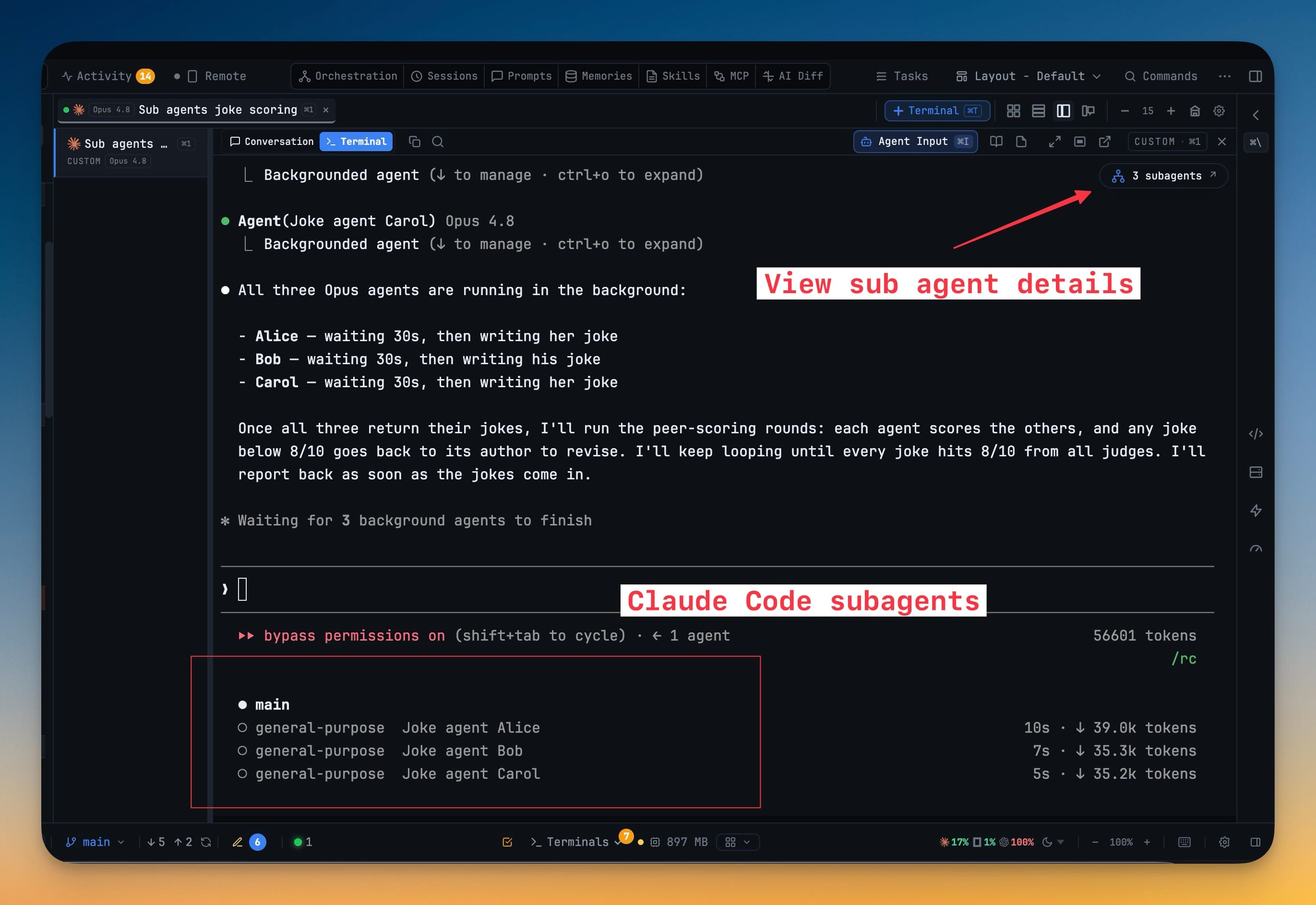
A status chip beside the delegation badge, such as 2 running · 15 done, opens a searchable list of the children your agent spawned; picking one shows its conversation, tool calls and results. It works on Claude Code, Codex, Cursor, Grok and Devin terminals, every child bound to the exact parent that spawned it. Running children are listed first and accept a follow-up, and a finished one opens as read-only history.

More Screenshots
Click any image to zoom in

Why You Need This
How this feature boosts your daily productivity
Delegation used to be a spinner and a summary. A child agent would spin up, do real work — read files, run commands, reach a conclusion — and then disappear, leaving you with whatever the parent chose to tell you about it. When the parent's summary was wrong or thin, there was nothing to check it against. Keeping finished children in the list turns a delegation into something you can read after the fact: the actual conversation, the actual tool calls, the actual results. Follow log streams a running child, Earlier logs pages back, Latest jumps to the end, and Copy follow-up for parent hands you a prompt to paste back into the parent conversation so acting on what you found does not mean retyping it. Each child is labelled **Running**, **Done** or **Stopped** with the time of its last activity, and the chip only shows a green dot while something is still running, so a count of children that finished hours ago no longer looks like work in progress. **Send to subagent** appears only while a child is running; a finished one is read-only history. Coverage matters as much as the panel itself. The viewer now opens on Cursor, Grok and Devin terminals too, so the answer to "what did that child actually do?" does not depend on which CLI you happened to delegate from. Each child is bound to the exact parent that spawned it — never the newest session or a same-folder guess — so a delegation cannot be attributed to the wrong terminal, and the names come from the spawn itself: the task title you would recognise, not an id. **Copy ID** hands you a child's id, **Earlier logs** and **Latest** page through the transcript, and the tool-call rows are the receipt when a parent's summary reads thinner than the work.
How It Works
Get started in 4 simple steps
Find the chip beside the delegation badge
When Claude Code, Codex, Cursor, Grok or Devin spawns children, a chip such as 2 running · 15 done appears on that terminal, with a green dot only while one is running.
Open the searchable list
Running subagents come first, each labelled Running, Done or Stopped with its last activity, and finished ones stay readable after their spinner has gone.
Pick one and read it
Selecting a subagent shows its conversation, its tool calls and its results — what it actually did, not the parent’s summary of it.
Follow a running child
Follow log streams a child that is still working, Earlier logs pages back through a long run, and Latest jumps to the end.
Carry a finding back
Copy ID and Copy follow-up for parent hand you a prompt to paste into the parent conversation, or the composer under the log sends it on for you.
Without 1DevTool
The manual way vs. the 1DevTool way
The Hard Way
The 1DevTool Way
Key Capabilities
Everything included with Subagent History for Claude Code, Codex, Cursor, Grok and Devin
Why It Matters
The productivity impact of having ai productivity built into your workspace
Delegations Stop Disappearing
A finished child stays in the list, so the record of what it decided outlives the spinner that was showing it.
You Can Check The Parent’s Summary
Reading the child’s own conversation, tool calls and results is how you find out the summary was thin — or wrong.
Long Runs Stay Navigable
Follow log, Earlier logs and Latest make a busy delegation something you can move through rather than scroll blindly.
Acting On It Is One Copy
Copy follow-up for parent turns something you spotted in a child into a prompt for the parent, without retyping it.
More in AI Productivity
Other features in this category you might find useful
Prompt History
Search prompts and sticky notes from Remote Control while away from the desktop. Switch between This project and All projects, filter prompts by agent or notes by source, copy entries, delete with Operator access, and sync local prompt history.
Resume UI
Read any past AI session before you resume it. Resume AI Sessions is a split view with a searchable list of every Claude Code, Codex, Gemini CLI and other agent session on the left and a live preview of the project, branch, tool calls and conversation on the right, with replies rendered as Markdown, with Resume, bypass permissions and an editable command one click away.
Combine Sessions
Merge several past AI sessions into one opening prompt, or hand a single session to a different agent. Tick sessions in Resume AI Sessions, see a token estimate of the context they add, and send the result to a new chat with any agent or preset or to a terminal that is already open.
AI Diff Review Panel
Track every file modification any AI agent makes — Claude Code, Codex, Gemini, Amp, custom — and review, accept, or revert their work per file from a dedicated panel with inline diff overlays in the editor.
Ready to boost your workflow?
Download 1DevTool for free and experience Subagent History for Claude Code, Codex, Cursor, Grok and Devin along with 345 other features — all in one app.