Remote Control over Tailscale
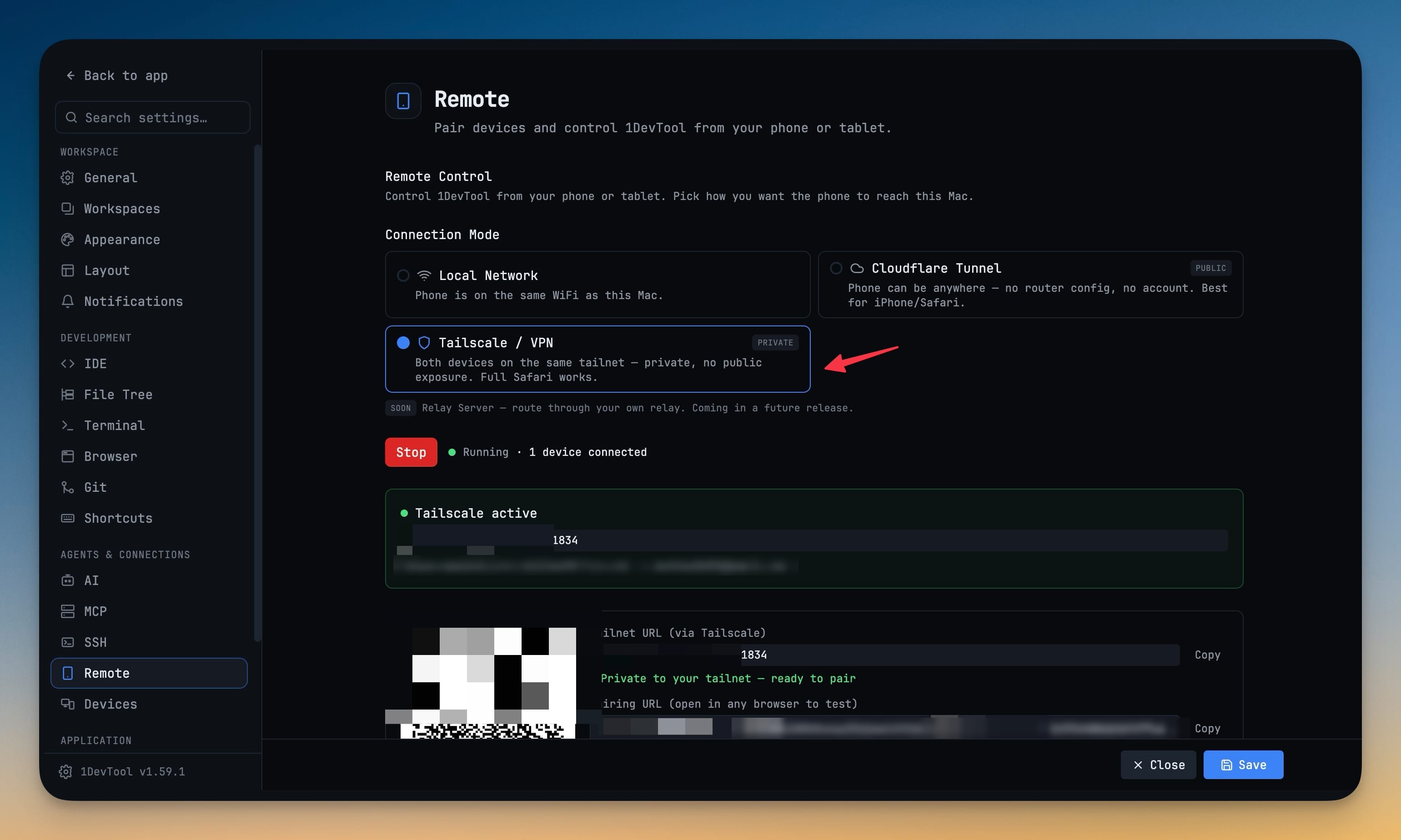
Reach your desktop from your phone over your own tailnet. Tailscale / VPN is a first-class Remote connection mode alongside Local Network and Cloudflare Tunnel — nothing is exposed to the public internet, there is no tunnel warm-up wait, and full iOS Safari works.
Why You Need This
How this feature boosts your daily productivity
The two older connection modes each force a trade. Local Network needs the phone on the same WiFi, and on a home network iOS pushes you into the in-app scanner browser instead of real Safari. Cloudflare Tunnel works from anywhere but publishes a public hostname and makes you wait for the tunnel to warm up. A tailnet gives you both halves: private like LAN, reachable like a tunnel. 1DevTool only detects Tailscale — it reads `tailscale status`, falls back to scanning for a tailnet interface in the 100.64/10 range when the CLI is wedged, and never downloads, launches or stops anything itself — then tells you plainly whether Tailscale is installed, running and connected, and points the QR code and pairing URL at the tailnet address.
How It Works
Get started in 4 simple steps
Run Tailscale on both devices
You install and run the official Tailscale app; 1DevTool only detects it and never downloads, launches or stops anything itself.
Pick Tailscale / VPN
In Settings → Remote, choose it as the connection mode alongside Local Network and Cloudflare Tunnel. The panel says plainly whether Tailscale is installed, running and connected.
Pair over the tailnet
The QR code and pairing URL switch to your tailnet address, so the phone connects privately with no public exposure and no tunnel warm-up wait.
Choose how long it stays paired
A week (default), a month, or never expire. Every connection restarts the window, so a phone you actually use stays paired.
Without 1DevTool
The manual way vs. the 1DevTool way
The Hard Way
The 1DevTool Way
Key Capabilities
Everything included with Remote Control over Tailscale
Why It Matters
The productivity impact of having project management built into your workspace
Instant Project Switching
Switch between projects in one click with complete state restoration. No more 5-minute setup rituals.
Visual Organization
Color-coded projects, file type icons, and layout presets keep your workspace organized and recognizable.
Smart File Navigation
.gitignore-aware filtering, instant search, and context menus make finding and opening files effortless.
Workspace Memory
Every project remembers its terminals, open files, database connections, and layout. Pick up exactly where you left off.
More in Project Management
Other features in this category you might find useful
Multi-Project Workspace
Work on multiple projects simultaneously with instant switching. Entire workspace state is preserved per project.
Smart File Explorer
Real-time file tree with type icons, .gitignore filtering, search, and right-click context menus.
Per-Project Code Intelligence
Spawn real typescript-language-server, gopls, pyright, rust-analyzer, clangd, solargraph, intelephense, or sourcekit-lsp for the projects you opt into — with project-aware errors and zero false positives.
Color-Coded Projects
Assign accent colors to each project for instant visual identification across your workspace.
Ready to boost your workflow?
Download 1DevTool for free and experience Remote Control over Tailscale along with 321 other features — all in one app.