เลือกโมเดลสำหรับการส่งต่องานให้ AI Agent ทุกครั้ง
เลือกโมเดลและระดับการให้เหตุผลที่แม่นยำสำหรับงานที่มอบหมายให้ AI agent แต่ละครั้งจาก Agent Input
เมื่อคุณส่งต่องานให้ AI agent อื่น คุณสามารถเลือกโมเดลที่ต้องการใช้รันงานนั้นได้โดยตรง แทนที่จะใช้โมเดลเริ่มต้นของ agent นั้น สำหรับ agent ที่รองรับระดับการให้เหตุผล (reasoning level) คุณยังสามารถเลือกได้ว่าจะใช้ reasoning effort มากน้อยเพียงใดในการส่งต่องานแต่ละครั้ง
ฟีเจอร์นี้ทำงานจากแท็บ Agents ใน Agent Input การเลือกโมเดลของคุณจะมีผลเฉพาะกับการส่งต่องานครั้งนั้นเท่านั้น คุณจึงสามารถใช้โมเดลที่เร็วสำหรับการแก้ไขเล็กๆ น้อยๆ และใช้โมเดลที่ให้เหตุผลได้ลึกกว่าสำหรับการ refactor ที่ยาก โดยไม่ต้องเปลี่ยนการตั้งค่าของ agent หรือรีสตาร์ตมันใหม่
เลือก Agent และโมเดล
- เปิด Agent Input
- เลือกแท็บ Agents
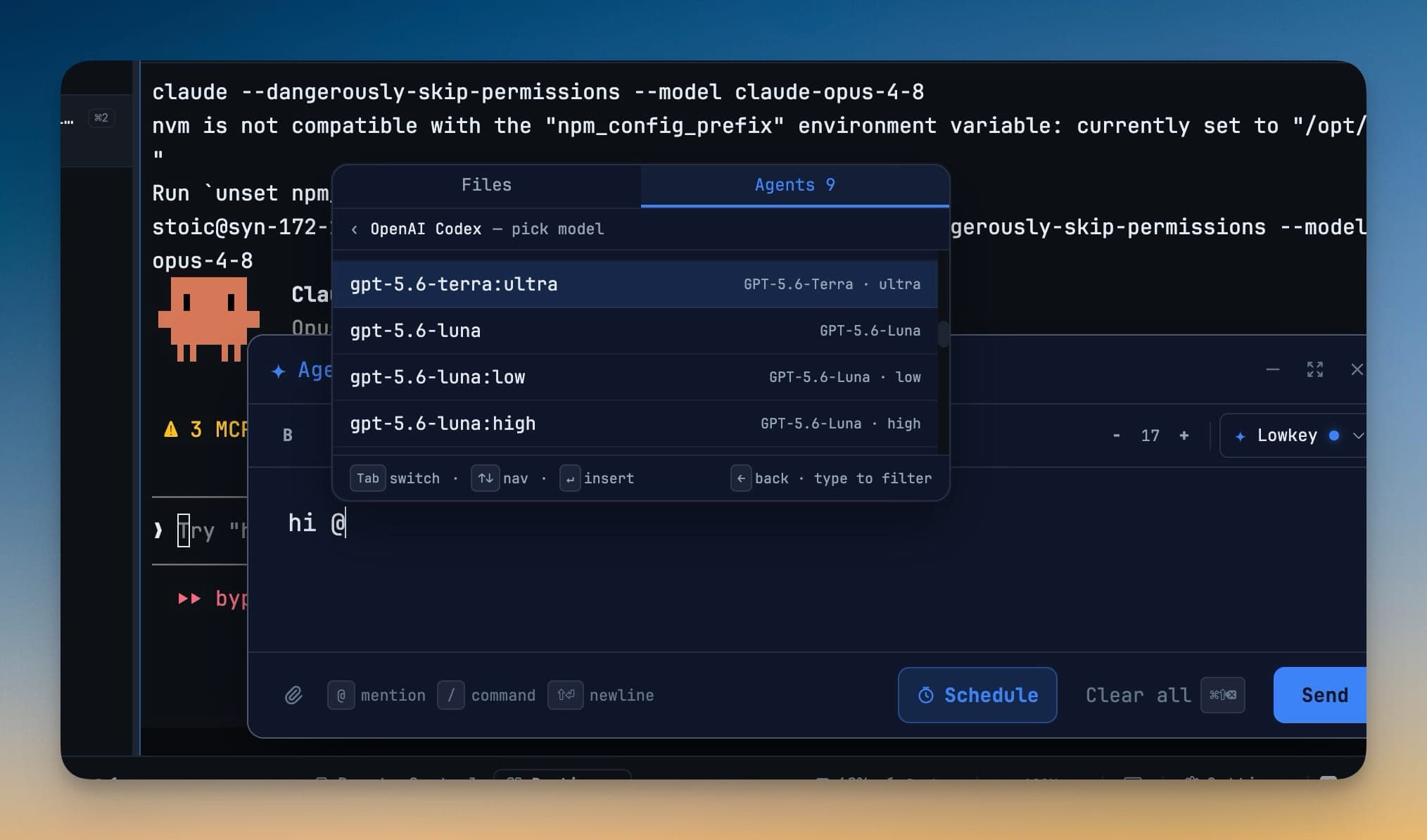
- เลือก agent ที่ต้องการมอบหมายงานให้ เช่น OpenAI Codex — pick model
- กรองรายการโมเดลด้วยการพิมพ์ หรือใช้ปุ่มลูกศรเพื่อเลื่อนดูรายการ
- กด Enter เพื่อแทรกโมเดลที่เลือก ใช้
←เพื่อกลับไปยังรายการ agent - พิมพ์งานที่ต้องการแล้วส่ง
งานที่มอบหมายจะรันผ่าน 1devtool-agent CLI ในเครื่อง โดยตั้งค่า --model ตามที่คุณเลือกไว้ การเลือกนี้เกิดขึ้น ณ ตอนที่ส่งต่องาน — ไม่ต้องแก้ไขไฟล์ config หรือรีสตาร์ตแต่อย่างใด
เลือกระดับการให้เหตุผล
เมื่อโมเดลใดมีระดับการให้เหตุผลหลายระดับ แต่ละระดับจะปรากฏเป็นตัวเลือกแยกกัน ตัวอย่างเช่น คุณอาจเลือก:
model:lowสำหรับการเปลี่ยนแปลงเล็กๆ ที่ทำตามรูปแบบและรวดเร็วmodel:highสำหรับการดีบักหรือการพัฒนาที่เกี่ยวข้องกับหลายไฟล์model:ultraสำหรับงานด้านสถาปัตยกรรมหรือการ migration ที่ยาก
ตัวเลือกจะแสดงเฉพาะระดับการให้เหตุผลที่รองรับเท่านั้น ทำให้แต่ละงานที่มอบหมายสามารถใช้ความสมดุลที่เหมาะสมระหว่างความเร็ว ต้นทุน และความลึกในการให้เหตุผล
ตรวจสอบและรีเฟรชโมเดลที่ใช้งานได้
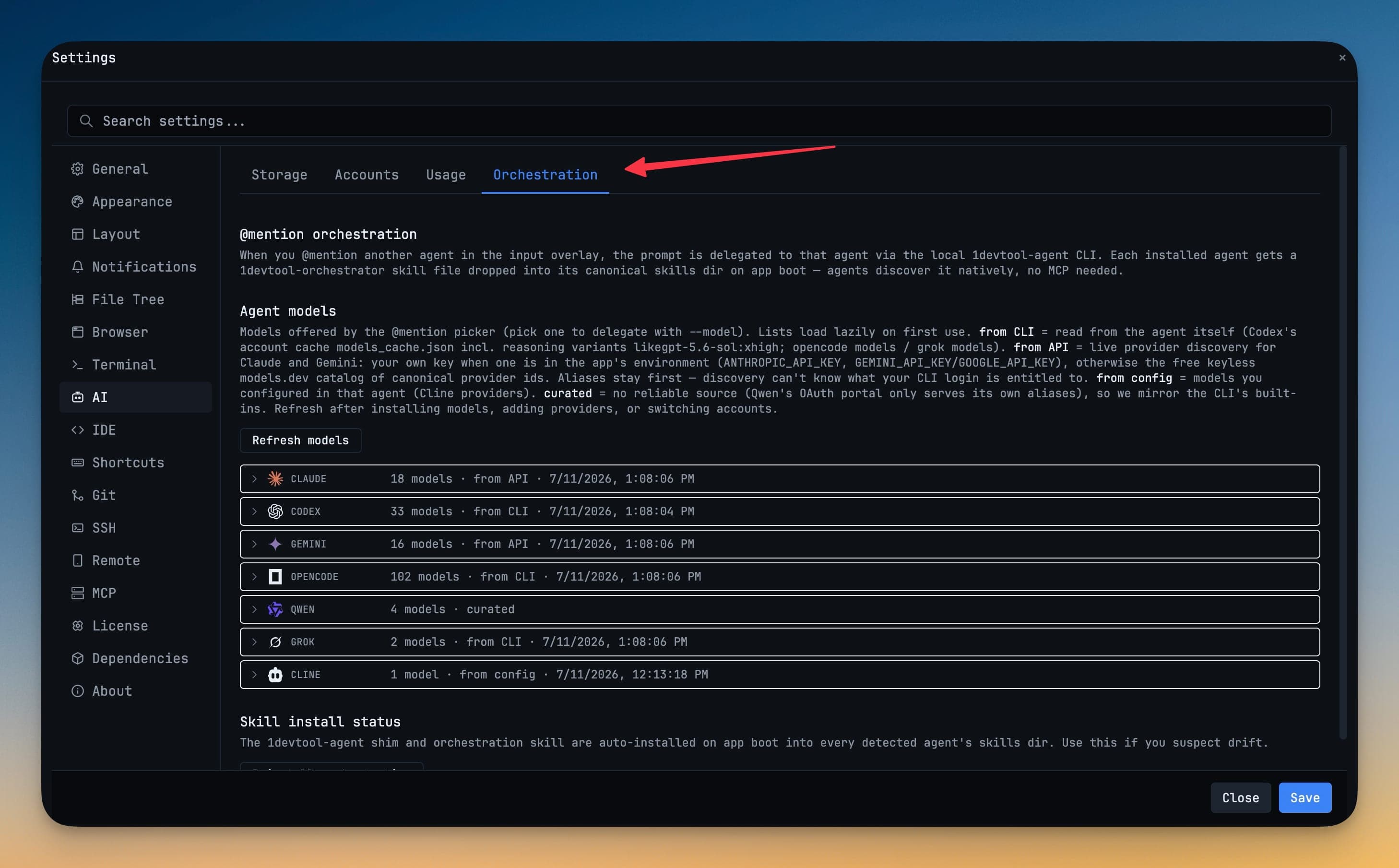
เปิด Settings → AI → Orchestration เพื่อดูโมเดลที่ใช้งานได้สำหรับ agent ที่ติดตั้งไว้ทุกตัว แหล่งที่มาที่แสดงข้าง agent จะอธิบายว่ารายการนั้นมาจากไหน:
| แหล่งที่มา | วิธีค้นพบโมเดล |
|---|---|
| from CLI | อ่านจากบัญชีหรือแคชโมเดลของเครื่องมือที่ติดตั้งไว้ รวมถึงรูปแบบ reasoning ที่รองรับด้วย |
| from API | โหลดผ่าน API ของผู้ให้บริการเมื่อมีคีย์ใช้งานได้ พร้อมสำรองด้วยแคตตาล็อกในกรณีที่รองรับ |
| from config | อ่านจากผู้ให้บริการที่ตั้งค่าไว้ใน agent เอง |
| curated | มาจากรายการความเข้ากันได้ที่ทีมงานดูแลปรับปรุงอยู่เสมอ |
ใช้ Refresh models หลังจากเปลี่ยนบัญชี เพิ่มผู้ให้บริการ หรือเปลี่ยนการตั้งค่าของ agent หากการรีเฟรชแบบสดล้มเหลว 1DevTool จะยังคงเก็บรายการโมเดลล่าสุดที่ดึงมาสำเร็จไว้ให้ใช้งาน แทนที่จะปล่อยให้ตัวเลือกว่างเปล่า
ตรวจสอบการส่งต่องาน
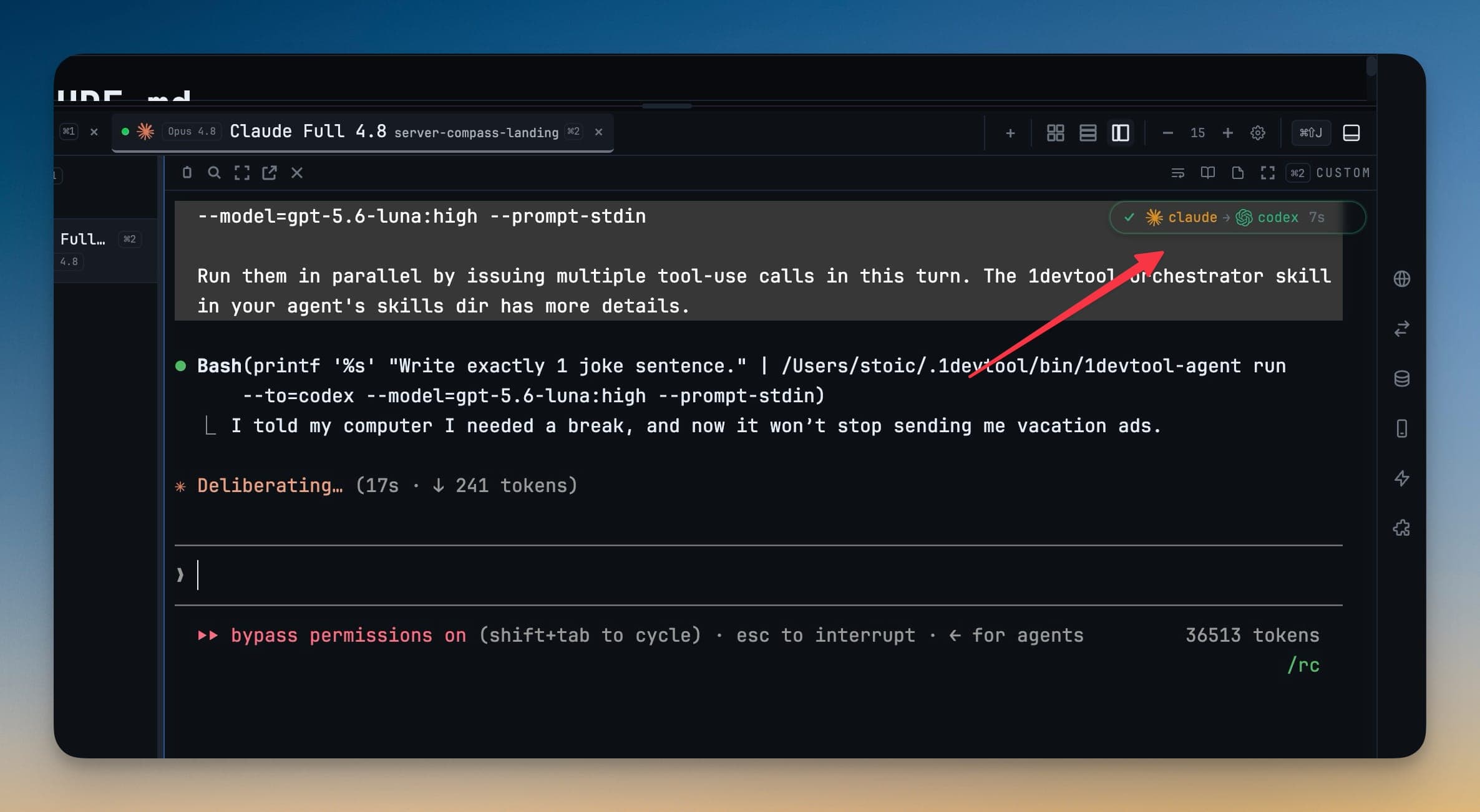
หลังจากส่งงานแล้ว ป้าย sub-agent badge จะแสดง agent ต่างๆ ในสายการส่งต่องาน agent ที่กำลังทำงานอยู่จะมีแอนิเมชันแสดงให้เห็น และคำสั่งที่ถูกส่งต่อจะรวมโมเดลที่เลือกไว้ด้วย ใช้รายละเอียดเหล่านี้เพื่อยืนยันทั้งปลายทางของงานและโมเดลที่กำลังรันงานนั้นอยู่
เลือกโมเดลที่เหมาะกับงาน
- ใช้โมเดลที่เร็วและต้นทุนต่ำสำหรับการเปลี่ยนชื่อ การจัดรูปแบบ boilerplate และการแก้ไขอื่นๆ ที่ขอบเขตชัดเจน
- ใช้ระดับการให้เหตุผลที่สูงขึ้นสำหรับการดีบัก การ refactor การ migration และการตัดสินใจที่ส่งผลกระทบในวงกว้าง
- รีเฟรชแคตตาล็อกโมเดลเมื่อโมเดลที่เพิ่งติดตั้งหรือเพิ่งได้รับสิทธิ์ใช้งานไม่ปรากฏขึ้น
- ตรวจสอบ handoff badge และคำสั่งที่ถูกส่งต่อ เมื่อคุณต้องการยืนยันว่า agent และโมเดลใดกำลังทำงานอยู่
หากต้องการดูขั้นตอนการทำงานแบบละเอียดยิ่งขึ้น ดูที่ เลือกโมเดลสำหรับการส่งต่องานให้ AI Agent ทุกครั้ง