ہر AI ایجنٹ ہینڈ آف کے لیے ماڈل منتخب کریں
Agent Input سے ہر تفویض کردہ AI ایجنٹ ٹاسک کے لیے صحیح ماڈل اور ریزننگ لیول منتخب کریں۔
جب آپ کسی دوسرے AI ایجنٹ کو کام سونپتے ہیں، تو آپ اس ایجنٹ کے ڈیفالٹ پر انحصار کرنے کے بجائے ٹاسک چلانے کے لیے صحیح ماڈل منتخب کر سکتے ہیں۔ جو ایجنٹس ریزننگ لیولز سپورٹ کرتے ہیں وہ ہر ہینڈ آف کے لیے آپ کو یہ منتخب کرنے کی سہولت بھی دیتے ہیں کہ کتنی ریزننگ ایفرٹ استعمال کی جائے۔
یہ Agent Input میں Agents ٹیب سے کام کرتا ہے۔ آپ کا ماڈل انتخاب صرف اسی ہینڈ آف پر لاگو ہوتا ہے، اس لیے آپ چھوٹی تبدیلی کے لیے تیز ماڈل اور مشکل ری فیکٹر کے لیے زیادہ ریزننگ والا ماڈل استعمال کر سکتے ہیں — بغیر ایجنٹ کی کنفیگریشن تبدیل کیے یا اسے دوبارہ شروع کیے۔
ایجنٹ اور ماڈل منتخب کریں
- Agent Input کھولیں۔
- Agents ٹیب منتخب کریں۔
- وہ ایجنٹ منتخب کریں جسے آپ کام تفویض کرنا چاہتے ہیں، مثلاً OpenAI Codex — pick model۔
- ٹائپ کر کے ماڈل کی فہرست فلٹر کریں، یا اس میں آگے پیچھے جانے کے لیے ایرو کیز استعمال کریں۔
- منتخب کردہ ماڈل شامل کرنے کے لیے Enter دبائیں۔ ایجنٹ کی فہرست پر واپس جانے کے لیے
←استعمال کریں۔ - ٹاسک درج کریں اور اسے بھیج دیں۔
تفویض کردہ ٹاسک مقامی 1devtool-agent CLI کے ذریعے چلتا ہے جس میں --model آپ کے انتخاب پر سیٹ ہوتا ہے۔ یہ انتخاب تفویض کے وقت ہی کیا جاتا ہے — نہ کسی کنفیگ فائل میں ترمیم کی ضرورت ہے اور نہ ری اسٹارٹ کی۔
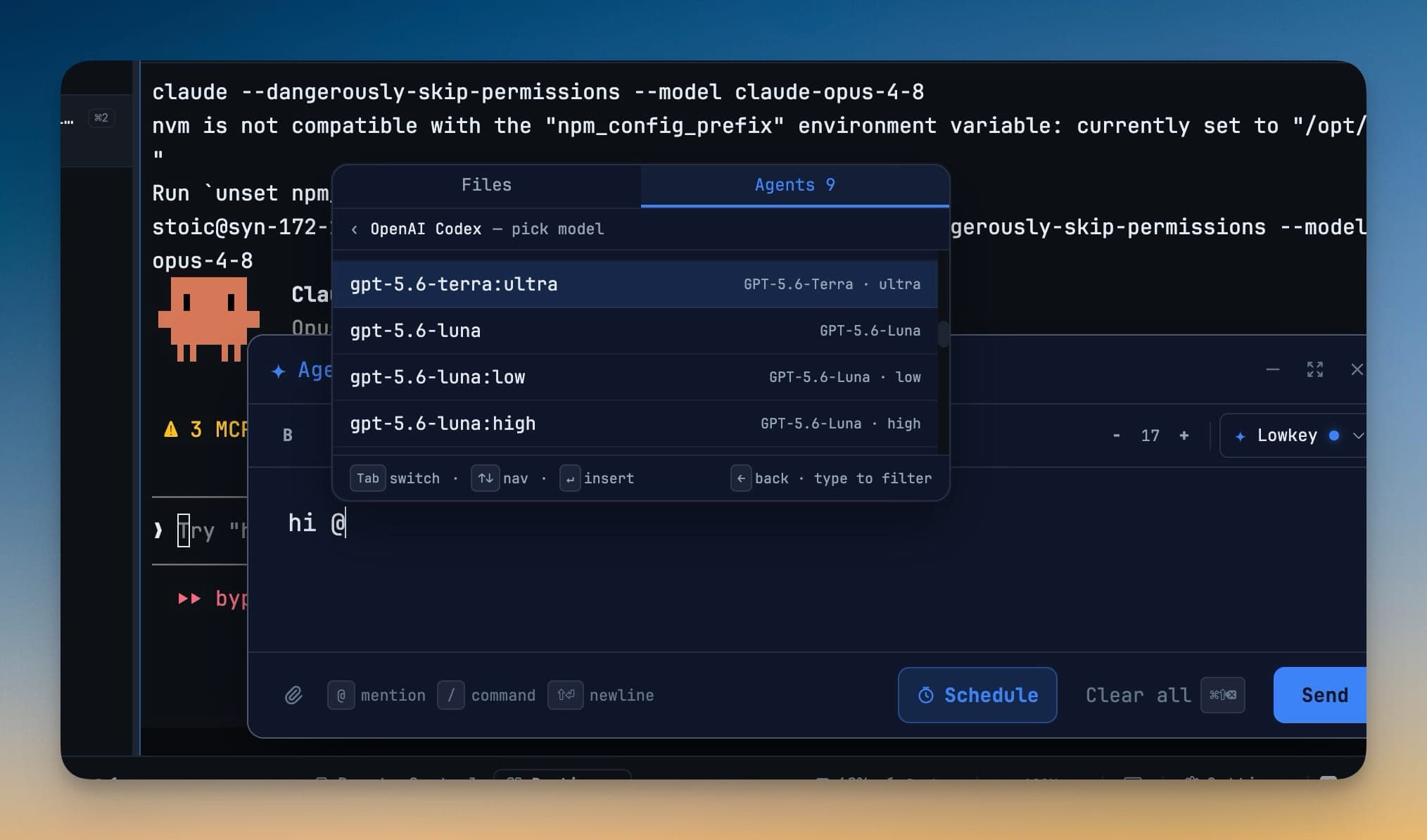
ریزننگ لیول منتخب کریں
جب کوئی ماڈل متعدد ریزننگ لیولز فراہم کرتا ہے، تو ہر لیول اپنے طور پر ایک الگ آپشن کے طور پر ظاہر ہوتا ہے۔ مثال کے طور پر، آپ یہ منتخب کر سکتے ہیں:
model:low— تیز، میکانیکی تبدیلی کے لیےmodel:high— ڈیبگنگ یا متعدد فائلوں پر مشتمل عمل درآمد کے لیےmodel:ultra— آرکیٹیکچر کے کام یا مشکل مائیگریشن کے لیے
پکر میں صرف سپورٹڈ ریزننگ لیولز ہی دکھائی دیتے ہیں۔ اس سے ہر تفویض کردہ ٹاسک رفتار، لاگت اور ریزننگ کی گہرائی کے درمیان مناسب توازن استعمال کر سکتا ہے۔
دستیاب ماڈلز کا جائزہ لیں اور ریفریش کریں
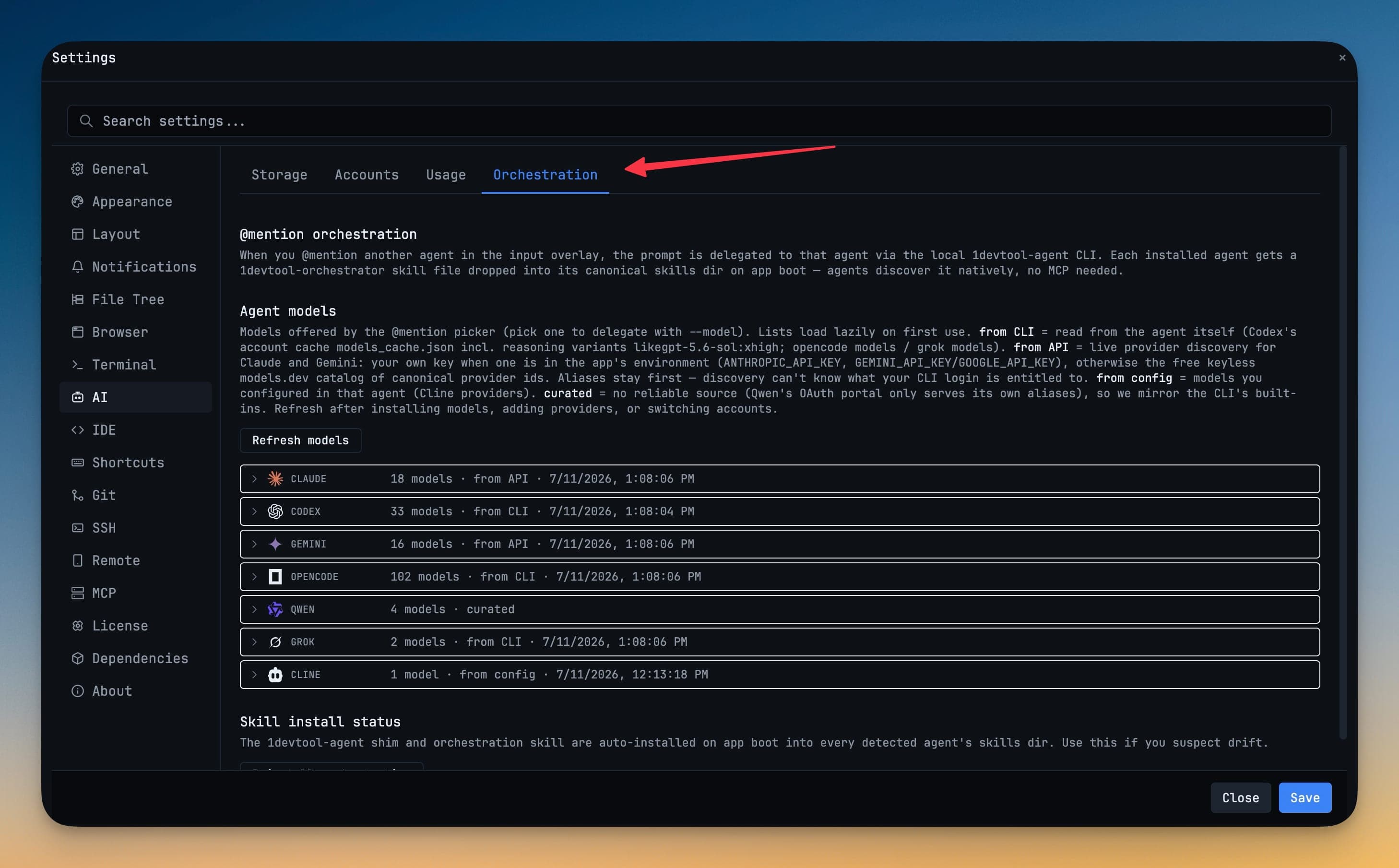
ہر انسٹال کردہ ایجنٹ کے لیے دستیاب ماڈلز دیکھنے کے لیے Settings → AI → Orchestration کھولیں۔ کسی ایجنٹ کے ساتھ دکھایا گیا سورس یہ بتاتا ہے کہ اس کی فہرست کہاں سے آئی ہے:
| Source | ماڈلز کیسے دریافت کیے جاتے ہیں |
|---|---|
| from CLI | انسٹال کردہ ٹول کے اکاؤنٹ یا ماڈل کیشے سے پڑھا جاتا ہے، بشمول سپورٹڈ ریزننگ ورینٹس۔ |
| from API | جب کوئی کلید دستیاب ہو تو پرووائیڈر API استعمال کرتے ہوئے لوڈ کیا جاتا ہے، سپورٹ ہونے کی صورت میں کیٹلاگ فال بیک کے ساتھ۔ |
| from config | خود ایجنٹ میں کنفیگر کردہ پرووائیڈرز سے پڑھا جاتا ہے۔ |
| curated | ایک برقرار رکھی گئی مطابقت کی فہرست کے طور پر فراہم کیا جاتا ہے۔ |
اکاؤنٹ تبدیل کرنے، پرووائیڈر شامل کرنے، یا ایجنٹ کی کنفیگریشن تبدیل کرنے کے بعد Refresh models استعمال کریں۔ اگر لائیو ریفریش ناکام ہو جائے، تو 1DevTool پکر کو خالی چھوڑنے کے بجائے آخری کامیاب ماڈل فہرست دستیاب رکھتا ہے۔
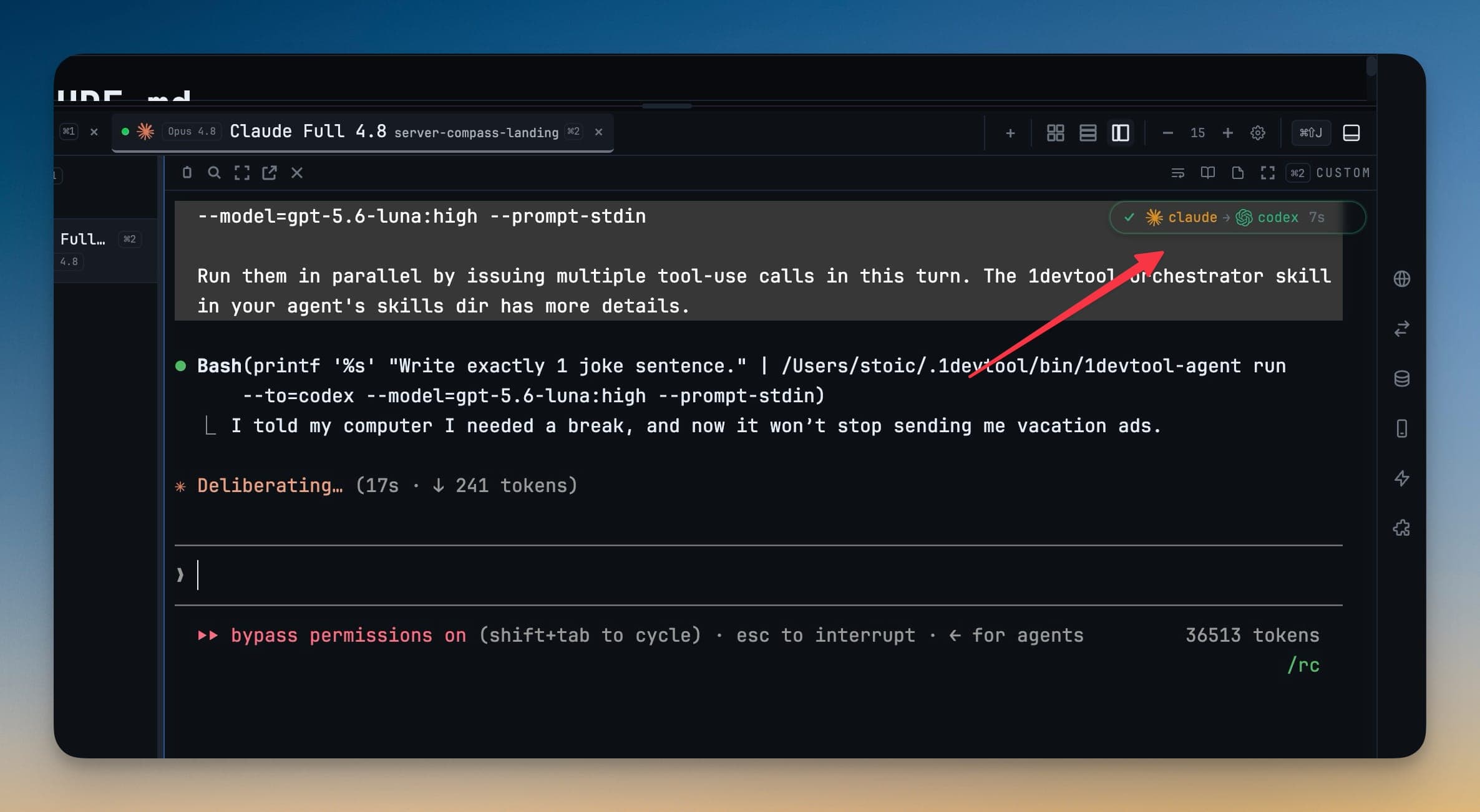
ہینڈ آف کی تصدیق کریں
ٹاسک بھیجنے کے بعد، sub-agent بیج ہینڈ آف چین میں شامل ایجنٹس دکھاتا ہے۔ فی الحال چلنے والا ایجنٹ متحرک دکھایا جاتا ہے، اور تفویض کردہ کمانڈ میں منتخب کردہ ماڈل شامل ہوتا ہے۔ یہ تفصیلات استعمال کر کے تصدیق کریں کہ ٹاسک کہاں گیا اور کون سا ماڈل اسے چلا رہا ہے۔
ٹاسک کے لیے صحیح ماڈل منتخب کریں
- ری نیمنگ، فارمیٹنگ، بوائلر پلیٹ، اور دیگر واضح دائرہ کار والی تبدیلیوں کے لیے تیز اور کم لاگت والا ماڈل استعمال کریں۔
- ڈیبگنگ، ری فیکٹرز، مائیگریشنز، اور وسیع اثر رکھنے والے فیصلوں کے لیے زیادہ مضبوط ریزننگ لیول استعمال کریں۔
- جب نیا انسٹال کردہ یا نیا مجاز کردہ ماڈل دکھائی نہ دے تو ماڈل کیٹلاگ کو ریفریش کریں۔
- جب آپ کو یہ تصدیق کرنی ہو کہ کون سا ایجنٹ اور ماڈل فعال ہے تو ہینڈ آف بیج اور تفویض کردہ کمانڈ چیک کریں۔
ایک تفصیلی ورک فلو واک تھرو کے لیے، دیکھیں Pick the Model for Every AI Agent Handoff۔