हर AI एजेंट हैंडऑफ़ के लिए मॉडल चुनें
Agent Input से हर डेलिगेट किए गए AI एजेंट टास्क के लिए सटीक मॉडल और रीज़निंग लेवल चुनें।
जब आप किसी दूसरे AI एजेंट को काम सौंपते हैं, तो आप उस एजेंट के डिफ़ॉल्ट पर निर्भर रहने के बजाय टास्क चलाने के लिए सटीक मॉडल चुन सकते हैं। जो एजेंट रीज़निंग लेवल सपोर्ट करते हैं, वे आपको हर हैंडऑफ़ के लिए कितना रीज़निंग एफर्ट इस्तेमाल करना है यह चुनने भी देते हैं।
यह Agent Input में Agents टैब से काम करता है। आपकी मॉडल पसंद केवल उसी हैंडऑफ़ पर लागू होती है, इसलिए आप छोटे एडिट के लिए तेज़ मॉडल और मुश्किल रीफ़ैक्टर के लिए ज़्यादा रीज़निंग वाला मॉडल इस्तेमाल कर सकते हैं, वह भी एजेंट का कॉन्फ़िगरेशन बदले या उसे रीस्टार्ट किए बिना।
एजेंट और मॉडल चुनें
- Agent Input खोलें।
- Agents टैब चुनें।
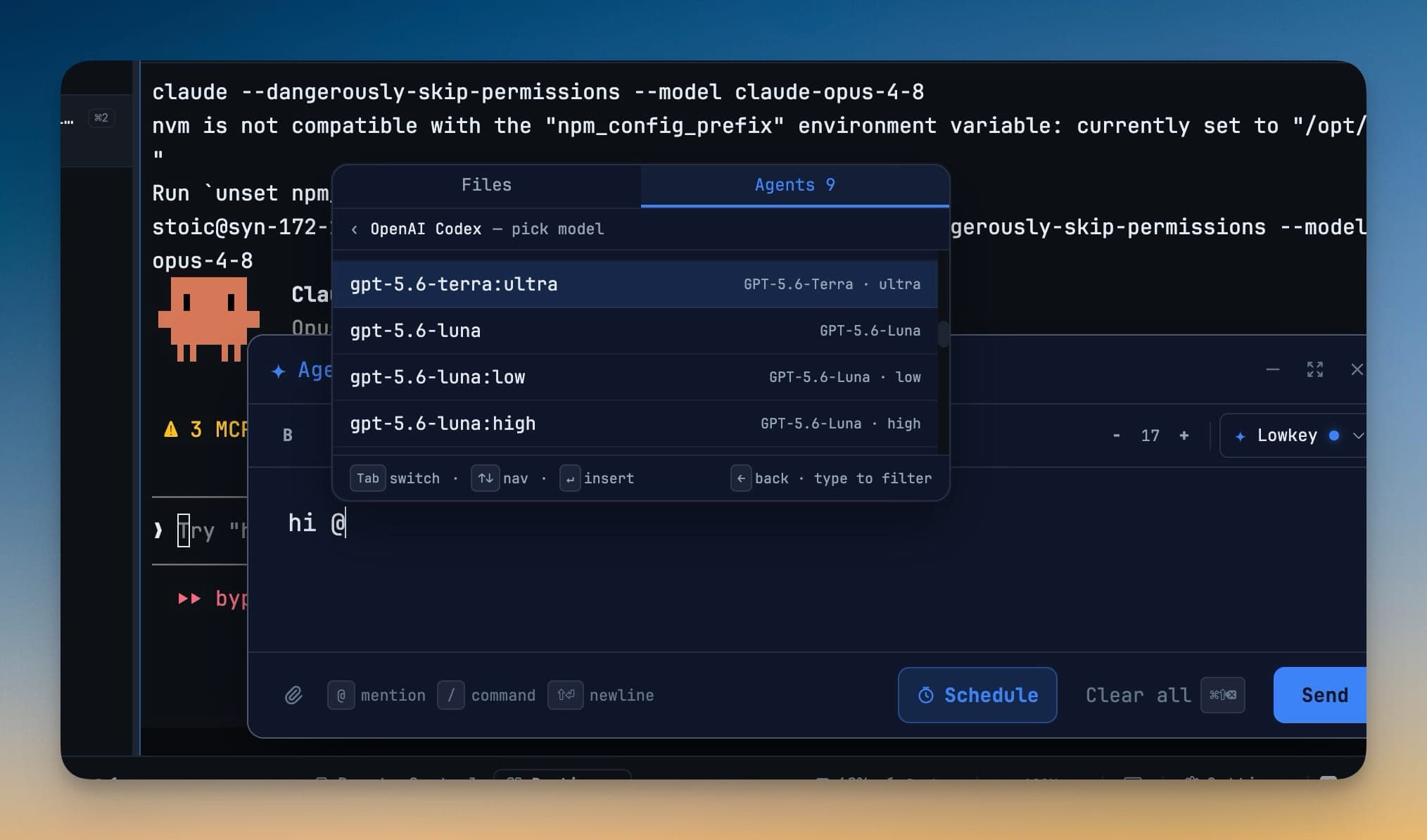
- जिस एजेंट को डेलिगेट करना चाहते हैं उसे चुनें, जैसे OpenAI Codex — pick model।
- टाइप करके मॉडल लिस्ट फ़िल्टर करें, या उसमें मूव करने के लिए ऐरो कीज़ का इस्तेमाल करें।
- चुने गए मॉडल को इन्सर्ट करने के लिए Enter दबाएं। एजेंट लिस्ट पर वापस जाने के लिए
←का इस्तेमाल करें। - टास्क एंटर करें और उसे भेजें।
डेलिगेट किया गया टास्क लोकल 1devtool-agent CLI के ज़रिए चलता है, जिसमें --model आपकी चुनी हुई सेटिंग पर सेट होता है। यह चुनाव डेलिगेशन के समय ही किया जाता है—किसी कॉन्फ़िग-फ़ाइल एडिट या रीस्टार्ट की ज़रूरत नहीं होती।
रीज़निंग लेवल चुनें
जब कोई मॉडल कई रीज़निंग लेवल ऑफ़र करता है, तो हर लेवल अपने खुद के ऑप्शन के रूप में दिखता है। उदाहरण के लिए, आप चुन सकते हैं:
- किसी तेज़, मैकेनिकल बदलाव के लिए
model:low - डिबगिंग या मल्टी-फ़ाइल इम्प्लीमेंटेशन के लिए
model:high - आर्किटेक्चर वर्क या मुश्किल माइग्रेशन के लिए
model:ultra
पिकर में केवल सपोर्टेड रीज़निंग लेवल ही दिखते हैं। इससे हर डेलिगेट किए गए टास्क को स्पीड, कॉस्ट और रीज़निंग डेप्थ का सही बैलेंस इस्तेमाल करने का मौका मिलता है।
उपलब्ध मॉडल्स रिव्यू और रिफ्रेश करें
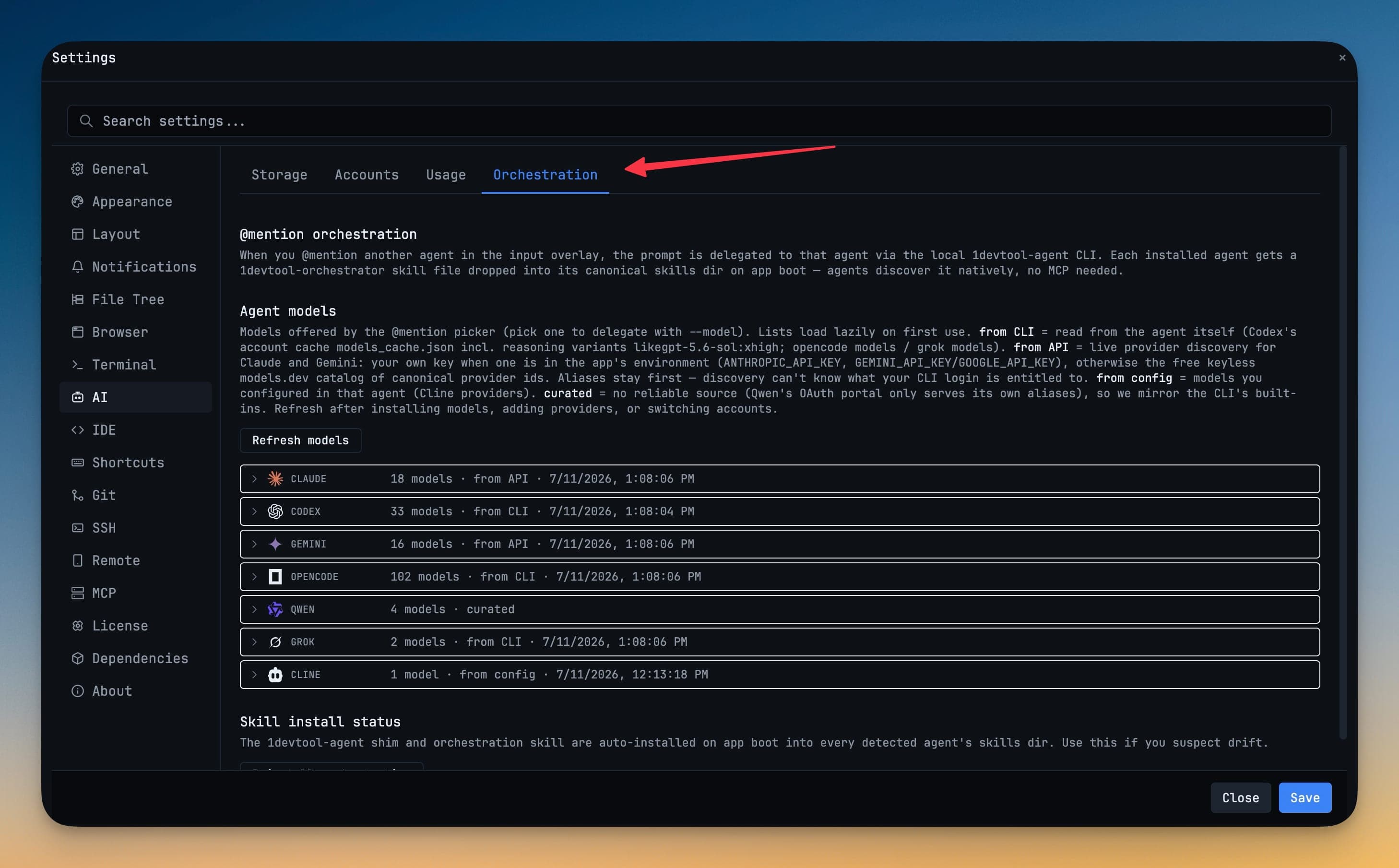
हर इंस्टॉल किए गए एजेंट के लिए उपलब्ध मॉडल्स देखने के लिए Settings → AI → Orchestration खोलें। किसी एजेंट के बगल में दिखने वाला सोर्स यह बताता है कि उसकी लिस्ट कहां से आई है:
| Source | How models are discovered |
|---|---|
| from CLI | इंस्टॉल किए गए टूल के अकाउंट या मॉडल कैश से पढ़ा जाता है, जिसमें सपोर्टेड रीज़निंग वेरिएंट भी शामिल हैं। |
| from API | की उपलब्ध होने पर प्रोवाइडर API का इस्तेमाल करके लोड किया जाता है, सपोर्ट होने पर कैटलॉग फ़ॉलबैक के साथ। |
| from config | एजेंट में ही कॉन्फ़िगर किए गए प्रोवाइडर्स से पढ़ा जाता है। |
| curated | एक मेंटेन की गई कम्पैटिबिलिटी लिस्ट के रूप में दिया जाता है। |
अकाउंट बदलने, कोई प्रोवाइडर जोड़ने, या किसी एजेंट का कॉन्फ़िगरेशन बदलने के बाद Refresh models इस्तेमाल करें। अगर लाइव रिफ्रेश फेल हो जाता है, तो 1DevTool पिकर को खाली छोड़ने के बजाय आख़िरी सफल मॉडल लिस्ट को उपलब्ध रखता है।
हैंडऑफ़ वेरिफ़ाई करें
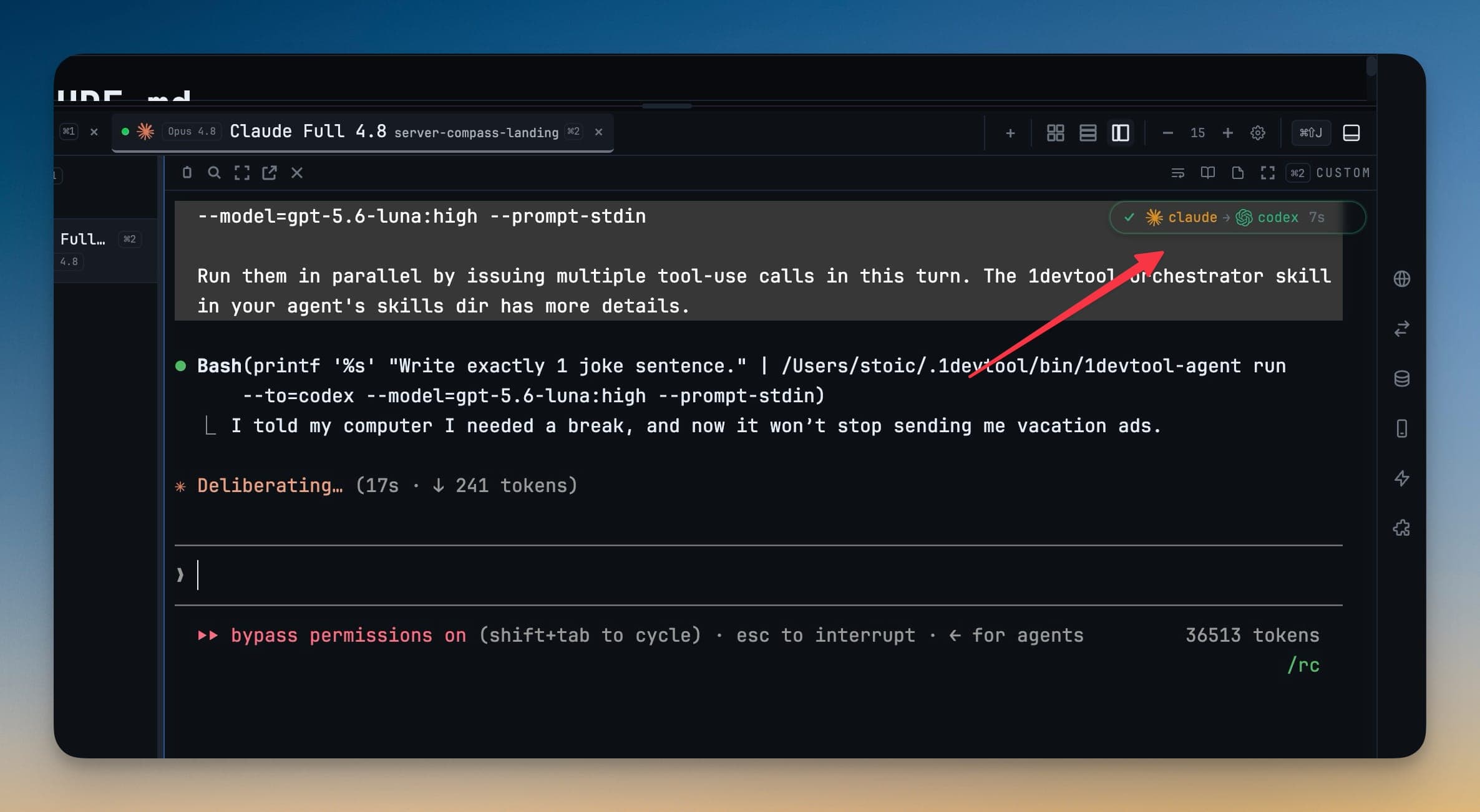
टास्क भेजने के बाद, सब-एजेंट बैज हैंडऑफ़ चेन में मौजूद एजेंट्स को दिखाता है। जो एजेंट अभी चल रहा है वह एनिमेटेड होता है, और डेलिगेट किए गए कमांड में चुना हुआ मॉडल शामिल होता है। इन डिटेल्स का इस्तेमाल यह कन्फ़र्म करने के लिए करें कि टास्क कहां गया और उसे कौन सा मॉडल चला रहा है।
टास्क के लिए सही मॉडल चुनें
- रीनेम, फ़ॉर्मेटिंग, बॉयलरप्लेट, और दूसरे अच्छी तरह स्कोप किए गए एडिट के लिए एक तेज़, कम-कॉस्ट वाला मॉडल इस्तेमाल करें।
- डिबगिंग, रीफ़ैक्टर, माइग्रेशन, और व्यापक असर वाले फ़ैसलों के लिए ज़्यादा मज़बूत रीज़निंग लेवल इस्तेमाल करें।
- जब कोई नया इंस्टॉल या नया ऑथराइज़ किया गया मॉडल न दिखे, तो मॉडल कैटलॉग रिफ्रेश करें।
- जब आपको यह वेरिफ़ाई करना हो कि कौन सा एजेंट और मॉडल एक्टिव है, तो हैंडऑफ़ बैज और डेलिगेट किए गए कमांड को चेक करें।
एक लंबे वर्कफ़्लो वॉकथ्रू के लिए, देखें हर AI एजेंट हैंडऑफ़ के लिए मॉडल चुनें।