Git क्लाइंट — अवलोकन
आपके वर्कस्पेस में बिल्ट-इन एक विज़ुअल Git क्लाइंट — बिना टर्मिनल के diff देखें, commit करें, push करें और branch करें।
Git क्लाइंट आपको Git से जुड़ी हर चीज़ के लिए एक विज़ुअल इंटरफ़ेस देता है — क्या बदला यह देखना, फ़ाइलें stage करना, commit मैसेज लिखना, remote पर push करना, branches बदलना, और worktrees मैनेज करना। इसे 1DevTool में सीधे बिल्ट-इन एक हल्के, पूरी सुविधाओं वाले विज़ुअल Git टूल के रूप में सोचें, जिसके लिए किसी अलग इंस्टॉल की ज़रूरत नहीं है।
Git क्लाइंट क्या है?
जब आप कोड लिखने के लिए किसी AI एजेंट का उपयोग कर रहे होते हैं, तो वह एजेंट लगातार आपकी फ़ाइलों में बदलाव करता रहता है। Git क्लाइंट आपको ये बदलाव विज़ुअली देखने देता है — कौन-सी फ़ाइलें बदली गईं, ठीक कौन-सी लाइनें जोड़ी या हटाई गईं, और diff कैसा दिखता है — इससे पहले कि आप कुछ भी commit करें।
इसका उपयोग करने के लिए आपको किसी भी git कमांड को जानने की ज़रूरत नहीं है। सब कुछ पॉइंट-एंड-क्लिक है।
इसका उपयोग क्यों करें?
AI एजेंट्स के साथ काम करते समय सबसे महत्वपूर्ण आदत है commit करने से पहले बदलावों की समीक्षा करना। एजेंट्स तेज़ होते हैं, लेकिन परफेक्ट नहीं। एक विज़ुअल diff से यह पहचानना आसान हो जाता है कि कब किसी एजेंट ने कुछ ऐसा बदल दिया जिसकी आपने उम्मीद नहीं की थी — कोई फ़ाइल जिसे उसे छूना नहीं चाहिए था, कोई लाइन जो गलत लगती है, या कोई फ़ंक्शन जिसे चुपचाप हटा दिया गया।
बिना किसी विज़ुअल क्लाइंट के, आपको टर्मिनल में git diff चलाना पड़ता और plain text को स्क्रॉल करना पड़ता। Git क्लाइंट के साथ, आप साथ-साथ रंग-कोडेड लाइन जोड़ और हटाव देखते हैं, और आप ठीक वही फ़ाइलें stage कर सकते हैं जो आप चाहते हैं।
कैसे खोलें
- बाईं ओर की आइकन स्ट्रिप में Git आइकन पर क्लिक करें
- या Cmd+G (Mac) / Ctrl+G (Windows/Linux) दबाएँ
Git पैनल आपके अन्य वर्कस्पेस पैनलों के साथ खुलता है। यह आपके मौजूदा प्रोजेक्ट फ़ोल्डर में git रिपॉज़िटरी को स्वचालित रूप से पहचान लेता है।
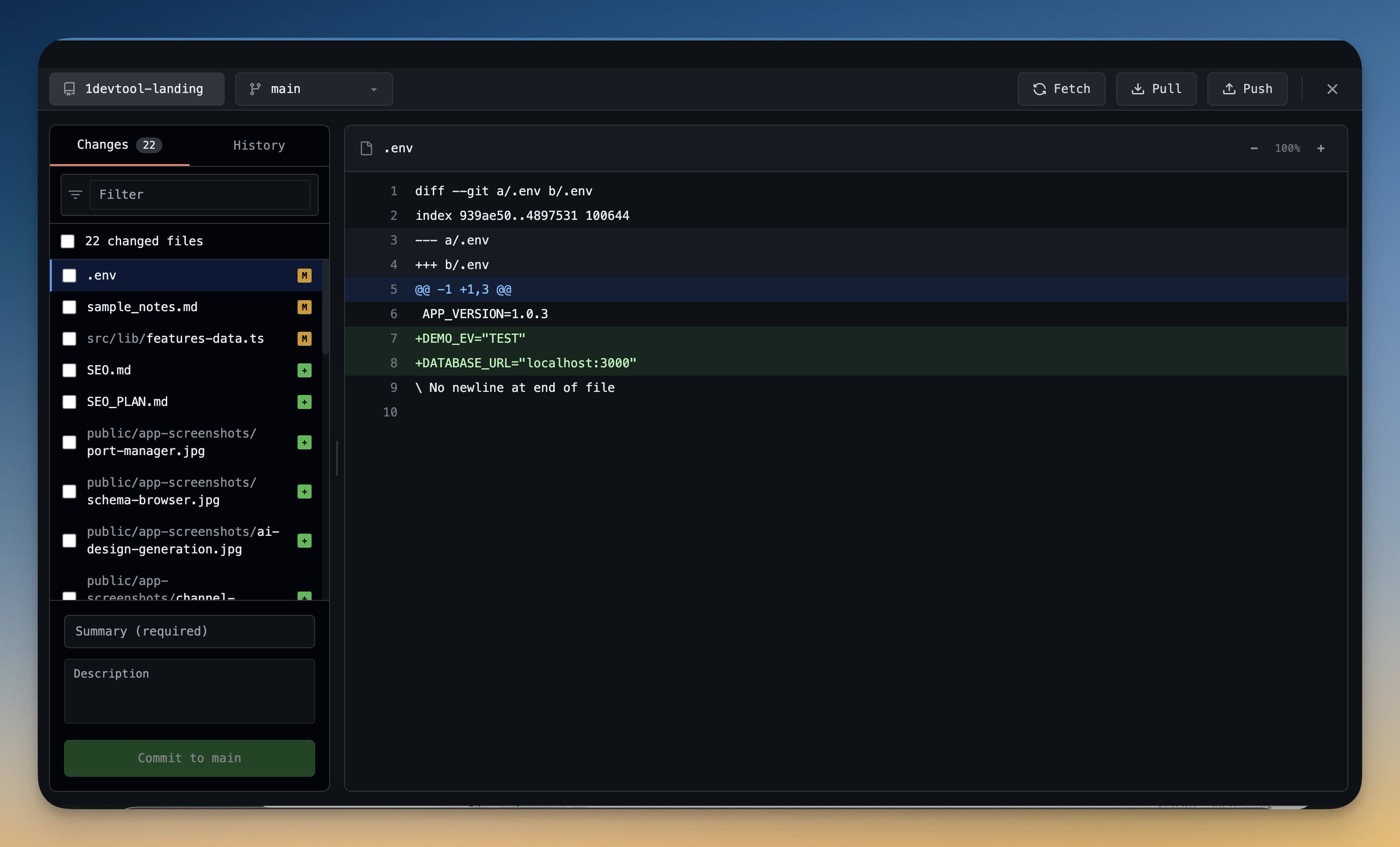
आप क्या कर सकते हैं
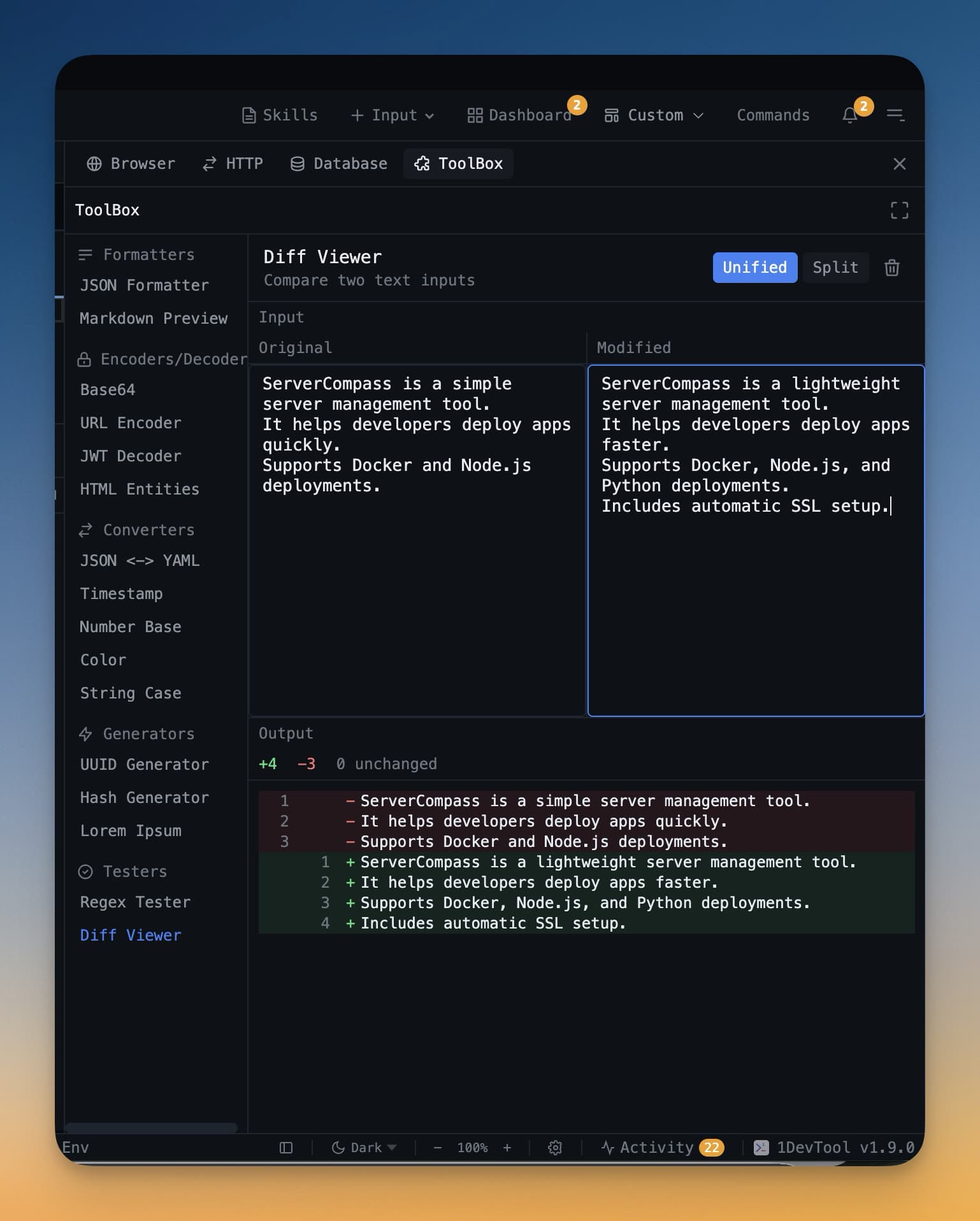
- Diff viewer — जोड़ी गई लाइनें (हरा), हटाई गई लाइनें (लाल), और अपरिवर्तित संदर्भ देखें। unified और side-by-side व्यू के बीच स्विच करें।
- Staging — प्रत्येक commit में ठीक क्या जाए, यह नियंत्रित करने के लिए अलग-अलग फ़ाइलों (या अलग-अलग hunks) को चेक या अनचेक करें।
- Commit — टर्मिनल को छुए बिना एक commit मैसेज टाइप करें और commit करें।
- Push & Pull — एक क्लिक में अपने remote के साथ sync करें।
- Branch switching — नई branches बनाएँ, मौजूदा branches checkout करें, और अपना पूरा branch इतिहास देखें।
- Worktrees — एक साथ कई branches checkout करें, हर एक अपने अलग फ़ोल्डर में। विवरण के लिए Git वर्कट्री देखें।
- एक प्रोजेक्ट में कई रिपॉज़िटरी — ऊपर दिया गया repository picker staged बदलावों, इतिहास, branches, और worktrees को एक साथ बदल देता है। मल्टी-रिपो वर्कस्पेस देखें।
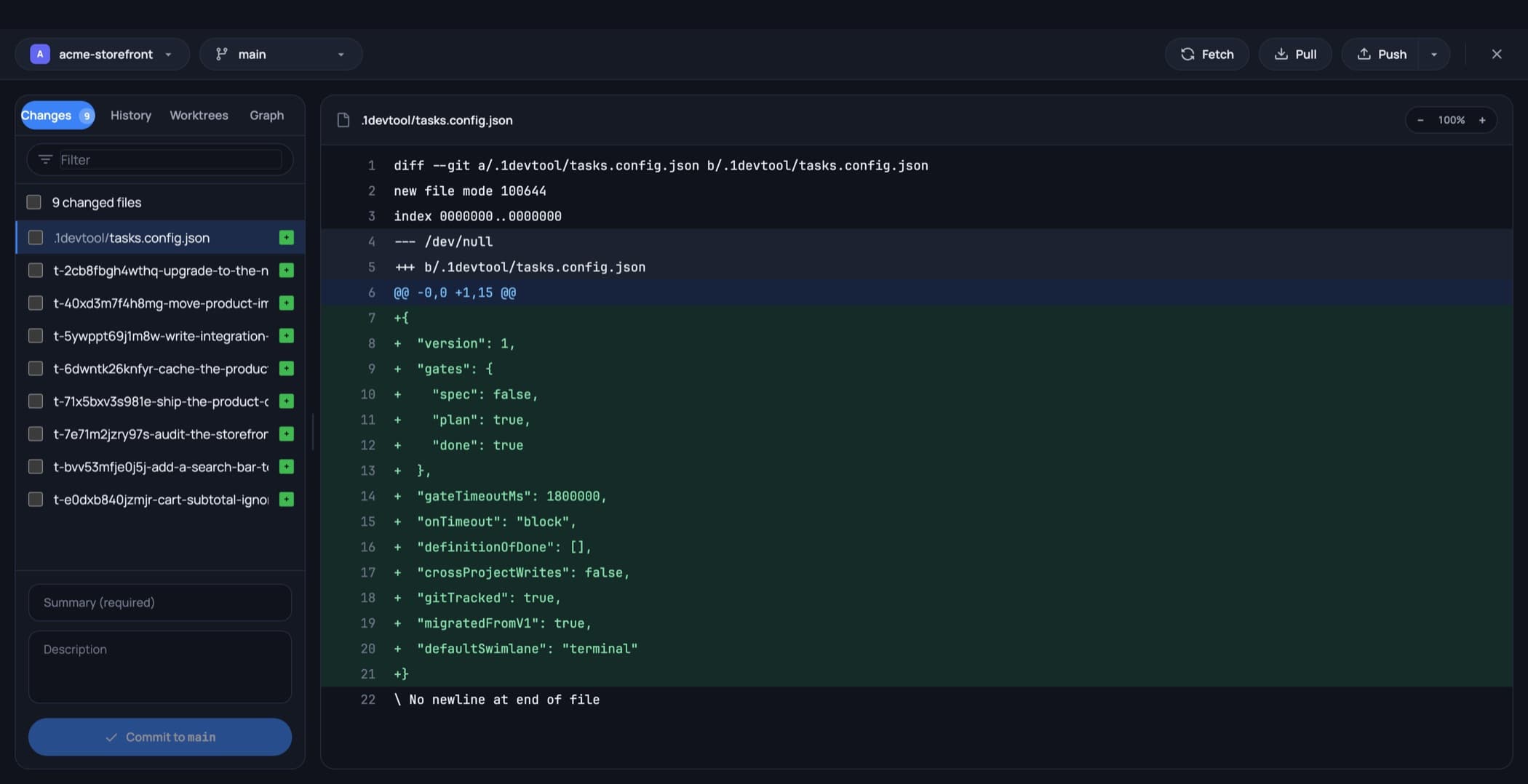
सबसे ऊपर repository picker, branch picker, और Fetch / Pull / Push होते हैं। बाईं ओर नीचे टैब्स हैं — Changes, History, Worktrees, Graph — इनके नीचे आपकी बदली गई फ़ाइलें, एक फ़िल्टर बॉक्स, और commit मैसेज फ़ील्ड्स होते हैं।
स्टेटस-बार branch picker
branch बदलने के लिए आपको क्लाइंट खोलने की ज़रूरत नहीं है। स्टेटस बार में एक branch इंडिकेटर होता है: उस पर क्लिक करने से branches और worktrees की एक खोजी जा सकने वाली सूची मिलती है, जिसमें मौजूदा वाली चिह्नित होती है। किसी भी row पर hover करने पर एक copy बटन दिखता है, ताकि लंबा branch नाम बिना checkout किए आपके क्लिपबोर्ड तक पहुँच जाए।
multi-repo प्रोजेक्ट में यह इंडिकेटर उस रिपॉज़िटरी को फॉलो करता है जिस पर आप काम कर रहे हैं, इसलिए स्क्रीन पर दिखने वाली branch हमेशा उसी फ़ाइल की branch होती है जिसे आप देख रहे हैं।
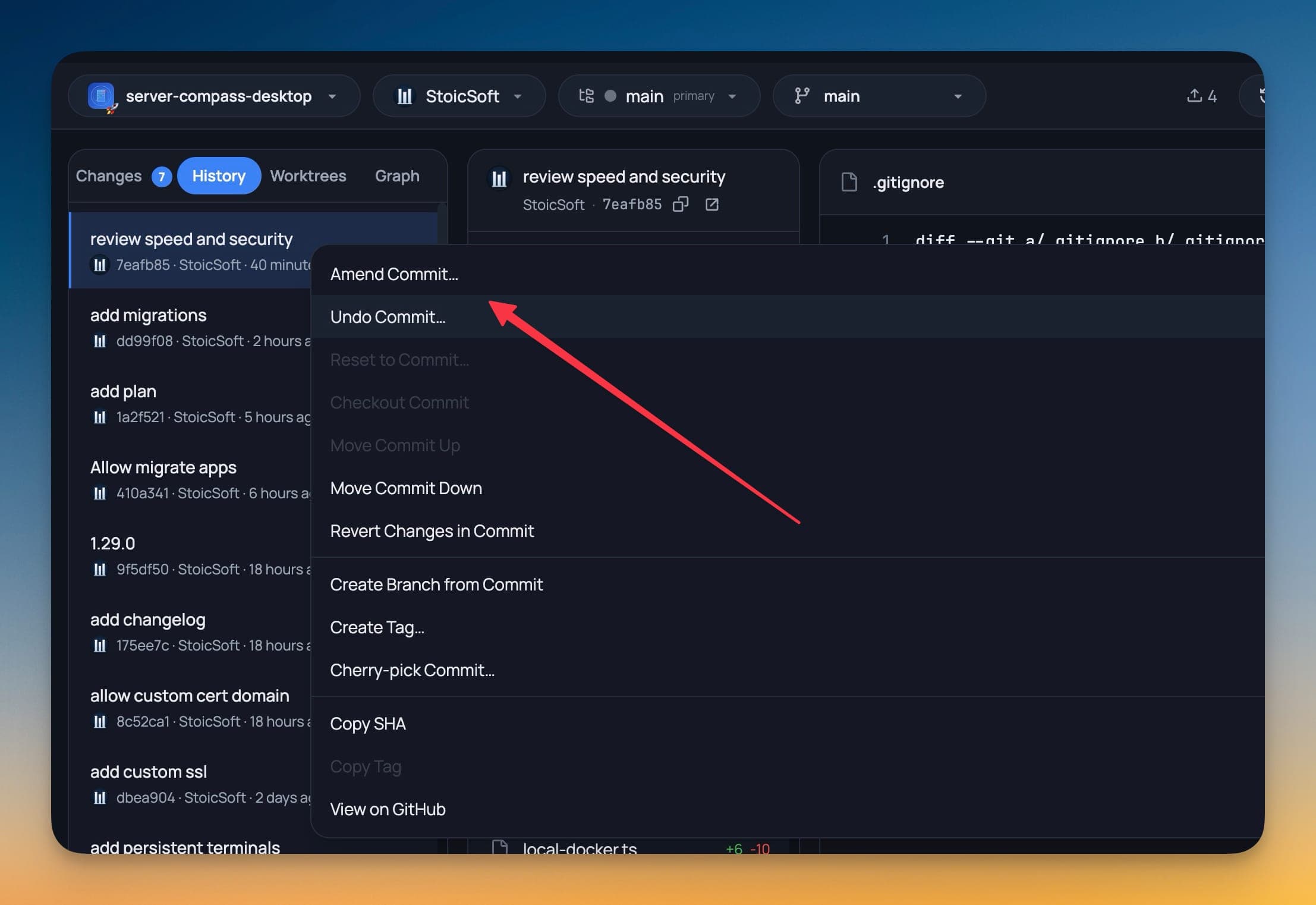
किसी commit पर एक्शन
इतिहास में किसी भी commit पर राइट-क्लिक करके वे एक्शन पाएँ जिन्हें आप अन्यथा script करते: उसका hash या मैसेज कॉपी करना, उससे एक branch या tag बनाना, उसे revert करना, cherry-pick करना, या उसका क्रम बदलना (reorder)। Reorder करने पर एक interactive rebase चलता है जो कुछ भी गलत होने पर खुद को साफ-सुथरे ढंग से abort कर देता है, इसलिए कोई गलती होने पर भी रिपॉज़िटरी वहीं रहती है जहाँ से उसने शुरुआत की थी।
खाते
प्रत्येक रिपॉज़िटरी एक अलग Git खाता — GitHub या GitLab — का उपयोग कर सकती है, जिसका अपना avatar क्लाइंट हेडर में दिखता है ताकि आपको हमेशा पता रहे कि आप किस अकाउंट से push करने वाले हैं।
Git का अनुभव आवश्यक नहीं
अगर आप git में नए हैं, तो Git क्लाइंट शुरुआत करने के लिए एक बेहतरीन जगह है। हर एक्शन का एक स्पष्ट लेबल होता है, और गलती होने पर आप हमेशा किसी commit को undo कर सकते हैं। जैसे-जैसे आप इसका उपयोग करेंगे, आप स्वाभाविक रूप से git वर्कफ़्लो सीख जाएँगे — staging, committing, pushing, branching — बिना कमांड्स याद किए।