Channel Templates
एक click में pre-built multi-agent workflow शुरू करें — code review, bug fix, test writing, और अधिक।
Scratch से multi-agent workflow setup करने में सोचना होता है: कौन से agents कौन सा role करेंगे, initial prompt क्या है, चीज़ें किस order में होंगी? Templates यह काम आपके लिए करते हैं। Template एक pre-configured channel है defined agent roles और starting prompt के साथ, ताकि proven workflow एक click में शुरू हो सके।
Template क्या है?
Template तीन चीज़ें एक साथ package करता है:
- Agent roles — कौन क्या करता है (जैसे "एक agent investigate करता है, एक fix करता है")
- Initial prompt — वो opening message जो workflow शुरू करता है
- Channel name prefix — ताकि channel का default meaningful नाम हो
Template start करते वक्त चुनते हैं कि कौन सा खुला terminal हर role fill करेगा, फिर channel initial prompt already sent के साथ खुलता है।
Built-In Templates
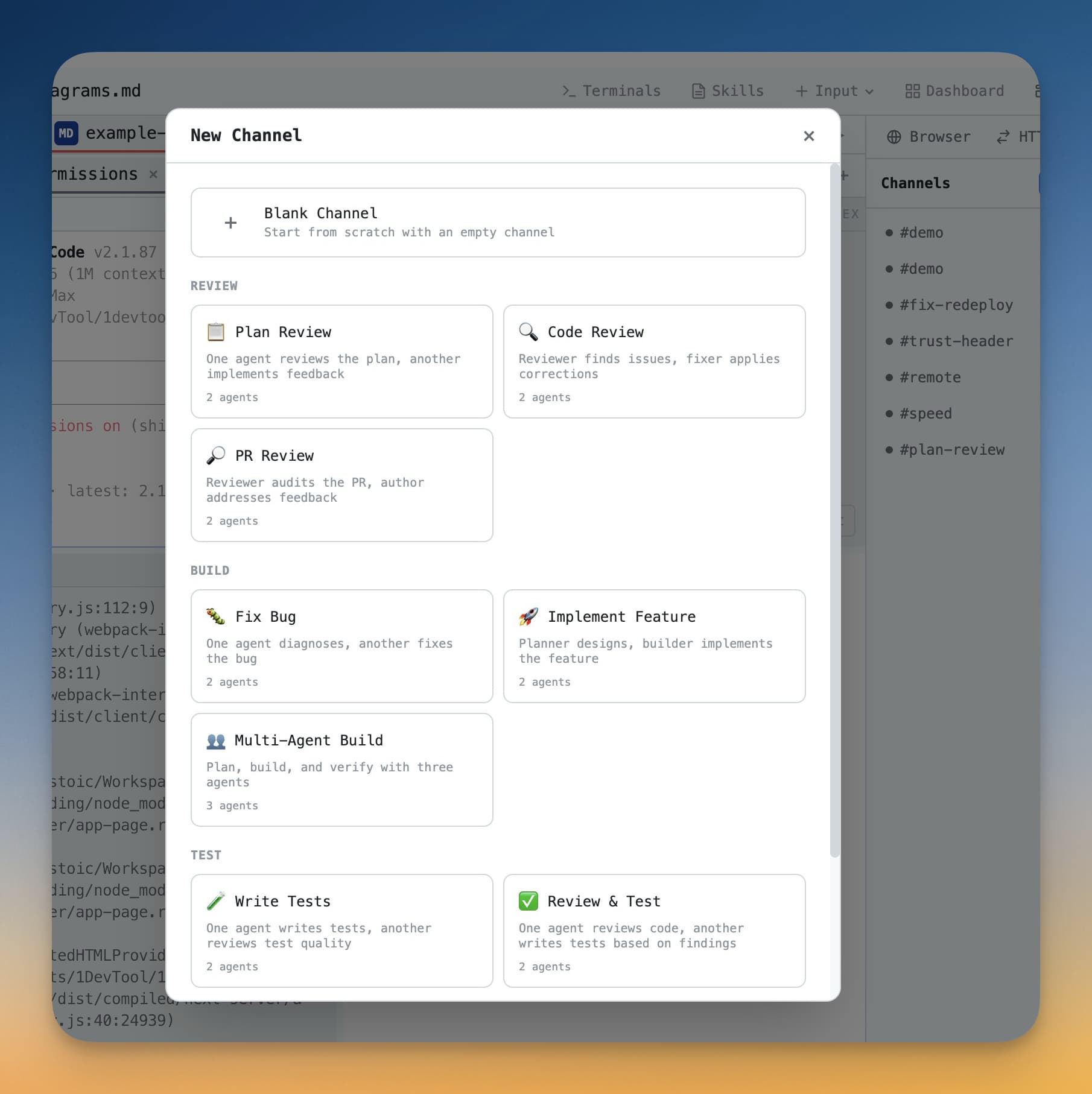
1DevTool चार templates ready-to-use के साथ आता है:
Fix Bug
तीन agents मिलकर bug squash करते हैं। पहला agent issue investigate करके root cause identify करता है। दूसरा fix apply करता है। तीसरा tests चलाता है और verify करता है कि fix काम कर रहा है और कुछ और नहीं टूटा। Bug description दें और template बाकी शुरू कर देता है।
Code Review
एक agent diff या file पढ़कर structured review post करता है: क्या अच्छा लग रहा है, क्या improve हो सकता है, और क्या bug हो सकता है। Changes करने के बाद commit करने से पहले दूसरी नज़र के लिए useful।
Write Tests
Agent code पढ़कर main logic paths, edge cases, और error conditions cover करते test cases लिखता है। किसी file या function पर point करें और run करने के लिए ready test file मिलती है।
Document Code
Agent source code पढ़कर clear documentation लिखता है: function docstrings, README sections, या full API reference। Feature work के sprint के बाद docs catch up करने के लिए अच्छा।
Template कैसे Use करें
- Left sidebar से Channels panel खोलें।
- Panel के ऊपर Templates button click करें।
- Available templates browse करें और जो चाहते हैं click करें।
- Setup dialog आता है। Template में हर role के लिए choose करें कि कौन सा खुला terminal वो role fill करेगा।
- Template जो specific context मांगे वो add करें (जैसे bug description, review करने की file)।
- Start click करें। Channel खुलता है और workflow automatically शुरू होता है।
अपना Template बनाएं
एक बार channel workflow पसंद का setup हो जाए तो उसे reuse के लिए template के रूप में save करें:
- जो channel save करना हो उसे खोलें।
- Channel header में ... menu click करें।
- Save as Template चुनें।
- Template को नाम और short description दें।
- Template अगली बार Templates panel खोलने पर personal templates list में दिखता है।
Custom templates team workflows के लिए खासकर useful हैं — जो processes team बार-बार चलाती हैं और जिनसे हर बार consistent starting setup benefit करे।
Tip: Template बनाते वक्त clear initial prompt include करें। Opening message जितना specific, हर use पर उतना कम setup।