Paired Devices
Pair a second computer so its agents, terminals, and projects are usable from this one — with per-peer permissions and a fingerprint you both confirm.
You have a laptop and a Mac mini. Or an office box and a VPS, both running 1DevTool. Devices pairs them, so the agents on one machine are usable from the other without a remote desktop session.
Open Settings → Machines.
Since v1.72.0 paired computers and SSH hosts are one list. The old Devices tab folded into Machines, and existing links still land in the right place. Pairing itself works exactly as described below — it is now one of the ways a machine can be reached, alongside SSH.
Pairing
- On one computer, open Settings → Machines → Pair a computer and press Show pairing code.
- On the other, paste it under Or join with a code from your other computer and press Join. Run 1DevTool on both computers, on the same network.
- Confirm the same three-word fingerprint on both screens, and press They match. Both computers must confirm.
Step 3 is not decoration. A key exchange nobody read aloud never becomes a paired device — if the words differ, something sat in the middle, and pairing is refused.
Once paired, that machine's terminals, projects, and installed agent CLIs are readable here.
Prompting a peer's agent
@mention a peer's AI terminal in Agent Input and send it a prompt like any other linked terminal.
Peer rows read as codex · Mini, so you always know which machine a mention runs on, and only online peers that granted you a catalog are offered at all.
Three guarantees worth knowing:
- A prompt to a peer never silently falls back to a local agent.
- It is never staged into a plain shell if the AI terminal is not ready.
- A dead terminal on the other side reports that, instead of swallowing the message.
Projects that live on a paired computer
Since v1.75.0 a project can live entirely on the other computer, with no SSH needed to add it or run its agents.
- In Add Project, open the machine dropdown and choose the computer marked · paired.
- Pick Existing folder, New folder, or that computer's own projects tab, then press Add project on … or Create on …. The folder stays on the other computer.
- Add Terminal lists only the AI agents that computer actually has installed, and they launch there with its own logins.
The terminal pane mirrors the agent running on the other computer. You send prompts from its composer and the work happens over there. Files, git and shells still need SSH to that machine. Pick an AI agent, or add SSH in Machines.
- First-run questions get one safe button. When Codex asks whether you trust the folder or offers to update, the mirror offers Trust folder or Skip update. Cursor gets Trust workspace, Devin gets Trust folder, and OpenCode gets Skip update. The other computer re-checks its own screen before it sends the key.
- Start again relaunches an agent that exited, for example after the other computer restarted, with its session resumed. An older 1DevTool on the other side tells you to update it first.
Adding a project and starting agents needs the Start terminals grant on the computer the project lives on. Answering a first-run question needs Control terminals.
Per-peer permissions
Each peer gets its own grants:
- See terminals & agents
- Control terminals
- Start terminals
- Orchestration
- Read memories and Write memories
- Headless runs
Every grant is enforced by the machine that owns the resource, not by the machine asking — so revoking a permission here actually stops the other side, rather than politely requesting that it stop. Revoke at any time.
What a paired phone may do
A newly paired phone starts as a Viewer and can only watch. The desktop asks "Allow this device to use this desktop?" and nothing beyond watching is granted until you choose a role and confirm — dismissing the prompt, reloading, or simply missing it all leave the device read-only.
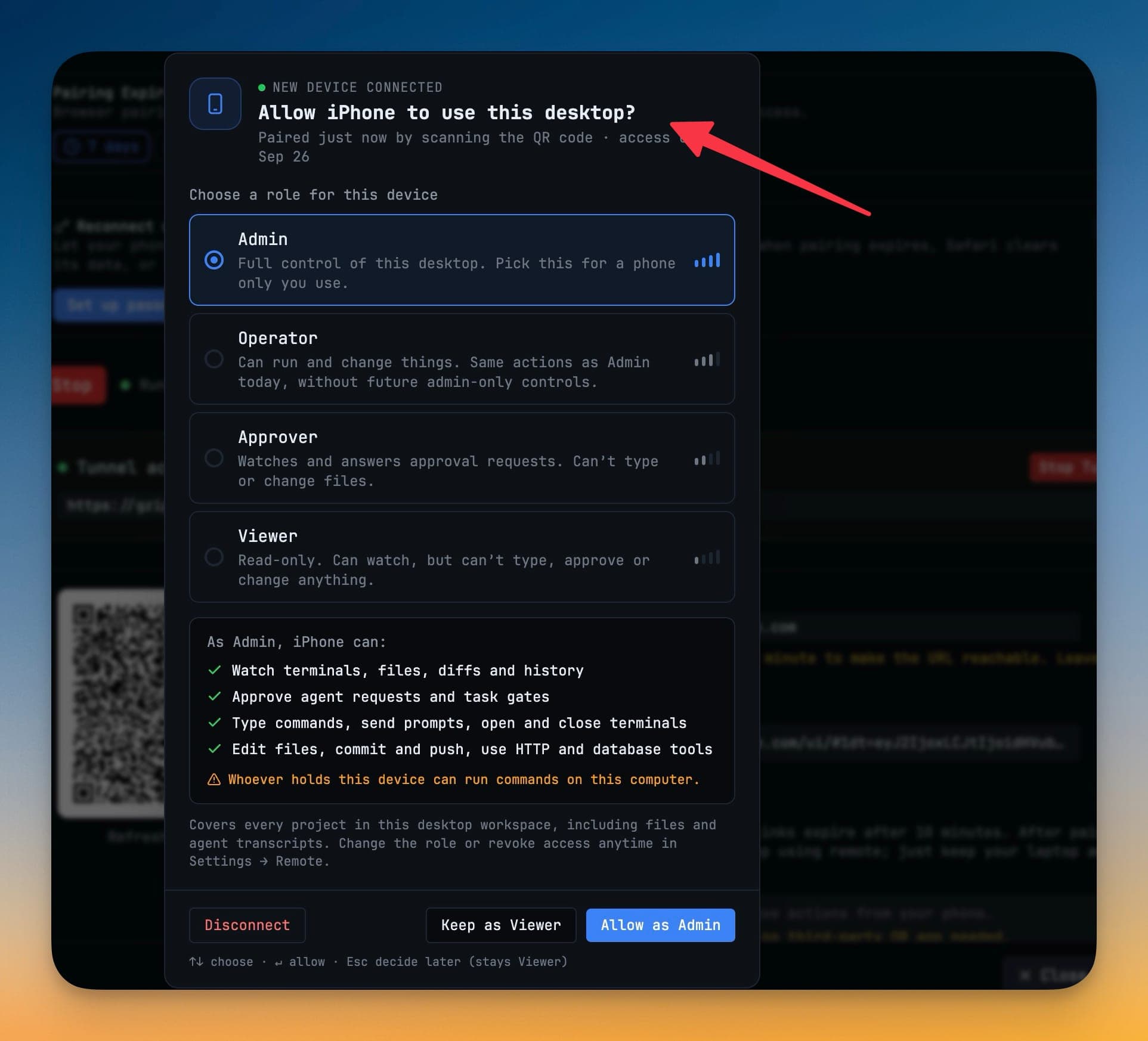
Four roles, strongest first:
| Role | What it is for |
|---|---|
| Admin | Full control of this desktop. Pick this for a phone only you use. |
| Operator | Can run and change things. Same actions as Admin today, without future admin-only controls. |
| Approver | Watches and answers approval requests. Can't type or change files. |
| Viewer | Read-only. Can watch, but can't type, approve or change anything. |
Choosing a role shows a live checklist of what it unlocks:
- Watch terminals, files, diffs and history — Viewer and up.
- Approve agent requests and task gates — Approver and up.
- Type commands, send prompts, open and close terminals — Operator and up.
- Edit files, commit and push, use HTTP and database tools — Admin.
When the role can run commands on your computer, the prompt says so in plain words. Allow as Admin grants it; Keep as Viewer or Esc leaves it watching.
Several phones waiting at once are handled one at a time, with a count of how many are queued. Settings → Remote explains each paired device in a line — what its role can and cannot do — so you can change a role or revoke access later.
Networking
Reachable over LAN, Tailscale, or a VPN. Candidate addresses are probed at connect time and the route that answered is remembered for next time, so a laptop that moves between home and office does not need reconfiguring.
- All of a pairing code's addresses are probed at once when you join. If none answers, the error names each address with its reason and the next step, such as Windows Firewall, macOS Privacy & Security → Local Network, or the other app still starting.
- A session stuck on an old address reroutes to the computer's current one.
- The machine roster shows each paired computer's 1DevTool version.
Windows Firewall
On Windows the pairing panel tells you when Windows Firewall blocks other computers from reaching this PC, which would otherwise surface as Could not reach. Press Allow through Windows Firewall and approve the administrator prompt. Only 1DevTool is allowed, on TCP ports 1834–1861, and pairing still needs a code.
Nothing runs until you pair something
With no paired device there is no server, no device identity, and no background work — the pairing panel under Machines is the only trace of the feature anywhere in the app. Pairing is the switch that turns it on.
Licensing
Pairing needs Pro. Managing pairings you already have never does, so an expired licence can never hold your devices hostage.
Related
- Control From Your Phone — the same idea for a phone rather than a second computer
- Linked Terminals
- Free vs Pro
See also
- Machines — the roster a paired computer now lives in, and the This agent runs on control that decides where an AI CLI process runs.