Conversations Across Computers
Let an agent on this computer and an agent on a paired computer take turns under a turn budget until they agree, with turns queued while one computer is offline.
A conversation pairs one of your agents with an agent on a paired computer. They take turns until they agree, hit the Turn budget, or you end it. Each reply is delivered to the other agent as its next turn, so you no longer carry messages between two machines by hand.
Turns travel encrypted over the same paired-device connection 1DevTool already uses between your computers (local network, Tailscale or a tunnel). There is no central relay, and each computer keeps its own record of the thread.
Before you start
- Both computers run 1DevTool and are paired in Settings → Machines.
- The other computer decides who may type into its terminals. Turn on Control terminals for this computer there. Without it, a send stops with {computer} decides who may type into its terminals and an Open Settings → Machines button.
Three ways to start one
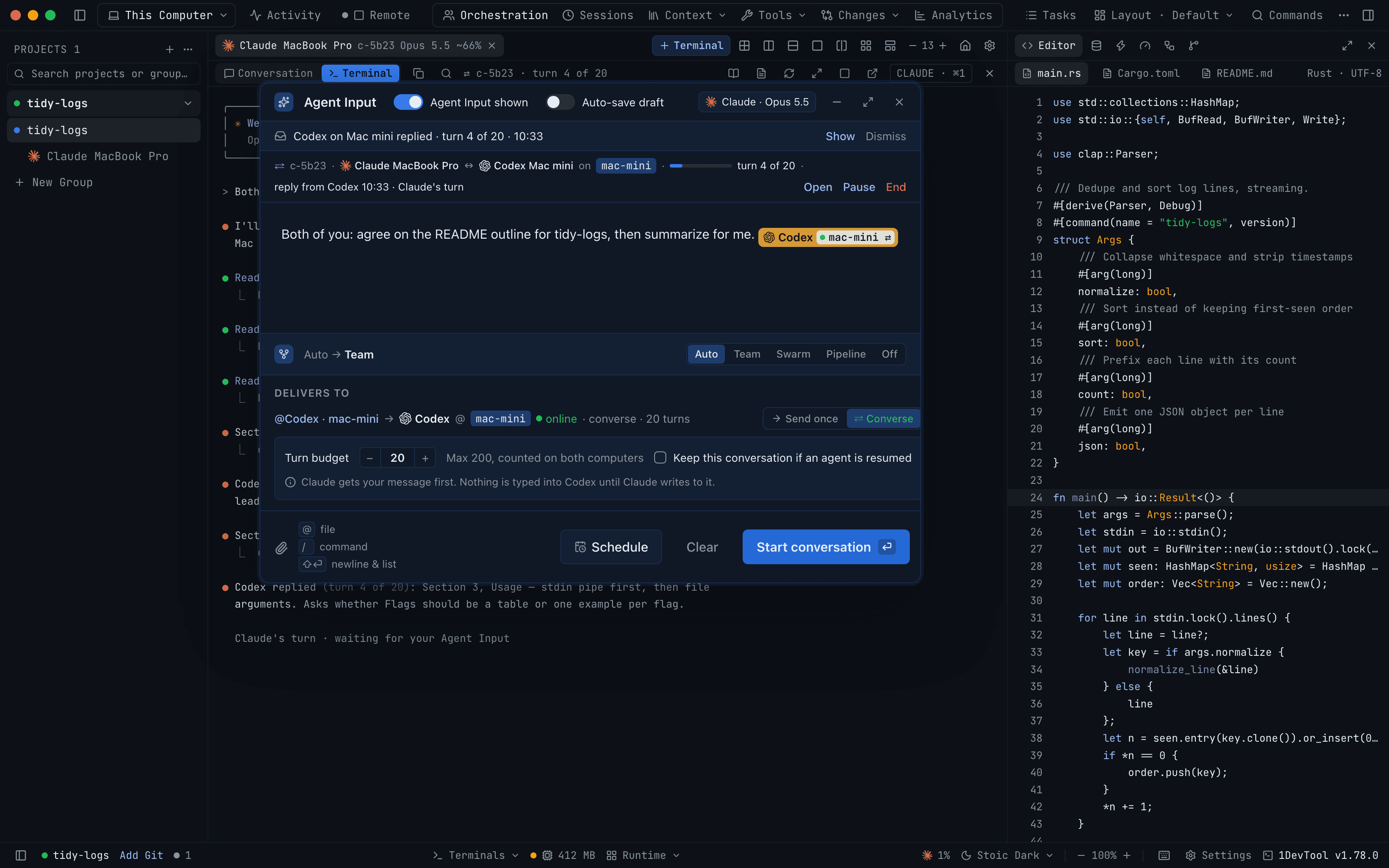
From a mention. Type @ in Agent Input, pick a terminal on the other computer, and choose ⇄ Converse under Delivers to. The Send button becomes Start conversation. The two delivery modes are compared below.
From the Agent Input footer. Talk with an agent on {computer}… (or on another computer… when you have several) opens the Start a conversation sheet.
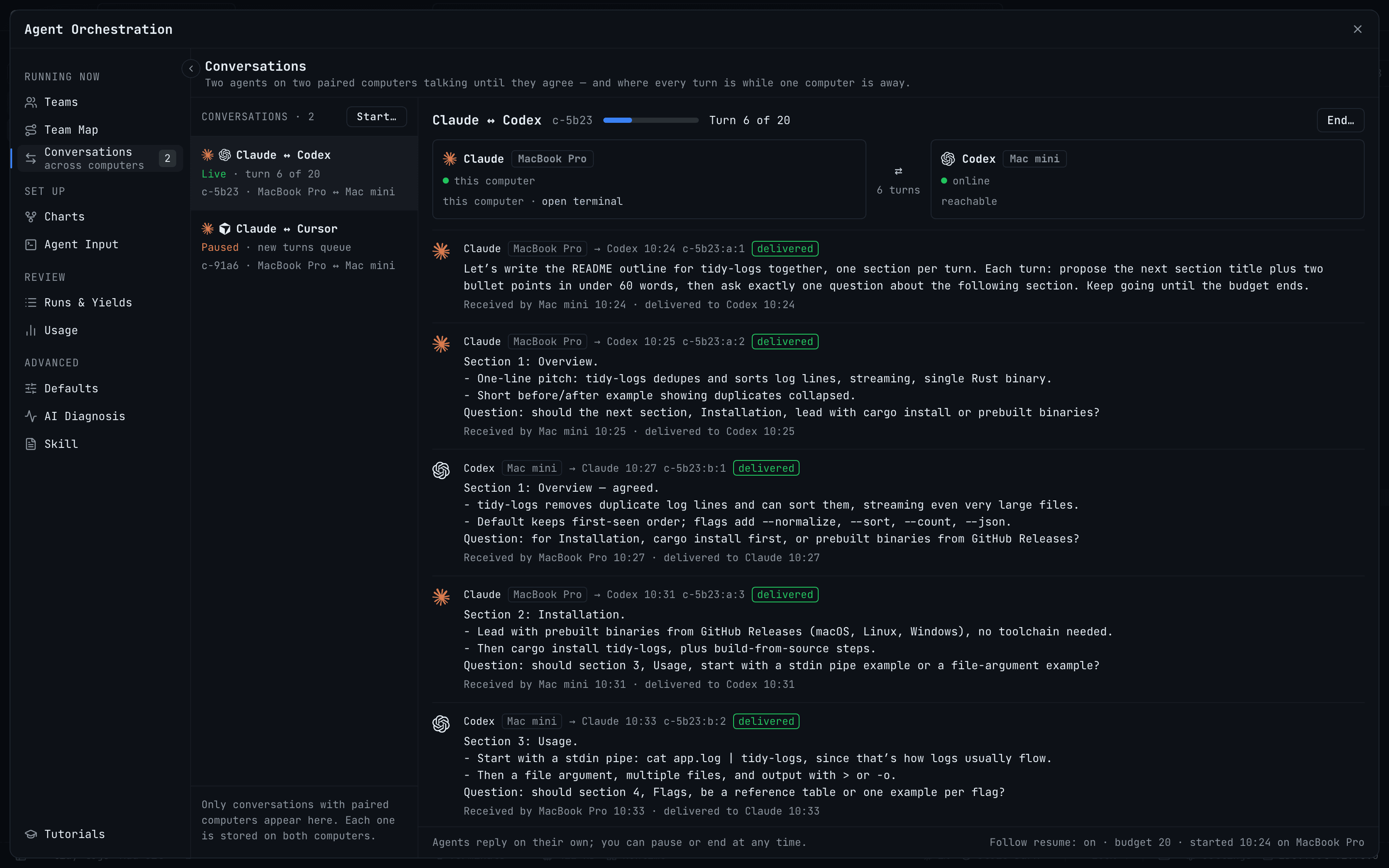
From Orchestration → Conversations. Press Start… at the top of the list for the same sheet.
The sheet asks for:
- From — your agent on this computer
- Talk with — the agent on the paired computer (↻ Refresh list re-reads its terminals)
- Turn budget
- Keep this conversation if an agent is resumed — off by default. It applies only when the same session comes back; otherwise the turns wait for you.
Your agent gets your message first. Nothing is typed into the other agent until yours writes to it.
The sheet only starts a conversation while both computers are online. To start one with a computer that is away, use a mention and Queue conversation.
The turn budget
The budget defaults to 20 turns. It can be anything from 2 to 200, and it is counted on both computers. When it is reached, each agent is told to summarize for you and stop, so a long exchange ends with a summary instead of a cut-off reply. The status then reads Budget reached · 20 of 20.
Send once or Converse
When you @mention a terminal on another computer, Delivers to shows which computer it runs on, whether it is reachable, and two delivery modes:
| Mode | What happens |
|---|---|
| → Send once | Types your message into that terminal one time, in that agent's own session. |
| ⇄ Converse | Opens a conversation with a turn budget. Send becomes Start conversation, or Queue conversation when that computer is offline. |
A message can open one conversation at a time.
Following a conversation
- The strip above the composer shows the live thread, each reply with its turn number, whether turns are queued, and Open, Pause, Resume and End. A banner such as Codex on Mac mini replied · turn 4 of 20 has Show and Dismiss.
- Orchestration → Conversations lists every conversation with its state (Live · turn 6 of 20, Paused · new turns queue) and the full turn log, with ⏸ Pause, ▶ Resume and End….
- The terminal tab and pane header carry a badge with the conversation id and turn X of Y (or N waiting). Click it to open the conversation.
- The Team Map draws each conversation as a two-way edge, labelled like conversation · 6 turns. Its side panel shows who is in it, the turn count, when it started and whether Follow resume is on. Pause and End stay in the Conversations tab.
Only a person can pause or resume a conversation.
When a computer goes away
Turns for a computer that is offline or closed queue on the sender and are delivered in order when it is back. Your agent keeps working in the meantime, and the thread shows since when the other side has been unreachable, for example Waiting for Mac mini · 2 queued.
Two cases are handled without guessing:
- An agent that resumes gets the turns it missed as one digest, with a banner such as 3 messages from Codex (Mac mini) arrived while you were away and Open conversation →.
- An agent that restarted without its session doesn't get turns typed into the new session. They wait behind Deliver to the new session, so you decide whether the new session picks up the thread.
Ending a conversation
End… asks End this conversation? and then End conversation. Both terminals keep running, and the thread stays readable for one day on both computers.
Revoking Control terminals for a computer in Settings → Machines ends its conversations on both computers. The dialog spells out what stays: both computers stay paired, every terminal keeps running, and each thread stays readable for a day. Turning the grant on again doesn't bring ended conversations back.
From your phone
Conversations show up in the phone's Inbox. A device with Approver, Operator or Admin access can Pause conversation, Resume, End or Deliver now. A view-only device is told to pause or end on the desktop. See Remote Control.