Agent Hooks
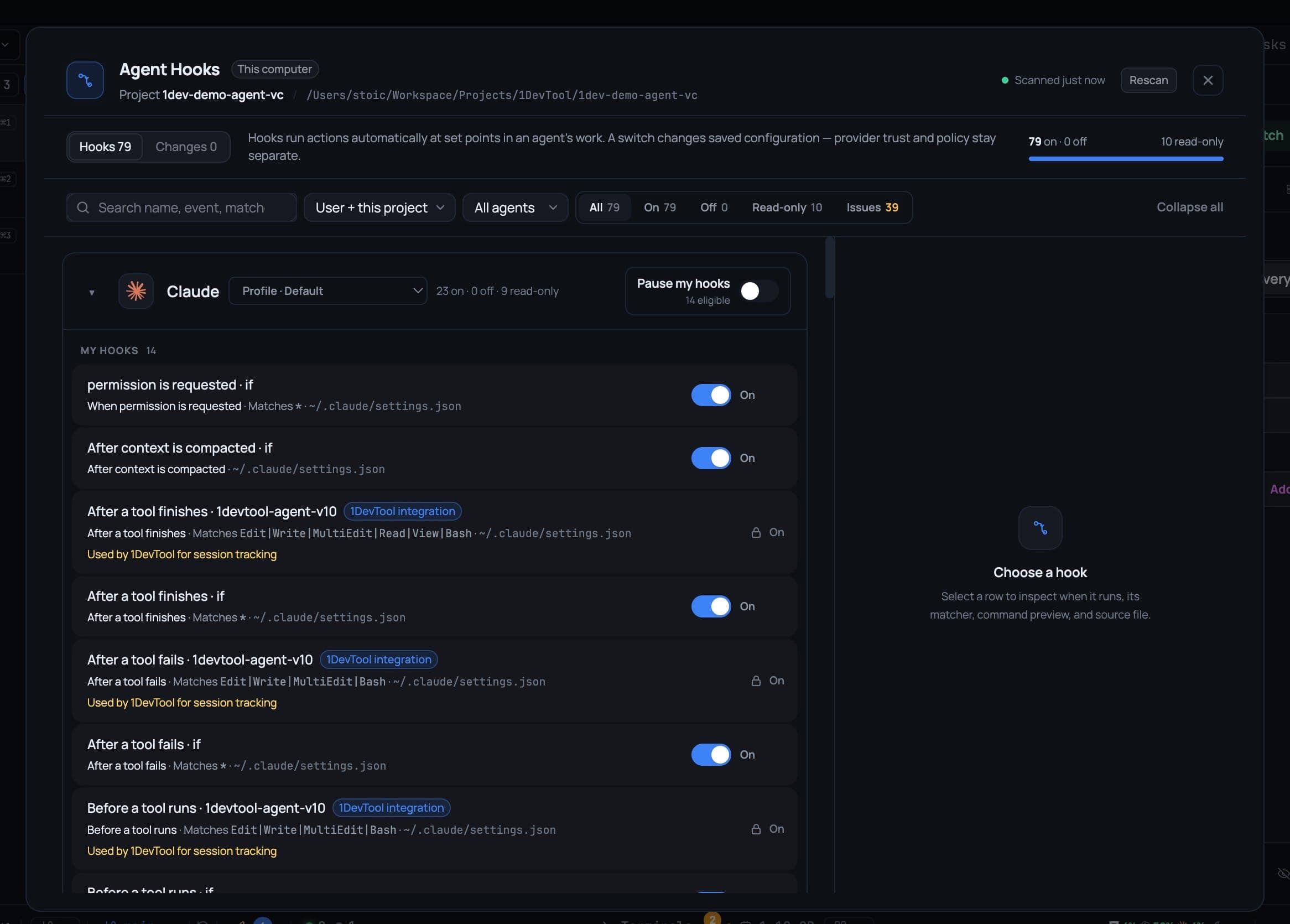
Every hook your AI agents have configured, in one dialog — when each runs, which config file it came from, who owns it. Turn one off with a switch, pause an agent's whole set, and read a journal of every edit.
Hooks run actions automatically at set points in an agent's work — before a tool runs, after a session starts, when you send a prompt. They are useful, and they accumulate: across a dozen config files, in three different formats, owned by you, by a plugin, by an organization policy or by 1DevTool itself.
The Agent Hooks dialog puts all of them in one list.
Opening it
- Tools → Hooks, in the AI group of the top bar.
- Settings → Agents → Open hook manager.
Both land on the same dialog. The header shows when it last scanned and offers Rescan.
What the list shows
Hooks are grouped by agent — Claude, Codex, Gemini, Kimi, Antigravity, Cursor, Kiro, Devin, Qwen, Qoder, Grok and more — with the config profile each group reads shown next to it. The counters across the top read N on · N off and N read-only.
Every row tells you:
- When it runs, in plain words rather than provider jargon — Before a tool runs, After a tool finishes, After a tool fails, When a session starts, When a session ends, When you send a prompt, When a sub-agent starts, When a sub-agent finishes, When the agent finishes responding, When the agent sends a notification.
- What it matches — the tool matcher, such as
Edit|Write|MultiEdit|Bash. - Which config file it came from, and whether it is user or project scope.
- Who owns it — you, a plugin, an organization policy, or a 1DevTool integration.
Select a row to inspect when it runs, its matcher, a command preview and its source file.
Finding one
- Search by name, event or match.
- Filter by agent, by scope (User + this project, and so on), or by status — All, On, Off, Read-only, Issues.
- Collapse all / Expand all for the group headers.
Turning a hook off
The switch on each row edits the agent's real configuration file, verifies the result, and offers Undo afterwards. Undo restores exactly the definitions that operation changed — nothing else.
If a re-enabled hook needs the provider to trust it or reload before it takes effect, the dialog names that next step instead of leaving you guessing whether the switch worked.
Pause my hooks
Pause my hooks captures the set that is currently enabled for that agent and turns it off. Unpausing restores exactly that set — hooks that were already off before you paused stay off.
Use it to run an agent clean for a few minutes without having to remember which hooks you had deliberately disabled.
What it will not touch
Some entries show as Read-only, with the reason printed on the row:
- 1DevTool's own session-tracking integrations.
- Organization policies.
- Plugin-owned hooks.
They are listed rather than hidden, so you can see they exist and what they do — but the manager never rewrites them.
The Changes tab
Every write the manager makes is journaled. The Changes tab keeps a bounded log of what was written where, so a bad edit is recoverable. Edits made outside 1DevTool show up after a Rescan.
Failed, partial and conflicted changes appear there too.
Editing by hand
From any row you can open the hook's config file in the editor, or reveal it on disk, for the times you would rather edit it yourself.